
- NewsmagUsing other ads
- NewsmagSidebar ads
- NewsmagImport / Export theme settings
- NewsmagRequirements for Newsmag
- NewsmagNewsmag documentation
- NewsmagHow to update the theme
- NewsmagBlock settings tutorial
- NewsmagIntroduction
- NewsmagPage Menu
- NewsmagMega menu
- NewsmagLogo & Favicon
- NewsmagFooter templates
- NewsmagTheme thumbs
- NewsmagBackground introduction
- NewsmagVideo playlist
 Anamaria
 Hello,
For errors, please sure your WordPress(5.7) and plugins are up to date.
It looks that your images and thumbs are not optimized, for example, you can use EWWW Image Optimizer plugin, also, you can try other plugins like Autoptimize. => https://www.screencast.com/t/1qWLnnA7G Your website needs an optimal speed that’s why you need to make some settings also to help for the improvement.
By the way, we have such a great result with this new update and with our new tool: https://www.youtube.com/watch?v=tnkVapqhIHc
Also, to increase the page speed you can check these similar topics for more solutions:
– https://forum.tagdiv.com/topic/optimize-script-to-improve-site-speed/
– https://www.infophilic.com/get-almost-100-pagespeed-newspaper-theme/
– https://forum.tagdiv.com/topic/a-few-tips-for-newspaper-x-speed-high-cpu-usage-issues/
– https://tagdiv.com/how-to-increase-page-loading-speed/
We are building a long term collaboration with our customers. You can see on our demos what page loading speed score can a website loaded with content can have. However, page loading speed can depend on many factors, and each website is unique from this point of view.
Let me explain some of these factors and maybe they give you some starting points for optimizing your website.
External factors: server speed, if you are using CDN or not, the external resources loaded by your website like ads, fonts, tracking scripts like Facebook Pixel, Google Analytics, Twitter analytics, Hotjar and so on.
Internal factors: the number of elements on the page, image size, image formats, if you are using mobile-optimized layouts, console errors, if you are using the Standard Pack plugin on not if you are using PRO demo or a standard one.
Thank you!
 leytol
Hi, after upgrading to the latest version (10.4) Newspaper, when I insert an image in a post and enable the “lightbox”, some images load fine and others do not. This did not happen before.
In other occasions the “lightbox” option disables itself, causing the error I am talking about.
For example (see attached screenshot), it happens in the fourth picture in this post: https://www.leyendasdetoledo.com/monumentos-que-se-pueden-visitar-gratis-en-toledo/

I’ve noticed that in some cases the lightbox fails when a link is included in the caption…. If I remove the link, it works. In other images, the lightbox option is simply disabled, not being possible to activate it…
Any help?
 jshallo
Hi, When I visit the homepage at http://www.cruiseaddicts.com mobile version on my Samsung 9+. The background is the black menu image behind the logo.

On other pages like this one:
https://cruiseaddicts.com/a-look-at-aqsc-new-ship-american-countess/

The background is blue to match the background of the logo.
I’m trying to figure out how to fix this. Thank you in advance.
 khan
khanI want to insert ad in above article using theme ads section(YOUR ARTICLE TOP AD) all other sections are working but this one is showing error blow.
wp_booster error:
td_api_base::mark_used_on_page : a component with the ID: tdb_template_30 is not set.
/home/booksfree/public_html/wp-content/plugins/td-composer/legacy/common/wp_booster/td_api.php
Display backtrace
wp_booster error:
td_api_base::get_key : a component with the ID: tdb_template_30 Key: exclude_ad_content_top is not set.
/home/booksfree/public_html/wp-content/plugins/td-composer/legacy/common/wp_booster/td_api.php
i have updated theme and plugins as well but it did not work 🙁 can you plz help?
 Bettina
 Hello!
Where exactly did you add your ad code?
If you use a cloud/PRO template, then you should use the element called “Ad box” from TagDiv Composer and there you need to add the ads. Otherwise, if you add the ads in Theme Panel settings, it is probably not displaying.
Thank you!
 patrickschua
 Hi Bettina, thank you for your reply. I was able to fix it by removing the amp auto ads tag in the amp section of the mobile theme.
I so far have only two problems right now. I hope you can help point me to the right direction on how to fix them –
1. Social media icons before and after the articles in any post page doesn’t appear in mobile devices. It does appear but as invisible. You can click on them but you don’t see them.
This is the desktop version highlighting the social icons – https://imgur.com/SU4bMe3
This is the mobile version (using chrome or safari regardless of iOS or Android)
https://imgur.com/mEc1acy
https://imgur.com/AkD13rN
2. The other problem I have still got to do with the header and the footer going garbled. This happens when you click on any categories like for example – https://insideios.com/category/aapl-stock/ https://insideios.com/category/apple/homepod/ this is what appears – https://imgur.com/jo2OrgP The header and the footer is very garbled. It seems to appear erratic and sometimes it appears well so I don’t know why as the category page is only connected to one cloud template. As usual I have cleared all cache.
Appreciate it if you can point me to how I can fix both the problems. And as always, thank you for your support.
Bettina Hello!
Please provide a screenshot where exactly did you paste the codes in order to help you.
If you use a cloud template, then you can add the ads in the element called “Ad box”.
Otherwise, you need to add the ads in Newspaper -> Theme panel -> Ads.
Thank you!
 AaermIndia
Ads feature is not working on my website as tried to paste Google Ads, Amazon Affiliate programe code and other source code too but i think there is problem with theme.
can you please suggest the solution on this ?
 vistaradio
Hello,
I am trying to add an ad spot to the top of all my pages to be placed directly under the navigation bar.
I was able to do it no problems on the desktop pages but on the mobile pages, the edits just do not show.
I have added the ad spot to both my “Mobile header” as well as my “Desktop header, mobile view”.
Either will not show the ad spot – OR – anything i put under the navigation.
I have tried adding new rows, Inner row and even just using any element other than Ad spot … nothing takes on mobile view. Odd part, if I add it above the nav bar, it takes – just nothing below it!
Website is here: https://dev.mylethbridgenow.com/
Screenshots of my TagDiv composer.
You can clearly see the Ad Spot is there in its own row.
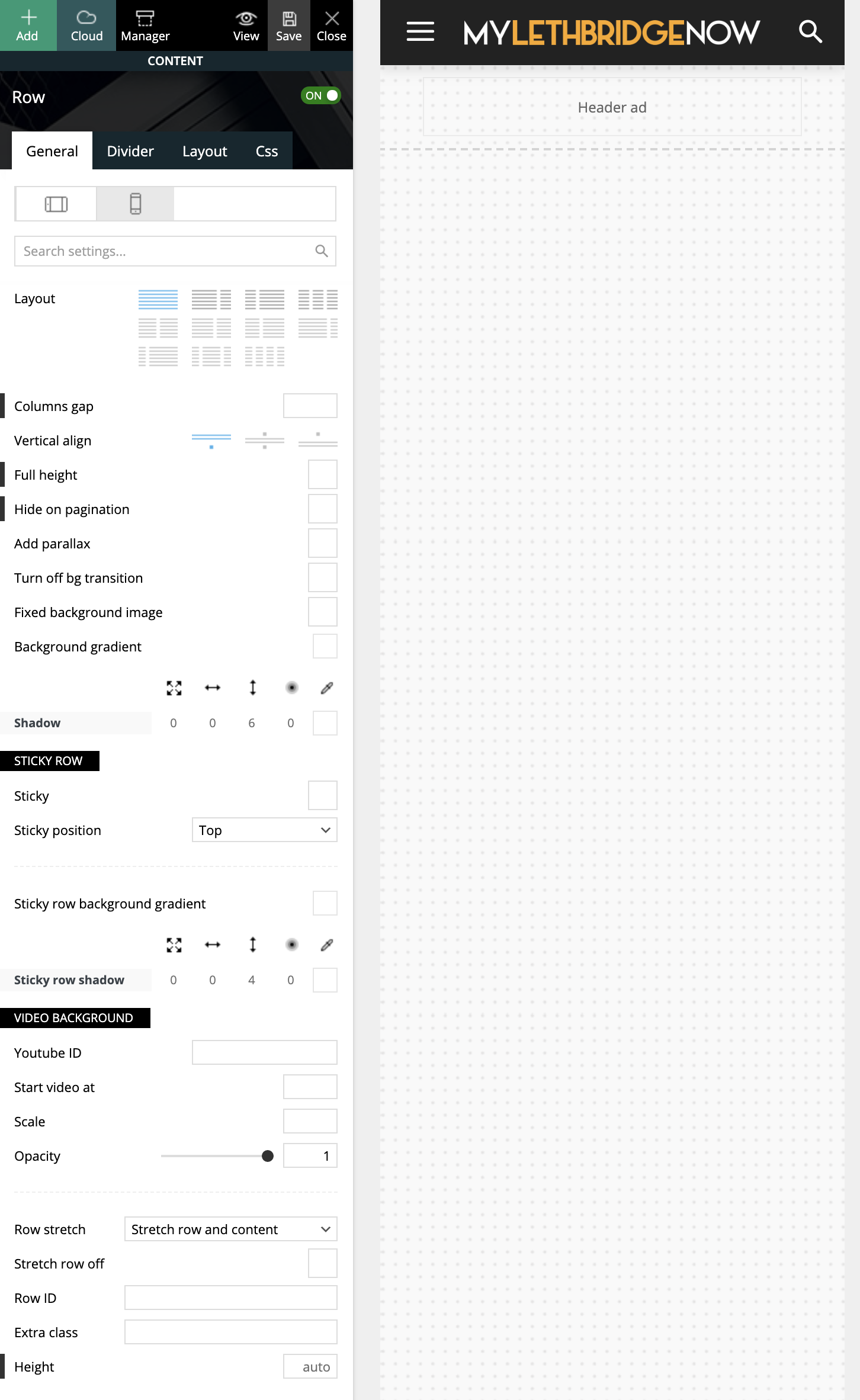
I have tried many attempts and many methods, which leads me here asking for guidance (or reporting a bug?!)
Cheers,
Ash
 afgunaydin
Hello I want to show different header ads in category and other pages is this possible with in theme settings or should I use other plugins if so do you guys know any good one?
Thank you
 Digital Team
The TD Composer will no longer function when attempting to edit pages. Clicking “edit with TD Composer” leads to an infinite loading page: 
Tried deactivating all plugins other than the TagDiv ones, multiple browsers, creating new pages, etc. The builder never loads.
Anamaria Hello,
@MattiaVe for your error please make sure all the settings are like in our requirements, please follow the guide carefully
– https://forum.tagdiv.com/requirements-for-newspaper/
and please increase all requirements that are lower, and follow all steps and you do not have a plugin conflict, please deactivate ALL plugins except tagDiv plugins, also if you are using a child theme or cache plugin, deactivate them, clear all cache and try again.
@jesperj Please provide some screenshots with the problem, because otherwise, I have no way of knowing exactly what problem you have. Have you tried to do a test on a subdomain for iPad using only tagDiv plugins and see if it’s still a problem? maybe you have plugins that interfere with our theme and cause these problems.
@avtomir Please do a test on a subdomain and use only tagDiv plugins, and see if the ads from the sidebar are still on the top of the post. Also, please provide screenshots and a link to your website to investigate the problem.
@dnf67 as I said above, please do a test on a subdomain using only tagDiv Plugins, because the update can not change so radically the aspect of the website only if you have used extra plugins that are not tested with the theme and they interfere with her.
@Playground Lda. and @mathew I’m not sure I fully understand your issue, please provide more details (screenshots).
@slimster8 I think the problem can be from the plugin cache you use. Please try the WP Super Cache plugin https://forum.tagdiv.com/cache-plugin-install-and-configure/ and see if the problem persists. Also, if your host uses cache then you should not use any cache plugin, and maybe, the cache plugin used by the host may not recognize if you use mobile page or mobile theme.
In the future, it will be recommended that each one of you create a separate topic so that we can answer to each one in part, this is because in this topic many of you have different problems.
Thank you for understanding!
patrickschua Hi Bettina,
Yes. The only issue I’m having right now is that my ads in my AMP is showing twice in every post page I have as seen in the following examples –
https://insideios.com/how-to-automatically-switch-airpods-between-devices/?amp=1
https://insideios.com/how-to-sort-images-and-videos-in-apples-photos-app-in-ios-14/?amp
You’ll be able to see that there are quite a lot of duplicate ads. Ads showing below each other. It happens on all the posts in mobile AMP. Please help me sort it out. Appreciate the help if you can point me in the right direction.
patrickschua Hi,
The footer page now shows two ads and I seem to not be able to know how to remove the words “About Us” and “Follow Us”. Please see attached. https://imgur.com/Vkafcs3 I just bought another license to start developing another site and I hope you can guide me through the process on how to fix this so I know what to do when I encounter it again. Appreciate your help.
 nerdmuchcom
I have this weird mobile menu transition effect that loads on every single page on mobile before loading the page. It’s like a mobile menu animation affecting my CLS scores.
See screenshot:

How can I disable this animation entirely? Or, do you guys have another fix?
I do not have rocket loader enabled.
 danielhipskind
 Thank you for your post.
I apologize for the multiple posts.
I disabled all my plugins individually when I did it and the issue only went away when disabling TagDiv Composer. With the caching issue, I did contact my Hosting Provider and did some checking on my end, and it appears there are no issues.
I tried reinstalling the plugin with no luck either.
I use DreamHost/DreamPress and with the cache, they do not support using a different caching plugin other than the one below.
Here’s a list of my plugins:
WPS Hide Login
WP to Twitter, WP Tweets PRO
tagDiv Standard Pack
tagDiv Newsletter
tagDiv Mobile Theme
tagDiv Composer
tagDiv Cloud Library
Site Kit by Google
Rank Math SEO
PublishPress Capabilities
Publish to Apple News
Proxy Cache Purge *Cache plugin*
Open Graph and Twitter Card Tags
OneSignal Push Notifications
Jetpack by WordPress.com
Feedzy RSS Feeds Lite
Edit Author Slug
Cookie Notice & Compliance for GDPR / CCPA
Contact Form 7
CoBlocks
AMP
Advanced Editor Tools (previously TinyMCE Advanced)
Advanced Database Cleaner PRO
Ads.txt Manager
-
This reply was modified 5 years by
danielhipskind. Reason: Added the result with disabling plugins individually
Anamaria Hello,
The ad is set in the Ad box and is an image, and you can remove it, edit with tagDiv Composer, select the Ad box element and with right-click you can delete it => https://www.screencast.com/t/2GfCVx9BCAw7 or with drag & drop place it into the deleting red zone from the bottom right of the page.
The ad box has 3 sections for ads: using theme panel ads -> https://i.imgur.com/KFa9ibl.png, using images/banners -> https://i.imgur.com/MfAPTaE.png and custom code -> https://i.imgur.com/2rh8SuD.png save it and will appear on the post (you can set a shortcode like a shortcode from adrotate plugin or other plugins)
Thank you!
 RenMatsuda
Hi
I’ve been trying to set up google tag manager in my newspaper theme panel, but the pages continues to load forever when trying to save the setting. I’ve deactivated all plugins (as advised in another ticket), but this didn’t solve my problem. Would you advise what I should try next?
Here I’ve stored the image for your references.
https://postimg.cc/Z9yC6X1N
https://postimg.cc/ftnf6GX7
Thanks,
Ren
 danielsandj
 This is the site on google news:
https://news.google.com/publications/CAAqBwgKMOnHlAswuI-qAw
I have verified that the problem is google
The problem with the wrong snippets is caused by the fact that google indexes me cybeout and cybeout.com
If you are looking for google cybeout, mistakenly upload the snippets by entering only the footer data
On the other hand, if you search on cybeout.com it loads all the data including the snippets correctly and loads the data correctly on google news.
I contacted google to understand why there is this double loading since on google search there is only one site indexed with cybeout
Now I have to understand why there are two cybeouts and cybeout.com is not loaded on cybeout
 DaveKinetic
Since updating earlier today, one of my custom ads is ignoring the rule to disable on desktop. It wouldn’t be so bad if it just displayed on the page, but it is also messing up the width of other ad units making them too wide for the page.
The ad unit is Custom Ad 2. In theme panel > Ads > Custom Ad 2 the disable on Desktop, Tablet Landscape and Tablet Portrait are both ticked. When I go to the page, an ad appears and it randomly changes the width of sidebar ads and tuns them into horizontal ads that push off the edge of the page and are hidden behind the background.
When I change the custom ad 2 settings to appear on everything, the ad appears as expected and all other ads units return to normal and display
When I delete custom ad 2 from the page, the other ads units display as they should do.
From these tests, it appears to be an issue when selecting to hide on the desktop.
Bettina Hello!
The ads are different and you need to check where you add the code for that ads and delete one. For example, if you edit the page with TagDiv Composer you can click on that element and delete one ad. Otherwise, check the settings from Theme panel, maybe you uploaded there as well.
Thank you!
 talkbaja
This morning I updated to Newspaper 10.3.9.1 and immediately I lost all access to the TD Composer tool, getting a “This site can’t be reached” error. I had been using TD Composer earlier and had made no other changes to the website or any plugins. I tried rolling back Newspaper to the 10.3.69 version but it still does not work.
Looking for other avenues to try…

 calvinw
WordPress has different kinds of users built in, each with different permissions. Admins can edit anything, but certain other types of users are prevented from editing pages, or plugin settings for example.
In the Newspaper theme, Authors and other users can edit cloud templates freely. This is a big problem and they should not be able to do that. Websites with external contributors need to be able to prevent them from making structural changes to the website.

In this screenshot I’m logged into the website with an “author” level account. Cloud templates should not even be visible to those user accounts.
Anamaria Hello,
Please make sure that you have activated the proper thumbs for the mobile theme. The mobile theme requires the “265×198” and the “741×486” thumbnail sizes in order to show the featured images properly.
This can be found here: https://www.screencast.com/t/N18dR3qZrh
The ad box has 3 sections for ads: using theme panel ads -> https://i.imgur.com/KFa9ibl.png, using images/banners -> https://i.imgur.com/MfAPTaE.png and custom code -> https://i.imgur.com/2rh8SuD.png save it and will appear on the post (you can set a shortcode like a shortcode from adrotate plugin or other plugins)
Thank you!
Anamaria Hello,
Our theme has these options for ads => https://i.imgur.com/IBxx4Bt.png -> https://forum.tagdiv.com/using-other-ads-non-adsense-ads/ -> https://forum.tagdiv.com/sidebar-ads/ -> https://forum.tagdiv.com/header-ads-adsense/ -> https://forum.tagdiv.com/article-ads/ -> https://forum.tagdiv.com/background-ads/ -> https://forum.tagdiv.com/post-template-ads/ -> https://forum.tagdiv.com/above-footer-ads/ ,on Cloud Templates and pages you can use the ad box element from tagDiv Composer => https://forum.tagdiv.com/custom-ad-spots/
If you use a Prebuilt Websites Pro you can set ads in the Ad Box from tagDiv Composer
The ad box has 3 sections for ads: using theme panel ads -> https://i.imgur.com/KFa9ibl.png, using images/banners -> https://i.imgur.com/MfAPTaE.png and custom code -> https://i.imgur.com/2rh8SuD.png save it and will appear on the post.
Also, the shortcode can be set with tagDiv Composer in column text or text with title in text area -> Edit Content =>https://www.screencast.com/t/yzHiFcS8g8 -> https://www.screencast.com/t/uDXaxJ8JSKFB. The shortcode is automatically saved.
Thank you!



