
- NewsmagUsing other ads
- NewsmagSidebar ads
- NewsmagImport / Export theme settings
- NewsmagRequirements for Newsmag
- NewsmagNewsmag documentation
- NewsmagHow to update the theme
- NewsmagBlock settings tutorial
- NewsmagIntroduction
- NewsmagPage Menu
- NewsmagMega menu
- NewsmagLogo & Favicon
- NewsmagFooter templates
- NewsmagTheme thumbs
- NewsmagBackground introduction
- NewsmagVideo playlist
 petar777
 Hey,
I am sharing you my WP Rocket settings and I think they might be useful for you:
ON THE FILE OPTIMISATION TAB
1. Activate Minify CSS Files
2. Optimise CSS Delivery > Remove unused CSS with these exclusions:
(.*).tagdiv-type(.*)
(.*).bhcrow-(.*)
3. Minify Javascript Files
4. Load Javascript Defered with these exclusions:
\/jquery(-migrate)?-?([0-9.]+)?(.min|.slim|.slim.min)?.js
5. Delay Javascript Execution with these exclusions:
\/jquery(-migrate)?-?([0-9.]+)?(.min|.slim|.slim.min)?.js(\?(.*))?( |’|”|>)
tagdiv_theme.min.js
tdTrendingNow.js
tdPopupModal.js
tdBlocksArray
hammer.min.js
tdbMenu.js
tdLoadingBox.js
tdb_p_autoload_vars
blockClass
tdAjaxCount.js
tdTabbedContent.js
tdStickyRow.js
tdSmartSidebar.js
OneSignalSDK
Important – delaying Javascript will make your ads load after any movement on the page so if you just reload the page they will not be loaded as soon as you move anything on the page it will load them immediately. For me this isn’t a problem.
ON THE MEDIA TAB
1. Activate Enable for images
2. Activate Enable CSS for background images
3. Exclude your logo
4. Activate Add missing file dimensions
5. Activate self host fonts
ON THE PRELOAD TAB:
1. Activate preload
2. Enable link preloading
3. Prefetch these:
//fonts.googleapis.com
//www.googletagmanager.com
//www.googletagservices.com
//tpc.googlesyndication.com
//use.typekit.net
//netdna.bootstrapcdn.com
//www.google-analytics.com
//ajax.googleapis.com
4. Preload fonts – /wp-content/themes/Newspaper/images/icons/newspaper.woff
ON THE DATABASE TAB
Enable everything without scheduling auto cleanup
ON THE HEARTBEAT TAB
Enable it and make everything reduced
Important – if you are self hosting your site on nginx you can enable this https://github.com/SatelliteWP/rocket-nginx – this enables Nginx to serve directly previously cached files without calling WordPress or any PHP
Important – if you are self hosting your site on nginx you can enable FastCGI and Redis (use redis cache plugin and nginx helper). When it comes to FastCGI MAKE SURE TO ENABLE SEPARATE CACHE FOR MOBILE AND DESKTOP OTHERWISE IT WILL WORK BADLY!
Important – if you have a large installation and you notice that your queries become slow (e.g. search page takes a lot of time to load or non-cached pages load for more than 1-2 seconds) you can buy Scalability Pro and Super Speedy Search from here https://www.superspeedyplugins.com/shop/ for me this plugins changed the way the theme worked immensely. My non-cached pages loading time dropped form 10 seconds down to 1-2 seconds.
Important – WPRocket offers a plugin that converts all your images to webp format and this is also crucial for your page speed. Their plugin works well for my site.
I hope this is useful for you!

 m
m Yes, we have code for ads that is the same on all the pages, including the responsive ones.So that is not the reason for this page to be so slow.
Do you have any other ideas how I can make Urban Observer run faster? Is it better to use another design?
 Anamaria
 Hello,
I recommend checking if you use standard templates from the theme panel, blocks from 1 to 25, and big grid blocks. Replace them with cloud templates and Flex block and big grid flex blocks, and disable the tagdiv Standard pack plugin. The prebuilt website doesn’t affect your page speed and how the website loads, but maybe on the other website, you have other extra plugins, and you optimized the website using the cache plugin, a plugin for images, and the OMGF plugin for Fonts. This depends on how your website is optimized and what plugins you use. You can provide the link to your website to check it.
Thank you!
 ikiweb
 OK, I solved it following your suggestion. Thanks.
But now I have another problem: I created different templates for the categories but I can’t assign them anymore.
Let me explain better:
– I created 3 different category templates
– I enter category “X” and try to assign a certain type of template by clicking on the appropriate link
– the page reloads but the template hasn’t changed
Until yesterday everything was working correctly. Could this problem be due to the update to the new version of Newspaper?
mI am running a site with a Newspaper: Urban Observer theme. I have tagDiv Composer, tagDiv Cloud Library, tagDiv Opt-In Builder and tagDiv Standard Pack plugins installed. My site is running very slow, loading time is above 3 seconds. Note that database returns queries in less than 0,2s.
I have tried to find what’s slowing the page down, including upgrading the server etc but nothing helped significantly. I have decided to change the theme to Twenty-Twentyfive and the site loads under 0,5s. Ovbiously,Newspaper theme is to blame for the slow response time. Since I’m running another site with Newspaper that runs faster, but using another theme (Gossip that is not cloud based), I have tried to see if the tagdiv cloud is slowing my site down. I have disabled tagDiv Cloud Library plugin and the site loaded in less than 1s. Of course, the site design was broken. But still, obviously, tagDiv Cloud Library plugin is responsible for greatly reducing site speed.
Here are my questions:
1. Am I using the Cloud theme somehow incorrectly?
2. Can I still use the theme but disable cloud features (and have a site that is not broken)?
3. If I change to another non-cloud theme, what’s the best way to do it in order not to lose all the settings?
Side note: two other themes that I’m using with different sites are also slow, but not so slow: Publication PRO and Video News PRO. Both are running with tagDiv Cloud Library enabled.
Anamaria Hello,
Maybe you need to add the ad from frontend using the ad box element.
The ad box has 3 sections for ads: using theme panel ads -> https://i.imgur.com/KFa9ibl.png, using images/banners -> https://i.imgur.com/MfAPTaE.png and custom code -> https://i.imgur.com/2rh8SuD.png save it and will appear on the post (you can set a shortcode like a shortcode from adrotate plugin or other plugins).
Thank you!
 danna
danna Hello, just to try it out? Because using another plugin is no option for us as we do everything with advanced ads as oud ads management system.
All the best,
Daniel
 karsjol
 hi The URL is https://distritrucks.com.
It is about the right scrollbar.
When a page loads, it starts without scrollbar.
Then, as soon as the content is more than fits on the screen (“overflow-y”) the scrollbar appears.
This causes the content to shift 15 pixels or so to the left.
All in a matter of milliseconds of course, but still visible (depends also o the quality of your internet connection)
This shifting is rather irritating.
when you google, you will find scripts that make the right scrollbar permanently visible. Also when the content is not overflowing the page. Then the shifting is gone.
one of these scripts:
body {
overflow-y: scroll;
}
I have tried different of these formulas to enter in the theme panel -> custom code -> custom css. But none of them works. It is possible that the custom css is not in the right position or that other definitions overrule it.
Maybe someone has solved this issue before me. I would be grateful for a solution.
Anamaria Hello,
Does the code of the ads need to be added in the head section of the website?If this code not need to be set in the head section, you can use AD BOX.
The ad box has 3 sections for ads: using theme panel ads -> https://i.imgur.com/KFa9ibl.png, using images/banners -> https://i.imgur.com/MfAPTaE.png and custom code -> https://i.imgur.com/2rh8SuD.png save it and will appear on the post (you can set a shortcode like a shortcode from adrotate plugin or other plugins).
Thank you!
 Simion C.
 If both codes are used it should work https://prnt.sc/rJL2rFbwCdF_
There’s no problem if you enter the codes in the theme panel https://prnt.sc/TcxdSYplNubs
Or in the theme Live CSS from the admin bar https://prnt.sc/fhKmSQE8JYdb
Or in wordpress https://prnt.sc/YHiXD_vec05p
As long as both codes are loaded the top bar should appear on mobile and have the color set in the code.
Currently I see only the code for the color on the website, the other code is required as well. Here is the full code https://pastebin.com/iqWmadsP Please check where you entered the code, remove it and add the full code.
Thank you!
 scopefeed.com
 Hello,
Thank you for your previous recommendations. I have followed your advice, but I’m still experiencing the same issues:
Recommended Theme Settings
I am still using the theme developer’s suggested configurations.
WP-Super Cache is installed and configured as recommended.
Plugins and Additional Adjustments
I have the Google Kit plugin installed for AdSense application.
“Spinet” is enabled for news registration.
I installed the AMP plugin because it was recommended by the theme. Previously, it was set to “mobile + AMP,” but following your advice, I switched it to “AMP only.”
I installed the EWWW Image Optimizer plugin to optimize images.
I have temporarily disabled Google Auto Ads.
Ongoing Issues
I haven’t seen any significant improvements in overall site speed or metrics such as Largest Contentful Paint (LCP).
The site loading speed is still slow, especially on mobile, which negatively impacts the user experience.
Occasionally, some devices continue to display the mobile version of the site instead of the desktop version.
Do you have any additional recommendations or further settings I should check? Any guidance on potential conflicts between AMP, WP-Super Cache, and other plugins would be greatly appreciated.
Thank you in advance for your assistance.
Kind regards
 sabedott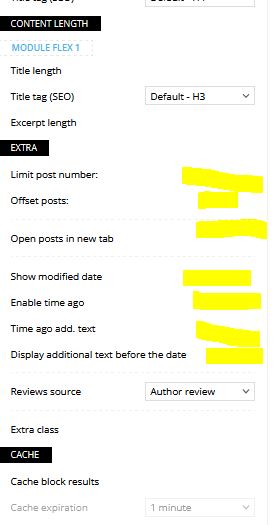
The Checkbox no longer appears in the options, has this option been removed? I tested it on another website with the theme and on another server and it’s the same
Anamaria Hi,
Yes, sorry.
I see that you have these ads, and I recommend using the WP Rocket or Lite Speed Cache plugin to optimize the images, fonts, and scripts because those can cause CLS. By optimizing the other parameters, it will influence all those metrics to have a better score.
Thank you!
 peters1964
Hello Anamaria,
thanks for your efforts, unfortunately the shadow in the header is still visible.
What other options are there?
Thank you, Christiane
Screenshot: https://mawi-westfalen.de/wp-content/uploads/2025/01/Screenshot-header-.pdf
Anamaria Hello,
You need to add your ad code in the page using the element ad box. The ad box has 3 sections for ads: using theme panel ads -> https://i.imgur.com/KFa9ibl.png, using images/banners -> https://i.imgur.com/MfAPTaE.png and custom code -> https://i.imgur.com/2rh8SuD.png save it and will appear on the post (you can set a shortcode like a shortcode from adrotate plugin or other plugins).
To create a sidebar please check this guide https://forum.tagdiv.com/sidebars-tutorial/
Thank you!
Anamaria Hello,
We are very sorry. In your screenshot, this seems to be a post, which is why I said how to create a single post template https://i.imgur.com/u1xNGaF.png
You can add text on a page using column text, to add ads you can use AD BOX.The ad box has 3 sections for ads: using theme panel ads -> https://i.imgur.com/KFa9ibl.png, using images/banners -> https://i.imgur.com/MfAPTaE.png and custom code -> https://i.imgur.com/2rh8SuD.png save it and will appear on the post (you can set a shortcode like a shortcode from adrotate plugin or other plugins).
To create a sidebar please check this guide https://forum.tagdiv.com/sidebars-tutorial/
Thank you!
 LKZ
LKZ Hello,
every viewport is right, in our opinion.
We just found out that he manually zoomed (115%) in Safari that’s why it happened.
This problem occurs on other tablets too (Safari).
So, if you zoom in, it loads the mobile version of the website. And at this moment the header disappears. This of course shouldn’t happen.
It only comes back when you zoom out to 100% again. Then it loads the tablet version again.
Do you know what we can do to solve this problem?
You could try it out yourself.
Thank you!
LKZHello,
this is our website: https://ludwigsburger-wochenblatt.de/
The website runs for about 1 month now and we have little to none problems by now – nice!
Though, one colleague opened the website on an iPad Air (4th Gen) in Safari and had following problem.
The browser loaded the mobile site without the header, not the tablet site (portrait mode). As soon as he rotates the tablet to landscape it loads correctly. But everytime he uses his tablet in portrait mode it would load the “wrong” mobile site without header.
The problem doesn’t occur in Chrome on the same tablet or on any other tablet I’ve tested.
Do you know how this problem can be solved?
Thanks for your help!
Regards, Valentin
 redheaddigital
Hi,
Filter fields are no longer displaying in the tagdiv builder.
I’m using Flexblock 5.
I use ACF to filter by custom fields and these are no longer working. When I went into investigate I noticed that I can’t access the Filter fields anymore.
I am on version 12.6.8 with an active licence.
Can you assist please?

URL: https://thepaige.au/
I notice it’s also the case for my other Newspaper site https://capsulenz.com/
 AndyMoD
 Thanks Anamaria, so I have to custom code them in?…
This setting does nothing?

Coding them all in will be a right pain as I’ll have to add categories and colours for them each time.
My other site sort of works with this setting on with no custom code…


Although some category colours do work and some don’t like this one…


 Bettina
 Hello Ritu!
Yes, the responsive version is like that. Another workaround could be to hide an element in the desktop so it will appear only in the mobile viewport and reverse. But you can build your mobile pages as explained here: https://tagdiv.com/newspaper-10-3-7-update-brings-customizable-and-fast-mobile-pages
There are only 3 options that you can use:
1. Responsive version: A responsive version of your website looks similar to the desktop version. TagDiv Composer is used to edit the page. Click on the mobile viewport: https://www.screencast.com/t/XDQJedlggSB. You can see your mobile version there and edit or adjust the elements to look better.
2. Mobile pages: https://tagdiv.com/newspaper-10-3-7-update-brings-customizable-and-fast-mobile-pages
3. Mobile theme plugin: The Mobile Theme is a performance-optimized theme included in the main Newspaper theme that only loads on mobile devices. It comes with its own templates and designs for pages, posts, categories, etc., so your current templates from the desktop theme will get converted to the mobile theme layout. Please see https://forum.tagdiv.com/the-mobile-theme/ and https://forum.tagdiv.com/mobile-theme-introduction/ for more information.
A full explanation is here: https://www.youtube.com/watch?v=SpGkOnJeNZY
If you need to use mobile version 1 or 2, then you need to uninstall the Mobile Theme plugin and AMP.
Thank you!
 akiim.deshay@onlymoveforward.com
 Thank you for your response and the helpful suggestions. I appreciate the insights and the screencasts you provided.
However, I have a follow-up question regarding the implementation. Correct me if I’m wrong, but wouldn’t using the “[tagdiv] Text with Title” shortcode or building the title separately with the TD Composer require future updates to be made directly through the TD Composer?
The reason I’m asking is that the “NDG CURRENT EDITION” section is updated weekly with a new title and link. The person responsible for these updates does not have access to the TD Composer. To make this process simpler and avoid potential disruptions to the website layout, we created this section as a widget (see #2 in the attached image ). This allows updates to be made directly on the WordPress widget page (see #1 in the attached image).
On the other hand, the first title, “Click Here: Win Tickets by Subscribing to NDG Video Channel,” does not change and was therefore built as a static title with the TD Composer.
That said, we are trying to achieve consistency by matching the width of the “NDG CURRENT EDITION” title bar to the “Click Here” title above it. Is there a way to achieve this while keeping the current setup of the widget for the “NDG CURRENT EDITION” section? Perhaps I am not understanding your suggestion correctly as I am also not sure what you mean by shortcode in this instance?
akiim.deshay@onlymoveforward.comI am seeking assistance regarding an issue with the title bar of a widget on the homepage of the North Dallas Gazette website, which uses your WordPress theme.
The title bar for the “NDG CURRENT EDITION” section (pointed to in the attached screenshot) does not span the same width as the element above it. 
This section is populated by a Custom HTML widget on the widget settings page, and the title, image and link are updated weekly by another user. 
I would like the title bar for this section to match the width of the element above it on the home page. My question is:
Is there a way to achieve this with the current Custom HTML widget, perhaps by adding some custom CSS or modifying the existing HTML?
Alternatively, should I use the “[tagdiv] Text with Title” widget instead? If so, is there specific CSS or code I can add to ensure the title bar width aligns with the above element?
Your guidance on this matter would be greatly appreciated, as I would like to ensure a consistent design across the homepage.
 karpov
I’m having a problem with categories that is really bothering me. When I register an article, I associate it with a category, among several that I have on my news website. It turns out that recently, I started having a problem where, when choosing a category, WP starts marking one or even several other categories or subcategories to the article. For example, let’s say you have the Country category and subcategories (USA, Brazil, China, German), and the Gastronomy category and subcategories typical foods, fast foods, hamburgers and even a third category cars with the subcategories Toyota, Nissa, Fiat, Volvo , etc.. Let’s say that when branding Country, WP also started branding Nissan, Harburgueria, Gastronomia. And if I uncheck them, WP unchecks them all and if I check them again, it repeats exactly the markings of the previous items. It is not random, however, from the example it is clear that there is no relationship between categories and subcategories and this is also independent of the category. I can only manage my articles with some ease in the list of articles published in Quick Edit where I have to check what was marked incorrectly and correct the association of categories and possibly subcategories.
I have already deactivated SEO plugins, in this case Rand Math, and other plugins that could somehow interfere with the case, but it does not solve the problem. Coincidence or not, I have a friend who implemented News Paper about a year ago, who reported the same problem to me about a month ago. At the time I suggested that he contact support to see if they could come up with a solution.
I uploaded two screenshots so that you can better understand the problem, if necessary. In the example in question, I only chose the BRAZIL category and all these others were activated.
I note that I have other websites, with other themes that I update frequently and on none of them the problem occurred.
 Thorsten Hahn
 Another question, same Filter:
https://www.bankingclub.de/wp-content/uploads/2025/01/Screenshot-2025-01-02-202723.png
The text in the buttons is not visible. I have tried a lot but cannot find the settings for this inner area of the button



