- TutorialsFrom WPBakery to tagDiv Composer
- TutorialsDefault Block Settings Guide
- TutorialsOffset Feature
- TutorialsSystem status parameters guide
- TutorialsWhat is Ajax preloading?
- TutorialsHow to Update the WPBakery Page Builder plugin
- TutorialsHow to Install bbPress forum
 Simion C.
 Hi,
Should display the logo that is set in the theme panel, menus as well, with the header template chosen in the panel.
What if you set a new page as homepage – https://forum.tagdiv.com/homepage-how-to-build-and-set-it/
You can build a new page with the tagDiv composer or import one and configure it
– https://tagdiv.com/tagdiv-composer-page-builder-basics/
Demo homepages designed by us can be imported with the cloud library plugin
– https://forum.tagdiv.com/tagdiv-cloud-library-plugin/
– https://cloud.tagdiv.com/#/load/Homepages
The blocks, grids and other post displaying elements will show posts according to the filtering set for each – https://forum.tagdiv.com/block-settings-guide/
Ads can be set in the theme panel predefined spots, or the ad codes can be inserted in an ad box element in the composer directly – http://prntscr.com/n9zjyu
We could take a look first hand to see what is happening, so we can understand better. Please send us an email at contact@tagdiv.com and provide admin login. Include a link to this topic in the email.
Let us know.
Thanks
Simion C. Hi,
The theme panel has ad spots that can be used, in the composer there are also ad boxes in which you can add the code directly – http://prntscr.com/n9wyx1 these can be placed anywhere the tagDiv composer can be used. You can use Adsense ads or other types of ads
– https://forum.tagdiv.com/ads-adsense-overview/
– https://forum.tagdiv.com/using-other-ads-non-adsense-ads/
As plugins are concerned I can’t say for sure what you could use or not. We haven’t testes such plugins unfortunately. Maybe some other users can share their experience with then.
Hard coding I don’t exactly know what this requires.
Thanks
Simion C. Hi,
I currently see an ad displayed below the header – http://prntscr.com/n9j0vg for me it appears in both desktop and mobile. Maybe the problem is not with this ad however. Where exactly is this video ad appearing? I could take a look at it, let me know.
It should appear across all devices – https://forum.tagdiv.com/using-other-ads-non-adsense-ads/
Thanks
 Calin
Calin Hi,
Yes, you can insert some inline ads, please check our documentation for ads -> https://www.screencast.com/t/HF9jjtknUCX -> https://forum.tagdiv.com/using-other-ads-non-adsense-ads/
Please check similar topics ->https://forum.tagdiv.com/topic/how-to-hide-ads-on-specific-post-pages/
Thank you!
 GoingFor2
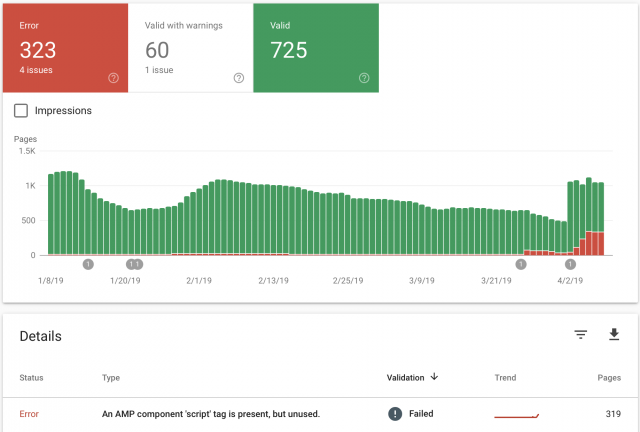
I recently updated the theme and the feature to use “mobile”, “Mobile + AMP” or “AMP” has started to create AMP errors, when previously there were none. It keeps telling me there, “An AMP component ‘script’ tag is present, but unused”. This was never an issue until after the upgrade. I had AMP Ads formatted the correct way without using the “Script” tag. As you can see from the image I attached, the errors started around March 26th, right around the time I updated. My website is GoingFor2.com. I currently have it set at “Mobile Only” because I don’t want to keep racking up errors, but I want to be able to use AMP as well. Thank you. Here is the link to the image: http://goingfor2.com/wp-content/uploads/2019/04/Screen-Shot-2019-04-08-at-10.12.43-PM.png
Calin Hi,
Our theme was designed to work with adsense by default. If you use any other ad system you need to use this method to do it: https://forum.tagdiv.com/using-other-ads/
Please check our documentation for using ads -> https://www.screencast.com/t/HF9jjtknUCX -> https://forum.tagdiv.com/using-other-ads-non-adsense-ads/
Also if your code need to be set inside of <head></head> or<body></body> you can set it in Theme panel>Analytics / JS Codes
-> Please check our documentation for using ads -> https://www.screencast.com/t/HF9jjtknUCX -> https://forum.tagdiv.com/using-other-ads-non-adsense-ads/
Thank you.
 Catalin
 Hi,
If you want to have some control over your Ads in mobile, you need to use the Mobile theme, Mobile Ads. Otherwise, the theme does not have any such an option for this case, sorry! As a hint, you can check the following useful guide from here -> https://isabelcastillo.com/adsense-native-in-article-amp Maybe this guide could be helpful for you.
Thank you!
Calin Hi,
Please check our documentation for using ads -> https://www.screencast.com/t/HF9jjtknUCX -> https://forum.tagdiv.com/using-other-ads-non-adsense-ads/
Thank you.
 Onofriomarcomancini
Hi there,
I would like to know if there’s a code or a way to exclude ads inserted via theme options in a specific category and its related posts.
I asked because Adsense doesn’t want its ads in certain categories of my site like sexual health and I need to deactivated them only in that category and post related.
I usually do this on Sahifa with plugin AdSense Integration WP QUADS but I opened an other topic above because this plugin doesn’t work well on Newspaper. Ads go over other ads and over text on mobile phone.
Thank you for your precious help.
OnofriomarcomanciniHi there,
I just installed Newspaper. I had Sahifa before. I have an issue with all plugin ads that insert ads in the post such as AdSense Integration WP QUADS and Quick Adsense. The issue is from mobile phone and with responsive and native Ads. When I rotate the screen, ads go over other ads and over post text. It happens from iPhone, Huawei and different browsers and phone. Adsense notifies me that this a violation of their rules and signal me a lot of invalid clic and traffic because ads go over text post and confuse readers.
How can I fix this issue? Thank.
I attach some screenshot of issues.
https://ibb.co/h9kqrbj
https://ibb.co/QrFhMxm
https://ibb.co/PYmNYTK
This issue doesn’t happen when I use Theme options ads but I need to use plugin to exclude ads from certain categories post that Adsense doesn’t like and to insert more ads in post.
Thank you so much for your help
 cpndgn
 Hi, I noticed it usuallay happens when I click on Google Matched Content (any content from my website in google matched content ads) on mobile.
You check it in this post or in other posts in mobile.
https://ailevecocuk.net/cocuklar-laftan-anlar-mi/
It inserts the matched content to the footer. You can try clicking any post there.
(Also although I disabled matched content in google auto ads settings it still shows them, Is there any code to disable it manually?)
Best Regards
-
This reply was modified 7 years by
cpndgn.
 rickman
 Hi Calin, thanks for your fast reply!
We have done that already, the problem is that it happens with several plugins (the rating plugin, the ADs plugin, the quiz plugin) and with any automatic code that is implemented inside the td-post-content. It also happens in another web that we have with your same Newspaper Theme installed.
We could apply the “display:none” tag to all of them, but we thought that you could offer us a better solution.
 Kanuj
Kanuj Thanks a lot, Calin, yes the code was inserted twice. I have rectified it.
Auto Ads are still not showing in the cloud template but show in the standard pre-built theme template.
The Auto Ad Code is getting loaded in the page source but Ads are not showing.
Have Setup a test :
Single Post Cloud Template 1 – https://candytech.in/oneplus-7/
Single Post Cloud Template 6 – https://candytech.in/android-go-smartphones/ (Auto Ads are not working, the Ads are custom ads inserted using the tag div composer)
Pre-Built Theme Template – Auto Ads are working – https://candytech.in/realme-2-pro-review/
Please guide how to either insert more inline ads in the cloud template or how to make the Auto Ads work with it.
Adsense text/display/in-article/in-display ads will not work with the Cloud Template based on my testing.
This is really essential to have either more inline ads or to add auto ads to the template. Kindly help solving this we are losing revenue due to this issue.
I will be even happy to edit the code if required.
By the way, the theme is great for publishers and have tons of features that are not present on many other themes.
Keep Up the Good Work…
Regards
Kanuj
Calin Hi,
In order to remove the ads from the Tech News demo please go in Newspaper > Theme Panel> Ads and remove the code from there -> https://www.screencast.com/t/XQSUcqri -> https://www.screencast.com/t/WRl4I9yq also there are some ads on homepage that was set using tagDiv Composer
Please check our documentation for https://www.screencast.com/t/HF9jjtknUCX -> https://forum.tagdiv.com/using-other-ads-non-adsense-ads/
Monetize your website with the new Ad Box Element -> https://tagdiv.com/ad-box-newspaper-theme/
Thank you!
rickmanHi,
We have made a Footer page with tagDiv composer and we don’t know how but different types of contents (the YASR -Star rating, Quiz questions, content ads, and other automatic codes-) appear below the Footer only in posts.
We have tried everything: we deactivated all plugins and activating them 1 by 1; checked the Footer page, checked the developers code, checked the templates php to see if there was something wrong…
The only thing we know is that the content that is showing below the footer is content related to automatic plugins or codes that go in the td-post-content (it duplicates):
Here is a post url so you can check it: https://www.flipa.net/viajar-al-pasado-es-posible/
Can you please help us with this?? Any ideas of what is happening?
Thanks a lot!
Tina
 inav
inav Hello,
I think I solved the issue on YouTube’s side – the subscribers are now shown there. But the information is still not updated on our homepage. It’s been a couple of hours already, I’ve cleared the cash and re-saved the page settings).
Should I ask my other questions in separate threads? I’ve read other posts with multiple questions in them, please accept my apologies if this was wrong.
Kanuj Dear Calin,
Have tried this to insert the Auto Ads, but it is not working – The auto ads need to be set in Newspaper > Theme panel> Analytics/Js Codes -> https://www.screencast.com/t/76QOyEIy
Have added the code like this – http://prntscr.com/n79j10
Why do you need to set ads different in single post template?
If we are using 2 or more single post templates, the Ads need to be added to them again using the tag div composer. Ads code added to one single post template will not show up on the 2nd or 3rd template.
Also, the issue is we can’t add more inline article ads there is only 1 ad spot given. Problem with long articles (say 3000 words). We need to place 4-5 inline ads after every 5-6 paragraphs. This is not possible currently.
It can be done easily with a plugin like Ads Inserter by just defining the paragraphs number where we need ads. Unfortunately, the Ad Inserter is not able to ingest with the single post cloud template.
It works with the pre-built single post templates in the theme. Earlier we were using that but there is no infinite scroll feature with the prebuilt templates. For infinite scroll, we need to use the cloud template.
This is hurting our daily Adsense revenue and many other publishers would also be having this issue.
Any way to insert more inline ads in the cloud template and also how to make the Auto Ads work with the cloud template.
 travelmagazine
 Hi this is the conversation I had with Siteground today
Sharron Livingston: I am trying to make a change on Newspaper – Theme panel – ads. I wish to delete the text in the header ad. Unfortunately the system won’t save. The Support Forum wants
Server requirements
WordPress 4.0 or later
Apache or Nginx
php.ini memory limit: 40MB (recommended: 96M)
PHP version 5.6 or greater (recommended: PHP 7.0 or greater)
MySQL version 5.0 or greater (recommended: MySQL 5.5 or greater)
The mod_rewrite Apache module (optional)
For optimal performance the server requires some settings to be made, the optimizations include:
Use a cache plugin – we recommend WP Super Cache
Page Speed optimization –
Can you help me with this?
Sharron Livingston: This question is related to account: resellerthetravelmagazine.net
Teodor A.: Hey there
Teodor A.: I hope you are doing fine today!
Sharron Livingston: Hi Teador
Sharron Livingston: I am, but feeling overwhelmed
Sharron Livingston: I wanted to save an amendment I made on Newspaper – Theme Panels – Ads
Sharron Livingston: but it won’t save the amendment. so I went to their support panel and they just said the above
Sharron Livingston: and I have no clue what any of that means.
Sharron Livingston: Can you help?
Teodor A.: I understand you and what I can do is to make sure that all the server-side requirements are met
Sharron Livingston: thank you.
Sharron Livingston: shall I hang on here to find out if they are met
Teodor A.: Most welcome! Can you just tell me the domain name in question?
Teodor A.: Yes, but can you just tell me the domain of your site?
Sharron Livingston: http://www.thetravelmagazine.net
Teodor A.: Thank you! I am onit
Sharron Livingston: That’s great. Hanging on…. 🙂
Teodor A.: I am all done now! I carefully reviewed your account and confirm that all requriements server-wise are met now! The only change I had to do was for the memory_limit PHP variable as it was indeed having a lower value
Teodor A.: Everything else looks great!
Sharron Livingston: A cache plugin – we recommend WP Super Cache Page Speed optimization – we created a guide for this here
Sharron Livingston: Do we have that
Teodor A.: Yes, I already checked your website and you do have this pluginSharron Livingston: WP_MEMORY_LIMIT try to increase it at least to 256mb. Also please check the php version to be 7-7.2
Sharron Livingston: do you know what that means
Teodor A.: Yes, the PHP version for your site is currenty 7.1 which meets these requirements, the memory_limit has just neen increased to 256MB
Teodor A.: Oh, great. Now in order to resolve the initial issue, I would suggest to contact the plugin developers you use directly and tell them that the server requirements are met so that they can do some other checks being most familiar with how it works and to resolve issues related to it
Teodor A.: Of course, in case there anything that we can help or adjust from our side, you are always welcome to come back at us
UNFORTUNATELY … the save function still does not work. Can you help?
Kanuj There are couple of screw ups with the new update. First why there is a need to use different ad codes on the cloud template and the template you have selected otherwise in the theme.
The Auto Ads are not working with the cloud template.
Non of the Ad inserter plugin is working with the cloud template.
It is not possible to add more inline ads in any of the template.
Theme has become more heavy and slow – despite all the optimizations the speed is poor for everyone.
Guys wake up and do something about these issues before you see people jump ship
Calin Hi,
1. Please check our documentation for How to Make an AMP Ready Website with Newspaper Theme -> https://tagdiv.com/amp-newspaper-theme/ here you’ll find how and were to set the code ads.
2. Is no need to set the code in other parts, set them only in Amp Ads and the theme will do the rest for you.
3. There are tow section one for amp ads and one for mobile ads -> https://www.screencast.com/t/2Tz1ccuM3y1 here is an example -> https://www.screencast.com/t/JFFiV6li3ofE
-> https://www.ampproject.org/docs/reference/components/amp-auto-ads
Thank you!
 serwisfinansowy
 Thank you for your support
This script displays a list of consolidation loans that should appear in the middle of the text (they are enriching the text and are a source of income for me). Therefore, none of the above solutions is good in my case : /
I have about 25 websites and have to display other ads in similar way on each (personal accounts, home insurance, leasing …).
Is there any way to run this type of scripts in the middle of the text on the mobile editor page?
Simion C. Hi,
That would be the normal size for the sidebar and that layout, the ads look alright to me. Some of the ads are bigger and fill the sidebar space, others are smaller than the width of the sidebar – http://prntscr.com/n5rzwv
I could give you a code to make the bigger ones be the same as the others
– http://prntscr.com/n5s1rc
.const-widget {

max-width: 300px;

}
Or maybe align the smaller ones center – http://prntscr.com/n5s9ia
.const-widget{

text-align:center;

}
Let me know if you need more help or you have more questions.
Thanks
Calin Hello,
We have not tested this type of ads so we have no idea of their functionality. Our theme was designed to work with adsense by default. If you use any other ad system you need to use this method to do it: https://forum.tagdiv.com/using-other-ads/
I hope this helps.
Thanks.
Calin Hi,
This usually happens when the account is not yet approved and Google is not yet serving the ads –
– https://support.google.com/google-ads/answer/1722120
– https://support.google.com/adsense/troubleshooter/7049023
Some topics I found – https://techbegins.com/adsense-403-forbidden-error-complete-solution.html
– https://www.problogbooster.com/2015/01/adsense-403-forbidden-error-html-google-adsense-not-showing-ad-code-403-fix-solved-troubleshoot.html
If there is others problems, please provide me a link were I can make some closer inspection.
Thank you for your understanding!
Simion C. Twitter may do that, as long as there is an AMP version available they will serve it
– https://developer.twitter.com/en/docs/publisher-tools/amp/overview.html
– https://searchengineland.com/twitter-ramps-amp-278300
– https://adage.com/article/digital/twitter-makes-major-implementation-moments-amp/303020/
If you want to disable AMP for the website, you could check some recommendations from some topics I found
– https://www.wpbeginner.com/wp-tutorials/how-to-properly-disable-google-amp-in-wordpress/
– https://kinsta.com/blog/disable-google-amp/
– https://gulshankumar.net/remove-amp/
If just the AMP plugin is used, the ads could be added as mentioned in the topics from above. Maybe there could be other ways, you could search more online for how to display ads with the official AMP plugin.
With the AMP and mobile theme there are ad spots in the mobile theme section, the ads will show on AMP. There are also AMP auto ads.
Or you could use a different AMP plugin entirely, depends on your needs and what you want to do.