- NewspaperDesign your Post Pages using the Cloud Library Templates
- NewspaperDesign your post pages using the Default Templates
- NewsmagPage templates
- NewspaperPage templates
- NewspaperCreate a form contact page
- NewspaperCloud Library Templates
- NewspaperCloud Library – Category Templates
- NewsmagCategory templates
- NewsmagFooter templates
- NewsmagDefault post templates
- NewsmagPost templates
- NewsmagHomepage – How to build and set it
- NewspaperHomepage – How to build and set it
- NewspaperPost templates
- NewspaperDefault post templates
- NewspaperCategory templates
- NewspaperPost template ads
- Apitd_api_single_template::update_key
- Apitd_api_single_template::update
- Apitd_api_single_template::add
 halim
halimI upgraded to the new version today. In older versions, I was able to use PHP pages that I created myself. I was able to see and add PHP pages that I added in td_composer as templates. But now I can’t run those files. How to run custom PHP files?
 marcorroma
 I have no problem with posts.
The problem is with the pages!
Can you try to display the function to avoid duplicate posts on post block pages?
Previously this function was available under the text of a page, during editing.
But now it’s gone!
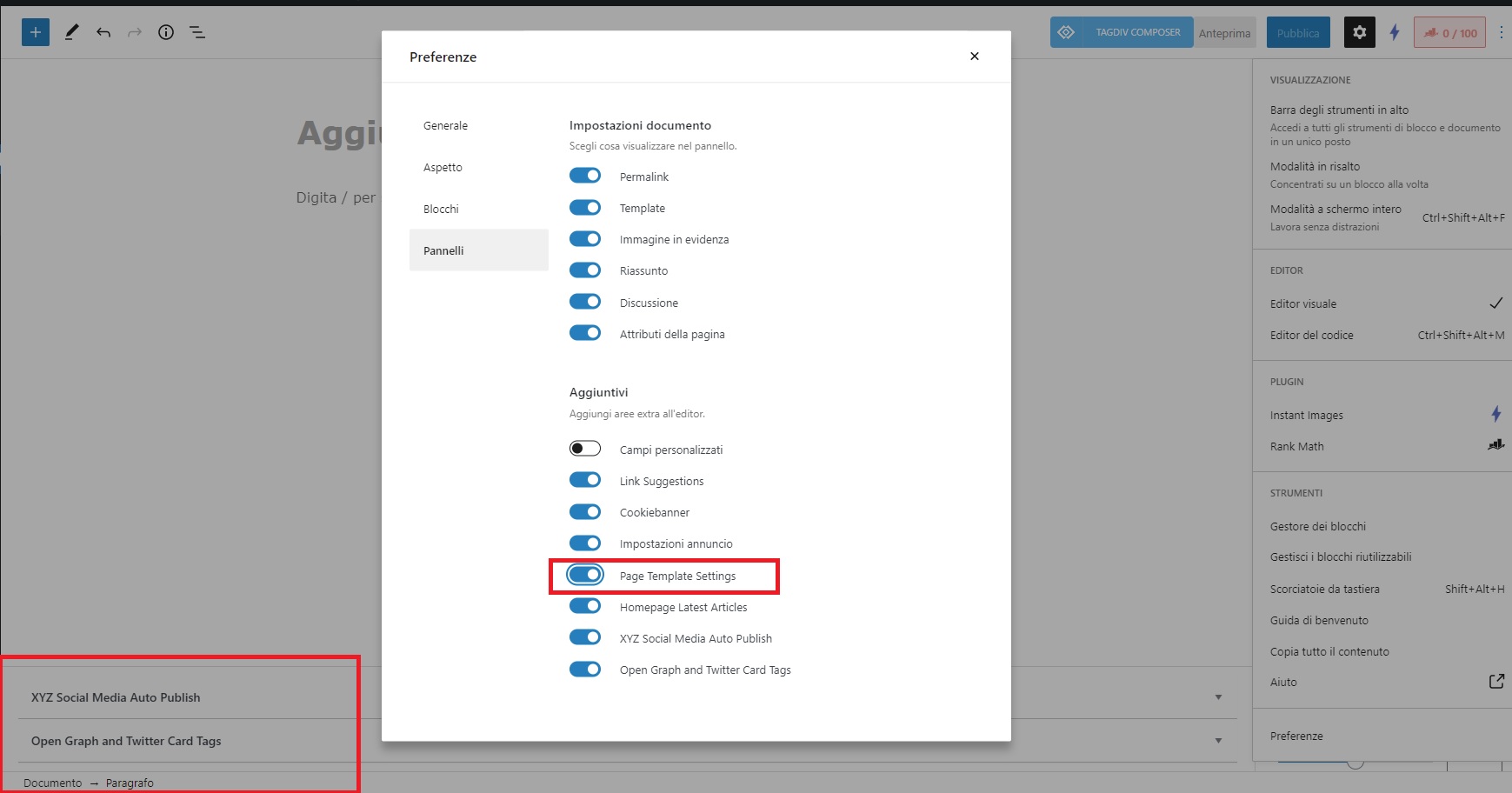
I add that the “Page Template Settings” option in the pages is active, screenshot:
https://i.ibb.co/vDvZBJQ/err-avoid.jpg
But it is not displayed.
Thanks for support
 tsc_site
Hi, I installed a 404 template (404 Template 28 – Life News PRO) and it’s not working.
I’ve tested with a fake post and it show’s the default 404 page and not the one I installed. Also in the top bar there’s no option to edit it so I could choose the template.
This is the page 404 with default layout
This is the top bar without option to edit
Thank you
tsc_siteHi,
I have activated a ˜date template” for my archives but it doesn’t work with one specific page and there’s no option to edit in the top bar.
This is the archive page
This is the top bar
The archive/date template I installed is the Date Template – Makeup Shop
Thank you
 Peter_86
Hello,
For certain pages I use cloud templates. How can I change/edit displayed urls for these pages. Now when I click on “Dogodki” category, I get: https://www.modre-novice-izdelava.si.ir-image.si/category/dogodki/
I would like to translate this link to: https://www.modre-novice-izdelava.si.ir-image.si/kategorija/dogodki/
Here is link for author page that uses cloud template:
https://www.modre-novice-izdelava.si.ir-image.si/author/a-c/
I would like to make it in native language: https://www.modre-novice-izdelava.si.ir-image.si/avtor/a-c/
Thank you,
Peter
 Bill Fleak
 We would like to copy the content in a single post Excerpt Field to the TD Theme Subtitle field. In the post export file, you will see both the data in the Excerpt field and the data in the td_post_theme_settings which is where the TD theme saves the Subtitle content.
https://www.screencast.com/t/PD4pkwujU
We are using the NewsPaper Cloud Templates with our site. Which does not allow us to display the Excerpt content on a single post.
We are looking for the best solution to accomplish copying the data from the Excerpt to Subtitle.
Or how can we display the Excerpt data in the same location the Subtitle is currently displaying on the single post page under the Title. Again we are using the Cloud Templates with our site.
Link to post: https://dev.hrexecutive.com/talent-management/5-ways-to-create-a-safe-workplace-culture-for-lgbtq-employees
 lenusmedia
Hi Newspaper, I have created this page:
https://eastwest.eu/it/autori/matteo-meloni/ (single-autori.php) It’s a custom php template into my child theme based on Newspapaer. I would like to load a list of posts based on a custom fields, so I have used:
$args = array('meta_key' => 'seleziona_autore', 'meta_value' => $post->ID);

query_posts($args);

get_template_part('loop' );
I would like to load a “tdb_module_loop” layout to show posts as happens in search results or category lists:
https://eastwest.eu/it/categoria/la-notizia-del-giorno/
https://eastwest.eu/it/?s=matteo+meloni
How can I perform this? Do I have to change :
get_template_part('loop' );
with something different?
 giuseppe39
Hello,
I have a category with 5 subcategories. Only the subcategories are populated with posts.
parent:
https://www.ilmediterraneo24.it/./in-sicilia/
children:
https://www.ilmediterraneo24.it/./in-sicilia/sicilia/
https://www.ilmediterraneo24.it/./in-sicilia/isole-minori/
https://www.ilmediterraneo24.it/./in-sicilia/euromed/
https://www.ilmediterraneo24.it/./in-sicilia/riva-sud/
https://www.ilmediterraneo24.it/./in-sicilia/lavoro-al-sud/
when i try to access the subcategory link from megamenu or breadcrumb or directly from the address bar he send me to the home page or in one specific post. ALL other categories parents URL work fine
i have used inherit global template for the subcategories in theme panel.
My cloud template is Pulse pro, but for single posts is Romania PRO and for category is Report PRO.
thanks
Giuseppe
 Redlemon
 Hi Bettina,
We are talking about two very different problems here. One is the theme appearing to be unregistered. The second is (was) that the theme completely broke the output on the front page. The former is still there – the theme appears to be unregistered still. The latter we addressed like explained previously. Allow me to point out that some theme settings were completely erased in the process of switching between child -> parent -> child themes; settings like the header, the logo, the default post template, the custom ads 1, 2, 3, 4, and more.
To be completely transparent with you, I am very hesitant in touching the update buttons again any time soon. This is not the first time I am experiencing unexpected output caused by updating Newspaper. If you search on previous tickets of mine (you could search history for my email associated with this account) you could verify this. Living with Newspaper has been anything but easy and trouble-free.
I attempted to re-activate the theme, but the wheel kept spinning, and spinning, and spinning. It was at least 5 minutes of spinning until I realized it was not going anywhere, and I had to cancel.
This is an alive installation, and every time something like this happens it never goes unnoticed. We honestly hope there will never be a “next time” in the months to come. The activation code is available, and we would rather resolve this without having to go through a similar experience another time.
Thanks.
 yeahthatskosher
hi – I’m editing the Cloud Templates for Magazine PRO and the mobile header/menu will not change, particularly for the homepage on mobile. For nearly all other pages the edits take effect, but not the homepage.
 tzimis0tigris
 Hello Anamaria,
the issue is that although I have disabled the mobile page & the mobile template, on the responsive site I get two different views depending on the device specifically on mobile I can’t see the submenu and the logout button https://imgur.com/9r4jEfG and I get a different footer https://imgur.com/l5coHH9.
Thank you
 Anamaria
 Hello,
Please let me know what footer you have.
If you have a footer template from Cloud Library, you can edit it with tagDiv Composer on a page and you can make change easy => https://i.imgur.com/hVRwTQn.png select the element and change the text -> https://i.imgur.com/iSBc3Cg.png
If you have a footer from Theme Panel then you can change the text here => https://i.imgur.com/QcZvnS0.png
or is the problem that the changes made are not saved?
Thank you!
 Bettina
 Hello!
Here is a possible solution for your issue mentioned by my colleague: https://forum.tagdiv.com/topic/newsletter-plugin-able-to-add-new-services-activecampaign/
We recommend to use cloud/PRO templates in order to have the possibility to edit them with the TagDiv Composer which contains a lot of functions and features, please check our tutorial here: https://forum.tagdiv.com/tagdiv-composer-tutorial/
Documentation here:
– https://forum.tagdiv.com/cloud-library-templates/
– https://forum.tagdiv.com/design-post-pages-using-cloud-library-templates/
– https://forum.tagdiv.com/cloud-library-category-templates/
Check also our video tutorials here: https://www.youtube.com/c/tagdivThemes/videos
Thank you!
Bettina Hello!
This is possible in our theme, only when you use a cloud/PRO template for your posts.
We recommend to use cloud/PRO templates in order to have the possibility to edit them with the TagDiv Composer which contains a lot of functions and features, please check our tutorial here: https://forum.tagdiv.com/tagdiv-composer-tutorial/
Documentation here:
– https://forum.tagdiv.com/cloud-library-templates/
– https://forum.tagdiv.com/design-post-pages-using-cloud-library-templates/
– https://forum.tagdiv.com/cloud-library-category-templates/
Check also our video tutorials here: https://www.youtube.com/c/tagdivThemes/videos
Thank you!
 jtoney
I have an issue, for each page and post I didn’t create a mobile page and now I have a few hundred pages that go to an odd version of the template. This template has the wrong logo along with wrong color scheme and so on. Is there any way to fix this without manually going and adding hundreds of mobile pages?
Bettina Hello!
Let me explain you which options of mobile versions are:
1. Responsive version: A responsive version of your website is looking similar like on desktop, edit the page with TagDiv Composer, click on the mobile viewport: https://www.screencast.com/t/XDQJedlggSB ; there you can see your mobile version and you can edit the elements there.
2. Mobile pages: https://tagdiv.com/newspaper-10-3-7-update-brings-customizable-and-fast-mobile-pages/
3. Mobile theme plugin: The Mobile Theme is a performance optimized theme included in the Newspaper main theme and it loads only for mobile devices. It comes with its own templates for page, post, category, etc so your current templates from the desktop theme will get converted to the mobile theme layout. For more details, please take a look here: https://forum.tagdiv.com/the-mobile-theme/ https://forum.tagdiv.com/the-mobile-theme/
A full explanation you can find here: https://www.youtube.com/watch?v=SpGkOnJeNZY
So, if you need first option (responsive version), then please make sure you have the Mobile theme plugin uninstalled and you do not build any mobile pages.
Thank you!
Bettina Hello!
This issue is discussed already here: https://forum.tagdiv.com/topic/uneditable-block/
We recommend to use cloud/PRO templates in order to have the possibility to edit them with the TagDiv Composer which contains a lot of functions and features, please check our tutorial here: https://forum.tagdiv.com/tagdiv-composer-tutorial/
Documentation here:
– https://forum.tagdiv.com/cloud-library-templates/
– https://forum.tagdiv.com/design-post-pages-using-cloud-library-templates/
– https://forum.tagdiv.com/cloud-library-category-templates/
Check also our video tutorials here: https://www.youtube.com/c/tagdivThemes/videos
Thank you!
 lemads
I can’t edit my posts. I get this message:
Please select tagDiv Builder Template from the theme panel or set a default template. The current page/post uses a template that is not editable.
I have been asking this question before, but are still unable to solve the problem.
The url is struernyheder.dk. and my version are 10.3.
It is the the demo called News Magazine.
I will problably need a step by step explanation. I’m vere puzzled right now.
Bettina Hello!
If you have WP Bakery plugin installed and active, then here is the problem. There is a conflict between TagDiv Composer and WP Bakery.
So, I gladly recommend you to shift from WPBakery to Composer, because WPBakery is an old builder plugin. Please check our guide to know how to shift from WPBakery to Composer: https://www.screencast.com/t/6xLVMmlsY ; https://www.screencast.com/t/zWHrRmK1LQC ; https://www.screencast.com/t/vuFdT9Stx ; https://www.screencast.com/t/DWbSf3qj ; https://www.screencast.com/t/QuHyGccTK71v
We recommend to use cloud/PRO templates in order to have the possibility to edit them with the TagDiv Composer which contains a lot of functions and features, please check our tutorial here: https://forum.tagdiv.com/tagdiv-composer-tutorial/
Documentation here:
– https://forum.tagdiv.com/cloud-library-templates/
– https://forum.tagdiv.com/design-post-pages-using-cloud-library-templates/
– https://forum.tagdiv.com/cloud-library-category-templates/
Check also our video tutorials here: https://www.youtube.com/c/tagdivThemes/videos
Thank you!
Bettina Hello!
And that page is looking different in your website: https://www.screencast.com/t/o4dwFWrFvg
Please clear your cache and see the results!
If you want to change the template for your posts, then you can import a cloud template and assign it to them: https://forum.tagdiv.com/design-post-pages-using-cloud-library-templates/
Thank you!
Bettina Hello!
Please check this documentation: https://forum.tagdiv.com/page-templates-2/
Hope that helps you!
Thank you!
Bettina Hello!
I see a code there which means you do not have the tagdiv social counter plugin installed and active in the Newspaper -> Plugins. Check also about the Standard Pack plugin to be active.
Also, you use default templates, that’s why you can not edit them with the TagDiv Composer.
We recommend to use cloud/PRO templates in order to have the possibility to edit them with the TagDiv Composer which contains a lot of functions and features, please check our tutorial here: https://forum.tagdiv.com/tagdiv-composer-tutorial/
Documentation here:
– https://forum.tagdiv.com/cloud-library-templates/
– https://forum.tagdiv.com/design-post-pages-using-cloud-library-templates/
– https://forum.tagdiv.com/cloud-library-category-templates/
Check also our video tutorials here: https://www.youtube.com/c/tagdivThemes/videos
Thank you!
Bettina Hello!
1. If you need AMP, you should have amp and mobile theme plugin installed and active.
a. Mobile – Displays content using the Mobile Theme on small screen devices (no AMP)
b. Mobile + Amp – Displays content using the Mobile Theme on both mobiles and AMP
c. AMP – Uses the responsive version of the theme on small screen devices and Mobile Theme only on AMP.
For more information about those plugins, you can find in our documentation:
– https://forum.tagdiv.com/tagdiv-amp-plugin-tutorial/
– https://forum.tagdiv.com/the-mobile-theme/
– https://www.youtube.com/watch?v=SpGkOnJeNZY
2. Please note that if you enable the Mobile Theme plugin on a page which was created with TagDiv Composer will not display the design you built because the Mobile Theme has its own templates design. https://forum.tagdiv.com/mobile-theme-introduction/
Thank you!
Bettina Hello!
If the settings from the theme panel are not working, probably you use a cloud/PRO template.
Anyway, we recommend to use cloud/PRO templates in order to have the possibility to edit them with the TagDiv Composer which contains a lot of functions and features, please check our tutorial here: https://forum.tagdiv.com/tagdiv-composer-tutorial/
Documentation here:
– https://forum.tagdiv.com/cloud-library-templates/
– https://forum.tagdiv.com/design-post-pages-using-cloud-library-templates/
– https://forum.tagdiv.com/cloud-library-category-templates/
Check also our video tutorials here: https://www.youtube.com/c/tagdivThemes/videos
Hope that helps you!
Thank you!
 jozef
jozef I create a page and I used a template from the pre-made template and I import it into the page that is
look here http://prntscr.com/1y5m6q9