- NewspaperDesign your Post Pages using the Cloud Library Templates
- NewspaperDesign your post pages using the Default Templates
- NewsmagPage templates
- NewspaperPage templates
- NewspaperCreate a form contact page
- NewspaperCloud Library Templates
- NewspaperCloud Library – Category Templates
- NewsmagCategory templates
- NewsmagFooter templates
- NewsmagDefault post templates
- NewsmagPost templates
- NewsmagHomepage – How to build and set it
- NewspaperHomepage – How to build and set it
- NewspaperPost templates
- NewspaperDefault post templates
- NewspaperCategory templates
- NewspaperPost template ads
- Apitd_api_single_template::update_key
- Apitd_api_single_template::update
- Apitd_api_single_template::add
 Bettina
 Hello!
1. Reset the license key from that website: https://www.screencast.com/t/Zt12bpyX and remove the theme (delete), in this way the license will be available for the new website and you can use the theme without any problems.
2. I can see a 404 – Page Not Found: https://forum.tagdiv.com/cloud-library-templates/
This website is not made with Newspaper theme.
Thank you!
 Anonymous
hi
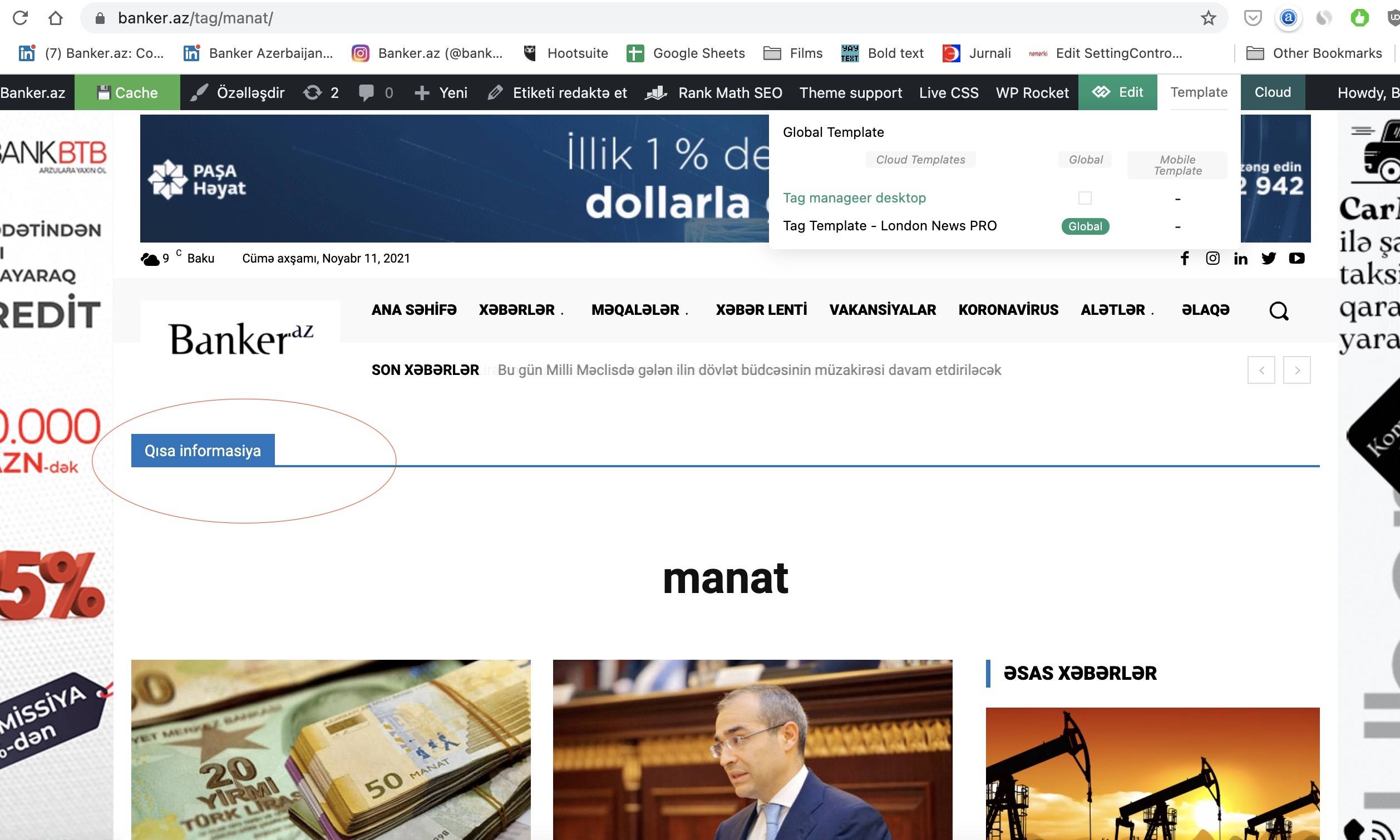
i don’t really get logic of this template system. can you please help me.
i want to create page for Tags. i create that and add element there. but that elements appears in other category pages also. i suppose i don’t create it correctly. what i’m doing wrong? for example here in this image i added title element there, but it appears in other pages also. there you also can see templates i created.
https://banker.az/wp-content/uploads/2021/11/Screen-Shot-2021-11-11-at-09.49.44.jpg
 BasamTahoor
Greetings,
Hope everyone is fine. I edited the Newspaper 11.3.1 themes for my WordPress website. I used one of the cloud templates for the post design. While editing the template everything is fine and showing well. After I publish it and select the template as a template for the posts from the themes panel, the template is not working well. I have shared the screenshots and details below. Please review it and anyone has any clue about how to solve it, please share it with me.
How the template should be according to the design (screenshots): How it should be screenshots
How the template is right now (screenshots): How it is right now screenshots
1. In the template that I have designed, the posts should have two columns which in the first column the image and the text appears and the second column, the related posts will appear in sticky mode. But after I chose it as a post template it only has one column and the second column goes down on top of other items.
2. The sticky ads I have chosen on the right column is appearing over the whole page.
3. The other posts which I have added under the single post template are coming over each other
4. The post is being repeated if you scroll down. It never ends.
Bettina Hello!
The Mobile Theme is a performance optimized theme included in the Newspaper main theme and it loads only for mobile devices. It comes with its own templates for page, post, category, etc so your current templates from the desktop theme will get converted to the mobile theme layout. For more details, please take a look here:
– https://forum.tagdiv.com/mobile-theme-introduction/
– https://forum.tagdiv.com/the-mobile-theme/
If you use Mobile theme plugin, then you can not edit the pages with TagDiv Composer.
You have only some settings for this layout, which you can find in Theme panel -> Mobile Theme. Please note that if a page is made by Composer, than the content won’t be displayed on Mobile theme version. You should create the content with the Mobile Editor.
Thank you!
 Anamaria
 Hello,
Unfortunately, the screenshots don’t work https://i.imgur.com/Wyi842L.png
If you had shortcodes on the pages, please make sure you have updated and activated the tagDiv Standard pack from version 10.4, this plugin is no longer required because the new demos are using cloud templates.
Also, I saw you use WP Bakery. This plugin is a conflict between tagDiv Composer/tagDiv Cloud Template which is why I recommend you to shift from WPBakery to tagDiv Composer because WPBakery is an old builder plugin => https://i.imgur.com/O4CA0y0.png -> https://i.imgur.com/bFnzNtQ.png -> https://i.imgur.com/mv8AhFU.png -> https://i.imgur.com/IMyLYiY.png
Also, on our channel https://www.youtube.com/channel/UCOT1RiNysIPCTPSnVZskwtQ, you can find more videos that can help you and documentation https://forum.tagdiv.com/newspaper-theme-documentation/ and you can ask us here on the forum if you have any questions.
Thank you!
 itgrcapitallink
I am on /wp-admin/admin.php?page=td_theme_panel and click “Save Settings” but the page is not saving.
The loading is never ending.
 princebilly
Hi there
I purchased Newspaper and also extended support now. I removed the old (not automatically upgradeable Newspaper 9) and exchanged the theme with Newspaper 11. Frontend works fine when i build the website using TagDiv Composer blocks again. But the posts do not work anymore due to an wp booster error (see [1]).
Please support. I love your theme, but this upwards not-compatibility is really hard to follow. Thank you.
Best j
wp_booster error: td_api_base::mark_used_on_page : a component with the ID: single_template_1 is not set.
/mnt/rawdata/www/cubicles/flock-0755/showreel.mdh.fhstp.ac.at/wp-content/plugins/td-composer/legacy/common/wp_booster/td_api.php
[1] https://showreel.mdh.fhstp.ac.at/5911/breathx-stressfree-radiotherapy/
 matt.bateman
Hi. First post.
I recently migrated my WP site to a new domain and new hosting. I used Migrate Guru and everything went well. Everything except featured videos.
On my current live site, this is how pages are rendered with a featured video:
https://snipboard.io/KDUkXE.jpg
This is how the exact same post renders on my new staging site:
https://snipboard.io/768wbA.jpg
The staging site does not have the same level of responsiveness either. The video just remains the same size as the page resizes. This does not repro on pages with Featured Images, these pages function exactly as intended.
Examining in Chrome developer tools, the CSS seems to be the same. There are no differences in the codebase that I’m aware of. The staging site does have the SeedProd plugin which I’m using for a Coming Soon page, but the bug is persistent when I deactivate the plugin.
I am using the standard Style 9 post template. Switching to a different template doesn’t fix the problem. Downloading a Cloud Template with featured videos does not resolve the problem. I feel like a critical part of the plugin code or a file is missing regarding the featured video. I do not know where to check for this.
The live site is running PHP 7.0.33 (-0ubuntu0.16.04.16)
The staging site is running PHP 7.4.25
Both sites are running Newspaper 11.3.1
Both sites are running WP 5.8.1
Bettina Hello!
If you use default templates for your posts, then you can not customize them with the TagDiv Composer.
We recommend to use cloud/PRO templates in order to have the possibility to edit them with the TagDiv Composer which contains a lot of functions and features, please check our tutorial here: https://forum.tagdiv.com/tagdiv-composer-tutorial/
Documentation here:
– https://forum.tagdiv.com/cloud-library-templates/
– https://forum.tagdiv.com/design-post-pages-using-cloud-library-templates/
– https://forum.tagdiv.com/cloud-library-category-templates/
Check also our video tutorials here: https://www.youtube.com/c/tagdivThemes/videos
Thank you!
 sumitmalhotra
 Hello,
The pages are not a problem. Posts are. Your documentation for posts is not clear so with what it states, it is impossible to build a post.
I have selected a cloud template – Single Post Template 9 (It is already saved in Cloud Templates tab in WordPress admin). But I am unable to integrate it with any post on my site.
 mcvanz
Hi, I’m trying to change the header of the single post page but I can’t confirm the use of a particular custom template, it keeps using the default one. Where am I wrong?
Bettina Hello!
If you want the same style/template of your categories, then you can duplicate a template/layout for every category to have different template, make the specific changes and assign it to that category.
Check this topic: https://forum.tagdiv.com/topic/different-logo-in-categorypage/ ; Here I explained step by step how you can duplicate a template.
For cloud/PRO templates: you should add the sidebar from tagdiv Composer. Steps:
1. Add 1 row
2. Split into 2 columns( 2/3 + 1/3 )
3. You can add whatever you want into the second column and consider it a sidebar.
Take a look here in this video for example where I build 6 columns: https://www.screencast.com/t/mZ2c5XamTFN
Hope that helps you!
Thank you!
Bettina Hello!
This page : https://3dprintingpricecheck.com/blog/ uses the default template, and you can not edit it with the TagDiv Composer.
Documentation here, please check: https://forum.tagdiv.com/excerpts-introduction/
Thank you!
 Bill Fleak
We are using the Newspaper theme with Cloud templates. We inserted the AD Block to display our ads from GAM using the Custom Ad tab for injecting the GAM code. We have the word -Advertisement- for the ad title in the Ad-block. When there are no ads displayed we would like to hide the word Advertisement above the ad. See link. We have 3 ad spots on the page. We have only 1 had being served of the 3. But the word -Advertisement- is still showing up where the ads would be. Is it possible that the text -Advertisement- not be displayed if there are no ads being delivered. Please advise.
 Bezukhof
I’ve fiddled with all the settings and set the Blog to an ‘excerpt length’ everywhere I can find it, but still I’m getting full length content on the Blog page:
https://3dprintingpricecheck.com/blog/
Also, is there any way to use Tagdiv to customize the Blog page. I tried to do it but couldn’t actually edit the blog page using a Cloud Template…
 shafiun
hi,
I am using Cloud Template from Gossip pro in my site. Its not showing any image when I want to print a post. Then I checked Newspaper demos site also. I found, images not showing neither on Demo site nor in my site.
Then I tried to fix it by custom CSS as you mentioned here
But its not working also. What to do to show featured image and site logo in print page?
Bettina Hello!
Check our documentation from here: https://forum.tagdiv.com/design-post-pages-using-cloud-library-templates/
Also, check if you selected a cloud template for the post or from panel (not default style 1-13) : https://www.screencast.com/t/orf8qzivqQ
Thank you!
Bill Fleak Can you please assist me with letting me know the location of the Single Post file for us to review and possibly customize the code? We are using the Newspaper Cloud Templates for our pages.
 patrixx73
I, I just installed newspaper last Saturday and today i create the first mobile page. This is the error I am facing on the mobile ios device. Please help me solve it.
Kindest Regards
Patrick
wp_booster error:
td_res_context->get_att(gap) Internal error: The atts are not set yet(AKA: the render template method was called without atts)
/var/www/vhosts/ecodisofia.net/httpdocs/wp-content/plugins/td-composer/legacy/common/wp_booster/td_css_res_compiler.php
Array
(
[0] => Array
(
[file] => /var/www/vhosts/ecodisofia.net/httpdocs/wp-content/plugins/td-composer/legacy/common/wp_booster/td_css_res_compiler.php
[line] => 385
[function] => error
[class] => td_util
[type] => ::
[args] => Array
(
[0] => /var/www/vhosts/ecodisofia.net/httpdocs/wp-content/plugins/td-composer/legacy/common/wp_booster/td_css_res_compiler.php
[1] => td_res_context->get_att(gap) Internal error: The atts are not set yet(AKA: the render template method was called without atts)
)
)
[1] => Array
(
[file] => /var/www/vhosts/ecodisofia.net/httpdocs/wp-content/plugins/td-composer/legacy/common/wp_booster/td_css_res_compiler.php
[line] => 362
[function] => get_att
[class] => td_res_context
[object] => td_res_context Object
(
[settings:td_res_context:private] => Array
(
[all] => Array
(
[gap] => 10px
[row_auto_height] => 1
[row_fixed] =>
[stretch_off] =>
[row_anim_off] =>
[svg_z_index] =>
[flex_display] => block
[flex_width] =>
)
)
[current_media:td_res_context:private] => portrait
[atts:td_res_context:private] => Array
(
)
[index_style] =>
[responsive_atts:td_res_context:private] => Array
(
[0] => gap
)
[fonts_to_load:td_res_context:private] => Array
(
)
)
[type] => ->
[args] => Array
(
[0] => gap
[1] =>
[2] =>
)
)
[2] => Array
(
[file] => /var/www/vhosts/ecodisofia.net/httpdocs/wp-content/plugins/td-composer/includes/shortcodes/vc_row.php
[line] => 365
[function] => get_shortcode_att
[class] => td_res_context
[object] => td_res_context Object
 marcorroma
 Hi, I have disabled all plugins, I have removed all php functions in functions.php.
But the problem persists.
screenshot:
https://i.ibb.co/58wV5LT/43355334.jpg
As I pointed out in the video, this function is not displayed in the page editor. I mean the Page Template Settings metabox.
Although in the panel I have marked the “Page Template Settings” function.
screenshot:
https://i.ibb.co/CnqQGTD/21122112.jpg
Are you sure you have the latest version of the theme and WordPress installed?
 Trennd
 Also, how can I add a discount badge to the store? I tried some plugins but they only appear on my cart page, where the products are not added from the cloud template. Like here: https://prnt.sc/1yqvpcj
Bettina Hello!
I’ve checked your website links and the pages are not longer working.
Did you manage to solve the issue?
You can change the permalink for you pages like this: https://www.screencast.com/t/h1t7uXQ7dy
Please check our documentation from here: https://forum.tagdiv.com/unique-articles/ or you can use an offset if you use a cloud template and not a default one.
Thank you!
 Peter_86
 Hello,
I am talking about cloud templates. For example when you click on category of the article on this page: https://www.modre-novice-izdelava.si.ir-image.si
Category “dogodki”: https://www.modre-novice-izdelava.si.ir-image.si/category/dogodki/
How can I translate word “category” in the link above?
I don’t have page for this under pages. I’ve customised cloud template for categories. So how can I change link in such occasion?
BR, Peter
Bettina Hello!
Let me explain you which options of mobile versions are:
1. Responsive version: A responsive version of your website is looking similar like on desktop, edit the page with TagDiv Composer, click on the mobile viewport: https://www.screencast.com/t/XDQJedlggSB ; there you can see your mobile version and you can edit the elements there.
2. Mobile pages: https://tagdiv.com/newspaper-10-3-7-update-brings-customizable-and-fast-mobile-pages/
3. Mobile theme plugin: The Mobile Theme is a performance optimized theme included in the Newspaper main theme and it loads only for mobile devices. It comes with its own templates for page, post, category, etc so your current templates from the desktop theme will get converted to the mobile theme layout. For more details, please take a look here: https://forum.tagdiv.com/the-mobile-theme/ https://forum.tagdiv.com/the-mobile-theme/
A full explanation you can find here: https://www.youtube.com/watch?v=SpGkOnJeNZY
So, if you need first option (responsive version), then please make sure you have the Mobile theme plugin uninstalled and you do not build any mobile pages.
If you created the mobile pages with TagDiv Composer, then when you install Mobile Theme plugin, your pages will be overwritten (disappear) by the plugin layout.
If you use Mobile theme plugin, then you can not edit the pages with TagDiv Composer.
You have only some settings for this layout, which you can find in Theme panel -> Mobile Theme. Please note that if a page is made by Composer, than the content won’t be displayed on Mobile theme version. You should create the content with the Mobile Editor.
Thank you!
 tamsin_lechner
 Hi again
I have a remaining issue re setting my global mobile post template.
When I open any post on my desktop, from the Admin Bar these are the template settings/options in my drop down menu >> https://www.screencast.com/t/8uA1R4iT9c
I have allocated a global template for my desktop post pages (the original default “single_template_1”).
Using Cloud Templates, I have customised a “Single Post Template 1” (as an alternative option) and also customised a corresponding “Single Post Template 1 – mobile” page which has been set to Global (for mobile). It shows as green when I hover over the mobile template icons.
However, this global mobile template is not being displayed on mobile posts. Also the wrong header displays. Instead mobile view is retaining the default “single_template_1” settings from desktop. FYI all my other mobile templates for pages, header and footer are working fine. It is just the mobile post template that is not working.
Q: What step am I missing?
Q: Will the mobile template (when correctly acting global) display for all new posts by default?
Q: For all existing posts, will they convert to the global mobile template automatically? Or do I have to do something to them manually?
FYI the main reason I have not made “Single Post Template 1” my global template for desktop posts is because I can’t seem to customise “Centre Align Image” in “Single Post Content” shortcode, to appear as a left aligned image similar to “Style 1” of Theme Panel default post template. This is my preference for desktop.
Thanks for your help.