- NewsmagPage templates
- NewsmagCategory templates
- NewsmagFooter templates
- NewsmagDefault post templates
- NewsmagPost templates
- NewsmagHomepage – How to build and set it
- NewsmagtagDiv Composer Tutorial
- NewsmagCustom Post Type Support
- NewsmagNewsmag documentation
- NewsmagHow to use the Visual Composer plugin
- NewsmagHeader styles
- NewsmagSmart sidebar
- NewsmagCategory grid styles
- NewsmagCategory top post styles
- NewsmagHow category settings work
- NewsmagFeatured images
 Anamaria
 Hello,
Please let me know what version do you use for mobile.
If you use a mobile responsive version or mobile page you can add the icon and text with tagDiv Composer if you mobile theme plugin you can’t edit with tagDiv Composer and you can’t add the elements.
This is a video about Responsive Newspaper Theme, AMP & Mobile Theme, Mobile Pages & Templates -> https://www.youtube.com/watch?v=SpGkOnJeNZY
Thank you!
 matthewbath
Hi!
I hope you can help.
I’m unable to make the option to ‘Hide description’ work when updating a global WooCommerce Product Category template in TagDiv Composer.
I can toggle ‘Show description’ between Show/Hide but the product description text remains. I want to have this hidden (though still crawlable). See linked image.
This may be a bug, but any advice would be welcome. The existing page shows how I want it to look (product description text has been removed).
Thanks!
Matt
 Big5
Big5Hi,
The “Exclusive Content” Module on the Home page of the Parenting template is not displaying any content. I hope someone can help me resolve this issue. I have attached an image of the empty module.
Thank you,
 creativeopole
 Hello,
In which file can you change the link to https?
The product template shows a picture that is added in css and causes security and SSL certificate issues.
During synchronization, the API checks if the website is safe and throws errors. The weird fact is that this photo is nowhere used on the product page and causes errors. Is it not possible to globally throw it away. Please also let me know where it is used.
 Praga
PragaHello to all the Newsmag team.
Thank you for this template, and I hope you continue to improve it in all aspects (more options, lighter and faster, and better for SEO)
I have been with the staff for more than three years.
But:
1) Do you recommend any plugin to protect the publications. Or rather, do you recommend one? I don’t want to break such a great job.
2) With the option that you have incorporated of content by subscription: Can you make it possible to read at least the first paragraph?
Both points are super important to me.
Thank you.
PD: my page is: http://www.viviendopraga.com
Anamaria Hello,
Please follow this guide -> https://forum.tagdiv.com/tagdiv-amp-plugin-tutorial/
Also, if you have other plugins, please disable them, and try to activate the AMP and Mobile theme plugins.
This is a video about Responsive Newspaper Theme, AMP & Mobile Theme, Mobile Pages & Templates -> https://www.youtube.com/watch?v=SpGkOnJeNZY
Let me know the results!
Thank you!
 Bettina
 Hello!
Let me explain you which options of mobile versions are:
1. Responsive version: A responsive version of your website is looking similar like on desktop, edit the page with TagDiv Composer, click on the mobile viewport: https://www.screencast.com/t/XDQJedlggSB ; there you can see your mobile version and you can edit the elements there.
2. Mobile pages: https://tagdiv.com/newspaper-10-3-7-update-brings-customizable-and-fast-mobile-pages/
3. Mobile theme plugin: The Mobile Theme is a performance optimized theme included in the Newspaper main theme and it loads only for mobile devices. It comes with its own templates for page, post, category, etc so your current templates from the desktop theme will get converted to the mobile theme layout. For more details, please take a look here: https://forum.tagdiv.com/the-mobile-theme/ https://forum.tagdiv.com/the-mobile-theme/
A full explanation you can find here: https://www.youtube.com/watch?v=SpGkOnJeNZY
Now, you can use which one is more suitable for your needs.
If the problem is still there, then please provide more information about your issue, screenshots or videos and your website link in order to help you efficiently.
A solution for sending a screenshot is this:
Download, capture, send: https://www.techsmith.com/jing-tool.html
After making the screenshot, you will have a link, paste it here.
Thank you!
 Piotrk87
Hi Team,
Could you please let me know what should be the sizes of images in the Product Template – Makup Shop? I don’t know where to find this information and currently my products don’t look good. I need to adjust them so that they would fit, but I am not sure what the image dimensions should be?
https://www.jakaoferta.stronazen.pl/wyszukiwarka-abonamentow/
Images: Product Catalogue
Product page
Bettina Hello!
Let me explain you which options of mobile versions are:
1. Responsive version: A responsive version of your website is looking similar like on desktop, edit the page with TagDiv Composer, click on the mobile viewport: https://www.screencast.com/t/XDQJedlggSB ; there you can see your mobile version and you can edit the elements there.
2. Mobile pages: https://tagdiv.com/newspaper-10-3-7-update-brings-customizable-and-fast-mobile-pages/
3. Mobile theme plugin: The Mobile Theme is a performance optimized theme included in the Newspaper main theme and it loads only for mobile devices. It comes with its own templates for page, post, category, etc so your current templates from the desktop theme will get converted to the mobile theme layout. For more details, please take a look here: https://forum.tagdiv.com/the-mobile-theme/ https://forum.tagdiv.com/the-mobile-theme/
A full explanation you can find here: https://www.youtube.com/watch?v=SpGkOnJeNZY
Now, you can use which one is more suitable for your needs.
For the page speed, I can recommend you some solutions in order to increase the score.
Our developers are working a lot to improve the page speed in every update.
So, please make sure you use the latest update of the theme and plugins(11.2) because it may help you for your page speed. First of all, please make sure you have a backup done and then you can update the theme and the TagDiv plugins also.
I recommend you to make a backup and update plugins and the theme via file transfer, so that you don’t face any error: https://forum.tagdiv.com/how-to-update-the-theme-2/
Also, to increase the page speed you can check these similar topics for more solutions:
– https://www.infophilic.com/get-almost-100-pagespeed-newspaper-theme/
– https://forum.tagdiv.com/topic/score-100100-pagespeed-with-newspaper-wordpress-theme/
– https://developers.google.com/speed/docs/insights/v5/about
– https://www.youtube.com/watch?v=tnkVapqhIHc
Please note that page speed is not covered by the support team: https://forum.tagdiv.com/newspaper-theme-support/
Thank you!
 edwinlima
 Hi,
Menu entries are generated directly from the categories, I have just deleted them all and added them again to the menu but the result is still the same. Even more intriguing is the fact that for menu item Tech, page one is not showing the sidebar correctly but page 2 is. I’ve checked the template for all categories and it’s the same for all of them.
Bettina Hello!
This is possible when you will use a cloud/PRO template. In order to have different elements(menus) inside for every category/post, you need to have different template for each category/post.
If you want the same style of your categories/posts, then you can duplicate a template/layout for every category/post to have different template, make the specific changes and assign it to that category/post.
Check this topic: https://forum.tagdiv.com/topic/different-logo-in-categorypage/ ; Here I explained step by step how you can duplicate a template.
Thank you!
Bettina Hello!
It seems that you have the Mobile theme plugin installed and active.
Let me explain you which options of mobile versions are:
1. Responsive version: A responsive version of your website is looking similar like on desktop, edit the page with TagDiv Composer, click on the mobile viewport: https://www.screencast.com/t/XDQJedlggSB ; there you can see your mobile version and you can edit the elements there.
2. Mobile pages: https://tagdiv.com/newspaper-10-3-7-update-brings-customizable-and-fast-mobile-pages/
3. Mobile theme plugin: The Mobile Theme is a performance optimized theme included in the Newspaper main theme and it loads only for mobile devices. It comes with its own templates for page, post, category, etc so your current templates from the desktop theme will get converted to the mobile theme layout. For more details, please take a look here: https://forum.tagdiv.com/the-mobile-theme/ https://forum.tagdiv.com/the-mobile-theme/
A full explanation you can find here: https://www.youtube.com/watch?v=SpGkOnJeNZY
Now, you can use which one is more suitable for your needs.
If you need a responsive version, then please deactivate the Mobile theme plugin and see the results!
Thank you!
Bettina Hello!
The tagDiv Shop plugin requires WooCommerce plugin to be installed and active!
Please install/activate WooCommerce plugin.
So, it should appear the templates too: https://www.screencast.com/t/Bmcn1KBX
The “woo product category” block appears to a WooCommerce product template.
These elements: https://imgur.com/a/6a20Bi2 will appear on every page, but the others only if you will assign a woo template and are specific to those templates.
Thank you!
 remsta
Hi there,
I have enabled AMP and it seems to work for my Home Page, Contact Page – etc.. anything that is a page. However, for my blog posts, I am using various Cloud Templates named ‘Category: Events’ or ‘Category: Lifestyle’.
Under Theme Panel > Categories I have the Cloud Library Template set to Category: Street Style which is used as the master and under each additional category I have inherit from Global settings.
But nowhere on these settings or within the cloud template settings can I find an AMP option. These pages are all showing up as normal pages on a mobile device, how do I fix this?
http://www.cocktailrevolution.net.au – you can see this by going to this site.
Thanks
 sabyp
sabypI am using cloud templates for both single posts and the homepage. How do I hide the sticky sidebar for a user on the non-amp mobile version? Thanks,
creativeopole Hello,
I noticed that description styling for products does not work in the template. It’s about the spaces between paragraphs.
This is exactly about the short description field. This is what it looks like in the Administrator Panel:
However, this is how it looks after saving and displaying on the products page:
edwinlimaHi,
I have an issue, I need to add shortcodes from plugins to the homepage that I have installed in WP that don’t belong to the tech predefined template. However, everytime that I make a change on the page using the tagdiv composer that shortcodes disappear and I need to add them manually using the page editor. Why is that and how to prevent that?
Regards,
Edwin Lima
 curistorian
I am unable to open the Cloud library to choose a product page template. When I click on the ‘Cloud’ button from the product page, nothing happens. Is there a fix for this? I was able to do this for the shop page so I’m not sure why this is an issue.
 zy331200
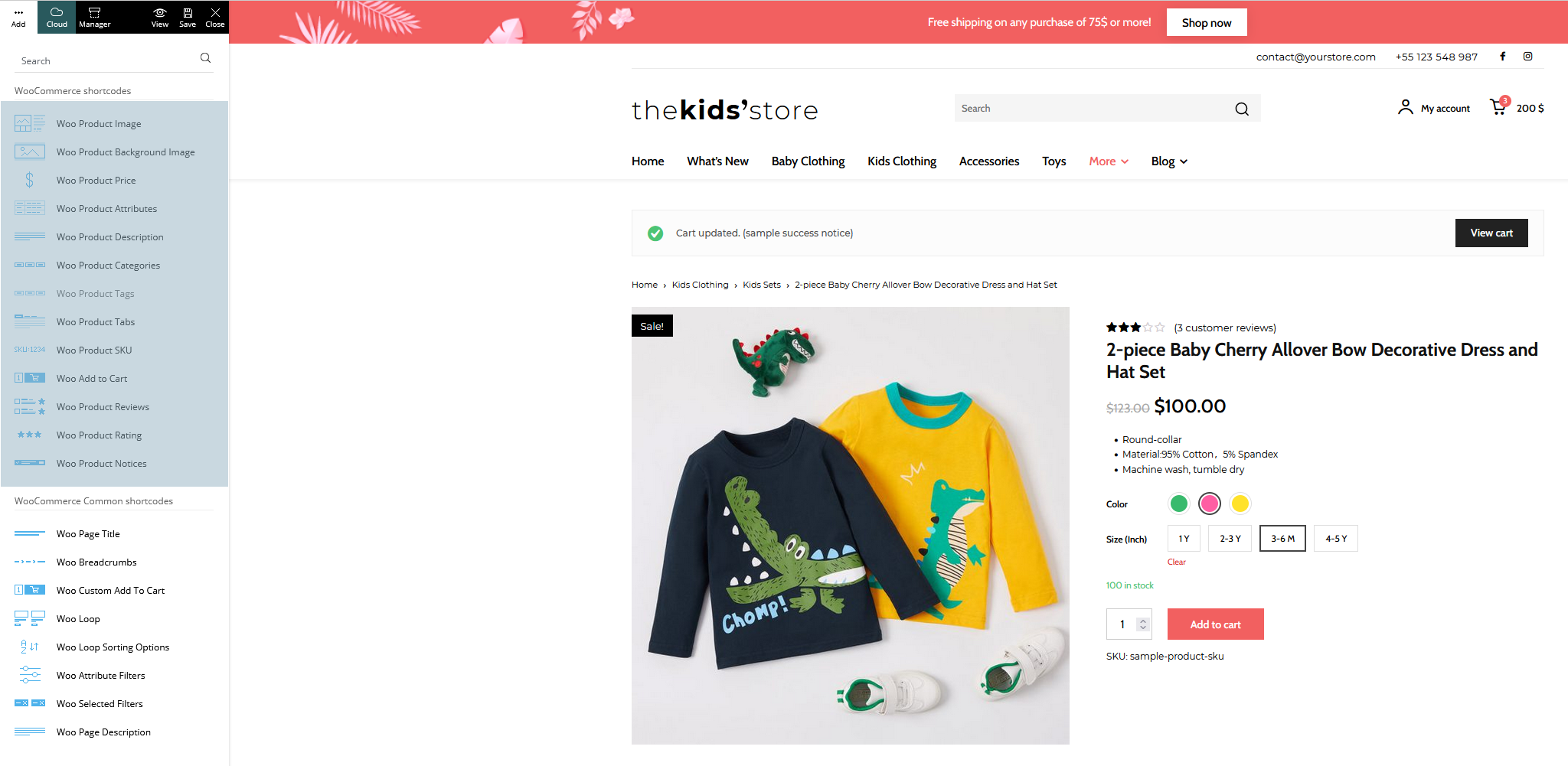
I am try to build an e-commerce website with newspaper theme, I am excited to know that V11.2 is able to support many woo commerce features after knowing from documentation. Anyway I am failed to do it when I creating a new page for my shop page, I can’t find “woo product category” block from my Tagdiv composer, which it is described in the documentation it should be available.
You can see from the image here what I have in my Tagdiv composer: https://imgur.com/a/6a20Bi2
And I am trying to install a shop template but I failed again, as it is not available in my cloud library: https://imgur.com/a/FuZ4o0i
And in the Tagdiv newspaper documentation here, it shows all blocks related to woocommerce: https://forum.tagdiv.com/wp-content/uploads/2021/09/woo-shortcodes.png
Can any one tell me what I was doing wrong?
 stroudtimes
I’ve noticed recently that the videos on our pages have switched to displaying in a square youtube player rather than the usual despite in the editor for the template the placeholder covers the full width.
For example: https://stroudtimes.com/pedal-power-the-bike-drop/
Any ideas why this might be?
edwinlimaHi,
I have created a website using the newspaper template but for two categories the side bar is not working properly, the links to the articles get surrounded by a square block, whereas for other categories it just works fine. For the category Tech is even weirder, the page number one doesn’t work fine but the page number shows just fine the side bar.
Not fine:
https://www.criptomania.info/category/tech/
https://www.criptomania.info/category/criptos/
Fine: https://www.criptomania.info/category/opinion/
Fine: https://www.criptomania.info/category/tech/page/2/
Any tips? Thanks in advance
Bettina Hello!
Let me explain you which options of mobile versions are:
1. Responsive version: A responsive version of your website is looking similar like on desktop, edit the page with TagDiv Composer, click on the mobile viewport: https://www.screencast.com/t/XDQJedlggSB ; there you can see your mobile version and you can edit the elements there.
2. Mobile pages: https://tagdiv.com/newspaper-10-3-7-update-brings-customizable-and-fast-mobile-pages/
3. Mobile theme plugin: The Mobile Theme is a performance optimized theme included in the Newspaper main theme and it loads only for mobile devices. It comes with its own templates for page, post, category, etc so your current templates from the desktop theme will get converted to the mobile theme layout. For more details, please take a look here: https://forum.tagdiv.com/the-mobile-theme/ https://forum.tagdiv.com/the-mobile-theme/
A full explanation you can find here: https://www.youtube.com/watch?v=SpGkOnJeNZY
Now, you can use which one is more suitable for your needs.
Please note that if a page is made by Composer, than the content won’t be displayed on Mobile theme version. Check the case here: https://forum.tagdiv.com/topic/amp-pages-not-shown/
If you use Mobile theme plugin, then you can not edit the pages with TagDiv Composer.
There are no settings to customize the pages.
You have only some settings for this layout, which you can find in Theme panel -> Mobile Theme.
AMP is faster and works better only with the Mobile Theme plugin. The design is looking pretty similar as our plugin. Please check our tutorial here: https://forum.tagdiv.com/tagdiv-amp-plugin-tutorial/
If you want only Mobile and not Mobile + AMP, please set it in the theme panel -> mobile theme -> mobile settings this option.
Hope that helps you!
Thank you!
Anamaria Hello,
The header and footer are taken from the standard ones. All you have to do is edit the mobile page, and in Manager (Website Manager) you need to import or the easy way is to convert the existent header/footer like this => https://www.screencast.com/t/HrjOBNayd -> https://www.youtube.com/watch?v=SpGkOnJeNZY (03:11 – Mobile Templates & Pages)
Thank you!
Anamaria Hello,
Please follow this guide -> https://forum.tagdiv.com/tagdiv-amp-plugin-tutorial/
Also, if you have other plugins, please disable them, and try to activate the AMP and Mobile theme plugins.
This is a video about Responsive Newspaper Theme, AMP & Mobile Theme, Mobile Pages & Templates -> https://www.youtube.com/watch?v=SpGkOnJeNZY
Let me know the results!
Thank you!
 alessandrogini1
Hi there,
I think there’s something wrong with the page builder for pages. When I go to “Pages > add new page > tagdiv composer” this is what I see: https://snipboard.io/XsmixM.jpg
The header and footer are overlapped and you can actually modify them like you were modifying the header/footer template. So if I mess up doing my page the changes are applied to all the website structure into the header or footer.
This is so weird ’cause I use newspaper on other WordPress installations running multiple websites and this neve happend. Normally tagDiv composer works just smooth and fine saving me a lot of time, but in this case I’m wasting a lot of time trying to figure out what’s wrong.
Can you please help me?
Thanks