
- NewsmagPage templates
- NewsmagCategory templates
- NewsmagFooter templates
- NewsmagDefault post templates
- NewsmagPost templates
- NewsmagHomepage – How to build and set it
- NewsmagtagDiv Composer Tutorial
- NewsmagCustom Post Type Support
- NewsmagNewsmag documentation
- NewsmagHow to use the Visual Composer plugin
- NewsmagHeader styles
- NewsmagSmart sidebar
- NewsmagCategory grid styles
- NewsmagCategory top post styles
- NewsmagHow category settings work
- NewsmagFeatured images
 Bettina
 Hello!
Please note if you use a cloud/PRO template you will be able to edit that page with TagDiv Composer plugin, and the changes made in theme panel should reflect on your default templates.
Please check the differences between cloud vs default templates from our guides:
– https://forum.tagdiv.com/design-post-pages-using-cloud-library-templates/
– https://forum.tagdiv.com/design-post-pages-using-default-templates/
Hope that helps you!
Thank you!
 dailykhabar
 Hi,
Thanks for the reply.
I tried both solutions that you have mentioned, but still results are the same. It is showing the same error.
This site can’t be reachedThe webpage at https://daily-khabar.com/wp-admin/post.php?post_id=11575&td_action=tdc&tdbLoadDataFromId=14045&tdbTemplateType=single&prev_url=%2F%2Fdaily-khabar.com%2F2021%2F03%2F31%2Findian-government-now-requires-companies-to-disclose-cryptocurrency-holdings%2F might be temporarily down or it may have moved permanently to a new web address.
ERR_HTTP2_PROTOCOL_ERROR
Please Help.
 cheryldimof
 OK, the issue on events seems to be solved. But I had to do it by switching out my single event template (the default page.php), which was working fine before the update. But with the template update, headers are displaying correctly again.
Thanks
 Smartegy
hi,
i’m using category cloud templates with post loop.
numbered pagination doesn’t work redirects to tag page…how can I fix it?
Bettina Hello!
Please check in Website Manager which template is assigned for your mobile version: https://www.screencast.com/t/CuLw1PERB
If you created a mobile page, then also you need to assign it. Please check our guide from here to understand how exactly you can assign a mobile page to your homepage:
https://tagdiv.com/newspaper-10-3-7-update-brings-customizable-and-fast-mobile-pages/
Please try not to reply multiple times in the topic if possible, this will only delay our response. Replying multiple times will refresh the topic date and move it to the back of the line, we answer from oldest to newest.
Thank you!
 Anamaria
 Hello,
If you activated the mobile theme plugin, then your pages will be overwritten by the plugin (the mobile theme comes with its own templates for page, post, category, etc so your current templates from the desktop theme will get converted to the mobile theme layout, the page content is made without builders in mobile editor => https://www.screencast.com/t/xbgZG8kH ) also, the options that are provided to edit the mobile theme version are limited (this keeps the things simple).
If you want to have the responsive version you can disable the mobile theme plugin on that page from the Gutenberg editor using the following option => https://www.screencast.com/t/axXRJsWby, if you create a mobile page, please check if is set correctly => https://tagdiv.com/newspaper-10-3-7-update-brings-customizable-and-fast-mobile-pages/
Also, this is a video about Responsive Newspaper Theme, AMP & Mobile Theme, Mobile Pages & Templates -> https://www.youtube.com/watch?v=SpGkOnJeNZY
Hope this helps you!
Thank you!
Anamaria Hello, Jack,
All the cloud templates you have/use are displayed here => https://imgur.com/a/KtWtADY#9lOaGon,when so you can edit them with tagDiv Composer, but for the homepage, I made a video on how to edit also, how to change the title of blocks and what is displayed in the flex block you can apply filter => https://we.tl/t-ESwbHnwHAE
Hope this helps you!
Thank you!
Bettina Hello!
Check which template you use for pages, posts, categories, etc. If you will find a default template, then it means you use the plugin. Otherwise, you can uninstall it.
Thank you!
Bettina Hello!
I checked this page and it seems you have a default template and in this case you don’t have the same settings. This is working only for a cloud/PRO template.
Thank you!
 Sodiac
 I’ve got the weird problem with Catagory template after 10.4 update. I have the main navigation with Category menu items. Some of them work fine but some look very bad, it looks like page code is broken or CSS not fully uploaded. I didn’t find any difference between categories neither name nor content.
When I downgraded to 10.3.9.1 this problem gone.
But now I cannot edit my (main) page with TD Composer: It gives me the Error message in very beginning:
“Error at zones: 6(models) : 0(dom). The model does not match the content Current state has involved an issue. You could try an UNDO operation (CTRL+Z / CTRL+SHIFT+Z)”
It seems that pages were updated either and I can’t edit them with previous version.
Please, check your 10.4 code for stable work.
Anamaria Hello,
About mobile page template if you made a page template and after that, you delete the mobile page without unassigned it from the page still be linked. To remove the linked mobile page you need to create the new one then select the new mobile page after that you can delete the mobile page.
This is a video about Responsive Newspaper Theme, AMP & Mobile Theme, Mobile Pages & Templates https://www.youtube.com/watch?v=SpGkOnJeNZY
Thank you!
Anamaria Hello,
Seems you have the mobile theme plugin activate, and it comes with its own templates for page, post, category, etc so your current templates from the desktop theme will get converted to the mobile theme layout. For more details, please take a look here: https://forum.tagdiv.com/the-mobile-theme/
If you want a responsive version of your website which is looking similar like on a desktop, then you need to deactivate Mobile Theme, edit the post with tagDiv Composer, click on the mobile viewport: there you can see your mobile version and you can edit the elements there.
Better deactivate the plugin and see the results.
Thank you!
dailykhabarTD composer is not working when i use td composer to edit any of my page using td composer it shows a message
This site can’t be reachedThe webpage at https://daily-khabar.com/wp-admin/post.php?post_id=11575&td_action=tdc&tdbLoadDataFromId=14045&tdbTemplateType=single&prev_url=%2F%2Fdaily-khabar.com%2F2021%2F03%2F31%2Findian-government-now-requires-companies-to-disclose-cryptocurrency-holdings%2F might be temporarily down or it may have moved permanently to a new web address.
ERR_HTTP2_PROTOCOL_ERROR
I have tried
updating wordpress
deactivating all plugins expect tagdiv default plugins
still the error persists.
Please help me resolve this issue.
 chip303
Hi,
I found something on your demo pages that would replace 2 plugins here. Namely an absolutely ingenious picture slider.
Can someone tell me or help me so that I can use it for myself?


I had already searched the forum, but all references to it are no longer current or end as 404.
Can that also be done with the Gutenberg editor (some things don’t seem to work with it) or do I have to change something again?
Is it generally more advisable to use the Classic Editor?
Template: BlackPro with edited Single-Page
 emreyldz41
I created and saved a mobile homepage template. Although I have selected the mobile home page I saved, the desktop homepage is still visible on mobile.
 Jackie C.
I tried this, but the theme was customized a little bit, it’s now my style, unfortunately, in the dashboard, there comes the new problem:
1.when I click the Cloud Templates(is this the tagDiv composer?), it shows like this=>https://imgur.com/a/KtWtADY#9lOaGon,when I choose the=>Attachment Template – Default PRO, it shows=>https://i.imgur.com/uKKtC5a.png, I still can’t see the banner on the homepage where it is=>https://i.imgur.com/NwPPynK.png, I’m trying to say is that in the tutorial, you are editing on the homepage, but I only can edit the=>Cloud Templates, how can I edit on my homepage? Where get I see the tagDiv Composer?
2.I also like to change the block title(Sorry, I don’t know what you call it.)=>here:https://i.imgur.com/oKnVc7t.png and the content it shows, cause they are the same right now.
Thank you so much for your kind help.
I’m eager to receive your feedback.
Thanks again.
Jack
 NesBmore
 So it looks like you have to go back into your website theme settings and assign the header, footer and page templates again. It resets to zero so it makes the site appear to be gone. Try that and it should correct @doocmandoo
 stephanwhelan
Hi team – got an issue with Mobile Theme. We have it installed and working perfectly for Homepage, Categories and Posts. However we are having issues on Pages.
We have some pages like this one: https://www.deeperblue.com/beginners-guide-scuba-diving/ that on desktop work perfectly. When we have mobile theme installed it just shows a page with a header, title and footer with no content. We tried creating a mobile version of the page in TD Composer and crafted one specifically as a mobile template – but that doesn’t show properly: https://www.deeperblue.com/the-beginners-guide-to-scuba-diving-mobile/
How do we get the right content to display on mobile with Mobile Theme installed?
Thanks,
Stephan
 abbyrocks
I have imported the template but when I load the site from mobile it still loads from the default mobile theme instead from the imported template. At “Mobile page” says “Homepage Mobile – Lifestyle PRO” yet it loads the default. What am I missing?
 szmarinov
Hello, can you help me solving this issue after updating to 10.4
https://lifeisfortravel.com/destinations/north-america/usa/ – Category using individual template -> http://prntscr.com/1131zgb
working as expected all settings from the theme panel are applied here:
the settings:
http://prntscr.com/113202r
http://prntscr.com/11320ci
http://prntscr.com/11320ub
http://prntscr.com/11321cc
Another category with individual template duplicated 1:1 from https://lifeisfortravel.com/destinations/north-america/usa/, here you can see the navigation with completely different background color and different fonts, and font sizes
https://lifeisfortravel.com/destinations/caribbean/aruba/
while the template is being updated, the menu seems OK, as it should look like
but in the front end part shows another thing -> http://prntscr.com/11323g9
another difference in the heading styles can be found, also -> http://prntscr.com/1132crn
all of the categories that are created and editing before updating to v10.4 are working ok, but the newest after 10.4 showing wrong settings. I even reset template settings to see if this will happen again, and yes, the same things. After importing template backup. Some of the categories were deleted for good. I did manage to bring them manually, but the problem with the different header menu/bar remains.
Also, there some differences in the page menu, and category menu.
page:
https://lifeisfortravel.com/travel-planning/
category:
https://lifeisfortravel.com/destinations/north-america/usa/
font-weight is different, not sure why
here are the settings:
http://prntscr.com/11329zi
http://prntscr.com/1132aea
http://prntscr.com/11329nc
Can you help me solving this problem? Thank you!
Jackie C. Hi,Anamaria,
I tried this, but the theme was customized a little bit, it’s now my style, unfortunately, in the dashboard, there comes the new problem:
1.when I click the Cloud Templates(is this the tagDiv composer?),it show like this=>https://imgur.com/a/KtWtADY#9lOaGon,when I choose the=>Attachment Template – Default PRO, it shows=>https://i.imgur.com/uKKtC5a.png, I still can’t see the banner on the homepage where it is=>https://i.imgur.com/NwPPynK.png, I’m trying so say is that in the tutorial, you are editing on the homepage, but I only can edit the=>Cloud Templates, how can I edit on my homepage? Where get I see the tagDiv Composer?
2.I also like to change the block title(Sorry,I don’t know you call it.)=>here:https://i.imgur.com/oKnVc7t.png and the content it shows, cause they are the same right now.
Thank you so much for you kind help.
I’m eager to receive your feedback.
Thanks again.
Jack
 rima144
 Hi
Thanks but none of that helps.
I use AmberLight PRO Templates.
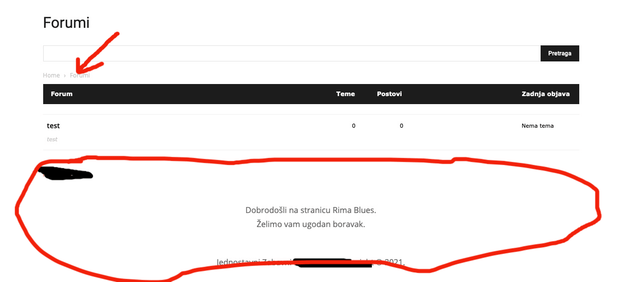
The problem is with the BBPress forum pages. There is an error with Header and Footer and only on the forum home page. While on forum topics everything is fine.
A little confusing !?
This is what it looks like on the home page of the forum: /forums
Header and Footer with error.

This is what the forum topic looks like and everything is fine here: /forums/forum /test
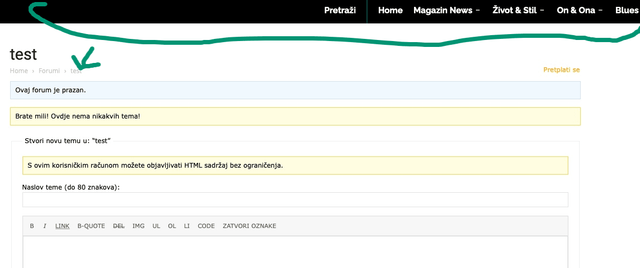
So the problem only appears on the forum home page.
It’s not urgent for me 🙂
Thanks for the good service.
 Thami
Thamiwebsite : http://www.mondedestoutous.com
Good evening,
While I had already uploaded Newspapper version 10.4 via envato, here are a few days that I was invited to update the same version via the wordpress dashboard, which I did to remove among other things an unnecessary notification. Just after, my site displays a fatal error because of td_composer. I tried to go back down to the previous version, back up from the day before, but it doesn’t work. By deactivating td_composer, the site is accessible but looks like nothing.
Here is the error message and I hope someone will save my life before the weekend.
Fatal error: Uncaught Error: Too few arguments to function {closure}(), 4 passed in /home/hath5827/mondedestoutous.com/wp-includes/class-wp-hook.php on line 287 and exactly 5 expected
in /home/hath5827/mondedestoutous.com/wp-content/plugins/td-composer/css-analyze/css-analyze.php on line 507
Call stack:
{closure}()
wp-includes/class-wp-hook.php:287
WP_Hook::apply_filters()
wp-includes/plugin.php:212
apply_filters()
wp-includes/meta.php:676
metadata_exists()
wp-content/plugins/td-composer/legacy/common/wp_booster/td_wp_booster_functions.php:572
td_load_css_fonts()
wp-includes/class-wp-hook.php:287
WP_Hook::apply_filters()
wp-includes/class-wp-hook.php:311
WP_Hook::do_action()
wp-includes/plugin.php:484
do_action()
wp-includes/script-loader.php:2004
wp_enqueue_scripts()
wp-includes/class-wp-hook.php:287
WP_Hook::apply_filters()
wp-includes/class-wp-hook.php:311
WP_Hook::do_action()
wp-includes/plugin.php:484
do_action()
wp-includes/general-template.php:3005
wp_head()
wp-content/plugins/td-standard-pack/Newspaper/header.php:11
require_once()
wp-content/plugins/td-composer/td-composer.php:246
{closure}()
wp-includes/class-wp-hook.php:287
WP_Hook::apply_filters()
wp-includes/class-wp-hook.php:311
WP_Hook::do_action()
wp-includes/plugin.php:484
do_action()
wp-content/themes/Newspaper/header.php:2
require_once()
wp-includes/template.php:730
load_template()
wp-includes/template.php:676
locate_template()
wp-includes/general-template.php:48
get_header()
wp-content/plugins/td-composer/legacy/Newspaper/page-pagebuilder-latest.php:4
include()
wp-includes/template-loader.php:106
require_once()
wp-blog-header.php:19
require()
index.php:17
 stanipro
After upgrading from 9.6 to 10.4 the site is getting fatal errors on any page and admin. Deactivating td-composer allows the site to load again. All plugins are deactivated except the theme plugins. Any ideas?
Fatal error: Uncaught ArgumentCountError: Too few arguments to function {closure}(), 4 passed in /wordpress-versions/5.6.2/wp-includes/class-wp-hook.php on line 287 and exactly 5 expected in /dom27706/wp-content/plugins/td-composer/css-analyze/css-analyze.php:507 Stack trace: #0 /wordpress-versions/5.6.2/wp-includes/class-wp-hook.php(287): {closure}(NULL, 175497, ‘tdb_template_ty…’, true) #1 /wordpress-versions/5.6.2/wp-includes/plugin.php(212): WP_Hook->apply_filters(NULL, Array) #2 /wordpress-versions/5.6.2/wp-includes/meta.php(676): apply_filters(‘get_post_metada…’, NULL, 175497, ‘tdb_template_ty…’, true) #3 /dom27706/wp-content/plugins/td-composer/legacy/common/wp_booster/td_first_install.php(201): metadata_exists(‘post’, 175497, ‘tdb_template_ty…’) #4 /wordpress-versions/5.6.2/wp-includes/class-wp-hook.php(287): {closure}(”) #5 /wordpress-versions/5.6.2/wp-includes/class-wp-hook.php(311): WP_Hook->apply_filters(”, Array) #6 /wordpress-versions/5.6.2/wp-includes/plugin.php(484): WP_Hook->do_action(Array) #7 in /dom27706/wp-content/plugins/td-composer/css-analyze/css-analyze.php on line 507
Bettina Hello!
The templates of Classic Blog Pro can be edited with TagDiv Composer plugin (documentation here: https://forum.tagdiv.com/tagdiv-composer-tutorial/). When you edit the homepage you can build the design same as in Classic Blog. You can delete elements which you don’t want on the page and insert there the element called “widget sidebar”, please take a look here: https://forum.tagdiv.com/sidebars-tutorial/
Hope that helps you!
Thank you!



