
- NewspaperDesign your Post Pages using the Cloud Library Templates
- NewspaperDesign your post pages using the Default Templates
- NewsmagPage templates
- NewspaperPage templates
- NewspaperCreate a form contact page
- NewspaperCloud Library Templates
- NewspaperCloud Library – Category Templates
- NewsmagCategory templates
- NewsmagFooter templates
- NewsmagDefault post templates
- NewsmagPost templates
- NewsmagHomepage – How to build and set it
- NewspaperHomepage – How to build and set it
- NewspaperPost templates
- NewspaperDefault post templates
- NewspaperCategory templates
- NewspaperPost template ads
- Apitd_api_single_template::update_key
- Apitd_api_single_template::update
- Apitd_api_single_template::add
 Vlad S
 Hello !
That can be achieved by importing a single post template from the Cloud Library and edit the page as you want with all the elements from the tagDiv Composer. Please find out more about it here: https://forum.tagdiv.com/design-post-pages-using-cloud-library-templates/
Thank you !
Vlad S Hello !
That widget comes from tagDiv Composer. You will have to import a Single post template from the cloud library and the edit it: https://forum.tagdiv.com/design-post-pages-using-cloud-library-templates/
Thank you !
Vlad S Hello !
I am sorry for missleading you.
In order to have clickable ads you will have to import a single post template from the cloud library and customize it with adboxes: https://forum.tagdiv.com/custom-ad-spots/ ; https://forum.tagdiv.com/design-post-pages-using-cloud-library-templates/
Thank you !
Vlad S Hello !
Yes, we do recommend using a Cloud Library Single post template, edit it using the tagDiv Composer and add an adBox: https://forum.tagdiv.com/design-post-pages-using-cloud-library-templates/ ; https://forum.tagdiv.com/custom-ad-spots/
Thank you !
 Calin
Calin Hello,
Please notice that writing multiple times in the same topic only delays the answer. In order to get a fast response, please write once and wait for an answer. We answer from oldest to newest so if you keep posting, your post is moved to fresher ones thus receiving the answer later until we answer all posts before your last reply, also please notice that we are working only from Monday – Friday: 8:00 AM – 17:00 PM -> http://prntscr.com/p6qbjh -> http://prntscr.com/p6qaga
If you send email with you wp-admin credentials, a member of Newspaper theme support will investigate your case/problem and will provide you a solution!
Thank you for your understanding!
Calin Hello,
In order to do that you’ll need to use a header template from tagDiv Cloud library; edit the header template with tagDiv Composer http://prntscr.com/p6pd6e , set the mobile device ->http://prntscr.com/p6pe2b after that set above a new row and drag the logo there -> http://prntscr.com/p6petq
Hope this will help you!
Thank you!
 GregorS
 It would be great if you could take a look at this. I can’t find any setting in templates (TD Composer) that would regulate this. I found one class that is loading at the beginning when page starts:
– td-pb-span12
and it’s “pushing” elements lower, but it’s not the only one and I can’t find why these classes are loading at all.
I’ve created login credentials (admin) for you – how can I send them to you?
Calin Hello,
Please make sure that all the settings are like in our requirements, please follow the guide carefully
– https://forum.tagdiv.com/requirements-for-newspaper/
and please increase all requirements that are lower, and follow all steps.
Also from what I can see you are using a demo that use cloud templates from tagDiv Cloud Library, so in order to change the logo, you’ll need to edit the header logo using the tagDiv Composer, click on logo an change it with yours.
http://prntscr.com/p6nk38 -> http://prntscr.com/p6nkms
Thank you!
Vlad S Hello !
Your homepage seems to be working fine. Also please note that if you want to edit single post templates you will have to add them from Cloud Library.
All the Cloud library elements are fully editable using the tagDiv Composer.
Find out more about it here: https://forum.tagdiv.com/cloud-library-templates/
Thank you !
 khunshan
Hello
I am currently using Gadget theme. However, I am looking to replace its header menu design. After exploring Header Templates in Tagdiv Cloud I am trying to use https://cloud.tagdiv.com/header-template-city-news/ instead of default in Gadget theme.
But, after importing the Header Template it is only allowing me to show it in a new page. Rest of the website has the default header everywhere.
So is there any possible way to replace my theme’s header with Header Template?
 liamc
liamcHey Guys,
Hopeing for some clarification on some theme behavior.
Firstly I will outline my workflow.
I have the latest verion of Newspaper installed (9.8) and I am using the WordPress Video Robot Plugin.
In my Theme Panel I have the following selected.
Default Post Template (Sitewide) – Style 9. I also have this selected in the WPVR theme fix. Please see images below.
https://drive.google.com/open?id=1JhjhWinr7-lyx8gQkE9tcacAu0fxV8E9
https://drive.google.com/open?id=1s5BS-1D7fAvZJ3ryKX-MX0KytV6lRJ0U
When I pull in a source from WPVR I have the option to specify the ‘Import Full Video Description’. Please see image below.
https://drive.google.com/open?id=1C_TSG7wlLlmwKWLEreRaRWjmfeC0CDl9
When I import a video the post looks like this. Please see image.
https://drive.google.com/file/d/1KfQqMSehJw62jIzxbu6AjTwWVYW-Q-BK/view?usp=sharing
So I then go into ‘Edit Video’ and under post settings > general select ‘From Panel’ to have the post show like this. Please see image below.
https://drive.google.com/file/d/1EY3WLadWPdkuzWbq4xyDV4SUN3DrmFGG/view?usp=sharing
So in order to get the post to show how I want it too with video embedded and full text description I have to edit it at the post level. But it appears I have already selected how I was the post to look. Style 9?
Going back to the Theme Panel I can see this note.
DEFAULT SITE POST TEMPLATE
Setting this option will make all post pages, that don’t have a post template set, to be displayed using this template. You can overwrite this setting on a per post basis.
So is there a spcific post template I need to change as well?
Is this normal behavior from the theme? I would like not to have to go into each post and edit it like this. Is this possible?
Lastly when I do get the video description into the post it appears all of the links have been stripped? Is there anyway to fix this too?
Thanks again for your time.
Liam
 sajeed
I have been raising an issue for 3 days in these forums, I have sent a mail also, yet there is no resolution to my issue,
post-settings-or-page-template-issue-no-fixed-position/
similar issue
post-editor-layout-messed-up/
post-settings-or-page-template-issue-no-fixed-position
post-page-is-messed-up
 nevinaydogan
Hello, I went to design other pages other than the homepage. I received a warning like this: Please select tagDiv Builder Template from the theme panel or set a default template. The current page / post uses a template that is not editable.
What should I do?
When I want to edit my pages with tagdiv composer, I get the following warning:
Error at zones: 5 (models): 4 (dom). The model does not match the content. You could try an UNDO operation (CTRL + Z / CTRL + SHIFT + Z)
Calin Hello,
From what I can see you have set a footer page, that is way the footer style 1 not apply -> https://prnt.sc/p5jwki
You can edit http://prntscr.com/p5p42g that footer page with tagDiv Composer and set the social icons -> http://prntscr.com/p5p3jt and make sure that in Theme panel> in social networks you have set the telegram.
If there is still a problem please provide me a link to your website.
Thank you!
 GiadaBenassi
 Okay thank you so much. A last question, where can find the page that generate the template of cloud library? Because i have need to add custom fields
 jaydeedaley1
Dear Support
I am using the LA MODE fashion template which I have updated with a new logo etc – wwww.jaydeedaley.com but it reverts back to the original -LA MODE logo when I toggle down the page that then displays a reduced header.
I look forward to hearing from you.
JD
Calin Hello,
This will do the trick, but for posts, we recommend to use some single post template from tagDiv Cloud Library, edit theme with tagDiv Composer and set in sidebar what you want like on homepage.
Thank you!
GregorS Thanks for your instructions, I’ll take a look and let you know how it goes.
What I’m trying to do is implement a AdRotate ads in Header instead of Theme native ones, I’ve tried and succeeded using a workaround:
– Imported Header Template 1 (Magazine theme) via Cloud Template
– deleted Ad Element
– replaced it with sidebar Element
– and inserted AdRotate Widget in it’s place (instead of PHP code)
It actually worked and displayed ads properly.
But here is the issue with this new (imported) header – and my sec. Question
I now have two headers – one for homepage (this new imported one – Template 1) and other one for inside pages (the theme default one). I have removed ad element from both – so that does not impact this test (and deactivated unsupported plugin).
They are behaving differently when loading – please check this video (tagDiv Speed Booster and WP Super Cache are turned off).
You can see it in this video – LINK (.MVK)
Do you know why is there this “gap bottom” under menu when header from template 1 loads? The other one loads just fine.
Calin Hello,
The function for the related article from our theme can be found in wp-content/plugins/td-composer/legacy/common/wp_booster/td_module_single_base.php -> http://prntscr.com/p5k82x
But if you want to change only the style of the single relate posts, you can use a single post template from tagDiv Cloud Library, edit it using tagDiv Composer , click on this element and change the layout how you want http://prntscr.com/p5k9l4
Thank you!
Vlad S Hello !
In order to make the site full width you have to select every row of your page using the tagDiv Composer and then set the stretch mode you want like here : https://www.screencast.com/t/BkWwdHh6
In order to make the post page full width you will have to add a single post template and then edit it. Check more about how to have single post template here: https://tagdiv.com/customize-articles-with-single-post-templates/ And for the header you can do it here: https://www.screencast.com/t/xf56tQN0.
These are the ways you can increase your page width from theme options. Anything above this will require custom code.
If you are using a background color / image this will cause the boxed layout.
Let me know if this helped you !
Thank you !
Vlad S Hello !
You can achieve this by adding a Cloud Library template in order to edit it using the tagDiv Composer: https://forum.tagdiv.com/header-manager/
After that you can add a button element and relate it to your login page.
Thank you !
 cantoute
Hi,
I’m very new to this theme and exploring it’s logics.
To start with, I wanted to keep things very simple having same sidebar on all the site.
I used a flex5 element to build a news feed without pictures. (a bit like Romania ‘Music’ block on homepage)
Got it working nicely on the home page and when I looked into ways of sharing sidebar across all website seemed the only way was using widgets (am I missing something?)
Ok… so I tried to do this using the {tagDiv} Block 17 but failed on hiding the picture (+ other things…)
Then I thought I was probably much better off just copy past of the shortcode… easy cool !!!
Works like a charm… all most… just a little css to “polyfill”
So I wanted to ark if that type of hack was considered acceptable (stealing shortcodes generated by the builder and pasting it into the html widget) and if so how should I manage the css story? (aka: is there a proper way of doing this?)
Thanks for help me out 🙂
Here is the shortcode I used
[td_flex_block_5 art_title_pos=”bottom” info_pos=”bottom” art_excerpt_pos=”bottom” art_audio_pos=”bottom” modules_category=”” btn_pos=”bottom” hide_image=”yes” show_excerpt=”none” show_audio=”none” show_review=”none” show_com=”none” show_btn=”none” modules_divider=”solid” all_modules_space=”10″ modules_gap=”40″ meta_padding2=”5px 0″ ajax_pagination=”load_more” td_ajax_preloading=”preload” custom_title=”Filinfo” h_effect=”” td_ajax_filter_type=”td_category_ids_filter” td_ajax_filter_ids=”6,2,12″ td_filter_default_txt=”Tout” block_template_id=”td_block_template_17″ title_tag=”” accent_text_color=”#ff036e” f_title_font_size=”eyJhbGwiOiIxNiIsImxhbmRzY2FwZSI6IjIwIiwicG9ydHJhaXQiOiIxNyJ9″ f_title_font_line_height=”1.2″ f_ex_font_size=”=” f_ex_font_line_height=”” tdc_css=”eyJhbGwiOnsiYm9yZGVyLWNvbG9yIjoiI2VlZWVlZSIsImRpc3BsYXkiOiIifX0=” f_header_font_style=”” f_header_font_size=”21″ m_padding=”0 7px” limit=”6″]
sajeed sajeedhello I have an issue while writing a post or a page, the section of post setting or page template settings down the editor is floating up displacing its position, attaching the screenshot
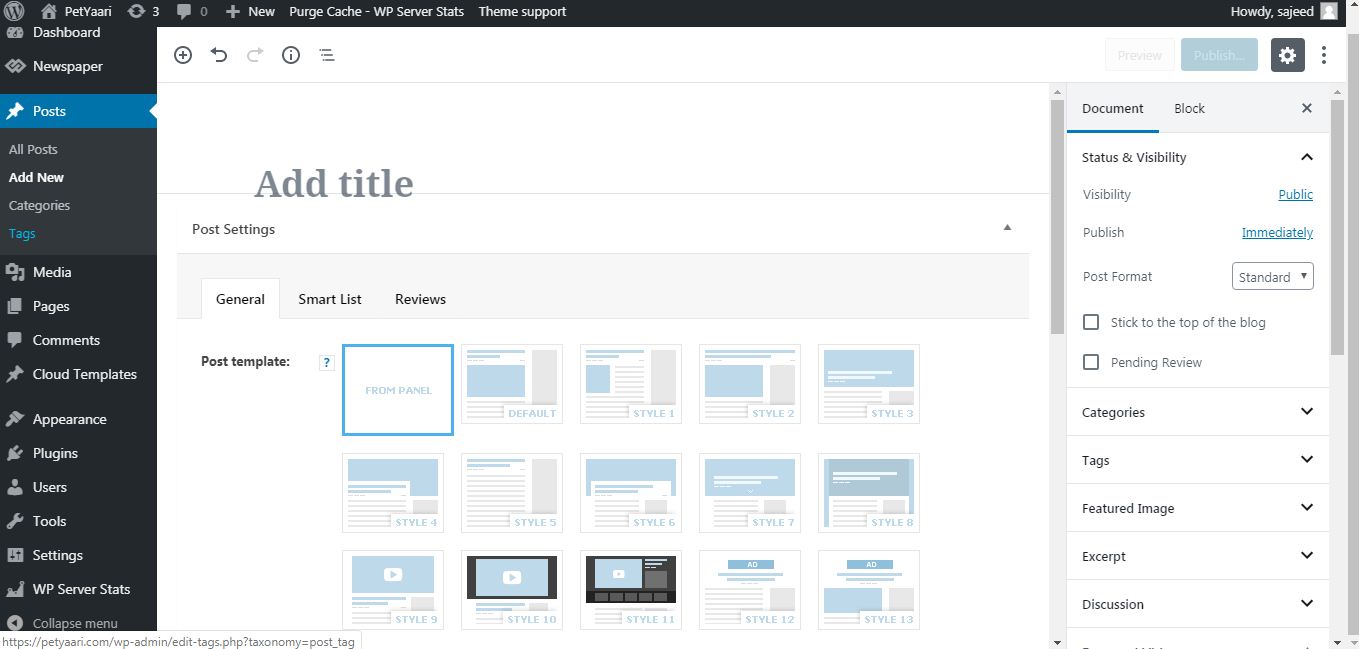
jaydeedaley1Dear Support
Is it possible to remove the login on the header? I am using the LA MODE fashion template using the Header Homepage Cloud Template – Fashion PRO and Header Cloud Template – Fashion PRO
I look forward to hearing from you.
JD
