
- NewspaperWP Rocket and Newspaper Theme: Optimization Guide
- TutorialsDefault Block Settings Guide
- TutorialsOffset Feature
 Bogdan B.
 hello,
you can use an overlay menu for that page using the page templates:https://forum.tagdiv.com/page-templates-2/
You can have a full width row if you stretch it in the tagdiv composer: https://www.screencast.com/t/CkWLnUWu
I’m not sure what moving picture you are referring to. Please provide more details.
Thanks
 Catalin
 Hello CreepyRavioli,
Our theme has more page templates. Also, if you do not want to have Latest Articles module through your page, you should simply use the Default one as you can see here -> https://www.screencast.com/t/6z27pskYQ
Thanks for your understanding!
Catalin Hi Ryansmccain,
Notice that section does not affect the structure of your posts. So, if you will set up your page to be by your latest posts -> https://www.screencast.com/t/1Cckwjn1Ns and if you will make some changes on this section you will affect the modules from your homepage set up by your latest posts. All the changes over your post should be made from loop-single or single template files as I have pointed your above.
Thanks for your understanding!
 ctoweett
 There is an easy way to do it with the new single post templates from the cloud library https://forum.tagdiv.com/tagdiv-cloud-library-plugin/. Just import a single post template and edit with td composer. You can assign the page title an h1, h2, h3 or h4 (Where you see Title Tag (SEO) dropdown http://prntscr.com/kn3onb)
 dvolatility
Hi there,
I want to replace page titles on category pages with images and keep them in the same spot as the page title, above the description. How may I go about doing that? It looks like I’m using “td_category_template_7”. So do I need to replace the title tag with a category image code in that php file? I’d like to keep the H1 tag, like the site’s logo in the header, and just replace the text with an img (see image). Thanks for your help.
 beppepicaro
Hello,
I just discovered the beauties of your cloud templates, there is one that fits my needs better than the default one but I cannot set it up as the demo. The one I choose is “404 template 11” and I would like to have it full screen, the image covering from left to right and no header and footer.
Inspecting the css so far I managed to hide the header adding this css code to the child-theme css stylesheet:
.error404 .td-header-wrap {
display: none;
}
Thanks.
 adiningg8826
Hallo Author
I have problem to edit pages with tagdiv composer, can you help me.
Warning: fopen(/home/vivagoal/public_html/media/wp-content/plugins/td-composer/includes/templates/font-awesome.php): failed to open stream: Permission denied in /home/vivagoal/public_html/media/wp-content/plugins/td-composer/includes/tdc_main.php on line 794
Warning: fwrite() expects parameter 1 to be resource, boolean given in /home/vivagoal/public_html/media/wp-content/plugins/td-composer/includes/tdc_main.php on line 823
Warning: fclose() expects parameter 1 to be resource, boolean given in /home/vivagoal/public_html/media/wp-content/plugins/td-composer/includes/tdc_main.php on line 825
Warning: fopen(/home/vivagoal/public_html/media/wp-content/plugins/td-composer/includes/templates/typicons.php): failed to open stream: Permission denied in /home/vivagoal/public_html/media/wp-content/plugins/td-composer/includes/tdc_main.php on line 794
Warning: fwrite() expects parameter 1 to be resource, boolean given in /home/vivagoal/public_html/media/wp-content/plugins/td-composer/includes/tdc_main.php on line 823
Warning: fclose() expects parameter 1 to be resource, boolean given in /home/vivagoal/public_html/media/wp-content/plugins/td-composer/includes/tdc_main.php on line 825
Warning: fopen(/home/vivagoal/public_html/media/wp-content/plugins/td-composer/includes/templates/open-iconic.php): failed to open stream: Permission denied in /home/vivagoal/public_html/media/wp-content/plugins/td-composer/includes/tdc_main.php on line 794
Warning: fwrite() expects parameter 1 to be resource, boolean given in /home/vivagoal/public_html/media/wp-content/plugins/td-composer/includes/tdc_main.php on line 823
Warning: fclose() expects parameter 1 to be resource, boolean given in /home/vivagoal/public_html/media/wp-content/plugins/td-composer/includes/tdc_main.php on line 825
Warning: fopen(/home/vivagoal/public_html/media/wp-content/plugins/td-composer/includes/templates/td-multipurpose.php): failed to open stream: Permission denied in /home/vivagoal/public_html/media/wp-content/plugins/td-composer/includes/tdc_main.php on line 794
Warning: fwrite() expects parameter 1 to be resource, boolean given in /home/vivagoal/public_html/media/wp-content/plugins/td-composer/includes/tdc_main.php on line 823
Warning: fclose() expects parameter 1 to be resource, boolean given in /home/vivagoal/public_html/media/wp-content/plugins/td-composer/includes/tdc_main.php on line 825
Thank You
beppepicaro Thank you for your reply. I updated everything, don’t use other plugins but yours. I don’t have a CDN system nor I use a wp caching plugin at the moment. Cleared browser cache and tested with other browsers and machines as well.
The shop page won’t change.
In the Woocommerce status I see that the Shop Page indicated is the one I designed, but when I open it, I keep seeing the default one. If I select another page as Shop Page, then the one I designed shows correctly. It is as if Woocommerce wants to show only its own Shop Page no matter what.
So I installed the plugin “Show Current Template” and the template for the Shop Page is always “archive-product.php”
In the Woocommerce System Status page, at the bottom, I see:
Overrides:
Newspaper/woocommerce/archive-product.php,
Newspaper/woocommerce/single-product.php
 Simion C.
 Hi,
You could use the page template page with title, that displays breadcrumbs
– https://www.screencast.com/t/7MakMN8MvDK1
 dkallail
 Thanks for the reply. I was trouble shooting and disabled the td-recipes class in the custom codes. That resolved all issues, but then did took away the formatting I was looking for on the recipes page.
It appears that the recipes custome template does not allow the review stars to show. It also messes with the side are module headlines.
That option was turned on, as it was the first setting I checked.
I will re-enable the td-recipes custom class so you can see my issue.
-
This reply was modified 8 years by
dkallail.
Simion C. Hi,
Pages can display comments if enabled in the Theme panel->Template settings->Page template
– https://www.screencast.com/t/58HiEUOboy
That is the general setting, then you can set it by page
– https://www.screencast.com/t/iKFJcaS8H
As a side note, if the page uses the latest articles template the comments will not be displayed.
If I misunderstand something please correct me.
Thanks
Catalin Hello alvarezcyberx,
Unfortunately, we do not have any kind of list with the supported icons on our theme, sorry! Do you have tried the Cloud Single Template to customize your post pages as you wish? Also, for more icons, you have to use the Font Awesome plugin and try to use them on your website. Check the documentation from here -> https://forum.tagdiv.com/tagdiv-cloud-library-plugin/
Thanks for your understanding!
 alebasur
This is the cover of my page. It contains 7 news photos. Could you put a single photo that occupies all the screenshot I’ve done? This modification is very important for me and I have already seen it on several pages that use the same template. Or is that made to measure?
 dm-2
dm-2 I created pages from categories in the menu system. These are feeds of the category give a certain style. But they are un-editable. I’ll have to create the category section from scratch using the template format.
 raphagui
 That inside the circle is the author name and the date. I wanna the author name and date continue in all my articles, but I don’t wanna the link to author page. I already did that in other template. How can I Do that in this template?
d 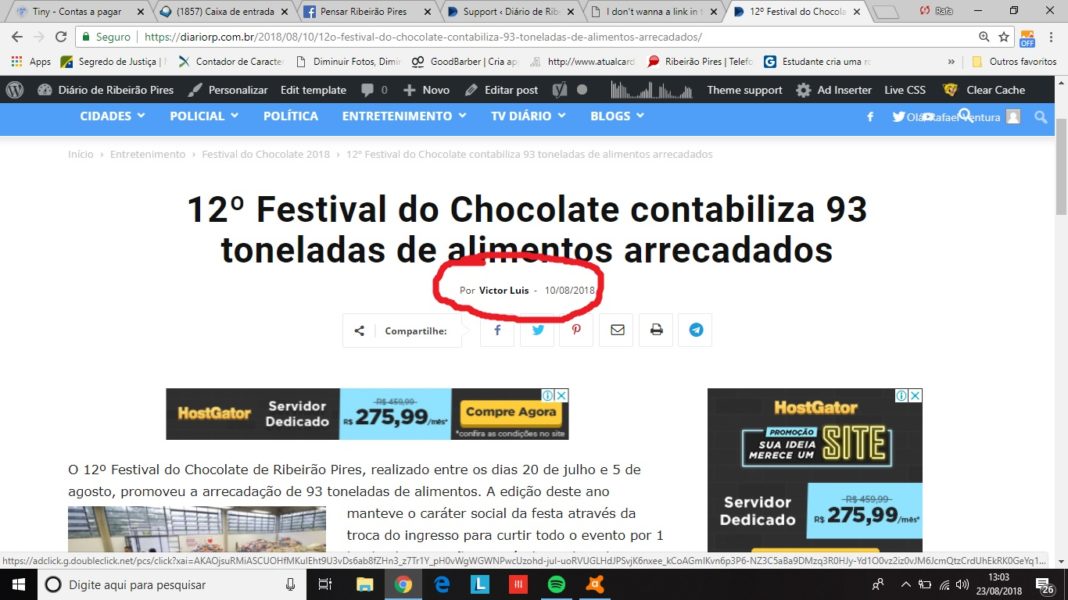
Simion C. Besides using the tagDiv composer and cloud library plugin there would be no easy way
– https://forum.tagdiv.com/tagdiv-cloud-library-plugin/
The predefined category templates only have the settings in the theme panel, there would be no options for adding buttons in them.
Only if the button was manually entered as code in the category template files, it would show up in the category page
– https://www.screencast.com/t/vslTbwH2V
Simion C. Changing the page template should always work, select the one you want and update the page.
If the page doesn’t change, then most likely it’s a form of caching. Either server cache if you have one, or a caching plugin, or even browser cache (force refresh the page Ctrl+Shift+R).
Changing the template from the latest articles, will remove the latest articles and it’s sidebar. Only the content you entered in the page will be shown.
 SPAREGmbH
 Hi Simion,
Thanks for your answer.
The whole idea is to give the user a more visual option to visit the authors page.
we dont post author names on the site, so we cant get to the author post template for example.
Also we display post content in other areas as well, and if someoene flipps through posts it would be nice to have a button, or as the “more from author” where the visitor can easily and most forwardly visibly click and visit the page from the author.
hence i would have liked to be able to link a specific PAGE to the post ..
Here is an expample of a such a Author Page
https://prnt.sc/klx3jz
at the very buttom every now post gets added
If i click on the post, which is in a certain category and can be reached also from other parts of the website.. i cant get back or easily access a page from the “same author”
https://prnt.sc/klx4bp
so the visitor is stuck in looking at other posts (i can manually of coure write in a link)
the author template, only can be visited if i display the author name and someone clicks on it.. thats not visible enough for our intention…
any ideas if we can change or modify this?
thanks a lot for your time and info
 Rob576
Brokenshire Memorial Hospital
Hospitals – February 4, 2018 0
” template=”/homepublic_html/wp-content/plugins/nextgen-gallery/products/photocrati_nextgen/modules/ngglegacy/view/gallery.php” order_by=”sortorder” order_direction=”ASC” returns=”included” maximum_entity_count=”500″] Brokenshire Memorial Hospital (BMH) is a tertiary general hospital offering a wide range of medical and surgical services in…
Simion C. Hi,
I think I understand now, so you want to remove the latest article section from the page. This section will always appear at the bottom of the page, when the template is selected.
You can remove it by changing the page template to a different one, like the default template. I think that is what you want to do.
Catalin Hello aresglez,
Please check more deeply this documentation from here -> https://forum.tagdiv.com/footer-templates/ Also, ensure that your system status parameters are correctly increased according to our documentation from here -> https://forum.tagdiv.com/requirements-for-newspaper/ purge CDN files and check the results. Also, please notice that you can try using the Footer Page functionality from here -> https://www.screencast.com/t/wnDKaeyGqQj
Thanks for your understanding!
 Yon
YonHi,
I would like to inject td_block_template_9 into my category pages (just below the top posts grid) which will dynamically generate one block for each sub-category for that category you’re on. Each block should contain the title header of the sub-category and the latest posts of that sub-category. For every 3 sub-category column blocks that get created, a new row should be added.
Can you please advise how I can implement this in the child theme?
Thanks!
Simion C. Hi,
I tried something like the following, made a few tests only so maybe try it locally before making it live, if possible.
First replace the all the code in the mobile smart list template with this one
– https://www.screencast.com/t/c35AGFXpA
– https://pastebin.com/fCwzufL2
Add this CSS in the mobile theme custom CSS section
– https://pastebin.com/eMVMcvmR
For me the result is like this
– https://www.screencast.com/t/k6rDWHEVaE
All the smart list sections are displayed one below the other, no next/prev pagination, all in one page. It is like smart list style 2
– https://demo.tagdiv.com/newspaper/smart-list-style-2/
 Benji
BenjiI have a couple of sites using the Newspaper theme, love it!
I know that Ultimate addons isnt a plugin that has been tested by you guys but was wondering if I could get any help with an issue.
I have Ultimate Addons on two of the sites, one of which it works perfectly on. The other when I enable it, it doesnt allow me to use the WPBakery Page builder… I am getting the following error in the console log:
Uncaught ReferenceError: _ is not defined
at HTMLDocument.<anonymous> (post-new.php?post_type=page:2809)
at i (load-scripts.php?c=0&load[]=jquery-core,jquery-migrate,utils,jquery-ui-core,jquery-ui-widget,jquery-ui-mouse,moxiejs,plupload&ver=4.9.8:2)
at Object.fireWith [as resolveWith] (load-scripts.php?c=0&load[]=jquery-core,jquery-migrate,utils,jquery-ui-core,jquery-ui-widget,jquery-ui-mouse,moxiejs,plupload&ver=4.9.8:2)
at Function.ready (load-scripts.php?c=0&load[]=jquery-core,jquery-migrate,utils,jquery-ui-core,jquery-ui-widget,jquery-ui-mouse,moxiejs,plupload&ver=4.9.8:2)
at HTMLDocument.K (load-scripts.php?c=0&load[]=jquery-core,jquery-migrate,utils,jquery-ui-core,jquery-ui-widget,jquery-ui-mouse,moxiejs,plupload&ver=4.9.8:2)
post-new.php?post_type=page:2809
When I click through to this file it takes me to this section of code :
<script>
jQuery(document).ready(function(){
// add your shortcode attribute and its default value to the
// gallery settings list; $.extend should work as well…
_.extend(wp.media.gallery.defaults, {
td_select_gallery_slide: ”, td_gallery_title_input: ”
});
// merge default gallery settings template with yours
wp.media.view.Settings.Gallery = wp.media.view.Settings.Gallery.extend({
template: function(view){
return wp.media.template(‘gallery-settings’)(view)
+ wp.media.template(‘td-custom-gallery-setting’)(view);
}
// ,initialize: function() {
// if (typeof this.model.get(‘td_select_gallery_slide’) == ‘undefined’) {
// this.model.set({td_select_gallery_slide: ‘slide’});
// }
// }
});
//console.log();
// wp.media.model.Attachments.trigger(‘change’)
});
</script>
Any ideas as why I would be getting this on one installation but not the other?
I have done the standard checks of, checking if it was the theme, and disabling all other plugins etc. Both sites have the exact same plugins installed on them as well.
Any help would be appreciated!
Simion C. Hi,
I don’t quite follow you here. Indeed each author will have a default author page. You can now build those pages with the composer for each author if needed.
Post templates can also be built with the composer, you can display anything the composer has available in them. There is a more from author element, it will show posts from the author of the opened post
– https://www.screencast.com/t/BaPqhGOgWyg
That is all it can display, posts from the same author.
Thanks

