
- Apitd_api_single_template::update_key
- Apitd_api_single_template::update
- Apitd_api_single_template::add
- ApiAPI – Single Template – Introduction
- ApiPractical example – How to add a new Block and Module
- ApiAPI – Category top section style – Introduction
- Apitd_api_module::update
- Apitd_api_module::add
- ApiAPI – Modules – Introduction
- Apitd_api_block::update
- Apitd_api_block::add
- ApiAPI – Blocks – Introduction
- ApiUsing the Theme API in plugins
 Bettina
 Hello David!
It is an old suggestion. We need to delete it.
We have 3 options available for mobile versions that you can use:
1. Responsive version: A responsive version of your website looks similar to the desktop version. TagDiv Composer is used to edit the page.Click on the mobile viewport: https://www.screencast.com/t/XDQJedlggSB. There, you can see your mobile version and edit or adjust the elements to look better.
2. Mobile pages: https://tagdiv.com/newspaper-10-3-7-update-brings-customizable-and-fast-mobile-pages
3. Mobile theme plugin: The Mobile Theme is a performance-optimized theme included in the main Newspaper theme that only loads on mobile devices. It comes with its own templates and designs for pages, posts, categories, etc., so your current templates from the desktop theme will get converted to the mobile theme layout. Please see https://forum.tagdiv.com/the-mobile-theme/ and https://forum.tagdiv.com/mobile-theme-introduction/ for more information.
A full explanation is here: https://www.youtube.com/watch?v=SpGkOnJeNZY
If you need to use mobile version 1 or 2, then you need to uninstall the Mobile Theme plugin and AMP.
Thank you!
 Southview92
This is not a SEO template this is a technical question about the template and cloud template. My pages are indexed but do not appear in Google since using the cloud template so i am wanting to know if there is a technical problem. I was talking to someone the other day who uses your template and they said they are having the same problem.
For example, this post here https://www.in2town.co.uk/skegness-news/labour-losing-lincolnshire-voters-after-itv-debate/ does not show in google. if you do the following “Labour Losing Lincolnshire Voters After ITV Debate” then the home page shows. I quickly spoke to an seo guy and they said it was the template causing this
can you please have a look and let me know
Bettina Hello Varun!
You should assign a template for your posts that have the shortcode to display the text.
Check the guide here: https://forum.tagdiv.com/design-post-pages-using-cloud-library-templates/
Thank you!
 Yuriy
Yuriy Dear Anamaria,
Thank you very much for your prompt response. It seems I didn’t fully convey my thoughts. I am sending a link to a video that is a few seconds long to make it clear what I am writing about (pls look on the site logo and/or subscribe button to understand what I mean). (Recording Video)
When switching between menus, the site jerks (like shaking), which is not OK and normal situation for pages loading process. This situation is repeated on your prebuild templates as well as on the already implemented sites of your clients. Also such jerks happen when clicking other links on the website and using it, not just menus. In my opinion, and based on examples from other resources, there should not be such jerks when updating pages. Therefore, I ask you to advise please how to resolve this so that page updates happen without the jerks, which is not OK for positive user experience.
Thank you in advance for your response and help!
Best regards,
Yuriy
Bettina Hello Varun!
I can see that you have mobile theme plugin installed and active.
We have 3 options available for mobile versions that you can use:
1. Responsive version: A responsive version of your website looks similar to the desktop version. TagDiv Composer is used to edit the page.Click on the mobile viewport: https://www.screencast.com/t/XDQJedlggSB. There, you can see your mobile version and edit or adjust the elements to look better.
2. Mobile pages: https://tagdiv.com/newspaper-10-3-7-update-brings-customizable-and-fast-mobile-pages
3. Mobile theme plugin: The Mobile Theme is a performance-optimized theme included in the main Newspaper theme that only loads on mobile devices. It comes with its own templates and designs for pages, posts, categories, etc., so your current templates from the desktop theme will get converted to the mobile theme layout. Please see https://forum.tagdiv.com/the-mobile-theme/ and https://forum.tagdiv.com/mobile-theme-introduction/ for more information.
A full explanation is here: https://www.youtube.com/watch?v=SpGkOnJeNZY
If you need to use mobile version 1 or 2, then you need to uninstall the Mobile Theme plugin and AMP.
Thank you!
Bettina Hello!
1. Check this guide: https://forum.tagdiv.com/modal-popup/
For customization and other services, you can contact our custom work team here: https://tagdiv.com/premium-customization-services/.
2. I think you should add the style as well in the raw html or raw CSS. A shortcode can be inserted also by using the element called “Column text” or “Text with title”. “Column text” and “text with title” elements have a button called “edit content” and if you click on that button, the WP Editor will open, and you can add some text/code/shortcode there. Close the WP Editor from X, save the changes from Composer and view the page to see the changes. It could be possible to be a conflict there, that’s why the shortcode do not display as you want. Please check.
3. You should build it to be responsive from the plugin source. Or you can use some CSS style added with the help of a raw CSS element from the tagdiv Composer. Check the guide: https://forum.tagdiv.com/create-custom-code-using-the-browsers-inspector/
4. We have 3 options available for mobile versions that you can use:
1. Responsive version: A responsive version of your website looks similar to the desktop version. TagDiv Composer is used to edit the page.Click on the mobile viewport: https://www.screencast.com/t/XDQJedlggSB. There, you can see your mobile version and edit or adjust the elements to look better.
2. Mobile pages: https://tagdiv.com/newspaper-10-3-7-update-brings-customizable-and-fast-mobile-pages
3. Mobile theme plugin: The Mobile Theme is a performance-optimized theme included in the main Newspaper theme that only loads on mobile devices. It comes with its own templates and designs for pages, posts, categories, etc., so your current templates from the desktop theme will get converted to the mobile theme layout. Please see https://forum.tagdiv.com/the-mobile-theme/ and https://forum.tagdiv.com/mobile-theme-introduction/ for more information.
A full explanation is here: https://www.youtube.com/watch?v=SpGkOnJeNZY
If you need to use mobile version 1 or 2, then you need to uninstall the Mobile Theme plugin and AMP.
Thank you!
Yuriy Good day!
I still want to return to my question, specifically about the page jumps (you can look at the video in my first post above, or on any example of your templates or already launched websites). In particular, when navigating through the menu, the page updates and there is a jump, meaning the update is not comfortable to perceive. This can even be seen on the implemented resources you demonstrate, for example, https://theprint.in/ and other websites made with your theme.
Can this jump and flickering be fixed, and how can it be done?
This is very important to me.
 danilloleite
First: My website has a button that opens a pop-up for users to report content. How can I use code to check if the page is single.php and, if so, trigger the Newspaper theme’s modal popup when the button is clicked? I want to use my custom code. I use various single templates, so the best solution would be to do this via functions.php.
Second: I have a custom-made shortcode, but it doesn’t execute properly on mobile devices when using the Newspaper theme. How can I resolve this?
https://www.abctudo.com.br/campeonato-brasileiro/ but worst in this url https://www.abctudo.com.br/proximos-jogos/?time=S%C3%A3o+Paulo+FC
Third: This same shortcode generates a table, but it’s not responsive in Newspaper. How can I call a responsive table directly through Newspaper’s code?
Fourth: We have a custom post type that also doesn’t appear in the Newspaper theme on mobile devices. How can we fix this? This post type displays current traffic conditions, so not having it on mobile is a major problem for us.
 sysdog
Hello development team!
Thank you for the new update Newsmag 5.4.3. Perhaps the following points could be included in the next update:
1. In addition to ‘Related Articles’, the post also includes ‘More From Author’. This display (‘More From Author’) should be able to be hidden or deselected. The option ‘Show Author Box’ in post settings is deactivated – but if it is responsible for it, it doesn’t seem to work. 2. Why is the ‘tagDiv Cloud Library’ plugin missing from Newsmag, which is included with Newspaper? 3. I use ‘Style 5’ as the post template. However, the header image is not shown across the board – there is always a wide gray border on the right, which looks unsightly (e.g. my page/post https://www.hundenachrichten.de/fellwechsel-bei-hunden-20249164.html). 4. Slider post template ‘Style 5’ with header image is not displayed on mobile phones – error: Slider could not be loaded. 5. Image Lightbox: Here the image description is not displayed under the image in the lightbox (see same page as above), which is partly important because I enter the copyright for the image there, for example. It would be good if this worked like other lightboxes. 6. Newsmag for PHP 8.x
Many greetings from Germany
Stefan Richter
 Anamaria
 Hi,
Using our theme, you can choose from 3 mobile versions
-> mobile responsive => https://www.screencast.com/t/oJ2ShOp47
-> mobile theme plugin => https://forum.tagdiv.com/the-mobile-theme/
-> mobile page => https://tagdiv.com/newspaper-10-3-7-update-brings-customizable-and-fast-mobile-pages/ The option that you need to use.
Suppose you created the mobile pages with tagDiv Composer. In that case, when you install the Mobile Theme plugin, your pages will be overwritten by the plugin (the mobile theme comes with its templates for page, post, category, etc, so your current templates from the desktop theme will get converted to the mobile theme layout, the page content is made without builders in mobile editor => https://www.screencast.com/t/xbgZG8kH also, the options that are provided to edit the mobile theme version are limited (this keeps the things simple)).
This is a video about Responsive Newspaper Theme, AMP & Mobile Theme, Mobile Pages & Templates -> https://www.youtube.com/watch?v=SpGkOnJeNZY.
So, the mobile responsive is what you see when that you select the viewport on phone => https://www.screencast.com/t/matV17hH, so some settings may apply for each viewport(where is the border blue), and others are not(where the border is black).
The mobile page has the mobile templates from Cloud Library => https://www.screencast.com/t/YCcZ8rL8
The Mobile responsive version of the theme and the mobile page editor can be edit with tagDiv Composer, the mobile theme plugin cannot.
For example, you can have the mobile theme plugin activated and use the mobile page/mobile responsive version for the homepage/pages, but for the categories pages/404 page, you can’t use the mobile page/mobile responsive version if you have the mobile theme plugin activated.
Thank you!
Southview92I am really confused about this and see this question all the time but cannot find an answer. i am using rankmath seo plugin and it is asking me if i want to include cloudtemplates in the sitemap but i do not know. all my category pages such as https://www.in2town.co.uk/skegness-news/ are built with cloud templates, so do i include them in my sitempa or not. can anyone please help
 bnbmedia
An advertisement is shown in a funny place in post pages. I’ve checked the settings but I don’t have any advertisement installed there.
It’s like it’s been hardcoded into the template?
You can see the ad by just going to https://bitnewsbot.com/paraguayan-authorities-shut-down-largest-illegal-bitcoin-mining-farm/ (post page).
I tried figuring out myself how to remove it, but, I can’t find it..
 passion-for-ocean
Hi,
I am using one of the pre-designed templates. Trying to set up one free membership, and one that costs money. For the free one, I would like it to be super easy for the user. At the moment, the registration requires everything from name, e-mail, adress to phone number. Where do I edit this? I only want people to register with name, country and e-mail for free use…
I added the plans button in the meny. And when I hit it, I end up on a billing page called “checkout-publication_pro/?plan_id=1” But I can’t edit it…
 w88agent
1) The tagDiv Cloud Library template appears normally when logged in, but a problem occurs where it is output in short code form when logged out.
2) My website url adrress : https://kkulpick.com
3) It is displayed in shortcodes form to regular homepage visitors who are logged out (when logged in, it is displayed in normal form)
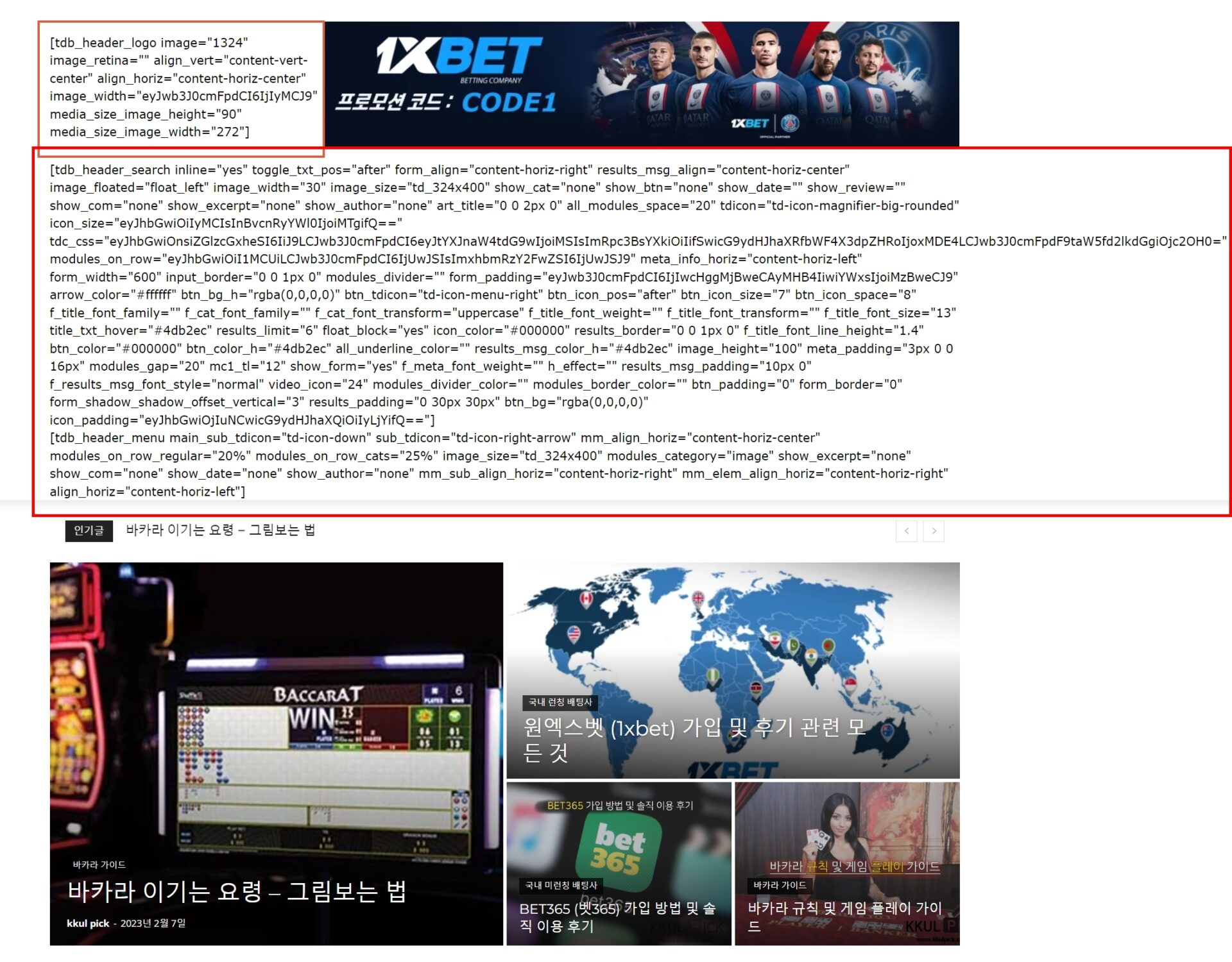
Bettina Hello!
You can install any demo without content. If you install the demo with content, then, of course, it will replace all your content and design as well. If you install a demo without content, then it will replace the previous design.
You can return the previous design only if you have a backup or you can import only some sections or templates of your current-designed pages from those demos. The template’s manager is in Cloud Templates. You can preview the demos here: https://demo.tagdiv.com/select_demo/newspaper-prebuilt-websites/.
Thank you!
Bettina Hello!
That’s strange! We will investigate this issue on all our demos.
Make sure you use the latest update of the theme and plugins.
If you do not use default templates and styles, then you can deactivate the Standard Pack plugin.
Read this useful guide: https://forum.tagdiv.com/what-is-ajax-preloading/
Please note that page speed or optimization is not covered by the support team: https://forum.tagdiv.com/newspaper-theme-support/
Thank you!
 sohee
soheeI am currently using the baby pro template. The font has been changed by mistake, and I would like to know the previously set font.
Bettina Hello!
I can see that you use mobile theme plugin.
We have 3 options available for mobile versions that you can use:
1. Responsive version: A responsive version of your website looks similar to the desktop version. TagDiv Composer is used to edit the page.Click on the mobile viewport: https://www.screencast.com/t/XDQJedlggSB. There, you can see your mobile version and edit or adjust the elements to look better.
2. Mobile pages: https://tagdiv.com/newspaper-10-3-7-update-brings-customizable-and-fast-mobile-pages
3. Mobile theme plugin: The Mobile Theme is a performance-optimized theme included in the main Newspaper theme that only loads on mobile devices. It comes with its own templates and designs for pages, posts, categories, etc., so your current templates from the desktop theme will get converted to the mobile theme layout. Please see https://forum.tagdiv.com/the-mobile-theme/ and https://forum.tagdiv.com/mobile-theme-introduction/ for more information.
A full explanation is here: https://www.youtube.com/watch?v=SpGkOnJeNZY
If you need to use mobile version 1 or 2, then you need to uninstall the Mobile Theme plugin and AMP.
Thank you!
Anamaria Hello,
Please import a cloud template for single to be able to edit it with tagDiv Composer https://forum.tagdiv.com/design-post-pages-using-cloud-library-templates/ -> https://forum.tagdiv.com/single-post-shortcodes/ https://www.youtube.com/watch?v=6m8-EebnfM0
Thank you!
Anamaria Hi,
Using the mobile theme, you cannot add shortcodes, only text and image in the mobile editor;
You can’t edit the Mobile theme and AMP version with tagdiv Composer; the only settings are from Theme Panel -> Mobile Theme.
The mobile theme comes with its own templates for page, post, category, etc so your current templates from the desktop theme will get converted to the mobile theme layout, the page content is made without builders in mobile editor => https://www.screencast.com/t/xbgZG8kH also, the options that are provided to edit the mobile theme version are limited (this keeps the things simple)).
So, if you want to have those shortcodes displayed, you need to disable the mobile theme plugin.
Also, please check this topic where I explained each mobile version -> https://forum.tagdiv.com/topic/mobile-version-not-working-properly-2/ and choose what mobile version you want.
You can translate the title “Latest articles”,from Theme Panel -> Translations -> Translations -> https://i.imgur.com/au65th8.png -> https://i.imgur.com/E46N46d.png
Thank you!
 naushad
Homepage: https://businessbenchmark.news/
In the homepage, the header and footer templates are also not able to edit.
 Teachy
 I get all that….and it’s totally correct, with one exception: Keep in mind that the mobile theme plugin is disabled.
I created a mobile home page. I also made changes to the individual blog page. Now when I edit the mobile home page and save my changes….the homepage as on desktop version becomes the homepage on mobile. When I then edit the desktop version and make changes, the mobile homepage becomes te desktop version.
Basically what happens is that the last template I change, becomes the new frontpage for desktop and mobile. Even though I delete all page cache.
In the mood for a challenge and want me to send you the login details, let me know 😉
Anamaria Hello,
You need to select the block and, in the tab filter, choose a category that you want to filter the block -> https://i.imgur.com/KKUZXqv.png -> https://forum.tagdiv.com/flex-block-settings-guide/
The tagDiv Composer is our page builder. It can be used to create pages and cloud templates, but not posts. For this, you’ll need to use Gutenberg or a classic editor.
Using tagDiv Composer, you can build/edit the single post template (the layout of the posts).
Here is a video that will show you how to use the builder to create a website from scratch https://www.youtube.com/watch?v=SoGQ0d5kIBg to do this you’ll need to have the posts already.
Also, on our channel, https://www.youtube.com/channel/UCOT1RiNysIPCTPSnVZskwtQ, you can find more videos that can help you, as well as documentation: https://forum.tagdiv.com/newspaper-theme-documentation/. If you have any questions, you can ask us here on the forum or by email.
Thank you!
Anamaria Hello,
Yes, it is okay if you have disable the mobile theme.
Using our theme, you can choose from 3 mobile versions
-> mobile responsive => https://www.screencast.com/t/oJ2ShOp47
-> mobile theme plugin => https://forum.tagdiv.com/the-mobile-theme/
-> mobile page => https://tagdiv.com/newspaper-10-3-7-update-brings-customizable-and-fast-mobile-pages/ The option that you need to use.
Suppose you created the mobile pages with tagDiv Composer. In that case, when you install the Mobile Theme plugin, your pages will be overwritten by the plugin (the mobile theme comes with its templates for page, post, category, etc, so your current templates from the desktop theme will get converted to the mobile theme layout, the page content is made without builders in mobile editor => https://www.screencast.com/t/xbgZG8kH also, the options that are provided to edit the mobile theme version are limited (this keeps the things simple)).
This is a video about Responsive Newspaper Theme, AMP & Mobile Theme, Mobile Pages & Templates -> https://www.youtube.com/watch?v=SpGkOnJeNZY.
So, the mobile responsive is what you see when that you select the viewport on phone => https://www.screencast.com/t/matV17hH, so some settings may apply for each viewport(where is the border blue), and others are not(where the border is black).
The mobile page has the mobile templates from Cloud Library => https://www.screencast.com/t/YCcZ8rL8
The Mobile responsive version of the theme and the mobile page editor can be edit with tagDiv Composer, the mobile theme plugin cannot.
For example, you can have the mobile theme plugin activated and use the mobile page/mobile responsive version for the homepage/pages, but for the categories pages/404 page, you can’t use the mobile page/mobile responsive version if you have the mobile theme plugin activated.
Thank you!
 newspatron
 Hi!
Can you please check again and let me know?
I have decided to include the following.
A seperate page for BBPress forums
url
https://newspatron.com/forums/
A forum Registration on every post
https://newspatron.com/turbo-review/
A forum on certain posts where there can be a topic.
Its working now.
Can you pleasae let me know after checking, if the look could be improved by making minor changes, or if there is a template that is compatible with BBPress
Thanks



