
- NewspaperFeatured Images
- NewspaperCredit System
- NewspaperLockers
- NewspaperDesign your Post Pages using the Cloud Library Templates
- NewspaperTheme Thumbs
 Calin
Calin Hi,
Normal, to avoid the CLS on image the height and width should be displayed and they are -> https://i.imgur.com/2IX7jVd.png but it is possible since your image structure is -> https://i.imgur.com/vV7WMhS.png to create this problem -> https://i.imgur.com/lYjvnax.png
For example on my install I use the Gutenberg and the structure is without one of the extra -> https://i.imgur.com/X2iU0Sk.png
As for placeholder our theme provide an option -> https://i.imgur.com/r7RAokf.png but it will apply only on blocks, it will not apply on images inside the post.
What are you using to create the posts?
Thank you!
 jasongavin
My ad network recommended I should add placeholder containers to my images to prevent layout shift. They said the Theme Developer should be able to help take care of that.
Tested page:
https://boraboraphotos.com/where-is-bora-bora/
As the image loads in, it pushes the content down. This single shift is causing 0.06 CLS. Just this one fix should be enough to get mobile CLS within the passing range of <0.1.
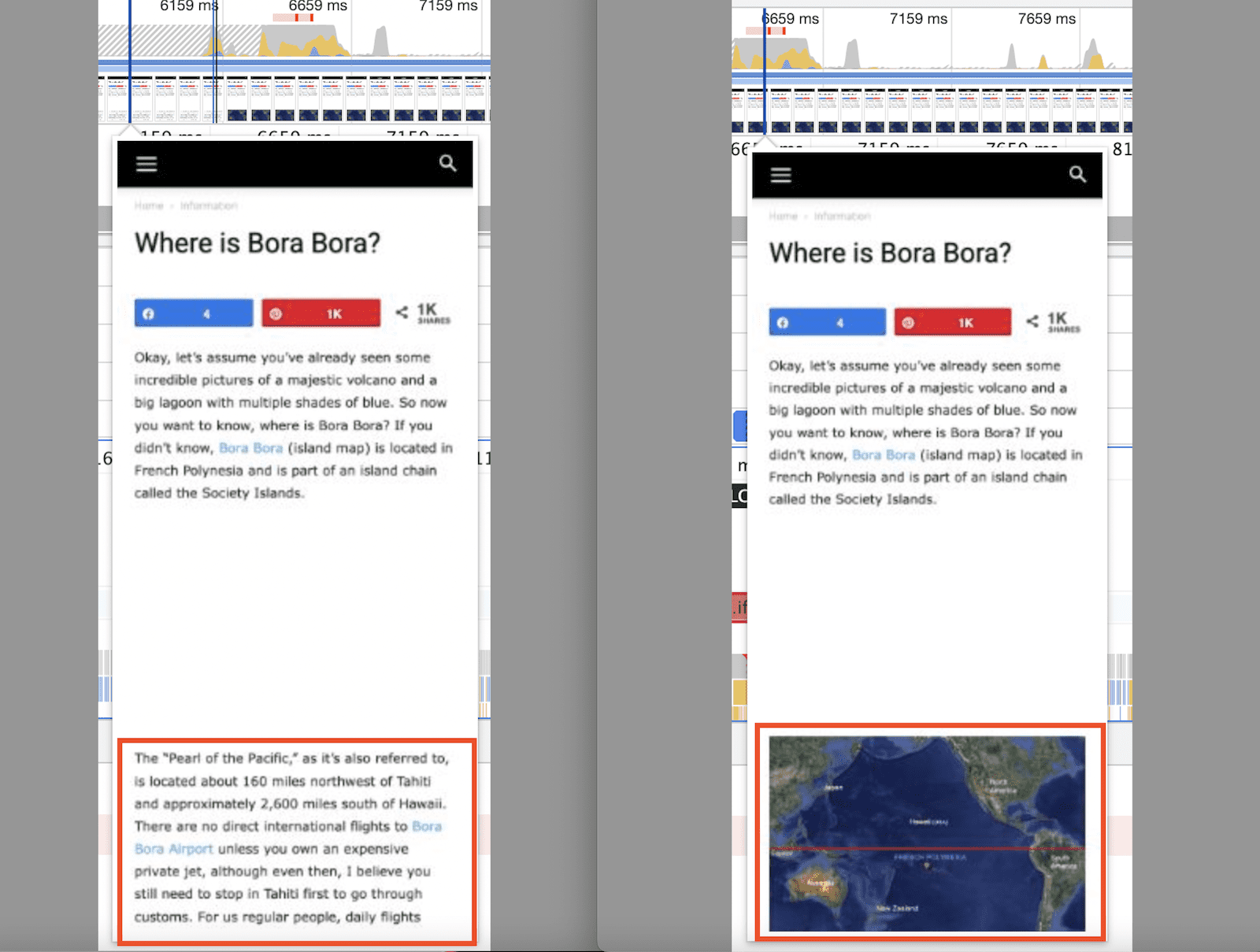
This shows the CLS measurement from the above image pushing the content down.
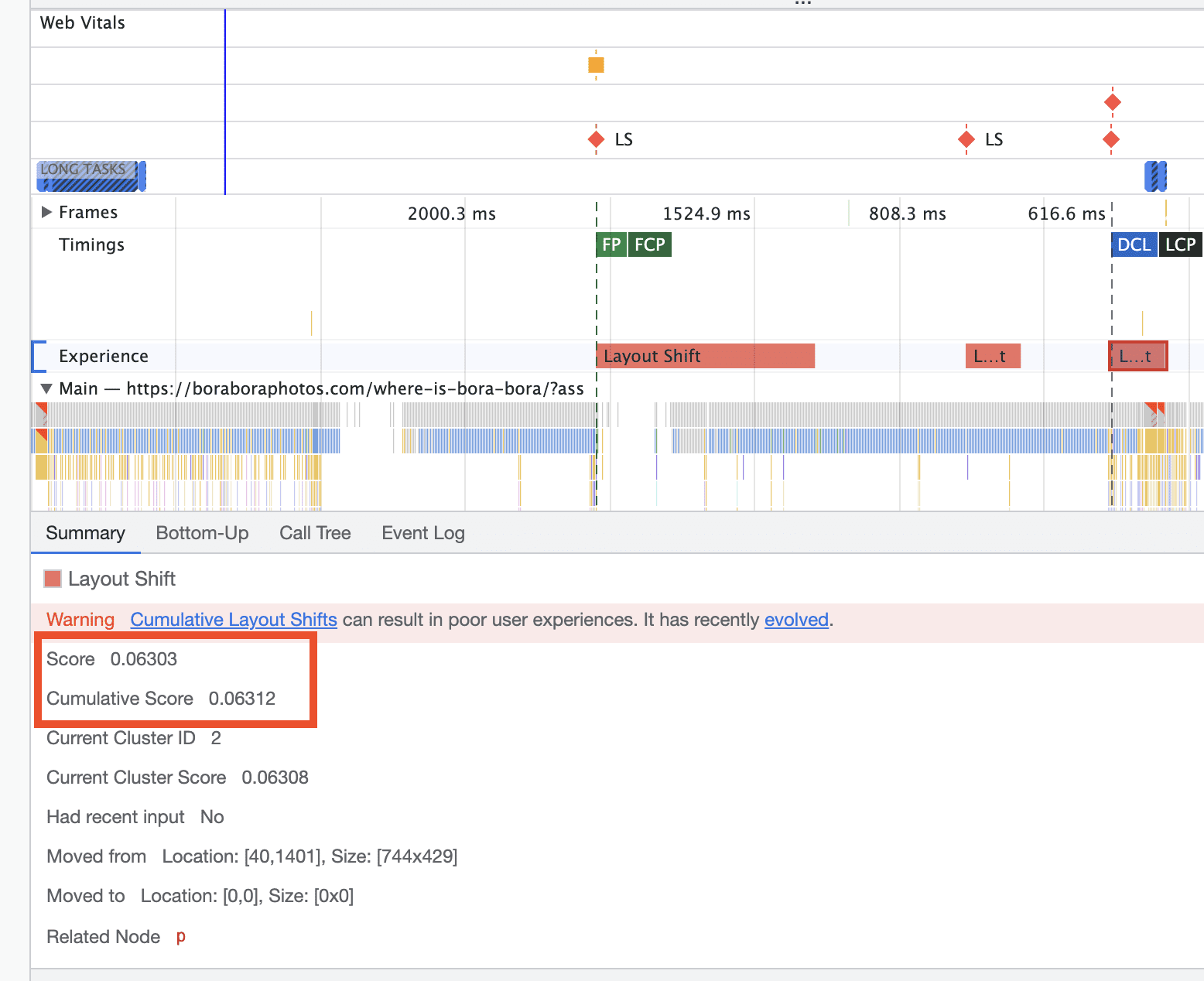
They said once I take care of that, I will be in a great position to get passing CLS scores. The question is, how do I go about doing this??
thanks
 ilmetu
Hi there,
i setup the category page with tagdiv composer and i saw something really cool.
CATEGORIES 😀
in my website i take time to fill every aspect of a category, long description included and it’s nice to see the subcategory appears with the text in the webpage .
for example you can see it in action here : https://elettronauti.it/categoria/auto-elettriche/
BUT …
i would like to setup the corrispondent category image…
how can i do it?
at the moment the categories has just a placeholder image … can you tell me how to set it up correctly?
thanks
image for reference: https://freeimage.host/i/S4FSXs
 Anamaria
 Hello,
1. Please check this thread and follow all the steps from here: https://forum.tagdiv.com/topic/http-error-500-internal-server-error-2/
Make a test and deactivate ALL plugins except tagDiv ones, also if you are using a cache plugin, deactivate it, clear all cache and let me know the results!
2. You can stretch the row as you want -> https://i.imgur.com/LxwWUpV.png
3. If you don’t set a featured image on the post, then the theme will load a placeholder image, the placeholder image can be set in Theme Panel -> Block Settings -> Thumbs on Modules/Blocks => https://i.imgur.com/iISRuoX.png
Thank you!
 umo2net
Hi there,
I have been having issues with td composer. When website wouldn’t load when I activate td composer, but I upgraded my php version and it loads fine. Now pictures are not displaying on the site again, only showing image placeholder.
Can I find help here?
Thank you
Anamaria Hello,
If you don’t set a featured image on the post, then the theme will load a placeholder image, the placeholder image can be set in Theme Panel -> Block Settings -> Thumbs on Modules/Blocks => https://i.imgur.com/iISRuoX.png
Or you can hide the featured images, from the posts loop block.
The Posts Loops settings are divided into 5 tabs: General, Layout, Style, ADS and CSS. The Posts loop is a special block and doesn’t have filtering options.
Also, one of the options for pagination of the Posts Loop has the option for normal numbered and the flex blocks do not have this option.
The Posts Loop is automatically filtering the posts depending on the cloud template you set (for example on the category page there will be posted posts from that category).
You can use the Flex Block 1 and you can filter it to display the posts only from a category -> https://i.imgur.com/Nnt3zGX.png and you can design it to look like a posts loops block.
Thank you!
 Charter Party Disputes
Hello, on our webpage https://charterpartydisputes.com/ we’re going to have a new posts category. Unlike most other posts they’re not going to have a featured image for this category. We’re using a Posts Loop element to feature all of the latest posts in chronological order, featuring the latest category though leads to a rather unpleasant result having a grid with empty image placeholders. Is there any way to exclude certain posts or posts categories from the Posts Loop element? If not what would be a workaround or solution for the desired result?
 SidCowans33
 So I can’t actually fit a 1000px image on the post page perfectly as none of the placeholder options offer 1000px thus a small grey border will appear ?
SidCowans33All of my images are pre-cropped to a maximum 1000px height or width with most being landscape format so 1000px wide. When I select these as my featured images, the resulting post page displays the image with a thin grey bar down the right side which suggests the placeholder width is something like 1024px or 1068px. How do I change that to 1000px ?
 FabiolaD
Hello,
whenever I add a featured video on a post, it shows correctly the video inside the post https://i.imgur.com/JztbWxB.png, but for example on the homepage I cannot see the video thumb but just a placeholder https://i.imgur.com/OVov7qW.png
Can you please help me?
Thank you
Fabiola
 huurneman
 Sorry, now i see those options. I didn’t noticed that i needed to add purchase code first. 🙂
Our website: https://www.all-answers.com/
Few questions:
– I read that this theme has a lot of possibilities to add Google Adsense. What is the easiest way to add Google Adsense ads on the ads placeholders? Do we need to add all positions manually, so add Google Adsense script there manually? Or are there easier options?
– How can we create url category https://www.all-answers.com/entertainment/ in stead of https://www.all-answers.com/category/entertainment/? So without /category/ in url.
– If we add a post then we see it several times on the homepage. How can we avoid that posts are displayed multiple times on the homepage?
– Is it possible to disable the post images on homepage and Single Template – Today News PRO?
– On mobile i still see the logo of TodayNews, not the new name we gave. On desktop it’s good now. How can we change logo name on mobile also?
Thanks!
 Narratives Admin
 Hello Bettina
Tx for feedback.
I like the placeholder so would want to keep it.
Let me explain in different way, and please see image of issue here: https://i.postimg.cc/yxXgxFQH/Placeholder-text.png
1. When I click into the search form text input field the placeholder text goes away (expected).
2. When I type into the search form text input field the what I typed shows and there is no placeholder text (expected).
3. When I click out of the search text input field (not clicking the search button, just somewhere else on the page) so that the text input field is no longer active, what I typed keeps on displaying, but the placeholder text reappears (over the text that I typed).
 smilelondon
 Hi Calin
thanks for getting back.
We are indeed able to delete elements,
But the default featured image is set as only to take action if there is an image.
And the player does not work even if the default featured image is shown. (check on https://www.livetube.tv/news
We have the single post content as the placeholder which starts with a center align image. But I tried, a right click would delete the entire element not only the image. How can we have a placeholder for text only without the center aligned image. This might cause problems as we are importing text and links and the embeding is done by our player.
See screen shot of the single post content i am talking about.
https://drive.google.com/file/d/1PkkGZPFK2gXrO9mu7CFlsp2QYasKd61q/view?usp=drivesdk
Anamaria Hello,
Unfortunately, our theme doesn’t have this option.
If you don’t set a featured image on the post, then the theme will load a placeholder image, the placeholder image can be set in Theme Panel -> Block Settings -> Thumbs on Modules/Blocks => https://i.imgur.com/iISRuoX.png
Thank you!
 tsharma
 Hello Bettina,
Thank you so much! Exactly the solution that I was looking for!!!
It never clicked my mind that I need to change the style to ‘SM1’ because I never found what SM1 and SM2 are different in except the H3-H4 or font change.
The cloud library edit template screen does not has images or image placeholders so when I was working on editing template choosing SM1 or SM2 the only thing visible was just the font size changes hence I could never notice that there is image placement difference as well between SM1 and SM2.
Thanks again! Great Help!
Regards -Tushar
 Matop
Matop I have the same problem. I use a Parenting template. The developer’s website is https://dev.detihravo.sk/a/2605/pod-na-turu-2021.html
I turned off the display of feature image (SHOW FEATURED IMAGE, FEATURED IMAGE PLACEHOLDER) in the Post settings / Featured image settings.
The image is still displayed on the page.
Thank you!
Anamaria Hello,
If you don’t set a featured image on the post, then the theme will load a placeholder image https://www.screencast.com/t/cc6AoItngp the placeholder image can be set in Theme Panel -> Block Settings -> Thumbs on Modules/Blocks => https://www.screencast.com/t/GhcQr6M6v
Thank you!
 sanjeev
Twitter is unable to display any featured image for a category. It shows a blank placeholder.
How do I choose the featured image?
My category link is : https://rashtrajyoti.in/category/our-sewa/
Here is twitter card validator: https://cards-dev.twitter.com/validator
 Bill Fleak
I would like to know if it is possible to add the ACF shortcode (img src=”[acf field=’2nd_feature_image’]”)to the single post cloud template to display ACF fields? This code works perfectly within the actual post, just not when adding to the cloud template. I am wanting to add a second Feature image and have that image display in the post instead of the standard WP feature image. This way the default feature image will display for the post thumbnails on pages and the ACF 2nd Feature image will display in my actual post. This is due to horizontal images do not display well when displaying on a page with a 4:6 proportion image placeholder. If this is not possible. Does your team have a plugin recommendation that will add the 2nd Feature image that will work with your cloud templates? Thank you in advance for your assistance.
 howard576
 Hi,
I have gone to the layout tab –> Article Image Section –> Image Size and changed my settings from medium-default-696x0px to Full-1920x0px. This hasn’t fixed the problem and appears to be for only the featured image of an article rather than the thumb placeholder image behind it.
The thumb placeholder still isn’t fitting into the flex block 1 box.
Here is is link to the thumb placeholder I am using:
https://drive.google.com/file/d/1–eFxPAEoFqVs8pCfPjgSqbsjxVyfikA/view?usp=sharing
This is what the thumb placeholder looks like inside of the flex block 1 grid:
https://drive.google.com/file/d/1J_qEnCb9f6GFdHYlNgioTSi6pjmtXN0Y/view?usp=sharing
Let me know your thoughts.
Thank you
howard576Hi, I’m trying to get my thumb placeholder image to fit into flex block 1, however I’m having some trouble.
The image size is 1038×248 pixels, which I have tried to resize using the ‘scale image’ function in wordpress so that it is 400px wide (which I believe is the width of the flex block 1 grid box), however, the image still doesn’t fit, instead it gets more pixlated.
I feel like i’m making an obvious mistake here but I’m not sure what, and I’d appreciate some advice.
Thank you
 kmos
kmos Hi,
I just figured it out 😉 I did everything as per your instructions and the documentation but forgot to delete the placeholder Image Ads that come with the theme …
If the place holder images are still linked under the Ad Box, the image overrides the Adsense code:
Maybe it’s a good idea to include that in the theme documentation … it seems a lot of people are asking why the ads are not showing.
Regards
-
This reply was modified 5 years by
kmos.
 Clecio
 Hi Anamaria,
Sorry, I don’t understand what you mean.
I believe this is a bug in the theme.
I created a category called TagDiv with 1 post without the featured image.
If you visit the link below, you can see that by opening the page on the desktop, the placeholder is displayed on the category page.
If you open the same category page in mobile version, the placeholder is not displayed.
Category and post with default configuration.
Clecio Hello Anamaria,
I don’t think you understand.
There is a Placeholder option in the theme, so when there is no feature image, the theme will automatically display a default image.
However, even sending the image and enabling the placeholder, the theme is not displaying the image in the mobile version.
It’s working on the desktop version, but it doesn’t show up on mobile.
 Bettina
 Hello!
You can set a featured image and delete the element by editing the post template with TagDiv Composer.
The placeholder image can be changed from Theme Panel –> Blocks settings as you can see in this screenshot: https://prnt.sc/y49ix5
Thank you!



