
- NewspaperDesign your post pages using the Default Templates
- NewspaperPost template ads
- NewspaperWP Rocket and Newspaper Theme: Optimization Guide
- NewspaperHow to use the Flex Blocks cache option
- NewspaperFlex Block Settings Guide
- NewspaperThe Newspaper Mobile Theme: Introduction
- NewspaperDefault Category Settings
- NewspaperCloud Library – Category Templates
- NewspaperBig Grid Flex Settings
- NewspaperHeader Builder
- NewspaperMeta Info on Modules and Blocks
- NewspaperTheme modules and blocks
- NewspaperImport / Export Theme Settings
- TutorialsDefault Block Settings Guide
- NewsmagImport / Export theme settings
- TutorialsOffset Feature
- NewspaperUnique Articles
- TutorialsSystem status parameters guide
- NewsmagRequirements for Newsmag
- NewsmagBlock settings tutorial
 Calin
Calin Hi,
to remove these element from pages/homepage you can do it in two ways:
– you can use the option from theme panel (this is a general option) -> https://i.imgur.com/0oSs7ys.png and -> https://i.imgur.com/jPVCJmA.png
– using tagDiv Composer -> https://i.imgur.com/Vq4wv7H.jpg this can be use on flex blocks and flex grids -> https://i.imgur.com/dSC4Kmj.jpg
To remove these elements from inside a posts, there are also two methods, one for standard templates, for these you can use the options from theme panel -> https://i.imgur.com/ykka05g.png or if you are using a pro demo or a single post template from tagDiv Cloud Library, then you can edit it with tagDiv Composer and use the right click to remove the elements you do not need -> https://i.imgur.com/PpkdQOF.png -> https://i.imgur.com/zvZfWyg.jpg
Hope this will help you!
Thank you!
 James David
I followed your API page at /youtube-api-key/ and you cover all the things except one that is somewhat important.. I think?
After Step 9 when you click “What credentials do I need?” button to retrieve your API key, the API key comes up but so does a warning. You can see it in your screen shot as well.
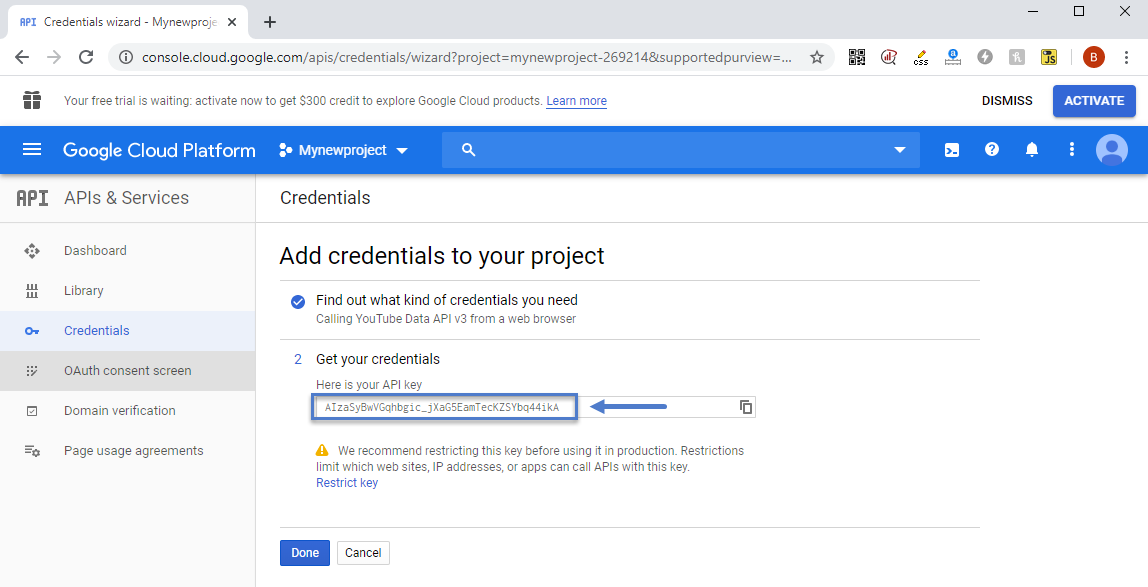
“We recommend restricting this key before using it in production. Restrictions limit which websites, IP addresses, or apps can call APIs with this key.”
In the past I did not restrict a key on previois APIs assuming my sites is small, it’d be fine, I was wrong. I was using the API in a simple YT plugin called Yottie and my site, with little to no traffic somehow had YT emailing me, suspending the API. They wanted me to resubmit an application and detail how/where it’s being used etc. Jump through hoops basically. I’m happy to copy/paste those emails if curious. I assumed it was the plugin, so I tried other plugins, and again.. same thing, too many calls, all over Quota.
I removed all YT API’s and plugins and was going to just copy/paste the URL for each video into a post as needed, knowing WordPress would embed it properly, it’d work, all would be fine.
I tried this, it worked fine, but.. the social counter I think needs the API doesn’t it? Can it work just with a channel name?
If I enter channel/yt-channel-code-here, will that work or do I absolutely need an API key?
So with those answers, I’ll know if I need the key for the counter.
Also – If I add the key in the theme panel under networks, when a video is loaded on a post I make, is that referencing my API key so YT is adding that page load against my quota?
That seems odd given I can just copy/paste the url in and it works so no api is needed etc.. am I missing something?
If I need the key, and I chose to restrict as Google suggests, any suggestions on how to restrict? As in, will this work against the theme at all? Easy to restrict using http/https as noted on their page https://cloud.google.com/docs/authentication/api-keys so that would be it.. right?
Thanks in advance
Calin Hi,
1. You can remove these element using tagDiv Composer -> https://i.imgur.com/PO3m4lJ.png click on the menu and change it -> https://i.imgur.com/cs9sVrX.png or use the right click to remove it -> https://tagdiv.com/right-click-menu-tagdiv-composer/
2. Please do not use WPBakery with tagDiv Cloud Library, this will not work correctly. please disable the WPBakery plugin and the layout will be display correctly.
3. To remove the author you need to edit the single post template with tagDiv Composer and use the right click on author to remove it.
4. You can remove the comment count from the blocks using this option from theme panel -> https://i.imgur.com/F5Q1tDg.png also in order to remove it from posts you can use these settings for standard templates -> https://i.imgur.com/iRudzRZ.png if you are using a PRO Demo or just a single post template from tagDiv Cloud Library for posts, then you need to edit it with tagDiv Composer and use the right click on the elements you want to remove. -> https://i.imgur.com/tEctz6F.png -> https://i.imgur.com/eZNPb6Q.png using other ads.
Thank you!
Calin Hi,
I think that you are using a PRO demo or cloud templates, that is why the theme panel settings are not apply. Using cloud template from tagDiv Cloud Library, you’ll need to edit the cloud template using tagDiv Composer and set on the elements the color and style you want
For example in order to change the share style, please edit the single post template wit tagDiv Composer, like this -> https://i.imgur.com/ZpxtjbP.jpg click on the share buttons and choose a style https://i.imgur.com/jyYrNlL.png after that do not forget to save the changes.
If you want to remove the view counter and comments use tagDiv Composer to edit the teplate -> https://i.imgur.com/2WTC8nR.png and use the right click on these elements and remove them -> https://i.imgur.com/9TJgyv4.png
For blocks like these from homepage -> https://i.imgur.com/4OoKykw.jpg check the layout tab from tagDiv Composer -> https://i.imgur.com/2qcT7ah.png -> https://i.imgur.com/xjphqay.png for more details about these options you can check our guide from here -> https://forum.tagdiv.com/flex-block-settings-guide/
Let me know the results!
Thank you!
 Vlad S
 Hello !
I have removed the text and added the image, but the size cannot be adjusted. When I add a width, it does nothing and when I return to the page it has defaulted to ‘auto’. When I try to delete an element in the header that I don’t want (eg the social icons), the screen goes dark and opaque and freezes, nothing is deleted.
This should not happen, there may be a plugin conflict on your website. please deactivate ALL plugins except tagDiv ones, also if you are using child theme or cache plugin, deactivate them, clear all cache and try again.
Can you provide a screenshot of your editor and show us what you are looking to change and how?
On posts you will have to use cloud library templates that are fully editable using tagDiv Composer: https://forum.tagdiv.com/design-post-pages-using-cloud-library-templates/ Once the templated installed you can open it using tagDiv Composer and remove the feature image element ( right click on it and delete )
You can import multiple templates and design each one to fit your taste. Each post can have only 1 design and it has to be set manually as you can see here: https://www.screencast.com/t/emXJrV3dO
For sidebars you can follow our guide here that will help you find lots of informations about how to use the tagDiv Composer more advanced: https://www.youtube.com/watch?v=fa7GenCHcBU&t=14s
The recommended image sizes are 800x600px or 1920x1080px this will create the image ratio that is needed.
That can be found in the ROW layout as you can see here:https://www.screencast.com/t/BVfRiPkUBAz
I hope this was helpful !
Calin Hi,
I think that you are using a PRO demo or cloud templates, that is why the theme panel settings are not apply. Using cloud template from tagDiv Cloud Library, you’ll need to edit the cloud template using tagDiv Composer and set on the elements the color and style you want
For example in order to change the share style, please edit the single post template wit tagDiv Composer, like this -> https://i.imgur.com/ZpxtjbP.jpg click on the share buttons and choose a style https://i.imgur.com/jyYrNlL.png after that do not forget to save the changes.
If you want to remove the view counter and comments use tagDiv Composer to edit the teplate -> https://i.imgur.com/2WTC8nR.png and use the right click on these elements and remove them -> https://i.imgur.com/9TJgyv4.png
Let me know the results!
Thank you!
Vlad S Hello !
We recommend you to use the Cloud library post template: https://forum.tagdiv.com/design-post-pages-using-cloud-library-templates/ All the post templates are fully editable using tagDiv Composer. You then can open the tagDiv composer over your template and remove the featured image element: https://www.screencast.com/t/9NeQzgeO.
Can you provide a link to your website or a screenshot and let us know what featured image you wish to remove ?
Thank you !
Vlad S Hello !
Please note that all the Cloud library templates are fully editable using tagDiv Composer. Open a post template using tagDiv Composer and you can customize / remove or add what element you want: https://www.screencast.com/t/0YRmslCZ7VP
After you opened tagDiv Composer you will be able to drag and drop elements, remove them and many other options. Simply click on a element to see what options are available for it.
Thank you !
 joe90s
On the website https://wwww.90sfashion.com I’m seeing in the source code on all my pages code with the rel=’prev’ rel=’next’ linking in sequence from blog posts to blog post.
For example in the source code on this page: https://www.90sfashion.com/90s-tracksuits-your-dad-called-he-wants-his-outfit-back/
I see this code:
<link rel=’prev’ title=’90s Tank Tops – The Least Amount of Effort You Can Possibly Make’ href=’https://www.90sfashion.com/tank-tops/’ />
<link rel=’next’ title=’21 British Game Shows of the 90s That Warmed the Cockles ’ href=’https://www.90sfashion.com/21-british-game-shows/’ />
However I don;t want the re prev rel next tags connected between each blog post as these tags should only be connected on a paginated series: page 1, page 2, page 3 etc.
How can I remove the rel=prev and rel=next on pages and posts on the website?
 domien
 Hi Calin,
1. Can you please conduct the same test for the “title” element, because it isn’t working for us on the homepage. If we select H2 in the tagdiv composer, it shows as H4. We are using the following:
Newspaper Theme version: 10.3.6.1
PHP Version: 7.3.20-1+0~20200710.65+debian9~1.gbpc9cbeb
WP version: 5.4.2
2. As for the related posts and side bar posts, we are now using flex block 1 for both. When we select h4 (default) for the tiles, the titles for those element show as h4, but the posts titles still show as h3.
for example, on this post: https://photographycourse.net/types-of-camera-lenses/
the title for the flex block 1 element “related posts” is showing as h4, but the 6 posts that appear under it, show as h3. Is there any way to fix this. The same issue is with the sidebar posts under the heading “must read”.
We do not want to tag any headings to these posts at all. Is there an element that doesn’t mark them all as headings? If not, how can we remove the current h3 from the titles of the related blog posts in the sidebar and in the end of the post.
Please let me know. thanks!
Domien
Calin Hi,
Please edit this cloud template with tagDiv Composer and remove the offset from the post loop -> https://i.imgur.com/B2YYpwY.png -> https://i.imgur.com/kMWaDV1.jpg -> https://i.imgur.com/oeJkZ55.jpg
Let me know the results!
Thank you!
Calin Hi citizenmilton, this is not what we mean, the thing is that if you are edition a demo, when you’ll uninstall it or change all the content that was add by that demo will be removed, therefore if you edit the category that was from demo or a post/page, this will be lost.
The demo content is just to have an idea for how it will look, also you can choose to use the demo with content or only the demo settings/layout -> https://forum.tagdiv.com/installing-demos/
Also you can choose to import the cloud templates from tagdiv Cloud Library -> https://i.imgur.com/OwYG2I9.png but you can edit them without any problems.
Hope this will help you!
Calin Hi,
If you are using a cloud header you can make the menu sticky from website manager -> https://i.imgur.com/Wxw7fVm.jpg if you are using a standard header style, use the settings from theme panel -> https://i.imgur.com/Kes35H4.png
For ads, as long you use the responsive version, the settings made with tagDiv Composer will work -> https://i.imgur.com/uhF328t.png also on this https://prnt.sc/u3hx8byou have set the ad only on mobile menu that is different form the rest of theme, therefore there is no need to extra html tags.
As for amp that is because you try to enable it on cloud template, this will be enable on post, pages and other settings that you can check here -> https://i.imgur.com/h55QHdp.png (but for the moment the cloud templates can not be use as amp, for the moment is use the mobile theme for amp).
Is look that you set an inline css in your code -> https://i.imgur.com/5BtoKb4.png if you remove that padding-left: 40px!important; the banner will be display like this -> https://i.imgur.com/ZDGrwdr.png
Thank you!
Calin Hi Tonyruik, the rss feeds are inserted using WordPress options also according to WordPress support -> https://wordpress.org/support/topic/is-there-a-way-to-remove-all-cdata/ the < pfdera
My website: http://www.prüfungsfragen.de
I use the demo-theme: Royal Pub
I need help with the following points. I am a beginner and this is my first theme that I adjust.
1) Change links under each post
At the end of each article-post are links shown to more articles. Those links refer only to articles of the same category as the article above.
I would like to show links of a different category und each article.
https://prnt.sc/u3wktd
Reason:
I have one general category (“Prüfungstipps”) with topics that are interesting to all visitors und more categories (“Schule”, “Ausbildung”, “Studium”, “Fortbildung”) where visitors are mainly interested in one single article. All other articles in the same category are for the most visitors not relevant. Therefore I would like to link to the post from the general category under each article.
2) Comments under each post
Please scroll down the homepage http://www.prüfungsfragen.de
Here I could insert the comment-box.
I would like to have the comment-box under each article and do not know how to implement
this. On the homepage I would like to remove the comment-box and have only comment boxes under each (or at least several) posts.
I followed the instructions https://forum.tagdiv.com/enabledisable-comments/
I enabled in the WordPress-settings each post for comments – do I need to insert a special wordpress-block in addition?
The comment-box on the homepage can be activated or deactivated only by changing the box in the template settings under “DISABLE COMMENTS ON PAGES”.
3) Star rating
On your template
https://demo.tagdiv.com/newspaper_pro/td-post-this-new-headphone-from-sony-cancel-out-almost-every-background/
is a star rating shown, what I like.
I would like to use it one my site, which is based on the Royal-Pub-Theme.
Do you have an instruction for me, how I can use this star rating?
4) Mobile version
The footer of your template (Royal Pub) is show on the computer screen in the right order, that means I would like to have the newsletter box in the lower right corner as shown here: https://prnt.sc/u3x4sb
If I open the same page on my cellphone it looks like here: https://prnt.sc/u3x3ez
I would like (only in the mobile version) to change the order of those two boxes. The newsletter box should be before the lighter box, which contains “Prüfungsfragen.de” and further formal links like the imprint.
Is there a way to change the order only in the mobile version?
 chirsyang09
I set the footer to style11, the footer should be with black color, but there are some CSS in the page
because the background-color: transparent;, my footer is transparent, how to remove these codes from my page?
<!– Header style compiled by theme –>
<style>
.td-container-wrap,
.post,
.tagdiv-type .td_quote_box {
background-color: transparent;
}
.td-menu-background:before,
.td-search-background:before {
background: rgba(0,0,0,0.5);
background: -moz-linear-gradient(top, rgba(0,0,0,0.5) 0%, rgba(0,0,0,0.6) 100%);
background: -webkit-gradient(left top, left bottom, color-stop(0%, rgba(0,0,0,0.5)), color-stop(100%, rgba(0,0,0,0.6)));
background: -webkit-linear-gradient(top, rgba(0,0,0,0.5) 0%, rgba(0,0,0,0.6) 100%);
background: -o-linear-gradient(top, rgba(0,0,0,0.5) 0%, rgba(0,0,0,0.6) 100%);
background: -ms-linear-gradient(top, rgba(0,0,0,0.5) 0%, rgba(0,0,0,0.6) 100%);
background: linear-gradient(to bottom, rgba(0,0,0,0.5) 0%, rgba(0,0,0,0.6) 100%);
filter: progid:DXImageTransform.Microsoft.gradient( startColorstr=’rgba(0,0,0,0.5)’, endColorstr=’rgba(0,0,0,0.6)’, GradientType=0 );
}
.td-container-wrap,
.post,
.tagdiv-type .td_quote_box {
background-color: transparent;
}
.td-menu-background:before,
.td-search-background:before {
background: rgba(0,0,0,0.5);
background: -moz-linear-gradient(top, rgba(0,0,0,0.5) 0%, rgba(0,0,0,0.6) 100%);
background: -webkit-gradient(left top, left bottom, color-stop(0%, rgba(0,0,0,0.5)), color-stop(100%, rgba(0,0,0,0.6)));
background: -webkit-linear-gradient(top, rgba(0,0,0,0.5) 0%, rgba(0,0,0,0.6) 100%);
background: -o-linear-gradient(top, rgba(0,0,0,0.5) 0%, rgba(0,0,0,0.6) 100%);
background: -ms-linear-gradient(top, rgba(0,0,0,0.5) 0%, rgba(0,0,0,0.6) 100%);
background: linear-gradient(to bottom, rgba(0,0,0,0.5) 0%, rgba(0,0,0,0.6) 100%);
filter: progid:DXImageTransform.Microsoft.gradient( startColorstr=’rgba(0,0,0,0.5)’, endColorstr=’rgba(0,0,0,0.6)’, GradientType=0 );
}
</style>
<!– Button style compiled by theme –>
Calin Hi kunpotsu, if you are referring to the h3 tag from posts titles, then you can use tagDiv Composer and use flex blocks, in this way you can choose the h tag for the post titles -> https://i.imgur.com/GPgKd5G.jpg
Unfortunately there is no option to remove the h tag completely.
Thank you!
 kunpotsu
Hi team,
I want to remove H3 tag on relevant posts that show on side bar. Please suggest how? Thanks.
Calin Hi enzomusto77, maybe I do not understand correctly, but the featured image is made to appear at the beginning of post article, you can remove it if you are using these standard post styles -> https://i.imgur.com/rWSxXHQ.png or if is a single post template from tagdiv Cloud library you can edit it using tagDiv Composer and use the right click to remove it.
If this is not what you mean, please provide some more details!
Thank you!
Calin Hi,
The pagination is only on latest articles option from page template or if you are using a posts loop, now the post loop can be edited using tagDiv Composer and you can change the pagination -> https://i.imgur.com/dE2Csxk.png this can be done on categories too if you are using cloud templates.
Unfortunately this is only way to remove the pagination an use something that will slowing down less the site.
Thank you!
Calin Hi,
These are single post templates from tagDiv Cloud Library, you can edit them using tagDiv Composer -> https://i.imgur.com/UJcNJwG.png and use the right click to remove these elements that you do not want.
If the new questions are not related on this topic, you can create a new one.
Thank you!
Calin Hi frespaniol, the social media can be removed from theme panel> social networks > social networks -> https://i.imgur.com/Qy2sHAA.png and the social share from here -> https://i.imgur.com/hBAF7Fw.png -> https://i.imgur.com/X9E4CJx.png
Also I can not see any sidebars -> https://i.imgur.com/V4CUsxN.png only this drop-down ->https://i.imgur.com/qT1Id4X.png that can be control from here -> https://i.imgur.com/Fgkea2r.png
Thank you!
 bjames1000
Hi,
I upgraded by NEWSMAG (NOT Newspaper) theme to the latest version AND went into the Theme Panel and obtained a new Instagram API key. It says “expires in 60 days” after installing it.
I then added the Instagram widget to my footer and it still will not update. It’s showing photos from a month ago, teh same ones that were in my widget before the API changed (and before I removed the widget.)
Based on other threads here on the forum, I waited 24 hours before writing to you, as some people said it took time to update. But I posted a new image to my IG account today and it is not showing> No update.
What else do I have to do to get this thing working again?
 Himanshu Kunwar
Using the Pulses PRO theme, and having a problem in mobile. Looks different from what the preview on the editor shows and the tag line says “Discover the Art of Publishing”, can’t find a way to remove this and none of the demo articles pictures load on mobile which just concerns me the same might occur for real posts.
Calin Hi,
Sorry, was my mistake, I understand something else.
If you want to edit the posts/categories that you want to be display in block you can do this using the filter tab from tagdiv Composer, and set the “-” before the category id or post id that you want to be removed. You can check more about this in our guide from here -> https://forum.tagdiv.com/block-settings-guide/
Thank you!



