
- TutorialsDefault Block Settings Guide
 azi
aziHi, I found these custom fields: td-review-final-score, and td_review_key with value 5.
But, when I try to put them in post manually, review does not show up.
So my question is what is the names for these custom fields and what kind of values they contain?

 ale
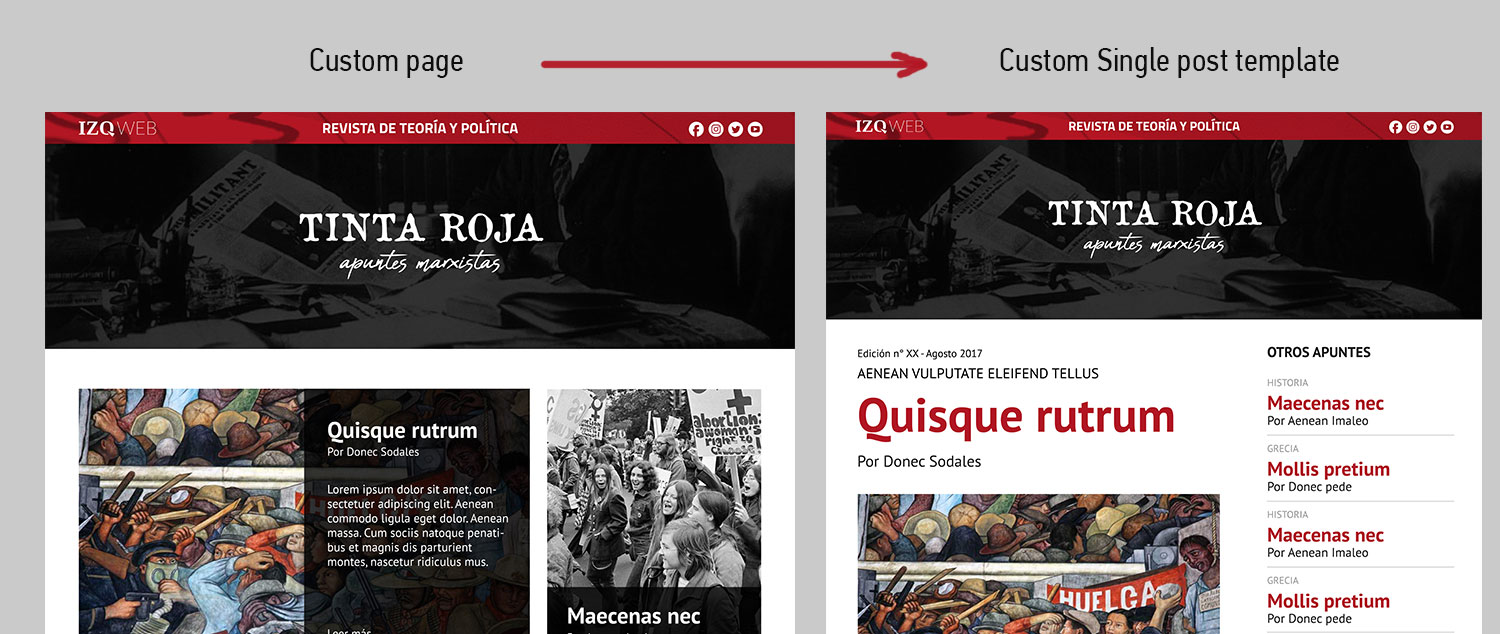
ale This is a preview of what we need. I´ve customized the page but I can´t do the same with de post template.
I create a loop-single-14.php but I dont know how to use it in my new posts. Any idea is welcome.
Thanks again
 ctoweett
 Those are post categories. To remove them, go to Theme Panel>Categories>CATEGORY TEMPLATE
(This is the header of the category), and try to select different category headers (while previewing the news category you screenshot) until you see the links disappear from the header. To change the link target, go to Post>Categories and (edit the category and) assign a different slug to the category you want.
 Fullliving1
Everything was working fine until about 30 minutes ago. Now I can’t add/save things in TD Composer and the site preview shows this error:
Fatal error: Uncaught Error: Class ‘""’ not found in /app/public/wp-content/themes/Newspaper/includes/wp_booster/td_block.php on line 181
This is what line 181 looks like from td_block.php
$this->td_block_template_instance = new $td_block_template_id($this->td_block_template_data);
I made NO changes to this file at any point. I have the Envato Market plugin installed. Everything looks up to date. Tested disabling plugins. Cleared all caches. I need this resolved today.
Thank You.
 NickDeBaerdemaeker
 Ok.
The tagdiv composer uses categories but not custom taxonomies to choose from to display a list of posts.
However it does support custom post type. Is it possible to show custom posts, with the custom taxonomy “alphabetical letter” ?
For instance the cd “Blackstar” would have category “albumreview” and alphabetical letter “ B”
If i can make a custom post type alphabetical letter, show the a,b,c… taxonomy there, would the tagduv composer then show a drop down list of the custom post type with the alphabet in it ?
If so what would be a good way to achieve this ?
 Catalin
 Hello,
Please provide your website URL so I can take a closer look at your footer section from your homepage. This area should be visible for all of your pages! You can check our demo preview to check what your website should works.
Thanks for your understanding!
 Thomas
 I did that https://www.virtualmagie.com/blog/test-gallery/
and it did the same thing.
I deactivate WP Rocket and solve the problem.
So I will install Swift Performance Lite instead of.
Just read this test on all cache plugin and it seems to rocks:
https://wpjohnny.com/best-wordpress-cache-plugins-review/
Catalin Hello pocto,
1)If you will check our demo preview here -> https://demo.tagdiv.com/newspaper/ you will see that the mega menu loading as expected. This problem can happen due to such untested plugins used by you and which can interact with the theme core files which might cause a lot of js and unknown errors. Remove all of them, clear all the caches and check the results.
2)You should provide your website URL so I can take a closer look at your Top Bar menu and also, so I will be able to provide a more accurate code.
3)Unfortunately, there is no option for this at the moment. If you edit the PHP files you will make all posts open in new tabs. If this is what you want, you can add
target="_blank"
here: http://screencast.com/t/4W7ikxysFjDy
Simply add it before the closing bracket for the tag.
I hope this helps.
Thank you!
 Mihkel
Hello. Block 15 have started to display images with bigger size. Why is that so ?

And also some posts doesent show image on front page but shows on post page.
 Renee
ReneeHi I was wondering if there was a way that I can change the size of the image that shows on the right hand side on smart list 4. Currently any image you add will be cropped into a square shape. However I am using the list to write book reviews and the pictures are book covers which need to be a rectangle that is taller than it is wide (portrait) shape or they don’t look right.
Is there anyway of doing this?
Thanks!
 Simion C.
 Hi,
That is quite an old theme version, you must also be using an old WordPress version. You should consider to update everything, theme, plugins, WordPress.
It is highly recommended and good practice to update as soon as possible and available. This way you will benefit from increased security and new features, compatibility and other factors
– https://codex.wordpress.org/Upgrading_WordPress
– https://www.wpbeginner.com/beginners-guide/why-you-should-always-use-the-latest-version-of-wordpress/
Check the changelog at the bottom of the page on themeforest to see the many fixes, also huge number of new additions in the theme. Consider to update to the latest version
– https://forum.tagdiv.com/how-to-update-the-theme-2/
Review the new theme requirements guide as well
– https://forum.tagdiv.com/requirements-for-newspaper/
I can’t access the screenshot you posted – https://www.screencast.com/t/RVhkji6gomu
Older theme versions are not available for download. Through themeforest only the latest version can be downloaded which at the moment is 8.8.2.
We don’t provide such older versions for security issues and maybe WordPress incompatibility.
Thanks
Catalin Hello theekalvin,
Please notice that if you are not using the Mobile Theme, the theme will display the exact elements which are displayed on the desktop version but in responsive mode, optimized for mobile devices. You should check our demo preview and find out what kind of blocks/modules you should use which looks on the mobile like with the mobile theme layout. You can start from here -> https://www.screencast.com/t/X6qnuF20dMy -> https://demo.tagdiv.com/newspaper/big-grid-9/
Thanks for your understanding!
 pcnow
pcnow Thank you. We’re hosted by GoDaddy, so some of the solutions are not applicable. However, after reviewing the info, we opted to inactivate some of our plug-ins, which helped resolve the situation for now. TD Composer now loads and Visual Composer works again, so page editing is much easier. Thanks.
P.S. WP SuperCache is not an available plug in for our site.
 geekykant
I want to show full width image for this latest article pagination. The images are getting cropped out.
(Site: http://www.ktustudy .in)

Please help 🙁
 OFFROAD
 In addition, Simion.
I tried three different customized fonts and changed it in the theme panel under “Theme fonts”. I changed only the header fonts – all fonts – but the design of the font in the preview had always the same design. It doesn’t matter if I have used arial bold, oswal dregular oder robotoitalic.
That’s confusing at all.
Do you have any idea which problem I have?
Thanks
Sascha
 c.schwalm
Dear forum members,
I know the tutorials for showing the image caption inside of the image itself. What about placing the image caption underneath the image, like Post Template Style 2? Any ideas?
Thanks!

Simion C. Hi,
Is it a fresh install? What happens if you edit other pages, or a new page? Try to deactivate all your other plugins, leave only theme plugin active. Also be sure to review the theme requirements
– https://forum.tagdiv.com/requirements-for-newspaper/
Let us know what you find.
Thanks
Simion C. Hi,
Thank you for all your appreciation and suggestions, it is always great when users provide feedback. Without feedback it would be much harder.
– Indeed, when using a cloud template the sidebar that is set in the template will be used. This may change if a different functionality is found or more options will be introduced in addition.
– Paginated posts currently do not work with cloud templates, we will fix this.
– The tabs are a much requested element, it may be considered for a future update along other new elements.
– I understand what you mean about the Load more, I don’t think this has been requested before. I will make a note of it.
– About the comments, I tested it and the same happens for me. I will add this on our fix list and it will be taken care of as soon as possible.
–> Please describe the issues with sticky columns and inner rows, I will try to replicate it on my end.
– The additions to the reviewing part were minimal, that is true. There were and still are plans to update the reviews, but it seems that always there is something else that has priority.
I conclusion we are sorry for any inconvenience, we constantly try to improve the theme and plugins while also adding more new features with each update. Many tasks take a lot of time and effort to complete and test however. The cloud plugin is still at the beginning (beta) so it may change in the coming updates, fixes will be made and options will be added.
Thank you!
 temproadalivre
I’d like to get a “live preview” of many of the demos running on my own data (posts, pages).
The option to install the demo asks me if I want to bring it’s own data or not, but even if I choose to install the demo without importing example data, it will erase my data and overwrite it (even with a blank state).
What’s the correct way of “installing” a demo layout without losing my data?
 stuartmasson
Hi guys,
We are playing around with tagDiv composer for our site redesign and it is amazing. We are still learning new things everyday as we explore new ideas. The ability to be able to control how the site appears on each screen size at a granular level is brilliant.
Also really pleased with the new cloud template function. It addresses my biggest bugbear with Newspaper – the ability to adjust the overall width of the columns – but it’s allowing us to create some genuinely unique page designs rather than seeing different sites that look exactly the same as ours.
Couple of requests for future updates. Some may already have been mentioned, some may be bugs, some may not currently be on your radar, but hopefully it helps:
– can’t choose a sidebar from the main post composition screen if using a cloud template. We would like to be able to run sidebars that are customised for different article categories, but that’s not currently possible. We could create several near-identical page templates, each with a different sidebar, to address this but it seems clunky when everything else is so sleek.
– paginated articles don’t work. It doesn’t seem to recognise page breaks. We may be missing something but we really can’t get it to work.
– TD composer doesn’t have accordion/tab functionality. We’re currently scratching our heads to work out how we will replicate or replace this, as we currently run a lengthy glossary that uses an accordion to hide and display all the descriptions, and we can’t do this with TD composer.
– following on from the above, it would be great to have the ability to load anything into a row that only displays a certain height and then has a ‘load more’ pagination function, like the blocks do for posts. For example, we are using the testimonial features in quite a different way, but there will be potentially loads of them on a page so it would be good to only show a few with the rest hidden behind a ‘load more’ button. See here:http://compareallvans.co.uk/reviews/ford-fiesta-active-2018/
– we have been trialling closing off comments after X days. Using cloud templates, this causes a “Comments are closed” message to pop up at the top of the page under the menu. See here:
http://compareallvans.co.uk/used-car-warranty-consumer-rights/
This doesn’t happen with the traditional Newspaper templates, which display the message in the correct place after the last comment.
– We’re currently having trouble with smart sidebars using inner rows, but this is probably our own fault rather than a bug.
– Newspaper (and Newsmag) lack behind other themes when it comes to presenting reviews. Given how slick the rest of the features are, this is something we’d really like to see developed in future editions. We’re also currently looking at plugins for incorporating user ratings, but not sure whether they’ll play happily with TD composer.
Thanks guys, and we’re really enjoying building a new site with Newspaper 8.8!
stuart
Simion C. Hi,
The theme has options to create a review for the post, like this
– https://demo.tagdiv.com/newspaper/td-post-intel-claims-new-ssd-750-drives-are-its-fastest-ever-for-desktop/
– https://forum.tagdiv.com/reviews-2/
A post that has a review will display in a block like shown in the guide. So you could create reviews for the posts and display them all in a block
– https://www.screencast.com/t/GaCv0fjkd6hA
If you require something else it could only be done with a review plugin maybe.
Thanks
 spexdj
Hello,
I want to replicate this menus (http://prntscr.com/k87y90)
The idea is to have 2 widgets one for ours reviews (order by last review and show the stars points and no photo), and the other widget to make a list of upcoming games, you can check the image link i attach to see full detail of this description,
Thanks for your time
Simion C. Hi,
Try to save a shortcode in a new page, see if the same thing happens. Try with other elements as well.
In case the same issue is happening, deactivate as a quick test all your plugins, leave only the composer and theme plugins active. Also be sure to review the theme requirements guide
– https://forum.tagdiv.com/requirements-for-newspaper/
Let us know what you find.
Thanks
 gregfox
Hi,
I have a couple of issues.
I created a page for my footer. I also use a plugin for Facebook comments.
What is happening is the FB comments are showing below the footer. I have also disabled FB Comments for Footer page. See below

Also, I am using the Title for the Titles of the 3 footer items. Below is what I am seeing in the editor:

However, when I view in browser they look like below:

Please advise.
Thanks for your help
Greg
 Rohit Sharma
 How can I make a shop like that? Can I add Amazon links on all products?
And what about the table, there is only a description and review option, can we add specification column too? If yes then how?
Please help me! I want to make the best shop for phones and gadgets.
Thanks! Rohit S
