
- NewsmagReviews
- NewsmagtagDiv Composer Tutorial
- NewsmagCategory templates
- NewsmagHow to add icons in the menu
- NewsmagNewsmag documentation
- NewsmagBlock settings tutorial
- NewsmagInstalling pre-built websites
- NewsmagMain menu
- NewsmagFeatured image or video
 munvik
 Q. Does post templates, block and grid support custom post.
Your Answer: Our blocks support custom post types but you will not be able to sort them based on their custom taxonomy. Please read this guide
Query: But in custom post type, option for selecting post template is not available
Q. Is there anyway to change style of reviews
Your Answer: Reviews can only be changed with css. There are no settings for more styles.
Query: Please help me in respect of class and modification code. I do not have knowledge about coding.
Q. Is it possible to create custom templates / style / block / Module / Grid for post, etc.
Your Answer: If you have the proper coding skills you can create anything, but our theme does not have a block/module/grid creator. It can only be done with hardcoding.
Oh, I dont know much about coding
Q. Number of youtube subscriber details are showing 0 insted of actual number
Your Answer: please use this guide to properly configure the plugin
I followed exactly the same. But still, there is problem. Further, my earlier facebook sharing number are not showing on posts
Q. In mobile theme, Menu background is not working. Menu items are there but due to no background it is not visible. see screenshot https://www.dropbox.com/s/8bnhu1mslnwd51e/MobileMenu.png?dl=0
Q. In desktop version, post template style-5 is not showing featured image in the post single page. But in mobile (mobile theme activated) it is showing featured image. Does all post template style, block and module are working only in desktop. Does mobile theme does not support them.
Q. How could I add custom post type posts list in the mobile (mobile theme)
Q. Does Mobile Editor works only in page. Mobile editor option is not available in post.
munvikThanks for wonderful theme. I have following problems:
a. When I am trying to applying Category Top Post Style in a category, then there is no space between top Post and Articles. How to increase space between them. See (http://viewpublish.com/category/movie_reviews/) see https://www.dropbox.com/s/t8537pbqmdtlhfg/Space%20Error.png?dl=0
b. Is it possible to hide category pull down filter for particular category.
c. Does post templates, block and grid support custom post.
d. Is there anyway to change style of reviews
e. Is it possible to create custom templates / style / block / Module / Grid for post, etc.
f. Does it support featured images from dropbox.
g. Does modal image supports images inserted into the post from dropbox.
h. Is it possible to show custom html / PHP Code in after page title & share buttons but before main content in post template styles
i. Further, how to show list of custom post type posts along with categories, etc.
j. number of youtube subscriber details are showing 0 insted of actual number.
k. Does theme supports custom taxonomies apart from ‘Category’ and ‘Tags’
l. In mobile theme, Menu background is not working. Menu items are there but due to no background it is not visible. see screenshot https://www.dropbox.com/s/8bnhu1mslnwd51e/MobileMenu.png?dl=0
m. In desktop version, post template style-5 is not showing featured image in the post single page. But in mobile (mobile theme activated) it is showing featured image. Does all post template style, block and module are working only in desktop. Does mobile theme does not support them.
n. How could I add custom post type posts list in the mobile (mobile theme)
 mdw84
mdw84I got an email from Google that I had a large amount of crawl errors on my site. I reviewed the errors and 99% are stock articles that came with the Newspaper theme. I trashed and emptied the trash to delete these articles a long time ago, back in November. Why would these URLs be showing up as part of the site for google to crawl? How can I completely remove these article URLs.
I ran Remove Old Slugs and did a sweep of the database. I don’t think that has an effect on this issue though. Please help.
[img]http://i.imgur.com/a51tTrI.png[/img]
thanks!
 Lucian
 Hi,
Please provide all steps and the code you have used to do this so we can review it and hopefully we will find where the issue is.
Thank you!
Lucian Hi,
The property ArticleBody of schema.org/Article dose not seem to be a required Google Rich Data property and it’s not reported by google’s structured data tool as missing so it’s not a problem.
I’m not sure about that second matter, you could go trough this google’s search preview tool and see if you can find anything related to your case: https://support.google.com/webmasters/answer/6398748
Hope this helps!
Thank you for your message!
 bariton
Hi,
I’m using block 16 in my homepage but some thumbnails don’t display correctly.
I’ve tried even to resize the images but it doesn’t work.
https://anonymster.com Here you can see that the thumbnail for ExpressVPN review is oversized.
How can I fix that?
Thanks
 kdannay
Hi –
Is is possible to have a full width basic slider with the NewsPaper 7 theme?
I know you can do a full width post, but I cannot seem to do a full width slider. I tried to install a demo revolution slider from the travel demo theme, but I get error messages when I try preview:
“Not Acceptable!
An appropriate representation of the requested resource could not be found on this server. This error was generated by Mod_Security.”
Is there any slider that will provide this option? Will Revolution Slider work in this capacity – if i can get it working? Help.
 planetcappe
Hi! I found that the property ArticleBody of schema.org is not present in the Newspaper theme; I’m wondering if it can be a problem for Google Rich Data.
Also I’m having problems with my site, the Google Structured Data Testing Tool is missing the preview I have in other sites with your theme: here it’s not present, here it is.
Do you have any advice? Thanks.
 danielr
 Bogdan, can you please review my last question and reply?
 Simion C.
 Hi,
You could try to remove the page title or change it as a test – https://www.screencast.com/t/u9fh11hpw and update the page then preview it and see if it is affected. If it’s still there it must be a cache issue, try clearing the cache, also disable all the plugins except Visual Composer and see what happens regarding this issue.
Thanks
 Catalin
 Hello darel,
Please notice that our theme does not have this behavior, as you can see in our demo preview here -> http://demo.tagdiv.com/newsmag/ Also, I have checked your website and I did not saw any problem with the blue screen. Also, if the problem is still there, you should check all your theme customizations or plugins. Try to revert the theme to the default state.
Thanks for the message!
 Bogdan B.
 Our theme together with wordpress seo provide all the necessary markup for the reviews on google:
https://yoast.com/wordpress-seo/
It however depends on google as well. The theme cannot force google to show anything. It can nonly provide the information needed for it.
As for the review text, it can be changed with css like so:
.td-review-summary-content{

font-size:15px!important;

}
Thank you!
 crika1
 hi Catalin,
I have rechecked SEO YOAST and followed everything for the sEO plugin,
however it still does not appear in search results,
when i checked the google code checker for the review it came up that it was all fine, so i am a bit confused heehh.
also is there a way to change the size of the text in the review box ?
 infoalert
 De asemenea la modulul composer exista aceasta notificare
FILE: /home/r36314stir/web/infoalert.ro/public_html/wp-content/plugins/js_composer/include/templates/editors/popups/shared-templates/category.tpl.php
————————————————————————————————————————————————————-
FOUND 0 ERRORS AND 12 WARNINGS AFFECTING 12 LINES
————————————————————————————————————————————————————-
134 | WARNING | Possible use of ASP style opening tags detected. ASP style opening tags have been removed in PHP 7.0. Found: <%- post_id %>”
135 | WARNING | Possible use of ASP style opening tags detected. ASP style opening tags have been removed in PHP 7.0. Found: <%- title %>”
141 | WARNING | Possible use of ASP style opening tags detected. ASP style opening tags have been removed in PHP 7.0. Found: <%- title %></button>
149 | WARNING | Possible use of ASP style opening tags detected. ASP style opening tags have been removed in PHP 7.0. Found: <%- post_id %>"]” titl…
160 | WARNING | Possible use of ASP style opening tags detected. ASP style opening tags have been removed in PHP 7.0. Found: <%- id %>”>
162 | WARNING | Possible use of ASP style opening tags detected. ASP style opening tags have been removed in PHP 7.0. Found: <%- thumbnailUrl %>” alt=””…
165 | WARNING | Possible use of ASP style opening tags detected. ASP style opening tags have been removed in PHP 7.0. Found: <%- previewUrl %>” data-tit…
167 | WARNING | Possible use of ASP style opening tags detected. ASP style opening tags have been removed in PHP 7.0. Found: <% if (!downloaded) { %>
171 | WARNING | Possible use of ASP style opening tags detected. ASP style opening tags have been removed in PHP 7.0. Found: <% } else if (downloaded &&…
175 | WARNING | Possible use of ASP style opening tags detected. ASP style opening tags have been removed in PHP 7.0. Found: <% } %>
180 | WARNING | Possible use of ASP style opening tags detected. ASP style opening tags have been removed in PHP 7.0. Found: <%- title %></span>
182 | WARNING | Possible use of ASP style opening tags detected. ASP style opening tags have been removed in PHP 7.0. Found: <%= status %>
————————————————————————————————————————————————————-
FILE: /home/r36314stir/web/infoalert.ro/public_html/wp-content/plugins/js_composer/include/templates/editors/partials/backend-shortcodes-templates.tpl.php
———————————————————————————————————————————————————-
FOUND 0 ERRORS AND 3 WARNINGS AFFECTING 3 LINES
———————————————————————————————————————————————————-
44 | WARNING | Possible use of ASP style opening tags detected. ASP style opening tags have been removed in PHP 7.0. Found: <%= type %>”>
45 | WARNING | Possible use of ASP style opening tags detected. ASP style opening tags have been removed in PHP 7.0. Found: <%= heading %></div>
47 | WARNING | Possible use of ASP style opening tags detected. ASP style opening tags have been removed in PHP 7.0. Found: <%= form_element %>
———————————————————————————————————————————————————-
FILE: /home/r36314stir/web/infoalert.ro/public_html/wp-content/plugins/js_composer/include/templates/teaser.html.php
————————————————————————————————————————————————————
FOUND 0 ERRORS AND 1 WARNING AFFECTING 1 LINE
————————————————————————————————————————————————————
84 | WARNING | Possible use of ASP style opening tags detected. ASP style opening tags have been removed in PHP 7.0. Found: <%= id %>” src=”<%= url %>”…
————————————————————————————————————————————————————
FILE: /home/r36314stir/web/infoalert.ro/public_html/wp-content/plugins/js_composer/js_composer.php
————————————————————————————————–
FOUND 1 ERROR AFFECTING 1 LINE
————————————————————————————————–
220 | ERROR | Visibility for magic method __sleep must be public. Found: private
————————————————————————————————–
Catalin Hello crika1,
Please keep in mind that our theme is fully compatible with the Reviews on Google SERP section as you can see on our demo preview, like this -> https://www.screencast.com/t/QKiV76MwlA In order to achieve best results in this regard, you should use the Seo Yoast plugin to do these changes and optimizations. You should try to read the plugin documentation and also, you can read the following guide which explains you these steps -> https://yoast.com/snippet-preview/
Thanks for your understanding!
 songhy
Dear TagDiv,
After I review your Newspaper Fashion demo ( http://demo.tagdiv.com/newspaper_fashion/ ), I really Love the ways you put the playlist video youtube in your website.
But when I install full demo, it is not include this playlist.
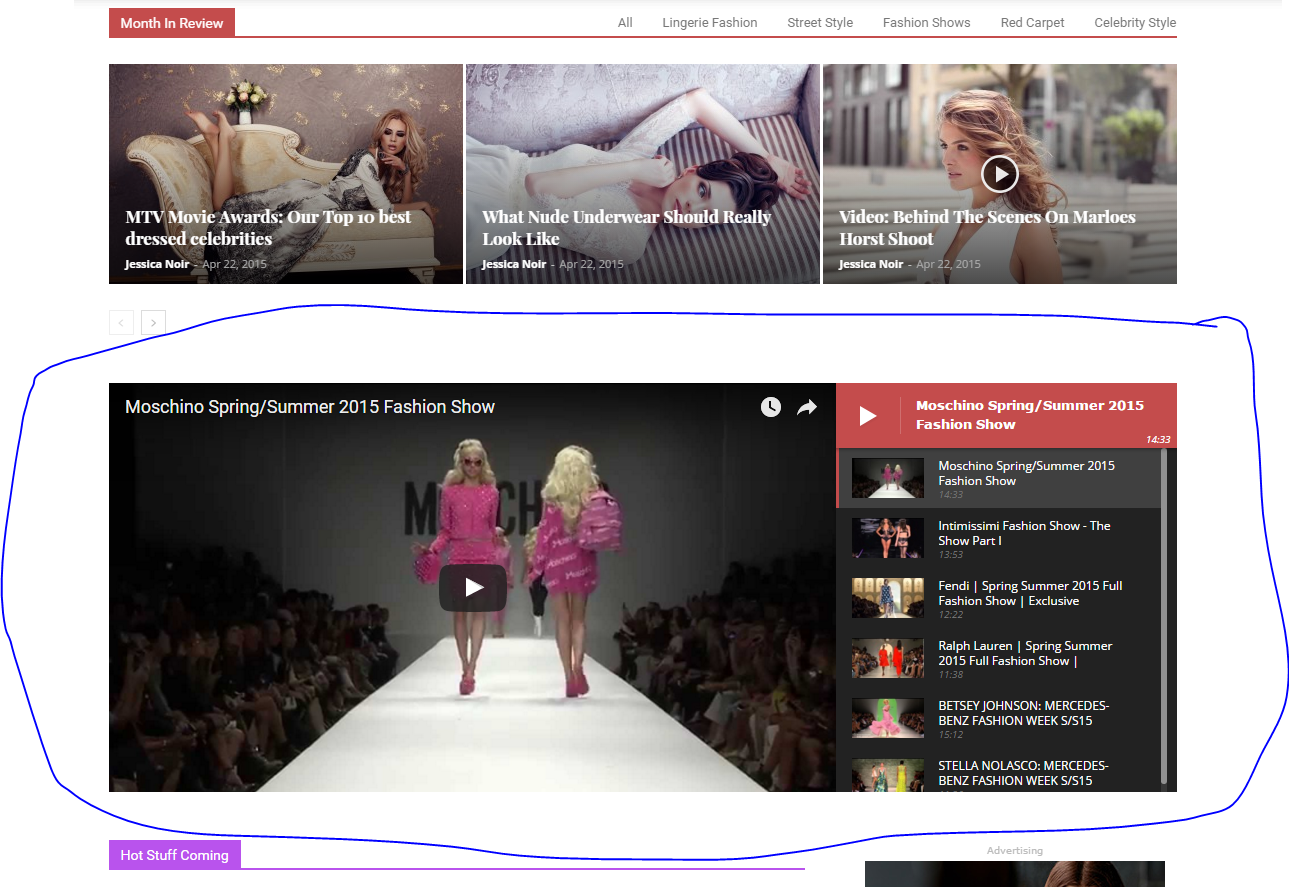
Could you please guide me to add playlist to my website like your playlist in Newspaper Fashion demo?
Thank you in advance
crika1hi Guys,
i have a question, when i am using the newspaper reviews this is not displayed in the google search results.
my understanding is that it should display, is there some issue with your review script that google is not picking up?
thank you
 InventorTechie
It would be great, if we had additional options in the mobile theme.
#1, different layouts for the top of the home page article layouts. The current option, does not look too great, even on phones. There are only 3 articles showing, and they are too narrow. This is especially worse while viewing the pages on any tablet. It’s a very long image box, showing the article preview. In Tablet mode, it would be better in a grid like format.
#2, Improve formatting for Disqus. Currently, it has no padding on the left/right side of the block for the Disqus section.
#3, the TagDiv galleries, are showing images that are too small in Tablets. It would be great to add some additional settings to handle these issues.
 factoryitalia
hello,
i would need to modify the mobile/responsive layout of my website http://www.factoryitali.com whenever is possible.
One of the most important matter is that looking inside the categories you will see the sidebar first and then the items i sell. In fact to see them you shall scroll down all the sidebar out.
Is there a way to move the sidebar below my products?
second question: is is possible to increase the item’s preview size on that page?
many thanks in advance,
Fabio
 atkinsonrm
I am trying to remove my author name on the Revolution slider images (using Travel Blog template), they are not on the featured images in my blog posts or on the previews in the main page, only on the images in Revolution Slider. I am searched everywhere I can think of? Thanks
Catalin Hello njtechreviews,
Try to add the !important tag to above custom CSS. Probably, that’s why the code is not applied. here you will see what type of plugins are not tested and you are using them -> https://www.screencast.com/t/PQJFdFEE2Z
Hope this helps and let us know how it goes!
Thanks for the message!
 nedo
nedo Hi,
thanks for your reply.
I haven’t changed nothing, no custom code, nada.
The last change was only https.
if you look at this 2 pages:
https://www.musicskanner.com/marshall-jcm-2000-review-modern-classic/
and
https://casinamia.com/armadio-con-cabina-angolare-reinventiamo-lo-spazio/
They use the same font, and dimension. exactely the same. but they look different.
This is what happened.
Looking for help
Thanks
Catalin Hello njtechreviews,
I have checked your website and I saw that your first black header does not come from our theme. To hide it, you should use the code below and place it in Theme panel->Custom CSS area.
The code is ->
#menufication-top{

display:none;

}

.menufication-add-padding{

padding-top:0;

}
The result is here -> https://www.screencast.com/t/BOOJb29K
Also, inspecting your website, I have noticed that you are using some untested plugins which can interact with the theme core files and cause a lot of unknown issues. Please try to disable all of them and install only the plugins that come bundled with the theme packet and rule out any conflicting plugins.
Also, if the problem is still there, try to make a new clean install from scratch via FTP, use only the required plugins which come bundled with the theme packet, clear all your caches and check the results.
Hope this helps and let us know how it goes!
Thanks for your understanding!
 Edward
Hello, dear Developers Team!
A wish for future versions of the Theme.
Sorry for my bad English but I will try to explain.
Make please option for “Generating thumbnails featured images only”.
A small example: for uploaded images only to one post of a total size of 1.5 Mbytes generated images total size of 10 megabytes.
Why generate so many thumbs with different sizes for the inner images that more will not be used anywhere?
For internal images, as I understand it, it is enough to generate a few thumbs, for example, to display the gallery.
Over 2 years of using this Great Theme preview the junk accumulated on hosting more than 3 gigabytes.
Thank you for understanding!
With respect to your work
Edward
 komsak
Clicked on google’s search page, and then preview page not found by photo editing?
https://www.mx7.com/view2/zBvvX21RzOrNOwrN


