
- NewsmagReviews
- NewsmagtagDiv Composer Tutorial
- NewsmagCategory templates
- NewsmagHow to add icons in the menu
- NewsmagNewsmag documentation
- NewsmagBlock settings tutorial
- NewsmagInstalling pre-built websites
- NewsmagMain menu
- NewsmagFeatured image or video
 PIF21
PIF21Hello,
I had registered with Google Adsense and they said my Newspaper website was connected and under review. They replied that I need to:
“Connect your site to AdSense
Copy and paste this code in the HTML of your site, between the <head> and </head> tags.
Place the code on every page you want to show ads. After we’ve run some checks, your site will be ready to show ads.
Remember to go to Ads and choose the ad formats you want to show.”
Question: Where do I find my site’s HTML? I had tried to paste in Newspaper’s backend “Ads” section, but it looks like Google Adsense wants me to place their ad code directly in the HTML. Where do I do this?
Thank you.
 alvecrisservices
Hello
On my website some articles, it does not show my pictures well as you see here ( https://techstart.ro/lifestyle/razer-lanseaza-o-colectie-vestimentara-intitulata-genesis-si-unleashed/?preview_id=20057&preview_nonce=1dfc1dff90&post_format=standard&_thumbnail_id=20095&preview=true)
there are blank spaces with that broken file. But on the same page is another picture that is showing well. And for some other articles working well and from time to time to other articles the photos are not showing. Do you have any solutions?
Thanks!
 kevingrech
 Hi,
I do all that. Something is strange as when I post the image appears in Facebook, but in preview it does not.
I refreshed all cache and checked all settings.
 dennisjpitocco
Reviewed theme documentation & forums, but can’t find the answer. Need to reduce the overall size of the video presented on this Page, as it dominates the Page. How can we reduce it by 50% or 75%? Thank you:
 gono
gono Hello
He is right, we should have the option to select.
If the rating is based on user submission, then you can use the # of votes but if it is an article review written by an individual author, you should always show the name.
This should be fixed instead of being custom work.
kevingrechHi
After recent update of WordPress and Newspaper Theme, I am noticing that when I share to Facebook from the article, the preview image is not showing.
When it is published on Facebook the image shows, but this is a inconvenience as I like to see how the image looks befor posting on Facebook.
Any ideas? I tried everything and all setting look correct.

 Lamb
Lamb The issue I have is that the smart list only works with template 5 (not with tagdiv template). Do you know how to have smart list + header ?
 Anamaria
 Hello @iasgharalikhan,
Please let me know if you check the console. Please check in preview and see if you don’t have Access Denied -> https://bobcares.com/blog/access-denied-sucuri-website-firewall/
Thank you!
 meugamer
 The problem was exactly that! When I put a non amp url, the site lost 50% of the hits.
What should not occur since 80% of the site visitors access is by search engines.
Now, when I reactivate the url by amp, in two days the accesses return to normal.
I believe this is a layout problem, since it doesn’t make sense for this to happen.
Also, the documentation you sent I have already reviewed in full, and it doesn’t have much to do with what I mentioned.
 erickimani
How can I remove hastags that seem to show at the end of some urls?
eg constructionreviewonline.com/#
 kaazuu
Hi,
as in subject i need to edit the preview image’s size.
The size selected in the block 17 (in my home page) is a thumbnail (something like: file_path/file_name-324×235.jpg), the image is blurred right now.
How can i increase that size?
Thanks in advance
 dusan.radevic
Hello,
I just activated full demo Dreamland Nest on my website https://quercusresidences.com
I have setup Youtube API as described in manual.
But, when I access home page from mobile phone, I don’t see video – I just see image with title “Luxury Resort Video”.
When I try to edit page via TAGDIV composer, and I got to mobile preview, I can see video loading, yet it is not showing on mobile phone.
How to make it show on mobile phone?
 dmxsta
 I’m glad you managed to fix PART of the review schema, the numbers are displaying properly, however, why are we stuck with “1 vote” and not the author’s name like every single other review site has?
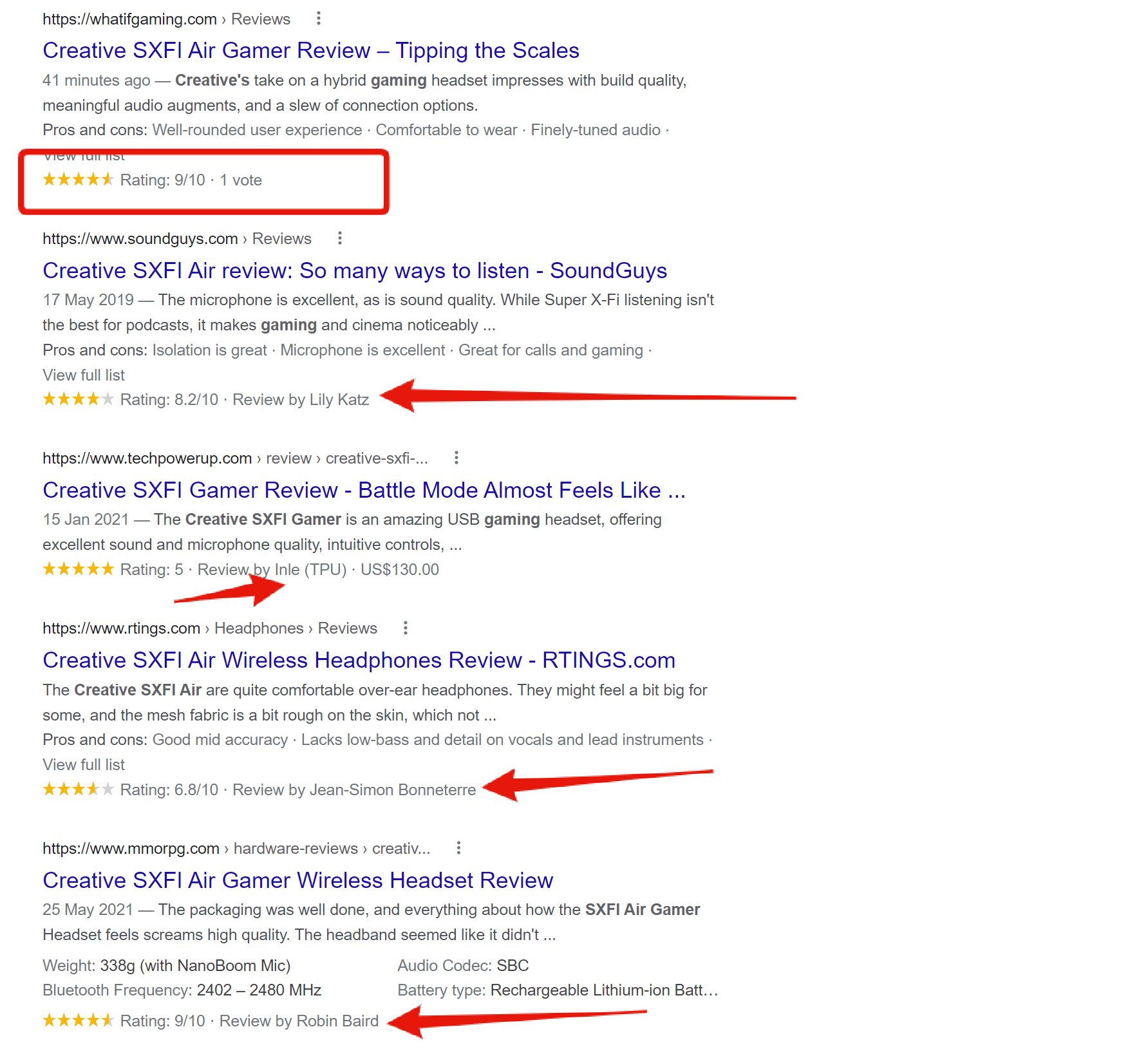
It seems strange to do something so half-heartedly when it’s so so simple, maybe you are not relaying the information properly to the dev team? It just doesn’t make sense to me.
PLEASE can we revise the review schema and make it right!
I’d love to be able to speak with the dev team myself or even pay someone on your team to fix it for me. It’s making our review site seem super unprofessional and just needs fixing ASAP.
Thank you!
-
This reply was modified 4 years by
dmxsta.
Anamaria Hi,
We haven’t tested it, but you can try one of these plugins described in this article -> https://www.kasareviews.com/automatically-post-from-wordpress-to-instagram/
Thank you!
Anamaria Hi,
Unfortunately, it is not an available option, I consider it a fairly easy method to just preview the post to see what the post looks like in the frontend -> https://i.imgur.com/WVi8oBG.png -> https://i.imgur.com/rpITiHV.png
Have a nice weekend!
Anamaria Hello,
I use this tool -> https://www.seoreviewtools.com/html-headings-checker/ and you have only 5 heading type h2 -> https://i.imgur.com/VhihBSV.png
The titles are duplicated because you have twice the same title https://i.imgur.com/05HHQiP.jpg
Thank you!
 jon238
Hello. I need support with creating a smart list post in the Newspaper Template. I’ve followed the instructions provided in https://forum.tagdiv.com/smart-lists/ but I’m not able to add content to the smartlist element.
Steps Taken:
– Created a new post using the Smart List Template 5 post template
– Published the post after adding title, images and paragraph blocks (at this point…the post does not resemble a smart list post)
– Go into edit mode of the post using tagDiv Developer and it automatically inserts a Single Post Smartlist element into the post with 3 pictures inserted from my media gallery.
– I save the post but the SmartList does not appear when going to live preview.
How do I insert content into the smartlist post?
Thanks in advance
 mgiannelis
Hello
Can you provide a roadmap for the new theme update coming this week so I can review
Anamaria Hello,
I did a test and for me works -> https://i.imgur.com/WBRafje.png please make sure you have the API key is valid -> https://apilayer.com/marketplace/description/fixer-api?preview=true#documentation-tab
Thank you!
 tejbiranand
 Thanks for the help. I did as you told me, and now the footer is fine. But there is still a problem with this. Footer is not showing full in mobile previews, like weather widget & policy pages, please tell me about it also, how can I fix it now. I am giving you the screenshot.
https://aws1.discourse-cdn.com/envato/original/3X/a/9/a91cccfe2e405db343c31337139fa4897eaabf7b.png
tejbiranand The way you mentioned, I have disabled the mobile theme plugin. But after that, the footer on mobile is not working properly. Whereas if I look at it in live edit preview, it’s fine here. Please tell me what should I do now. I am giving you the screenshot.
https://aws1.discourse-cdn.com/envato/original/3X/6/7/67f873d8809e237b08ddf0032d3426d959febcc3.png
https://aws1.discourse-cdn.com/envato/original/3X/5/9/59d8be2ddd06124be0eb0fcc5cfaa21a69777764.png
 Raffi
Raffiwhy tag div no longer sees menus but instead gives me what is above?
[tdb_header_logo align_vert=”content-vert-center” show_image=”” tagline_align_horiz=”content-horiz-left” align_horiz=”content-horiz-center”]
[tdb_header_menu mc1_title_tag=”p” main_sub_tdicon=”td-icon-down” sub_tdicon=”td-icon-right-arrow” mm_align_horiz=”content-horiz-center” modules_on_row_regular=”20%” modules_on_row_cats=”25%” image_size=”td_324x400″ modules_category=”image” show_excerpt=”none” show_com=”none” show_date=”” show_author=”none” mm_sub_align_horiz=”content-horiz-right” mm_elem_align_horiz=”content-horiz-right” inline=”yes” menu_id=”28″ mm_align_screen=”yes” f_elem_font_family=”” f_elem_font_size=”eyJwb3J0cmFpdCI6IjExIn0=” mm_width=”1300″ mm_subcats_bg=”#ffffff” mm_elem_border_a=”0 1px 0 0″ mm_elem_padd=”eyJhbGwiOiIycHggMjJweCIsInBvcnRyYWl0IjoiMCAxNHB4In0=” mm_sub_padd=”eyJhbGwiOiIxNnB4IDAiLCJwb3J0cmFpdCI6IjE0cHggMCJ9″ f_title_font_size=”eyJhbGwiOiIxNSIsImxhbmRzY2FwZSI6IjE0IiwicG9ydHJhaXQiOiIxMyJ9″ f_title_font_line_height=”1.2″ art_title=”3px 0″ f_mm_sub_font_size=”eyJhbGwiOiIxMyIsInBvcnRyYWl0IjoiMTEifQ==” mm_child_cats=”10″ mm_elem_border=”0 1px 0 0″ mm_height=”eyJhbGwiOiIzNDUiLCJsYW5kc2NhcGUiOiIzMDAiLCJwb3J0cmFpdCI6IjI0MCJ9″ mm_sub_width=”eyJsYW5kc2NhcGUiOiIxNjAiLCJwb3J0cmFpdCI6IjE0MCJ9″ mm_padd=”eyJwb3J0cmFpdCI6IjE0In0=” modules_gap=”eyJwb3J0cmFpdCI6IjE0In0=” elem_padd=”eyJwb3J0cmFpdCI6IjAgMTJweCJ9″ f_elem_font_line_height=”eyJwb3J0cmFpdCI6IjQ4cHgifQ==” video_icon=”eyJwb3J0cmFpdCI6IjI0In0=” all_modules_space=”26″ tds_menu_sub_active=”tds_menu_sub_active1″ tds_menu_sub_active2-line_color=”” tds_menu_active=”tds_menu_active1″][tdb_header_search inline=”yes” toggle_txt_pos=”after” form_align=”content-horiz-right” results_msg_align=”content-horiz-center” image_floated=”float_left” image_width=”30″ image_size=”td_324x400″ show_cat=”none” show_btn=”none” show_date=”” show_review=”” show_com=”none” show_excerpt=”none” show_author=”none” art_title=”0 0 2px 0″ all_modules_space=”20″ tdicon=”td-icon-magnifier-big-rounded” icon_size=”eyJhbGwiOiIyMCIsInBvcnRyYWl0IjoiMTgifQ==” tdc_css=”eyJhbGwiOnsiZGlzcGxheSI6IiJ9LCJwb3J0cmFpdCI6eyJtYXJnaW4tdG9wIjoiMSIsImRpc3BsYXkiOiIifSwicG9ydHJhaXRfbWF4X3dpZHRoIjoxMDE4LCJwb3J0cmFpdF9taW5fd2lkdGgiOjc2OH0=” modules_on_row=”eyJhbGwiOiI1MCUiLCJwb3J0cmFpdCI6IjUwJSIsImxhbmRzY2FwZSI6IjUwJSJ9″ meta_info_horiz=”content-horiz-left” form_width=”600″ input_border=”0 0 1px 0″ modules_divider=”” form_padding=”eyJwb3J0cmFpdCI6IjIwcHggMjBweCAyMHB4IiwiYWxsIjoiMzBweCJ9″ arrow_color=”#ffffff” btn_bg_h=”rgba(0,0,0,0)” btn_tdicon=”td-icon-menu-right” btn_icon_pos=”after” btn_icon_size=”7″ btn_icon_space=”8″ f_title_font_family=”” f_cat_font_family=”” f_cat_font_transform=”uppercase” f_title_font_weight=”” f_title_font_transform=”” f_title_font_size=”13″ title_txt_hover=”#4db2ec” results_limit=”6″ float_block=”yes” icon_color=”#000000″ results_border=”0 0 1px 0″ f_title_font_line_height=”1.4″ btn_color=”#000000″ btn_color_h=”#4db2ec” all_underline_color=”” results_msg_color_h=”#4db2ec” image_height=”100″ meta_padding=”3px 0 0 16px” modules_gap=”20″ mc1_tl=”12″ show_form=”yes” f_meta_font_weight=”” h_effect=”” results_msg_padding=”10px 0″ f_results_msg_font_style=”normal” video_icon=”24″ modules_divider_color=”” modules_border_color=”” btn_padding=”0″ form_border=”0″ form_shadow_shadow_offset_vertical=”3″ results_padding=”0 30px 30px” btn_bg=”rgba(0,0,0,0)” icon_padding=”eyJhbGwiOjIuNCwicG9ydHJhaXQiOiIyLjYifQ==”]
 carmelo3m
Good morning, I want to change template of “simple post” on my website. I choose a template from cloud library but I’ve many issues. Loading the template in the editor I encountered several problems, including the lack of the sidebar (with instead was in the preview).
 Calin
Calin Hi blawrimore, the readers do not have any options to do this.
The popular (all time) is base on the post view counts (that option must be enable and displayed on posts) with the Popular (Jetpack + stats) it is a similar option and the Highest Rated (reviews) is based on the reviews that are set on the posts when those are created (by the author of the post).
Thank you!
 mrpuyal
i crate custom pages http://test.mrpuyal.com/books/super/ to following the website based the article https://www.placementedge.com/blog/create-post-sub-pages/. but my sub pages not showing newsmag and newspaper theme. its showing twenty leven theme with baesed child theme.
Here is the structure of my project site, using the custom post type “books”:
Book: To Kill a Mockingbird (mysite.com/books/to-kill-mockingbird/ – the actual post)
Author Biography (mysite.com/books/to-kill-mockingbird/author/) – virtual child page
Purchase Book (mysite.com/books/to-kill-mockingbird/purchase/) – virtual child page
Reviews (mysite.com/books/to-kill-mockingbird/reviews/) – virtual child page
how to i create successfully child pages for my post.



