
- NewspaperModules Builder in Newspaper Theme
- NewspaperSingle Post Shortcodes
- NewspaperThe Mobile Theme
- NewspaperSmart Lists
 carpediem
 Hey Simon,
I appreciate your reply, its all good, I can understand your initial reservations…RTL is pain in the ass.
But i must say, this is far from being a first theme we RTL, this issue is still quite strange for all the crazy stuff that happens with RTL, so i am not sure it is, and if it is then at least i will know for sure, and it will be much more easier to solve it.
so as currently this version of the website is not live yet, in order to see it you will have to modify your ‘hosts’ file with those records:
82.166.139.85 naturetech-stage.co.il
82.166.139.85 http://www.naturetech-stage.co.il
then you will see the issue all over.
thank you in advance
 Simion C.
 Hi,
I will take a look if you can provide a link to your website, so I can inspect it and see the issue. I am sorry for my previous reply, but usually modifications to the theme involving RTL are not easy to implement. The theme is not built to accommodate changes like that and some elements of the theme may not work properly. I thought that maybe you are not satisfied, so I provided an alternative.
The issue with the menu should not happen, and if you ruled out plugins as the cause maybe we can identify what the problem is and try to give you a solution. Sorry again for my other reply, I may have jumped to conclusions too early without better understanding the problem.
Thank you for your understanding!
carpediem Seems that you not even sure that this is what really causing the issue, but jumping to the easiest conclusion for you.
You claim to have a superb support, but in this case it doesnt sound like you want to help.
I have an issue with my theme, i disabled all the plugins, and the issue persist…i suggested it might be an RTL issue, and without checking you send me to get a refund?!
Its not necessary an RTL issue, as it has to do with the mobile menu showing on desktop and auto open on mobile, it could be JS issues, it could be other causes, I would expect you to at least take a look before sending me off.
I will really appreciate if you can consider supporting my issue, at least looking at it, and maybe, just maybe going extra “mile” to help me resolve it, after all I am a paying customer, for a #1 theme with great support.
Thank you in advance
Simion C. Hi,
That could be what is causing this problem. We have not tested the theme with RTL direction, modifications in this matter could cause these unexpected results. The theme style and other functions may not work properly under these conditions, including the mobile menu. We cannot provide any RTL solution sorry. If you find that you cannot use our theme properly because of the missing RTL functionality, we will be able to provide a refund as our theme is not RTL compatible.
Thanks
carpediem Thank you for a quick reply.
I have tried that, i have disabled all plugins except VC, the theme install was brand new with no code added, but this still happens.
The only difference from the demo is that my website is RTL, maybe it has something to do with that?
Please assist.
 Catalin
 Hello orlando,
This iframe can be found here -> https://www.screencast.com/t/Rr4czrTl in td_module_single.php. In the future, you should try using the Notepad++ and you will have to find as you want yourself with CTRL+Shift+F.
Thanks for your understanding!
 arcchie
Hello
I try to make a smartlist on my page SAIL24.pl like in tutorial (h3, image, paragraph).
When I try to previev article, paragraf text doesn’t appear.
Any help with this??
Here screens


Thanks
 Bogdan B.
 Hello,
Arabic fonts can be added at any time using this guide: https://forum.tagdiv.com/font-customization/ but the main issue will be the RTL direction. Our theme is not compatible with RTL. Sorry.
Thanks.
Bogdan B. Hello,
Yes there are many RTL requests on our theme but for the moment we did not find any viable solution for the RTL direction.
Thank you!
 3click
 thank you Bogdan, i will try with my designers to resolve problem, my client was choose the theme and i said that it will be ok so i can’t say “ther’s problem with arabic” 🙂
thanks for help ! i dont know but it seems ther’s many topic for arabic rtl with the theme so may be it’s time to resolve the RTL probleme 🙂
Bogdan B. Hello,
In the rtl modification this is very different. This s because of the rtl direction change. We have seen this before and this is a css issue. The modification to move the theme to rtl is not easy as lots of elements have to be adjusted including the mobile menu. By default the mobile menu is hidden from view to the left of the screen. If you change direction you will make it visible and have to hide it from view again. Sorry but we cannot provide any rtl solution sorry. if you find you cannot use our theme properly because of the missing RTL functionality we will be able to provide a refund as our theme is not RTL compatible.
Thank you!
 anoopcnair
I have been working with Godaddy hosting (the linux virtual server provider) because of the issues of very slow loading time of the site.
I tested the loading time with different tools but it’s seems loading time is very high. Rather in the flow I could see that it’s wait for 5S/7s before loading the website. This is really slow
(see the attached pic 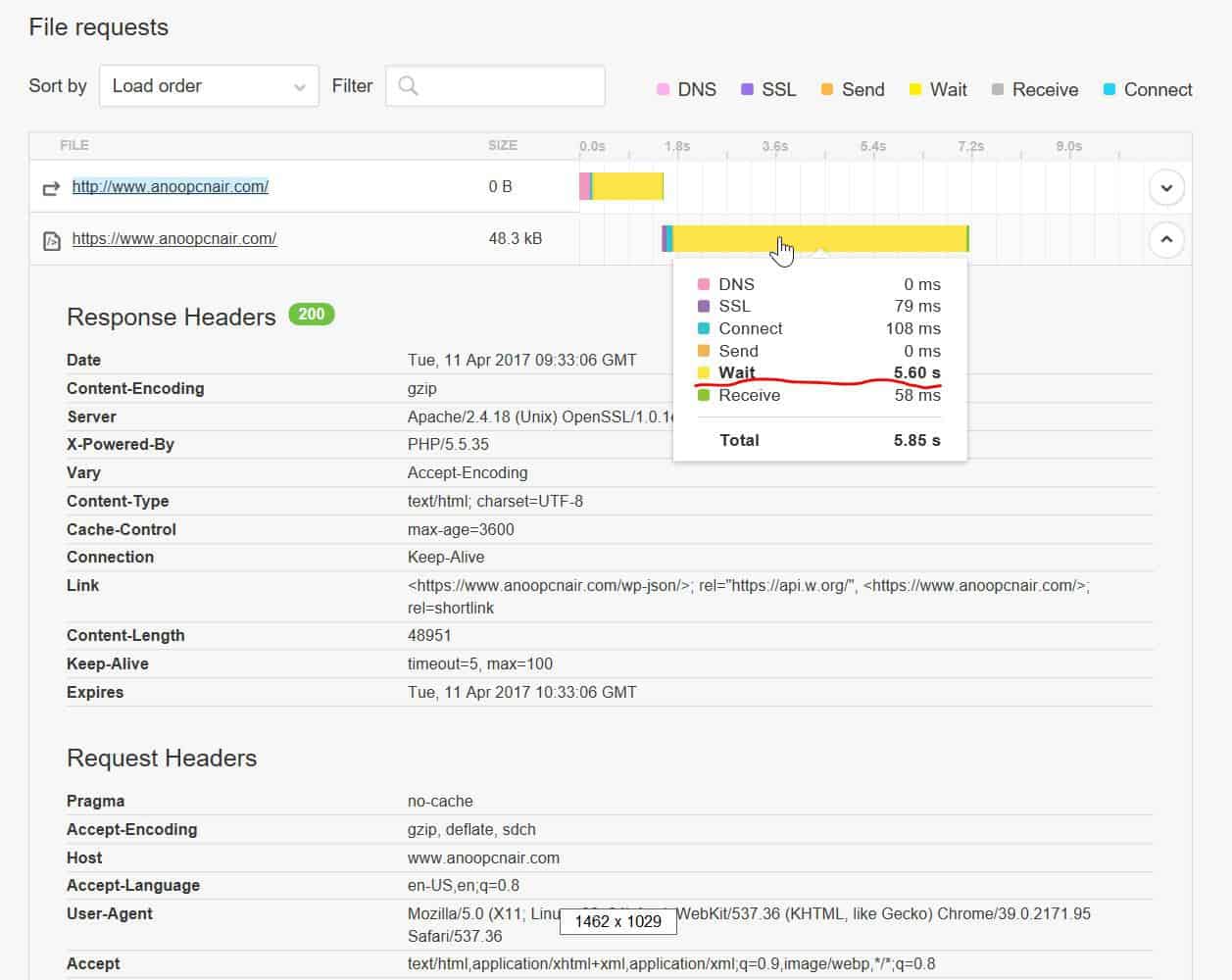 )
)
https://gtmetrix.com/reports/www.anoopcnair.com/3pyMLT7K (result is copied below)
https://tools.pingdom.com/#!/dtR5oa/www.anoopcnair.com
Godaddy says this is coding issue and the web developer says this is server issue but I’m stuck now . Any pointers would be really helpful !!
200 OK
anoopcnair.com
47.8 KB
7.52s
HeadersResponse
Response Headers
Date
Tue, 11 Apr 2017 09:34:23 GMT
Server
Apache/2.4.18 (Unix) OpenSSL/1.0.1e-fips mod_bwlimited/1.4
X-Powered-By
PHP/5.5.35
Link
<https://www.anoopcnair.com/wp-json/>; rel=”https://api.w.org/”, <https://www.anoopcnair.com/>; rel=
shortlink
Vary
Accept-Encoding
Content-Encoding
gzip
Cache-Control
max-age=3600
Expires
Tue, 11 Apr 2017 10:34:23 GMT
Content-Length
48957
Keep-Alive
timeout=5, max=100
Connection
Keep-Alive
Content-Type
text/html; charset=UTF-8
Request Headers
Host
http://www.anoopcnair.com
User-Agent
Mozilla/5.0 (X11; Linux x86_64; rv:49.0) Gecko/20100101 Firefox/49.0
Accept
text/html,application/xhtml+xml,application/xml;q=0.9,*/*;q=0.8
Accept-Language
en-US,en;q=0.5
Accept-Encoding
gzip, deflate, br
Connection
keep-alive
Upgrade-Insecure-Requests
 T2N
T2NHello team,
Google Webmaster Tools is telling me my smartlists are creating duplicate metas. It looks like it’s impacting SEO. Please help.
For example:
Pages with duplicate meta descriptions
4 secret spots in Tasmania’s north west only known to locals.
/4-secret-spots-in-tasmanias-northwest/2/
/4-secret-spots-in-tasmanias-northwest/
 hawks13
For some reason, my smartlist postings aren’t coming up correctly on mobile. I am using smartlist 2 where is doesn’t require the user to hit the next button to load a new item. Instead, a user can just scroll down the page and see all the numbers. This use to be te same if someone viewed it on their mobile device. For some reason, if someone views it on their mobile device, they have to hit the next button to see the next list number. On a desktop, it still works where someone can just scroll down the page, just not for mobile and it’s annoying. For some of my smart list, I have a long intro. So if someone on mobile views that posting, they have to keep scrolling halfway down the page and load the next item. Is this a bug or did something change? Does anyone know how I can have a single page smartlist 2 for mobile where a user can just scroll down the page?
Bogdan B. Hello,
Please understand our theme does not support RTL out of the box. It can be done but only with customization. Customization is not part of the theme support.
So we cannot help with RTL customization. We understand you like our theme and we really appreciate it but unfortunately we cannot help you with this. If you want to customize the theme into a RTL layout you will have to hire a freelancer/developer to help out. The issues you are facing are caused by your customization as it was not done properly. It is not a simple customization to make as if it were, our theme would have been compatible with RTL already. If you decide you cannot use our theme because of this we will be able to provide a refund if you request it on envato.
Thank you for your understanding.
Bogdan B. @ Sundial you can show the counter again as it shows the correct count now: https://www.screencast.com/t/c0uWltbm7W that is your likes number.
@ Marc_Ravaris this is where your counter takes users: https://www.screencast.com/t/J2zfyt2fO5hc. The facebook id is not valid
@Turtlechips The plugin works if you set it up properly. There is no issue with it. Please use this guide to set it up properly https://forum.tagdiv.com/tagdiv-social-counter-tutorial/ and then clear all caching as it is affected by cache
Thank you!
 simchris
 welcome to WordPress. FYI, most complex themes use custom classes (e.g., td_) for custom code, custom plugins, and custom CSS to extend Visual Composer; this is partly to keep things organized for developers and also to minimize “collisions” with other theme developers. Most plugin devs do this also, whether it’s Yoast, Advanced Custom Fields (eg., “acf_blah”), etc.
Doesn’t it make sense if the theme has a custom plugin, custom menus, etc. that are intended for its own theme, to use custom classes?
You can use a proper programmer editor to do full search/replace in ALL files but no way to do this by hand, and also it means you won’t be able to do updates to theme without redoing all the changes.
Most savvy webdev folk can “figure out” which theme you use without too much trouble, so you’re not really hiding that from anybody except newbies looking at source code. “real devs” can easily deduce which theme it is.
Bogdan B. Hello,
Sorry but our theme doe not have any rtl options. This customization is not easy to make as if it was, our theme would have been rtl compatible already. I suggest hiring a developer to help out with the customization as the re is no single code to add. Multiple parts of the theme will have to modified.
Thank you!
Bogdan B. Hello,
Sorry but the smart lists do not have this sort of options. They are very complex parts of the theme and the smart list elements cannot be changed. It is not a simple customization to make. The smartlist layout will have to be re-created in order to move an element. Sorry but we cannot provide any solution in this regard. You will have to hire a developer to help out with the customization. The code for the smart list can be found here:
https://www.screencast.com/t/bZDxHmFynPv0
Thank you!
 dinn
dinnHey there,
IS there a way to change the buttons position to below the image on the Smartlist 1?
Right now we have the buttons above each image but we would like to change it and set them up below the image.
many thanks for all the help!
Catalin Hello eman,
If you want to exclude these elements from your Sidebar, you should check the panel -> Appearance -> Widgets Section, like this -> https://www.screencast.com/t/XQnOnDrtlnKj and from here you can remove/add any element you want to be or not in your website.
Thanks for your understanding!
Simion C. Hi,
Unfortunately that is the way the smart list were designed, as it can be seen in the demo also – https://demo.tagdiv.com/newspaper/smart-list-style-2/ and at the moment there is no solution in this regard. More information in this topic here – https://forum.tagdiv.com/topic/images-in-smartlist-are-missing-their-alt-and-title-attributes/
Thanks
 emperorzbigniew
 Well – I resolved the issue, partly.
In “image loading – animations (lazyload)” I switched to Fade (instead of scaling). And now everything works perfectly. However if you use “fade&scale” or “up fade” there are issue with thit Big Grid again.
I’m using FF50 on Win7/64.
T2NHello,
When using Smartlist 2, it looks like the photo alt attributes are stripped out. I can’t seem to see them when using “inspect element” and SEO tools are telling me I don’t have alt text for those photos.
Please advise.
Here’s an example of a post
https://travel2next.com/10-amazing-animal-encounters-around-the-world/
Thanks
 EU-uutiset
 That is not my issue.
I’m referring to this post answered by Andrei: https://forum.tagdiv.com/topic/categories-6/
where child posts are visible in the archives. When you click in on a sub heading on site: http://eu-uutiset.fi/wp-content/uploads/2017/03/categor_parent.jpg
then it would be nice that the child posts of that sub heading isn’t visible, like it is now:
http://eu-uutiset.fi/wp-content/uploads/2017/03/categor_parent_fail.jpg
According to Andrei the following code should have worked:
function exclude_categories() {
$excluded = array( ‘2184’ );
if (is_category(1169)){
set_query_var( ‘category__not_in’, $excluded );
}
}
add_filter( ‘pre_get_posts’, ‘exclude_categories’ );
and it works partly. This is from parent:
http://eu-uutiset.fi/wp-content/uploads/2017/03/categor_parent_fail.jpg
it shows that the child posts are visible, but sowehow they have been placed further down on than without that code.


