
- NewsmagSharing buttons
 Bettina
  Bruno Riggs
Hello.
When sharing via WhatsApp the system adds html codes, can you help me with this? I’ve already tried to see where I can configure it, but I haven’t found it.
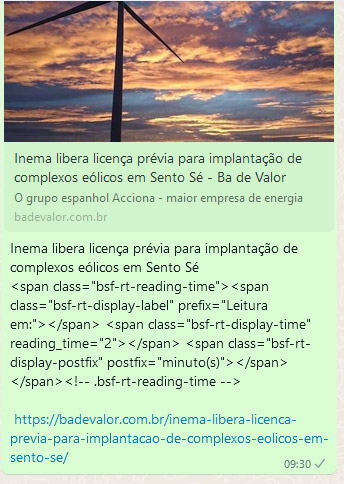
 Calin
Calin Thank you for sharing this solution with us!
Have a grate day!
 retrology
Hi.
Please note that the mega menu on my website sometimes doesn’t appear the right way. The issue is that sometimes it very much indented to the right side.
It gets fixed when I manually change the size of the browser window and then again make it a full window.
Screenshot:
https://drive.google.com/file/d/106Rl-33zoN0gE8Bmdpn32OetL_JZuEhA/view?usp=sharing
Website: https://retrology.net/
Kindly let me know how it can be fixed permanently.
Thank you.
Regards,
Talha
retrologyHi there.
I hope you are doing well.
Please note that the Sidebar (Column) in Single Post Detail Page is acting as a sticky sidebar even though the sticky option is unchecked.
I have also cleared the cache of both the website and browser multiple times, but it still doesn’t work.
Please assist.
Website: https://retrology.net/
Please refer to the following image:
https://drive.google.com/file/d/1-yfap2v6zK1lSXCIv6K3zvbbqavxpJcY/view?usp=sharing
Page with the issue:
https://retrology.net/oscar-winner-amadeus-1984-movie-review-realm-of-classical-music/
Thank you.
Regards,
Talha
 tgamble
so I am choosing a navigation from the cloud library. its an overlay and looks great on the homepage. but on interior pages it is not ledgible since the background is transparent.
here is what I am using. https://demo.tagdiv.com/newspaper_scuba_pro/
this is the homepage, looks good here. background image is on the homepage not in the header. https://drive.google.com/file/d/1yg_c0ncxLQMJjiXZ23WdvKHkHtN1q3HO/view?usp=sharing
here is the interior issue. now I can put a semi-transparent background color behind the header bar, but below is a demo site where the interior is different so I would rather do this. but the bigger issue is the interior page content is sucked up under the header.
https://drive.google.com/file/d/1Zwm4wmDr8kSSH_mDUh0WTGKlGaqxW7wi/view?usp=sharing
demo site with interior header having a background. https://demo.tagdiv.com/newspaper_metropolitan_pro/
this is the desired effect. overlay on homepage, but has a background on interior pages. and the interior content is beneath the header. any idea what is happening? I cannot find a setting anywhere and the documentation is not this specific.
 Anamaria
 Hi,
I’m glad that you manage to resolve the situation!
And thank you for sharing with us the solution!
Have a great day!
 editamagerit
Good morning we have a problem with the styles of the theme, the page if you are not logged in looks like this (it loses the styles we have designed with tagDiv):
https://drive.google.com/file/d/1Cr4rzdKBF6bX-2tqTFE0GAebp1dikU1u/view?usp=sharing
But it should look like this:
https://drive.google.com/file/d/1CjeWuLLsTMRVVkd8MfWXRX8-IpLx5y54/view?usp=sharing
Sometimes it is solved by cleaning cache, but we can not be like this all the time, we have several websites with the same theme and this problem does not happen to us, it is very URGENT because it is a very read newspaper.
I have tried to deactivate the cache plugin in case it was the problem, but it has not been solved, I don’t know if it is because of some update of the Newspaper theme.
Any idea? Thanks and best regards.
Calin Hi,
When you check theme in tagDiv Composer, the social share are looking the same? If is looking correctly, then the problem is related to an extra plugin.
If is not the same, then please use the right click to copy and past the social share style -> https://i.imgur.com/dJra3nt.png
Thank you!
 smilelondon
 Hi Bettina,
it looks like the emails I sent as response to this ticket did not make it to you.
Question was – is this an issue only affecting us or a general plugin problem which we have to be patient until you have a fix?
Secondly is this related:
Mobile header in Chrome and Firefox.
It is not opening for us,
We can open the header in Safari just fine and also on desktop.
From what we checked, it seems not to be an issue with the cache.
Can you perhaps point us to the right direction on how to fix this?
You can check on https://www.livetube.tv/news
Here is a video:
https://drive.google.com/file/d/1WXA8Bl-ZFQRRTMNMQ4KCUgC9-9175Jhi/view?usp=sharing
 Bill Fleak
 Thank you for sharing the information. This process does not seem as intuitive as a plugin would be. Per the screenshots. I can exclude all pages or all posts, is there any way to exclude specific categories? For the loop element used in the cloud template, I am able to exclude posts ids. Again not very intuitive. Are there plugins that you have tested with your theme and can recommend similar to https://wordpress.org/plugins/search-exclude/.
Please let me know.
Calin Hi,
I’m glad that you manage to resolve the situation!
And thank you for sharing with us the solution!
Have a great day!
 great1212
 Ok. Will adopt the above procedure again and let you know….
My client has refused sharing the credentials and I cannot do anything in this regard.
Thanks for your understanding…
 christvbible
I’ve installed Newspaper and the Default Website template without dummy content
All looks good with my existing content.
Except on the Posts page there are no options
 casprom
Hi guys. Thank you very much for all the support so far in each topic.
Here’s a new thing we’re trying to optimize on our site. We would like our writers to be able to put the feature video link in the Feature Video box, but this field doesn’t display in the Authors view.
If they could use this box it would be much faster to review and publish their works so we we’re hoping there’s a way to make this field available and visible to them. Image of the box here: https://drive.google.com/file/d/1YXuYmILhK6-atA3tvoGx_fw016VE69qR/view?usp=sharing
smilelondon Just to add, please see attached screenshot. Something seems to be broken with the templates.
https://drive.google.com/file/d/1Un7plokEY64IoJAp1_ZYH0f_R_2wYn3c/view?usp=sharing
 Bartje
Hey Guys,
We have kind of a big problem with our site. It happens often that it takes more then 10 seconds to load the front page. Sharing posts on Facebook is even a problem, because they give a time out. Therefore I did some troubleshooting and found out the plugin TD Composer and/or TD Standard Pack is causing this issue according to the Query Monitor logs:

We are really disappointed at the moment because visitors are now gone before they even can view the front page.
For instance, when I disable the tagDiv Standard plugin, the issue seems to be solved. But unfortunately that isn’t the solution because then our site is broken.
Looking forward for your assistance.
URL: https://leidenamateurvoetbal.nl/
Kind Regards,
Jordy Boutier
 hanna2390
 Can you review those files that the Mangboard team has changed for the User system?
/wp-content/plugins/td-composer/legacy/Newspaper/parts/login.php
/wp-content/plugins/td-composer/legacy/Newspaper/parts/logged.php
/wp-content/plugins/td-subscription/includes/td_subscription.php
/wp-content/plugins/td-subscription/includes/shortcodes/tds_menu_login.php
Because we wanted to use a social login feature on their user system and we were using Mangboard, we tried to use Mangboard user system. They provide a menu we can simply add our social login ID and secret on their user system. However, their login status was not worked properly on our site, so they worked on those files to let us use their login system.
Do you think those file made any problem?
we had a backup file so we just overwrite with backup and it return to normal now.
Can you guide how to add some sources to those files safely? I have added the link to their sources here.
Please review and give us some solution.
Thank you.
https://drive.google.com/drive/folders/1lMWvcq3z0NJuZ4oQxfhxaaFVsyYD591g?usp=sharing
 studioware
Hello,
I would like to show articles on my site based on a custom taxonomy instead of a post category. Is there any way to do it? Custom taxonomies are not visible within the category list.
Thank you
Bettina Hello @pratiek!
It could be a plugin conflict there or something that can interfere in our theme: https://forum.tagdiv.com/general-options-may-interfere-newspaper-theme/, so please make a test and deactivate ALL plugins except tagDiv ones, also deactivate the cache plugin that you use, and try again.
Enable the sharing feature on mobile theme + AMP from Theme panel -> Mobile
Theme -> Post Settings -> Sharing.
Yes, you’re right they do not appear on AMP. I’ll address this issue to our developers.
Yes, we implemented it in the new update.
Thank you!
 PrimeNewsAndreas
 Okay, this option was at Theme Panel -> Social Network -> Social Sharing
PrimeNewsAndreasHello there,
I was just trying to configure the Social Sharing and if i go to Theme Panel -> Post Settings there is not any option for Social Sharing as others got it.
Anybody can help?
casprom Hi Calin, it kinda worked but for some reason the font is too big (https://drive.google.com/file/d/180o1Mng9Ch-YM5p_JZOcKugvO_9nAEPb/view?usp=sharing)
See this one for comparison: (https://drive.google.com/file/d/1j_gFt97a0mi9KRlr4LLICEFboPAO5W8o/view?usp=sharing)
I’ve compared the code you sent with the one on Style.css just to make sure the values were the same, and they are alright. Then I tried to change some values (on the Custom CSS code you wrote above) but it didn’t took effect on the size of the this big dropcap, so I don’t know why the letter is so big when compared to the regular dropcap. For further explanation: the first picture with the “O” is with the custom css, and the one with the “K” is the regular.
 mita
mita Hi Calin,
Thank you for your reply, as stated, I believe that the code that I exported is corruped:
https://drive.google.com/file/d/109wqAZHSwUybF3yv1lOoSBsNNLtAa_DP/view?usp=sharing
The reason why:
https://drive.google.com/file/d/10FnEaa6sfkw_nKcUJK66Z3_0JKkTTRTu/view?usp=sharing
I wonder if the source (old staging) has its database corrupted, so I wanted to see your thoughts on this before we decide how to proceed.
Thanks
 Trung Nam
Why doesn’t my website have a Logo?. I updated the logo in the theme panel, it doesn’t show the Logo image when sharing the website homepage on Facebook?


