- NewspaperSocial Sharing
- NewsmagSharing buttons
- NewspaperSharing
- NewspaperDesign your post pages using the Default Templates
- NewspaperFacebook Share
 ySV
ySV Hi.
I have apparently found a way to fix this CRITICAL bug. The developers made a terrible programming error in loop-single.php file.
Solution consists in using the extended td_module_single class when create a $td_mod_single, instead the developers used the main class td_module_single_base.
In addition, it is necessary to insert the social and related posts function to loop-single.php
Code for solve extended class bug:
$td_mod_single = new td_module_single($post);
Code for top social icons:
<?php echo $td_mod_single->get_social_sharing_top();?>
Code for bottom social icons:
<?php echo $td_mod_single->get_social_sharing_bottom();?>
Code for related posts:
<?php echo $td_mod_single->related_posts();?>
-
This reply was modified 7 years by
ySV.
 shubhamsharma7979
 Social sharing bottons not showing in all posts
 zekavr
  meri
meri Hi @gferrise, may I ask you the name of your social media plugin? The one for the bar on the left hand side and the “Sharing is caring” at the bottom. Thanks
 guido892
 Same problem …. Sharing is activated but not displayed.
https://laltracampana.guidoferrario.org/2019/04/15/il-tour-degli-studi-di-game-of-thrones-sta-per-aprire-in-irlanda-del-nord/
 buddymantra
 I forgot to mention you need to add the plugin js_composer.zip manually and you will see the social sharing icon will appear.
 Pradeep Singh
Hello,
What is going on, Sharing button and related articles section is not working in my blog logicaldost.in
Please fix this issue
 Calin
Calin Thank you for sharing your experience.
 yukiy531
Hello,
I want to hide the like button.
How should I do it?
https://drive.google.com/file/d/1p5e7UQHlmFhgeSTVzNDofs5ieAlHDzQg/view?usp=sharing
Yukiy531
buddymantraSocial sharing on the post is not coming after the newpaper theme update.
refrance image.
https://www.screencast.com/t/Wy01RTURX
https://www.screencast.com/t/kWmnGhC8v9t
Blog link https://buddymantra.com/
 laotracara
Hello,
I’m having trouble displaying the sharing buttons at the top and bottom of posts.
View:
https://www.screencast.com/t/0jRg3swe3Ph
Settings:
https://www.screencast.com/t/ungUkm201Gyv
https://www.screencast.com/t/1wlAmlC3
Icons are also missing from settings:
https://www.screencast.com/t/7vvhFY8XM6
Thanks for your help!
 desiyatri
 Hi all.
I have good news I guess, so I am sharing it. Not sure what the future holds in store for me but as of now my site is working along with Mobile Theme. I faced the same problem of
“This version of the tagDiv Mobile Theme plugin is not supported by the current activated theme! Please update your theme!”
While updating via FTP, I was getting “1 Failed Transfer”, all files except one were getting transferred. So I deleted the entire Newspaper Folder in Themes. Then I uploaded the new 9.7 Newspaper folder and there was no failed transfer. But I got another problem:
Not able to login using mysite.com/admin. From another support thread I got this: Login using mysite.com/wp-login.php. This worked. After login, I installed the Mobile Theme plugin and that too started working. My earlier customization of Mobile Theme was still there. Now I am back to normal, touch wood.
So, the moral of the story is:
1. Put the site in maintenance mode.
2. Use FTP and delete the old Newspaper theme folder.
3. Upload the new folder.
4. Login to the site using mysite.com/wp-login.php
5. Install & activate all new plugins including Mobile Theme Plugin.
I just hope I am not celebrating too soon.
Thanks.
 viniciusyamada
 The same problem here! The sharing buttons are gone, even when activated.
gay.blog.br
 Igor
IgorHi,
After updating the Newspaper to version 9.7, “RELATED ARTICLE” and “TOP ARTICLE LIKE” no longer appear on the pages of the records.
At the same time, the buttons “RELATED ARTICLE” and “TOP ARTICLE LIKE” were activated in the settings (see screenshots).
In the loop-single.php new file the codes is now missing:
<?php echo $td_mod_single->related_posts();?>
<?php echo $td_mod_single->get_social_sharing_top();?>
<?php echo $td_mod_single->get_social_sharing_bottom();?>
 Viju
Viju Forget to add shortcode “<?php echo $td_mod_single->get_social_sharing_bottom();?>” in “loop-single.php”.
Viju Forget to add shortcode “<?php echo $td_mod_single->get_social_sharing_bottom();?>” in “loop-single.php”.
Calin Hi,
Please check our documentation for sharing -> https://forum.tagdiv.com/sharing/
If there is still a problem please provide some more details.
Thank you for your understanding!
 MartinaSchneemayer
 Hi,
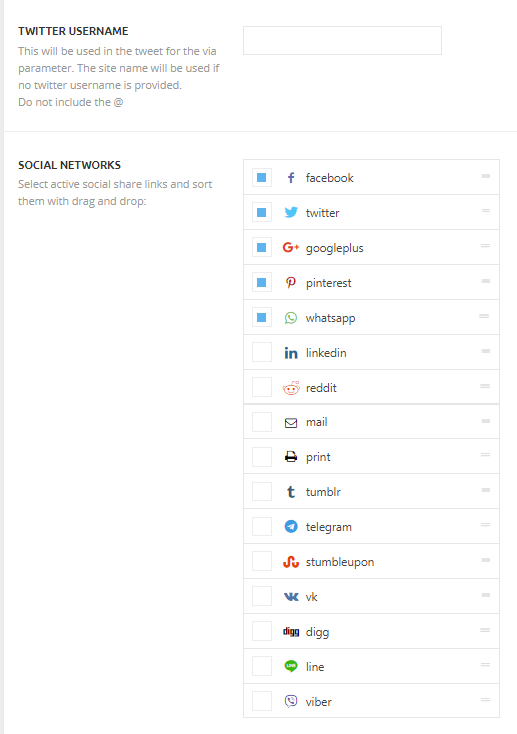
I can’t choose any social networks because the list (https://forum.tagdiv.com/wp-content/uploads/2015/05/sharing2.png) is not shown.
Best regards
Calin Hi,
In order to hide the social sharing buttons from some post you’ll need to use a single post template from tagDiv Cloud Library, edit the template with tagDiv Composer and remove the share buttons, after that set the templates on the post were you do not want to have the sharing buttons.
Thank you for your understanding!
 mcdv01
Hi,
Under the POST we activated the SHARING TOOLS.
On the POST When you click the TWITTER SHARE button there’s a pop-up containing the TWEET. On the TWEET there is a “VIA” clause where after the “VIA” word it appends the TWITTER HANDLE you have set.
Our problem is that we don’t want to include the “VIA” part of the tweet because we don’t have a twitter account for the specific site. We just want the users to be able to TWEET the story and without the “VIA” part by default.
Is there a way to modify this one?
Let us know.
yukiy531Hello,
I only want to hide the TAGDIV COMPOSER button if the author’s permission. How should I set it?
https://drive.google.com/file/d/1a3yP5ymxrVAbNlhm2_7fgBkkyRBLQjOW/view?usp=sharing
Yukiy531
 wspeed
Hi Team,
I have created a revslider and I tried to use the Element “Revolution Slider” to add to my page.
I can add but the design gets scrambled, the slider images get cut in half, very weird.
So, I tried to add the [revslider shortcode by myself inside a “Column text” element. IT WORKED. Slider shows perfectly.
But then, when I exit and reopen the TD Editor, I get error “Reply To: Error at rows: 7(models) : 1(dom). The model does not match the content”.
Then, I go to the WordPress editor, remove the shortcode I added [revslider… I can now edit the page via TD Composer, but I’m out of Revslider.
Not sure what to do.
I’m sharing the page below with the TD Composer slider code.
If you go to the second slide, you can clearly see that the image is cut in half.
Please advise.
http://server.rpbr.me/wsp/backup-em-nuvem-para-empresas/funcionalidades/
 sentierol
 Hello Bogdan,
thank you for your help but I meant this, sorry:
how to remove the small social sharing buttons from every private post of a single category?
I’m referring to the following ones:
1. TOP ARTICLE SHARING
2. TOP ARTICLE LIKE
3. BOTTOM ARTICLE SHARING
4. BOTTOM ARTICLE LIKE
I found no option for this inside NewsPaper, neither inside the category (under LAYOUT SETTINGS)
https://forum.tagdiv.com/how-category-settings-work/
nor inside the single post:
https://forum.tagdiv.com/post-templates-2/
Hope it’s clear now: I need to hide facebook button, telegram button, whatsapp button, pinterest button on all posts of a single category, BUT I want to keep these buttons on all other categories.
About social counter, I choose that this single category has NO sidebar, so they don’t appear.
Hope there’s a solution for hiding the social sharing buttons, thank you very much!
Angelo
 sujai.chand@gmail.com
HOw to move the date, login and Username to right isd eof the top menu bar
How to move the other menus like about, publish, Jobs, events, and contact us to the left side of the top bar
Here is the screen shot..
https://drive.google.com/file/d/1bd_EmqJ3XZz2C_URt-rHCySbkt-SwS09/view?usp=sharing
sujai.chand@gmail.com Here is the Screen shot https://drive.google.com/file/d/1omoDpAAQCpPE7KZLcweOE61GOvdhznZ0/view?usp=sharing