
No search results were found in Documentation!
 Catalin
 Hello bgo,
I have inspected your website, and I saw that you are using the module 1 to display the posts on the category page. So, I check your featured image, and I notice that the size of it is not right. Your natural image size is 108*300 px and the size of the thumb for module 1 is 324*160 px. Please keep in mind that you should have minimum 324px for image width if you want to bring best results. Notice that the theme thumbs only crop the image and not enlarge it. The image thumb crop from center to top the image and that’s why you have only the top of your image displayed in the thumb…the image is too short. Also, I have made a test with your featured image to my side, using the module 1 and the result is here -> http://screencast.com/t/nNRoZSTFChD and your result in here -> http://screencast.com/t/uxqeIqgKNS Your image it seems to be zoomed in and our theme does not do this. I think that you are using some plugin which enlarges the image. Please try to disable all the active plugins, leave just Visual Composer to active, clear all your caches and install only the plugins that come bundled with the theme and rule out any conflicting plugins. Also, please use some properly images according to our thumb sizes. For more information, consult here -> https://forum.tagdiv.com/thumbnails-fix-strange-looking-images-on-blocks/
Hope this helps!
Thanks for the message!
Catalin Hello gorkemaslan,
The problem seems to be generated by CDN. You can find a solution here: https://forum.tagdiv.com/topic/strange-chinese-symbols-replaced-icons-and-arrows/ Also, if the problem will not be solved with this advice, please try to find other online solutions in this regard because the origin of this issue can be more complex and depends on a lot of things and it is not theme related.
For your second request, you should provide your website URL so I can inspect it closer and also, so I will be able to provide a more accurate response.
Thanks for your understanding!
 Bogdan B.
 hello,
Please use this guide: https://forum.tagdiv.com/thumbnails-fix-strange-looking-images-on-blocks/
Thank you!
Bogdan B. Hi,
Please use this guide: https://forum.tagdiv.com/thumbnails-fix-strange-looking-images-on-blocks/
Thank you!
 mikegiam
 I too am having this same problem. Only within posts however. If I embed an image into the post or if I add an image to feature images, still nothing shows up. This is even stranger because this just started happening two days ago. Prior to that everything was working perfectly. We haven’t added any new plugins or done anything to further configure the settings, etc. but now we’re not getting images in our posts. Bummer!
I check the lazy load option and it had no effect. Please let me know your thoughts asap.
Thanks,
Mike
Bogdan B. Hello,
Well it’s best to keep the aspect ratio as close to the grid aspect ratio as possible so your images will not get cropped as much. The grid is almost square but your image is wide Here is a list of thumbnails used by our theme so you can have a general idea of the image sizes that will fit best: https://forum.tagdiv.com/theme-thumbs/
Also please regenerate your thumbs by using this guide: https://forum.tagdiv.com/thumbnails-fix-strange-looking-images-on-blocks/
Thank you!
 peeradetch
When I use visual composer for post and divide row in 3 columns, i got a strange vertical line in the middle of 1st and 3rd column. I don’t know where it comes from and try to find a css and fix it but nothing found. Please tell me how to get this strange vertical line out or disable it?
screenshot -> https://s18.postimg.org/vcyp18hwp/2016_11_27_105825.jpg
 techpaced
 That’s a strange answer. How about using a button, message/alert box inside a post ?. If i want a user to provide a download link inside my post what should i use ?. If I want to add a accordion or any other shortcode inside post then what should i use ?
 nkodgh
I have a couple of issues that need support:
1. How do I remove the comments counter that appears like an icon on all blocks and modules.
2. How do I custom order the list of sub-categories instead of the alphabetical order.
3. Instead of the 7 days post sorting, how do I list the most popular posts within the last 14 days instead of 7 days?
4.
“To mark a post as featured just include it in the Featured category. This Featured category is created by default, so you will have it in the category list.”
That’s what the documentation says but it seems I may have renamed or deleted the Featured category mistakenly, how do I restore it to enable me mark particular posts as featured?
5. Lastly, I have lists of articles displayed in blocks on the Frontpage, but strangely, a comments box appears at the bottom of my frontpage, how do I disable that?
Thanks in advance.
Catalin Hello rahulagg25,
The problem seems to be generated by CDN. You can find a solution here: https://forum.tagdiv.com/topic/strange-chinese-symbols-replaced-icons-and-arrows/ Also, if the problem will not be solved with this advice, please try to find other online solutions in this regard because the origin of this issue can be more complex and depends on a lot of things and it is not theme related.
For your second request, you should provide your website URL so I can inspect it closer and also, so I will be able to provide a more accurate response.
Thanks for your understanding!
Bogdan B. Hello,
Please disable all plugins except visual composer, clear cache and reset cdn files if you use it. It could be a plugin conflict or it could be a broken visual composer element. Please try to recreate the layout on a dummy page and see if the sidebar still behaves strangely
Thank you!
Catalin Hello rahulagg25,
Please keep in mind that this type of issue is not theme related. The issue is generated by your CDN system because the fonts which theme uses cannot be loaded due to your CDN and that’s why you should try to fix the problem with your CDN system because they should be able to provide a more accurate response in this regard and not our them, because this issue is not theme related, sorry! Notice that above I gave you some hints and online documentation regarding on this issue and you have to try which method will work. In this case, from our point of view, you should not use the CDN if you want the Chinese the strange symbols disappear.
For more information about our support policy you should see here -> https://themeforest.net/page/item_support_policy
Thanks for your understanding!
 Edward
 Check your thumbnails size images: https://forum.tagdiv.com/theme-thumbs/
When you decide to post content on your website, the theme automatically generates thumbnails from the featured image to display the content on your pages in an attractive way. To make your website faster, you can control which thumbnail is generated. To do this go to Theme Panel > Block Settings > Thumbs on Modules/Blocks and disable the unused ones to save space on your server.
And see here: https://forum.tagdiv.com/thumbnails-fix-strange-looking-images-on-blocks/
Catalin Hello rahulagg25,
The problem seems to be generated by CDN. You can find a solution here: https://forum.tagdiv.com/topic/strange-chinese-symbols-replaced-icons-and-arrows/ Also, if the problem will not be solved with this advice, please try to find other online solutions in this regard because the origin of this issue can be more complex and depends on a lot of things and it is not theme related.
For your second request, you should provide your website URL so I can inspect it closer and also, so I will be able to provide a more accurate response.
Thanks for your understanding!
 insomniac79
Hi,
all of a sudden, my website is showing the mobile theme only, also on webbrowser on my desktop:
http://www.daydreamdistrict.com
It’s really strange, I have not changed any settings, only written blogposts. What happened, how can I get it back to the normal theme in Desktop mode??? I have tried several browsers on my laptop, it really shows the mobile theme only.
Bye, Sebastian
 LTH
LTH Bingo, it was a conflicting plugins prolem ! Thanks.
One more question, very simple… How to remove the blank space between the logos in my sidebar ?
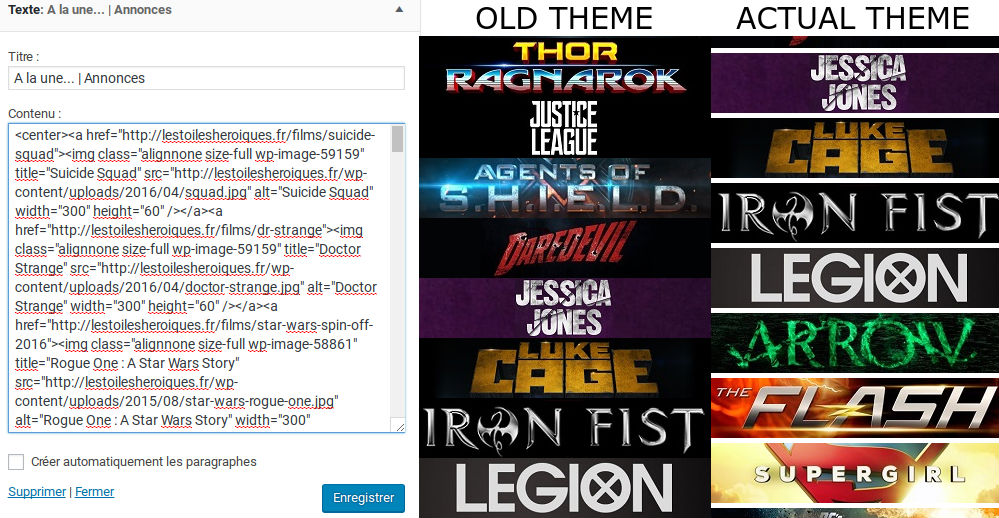
In my actual theme, there is no blank space. It’s strange.
 Bogdan B.
 Hello Pietro
Apart from the thumbnails I could not see any issue. Please use this guide to fix the thumbs: https://forum.tagdiv.com/search/strange/ and make sure you do not add the featured image inside the post content as well if you use a template that will show the featured image:
If the double image is not added as featured and as an embedded image, it could be an external issue from jetpack’s photon maybe or another image optimization tool. In any case, we recommend using the latest version of the theme. We are now at 7.5 ^.6 is pretty old and we cannot guarantee it;s compatibility with the current version of wordpress and pluins
Thank you!
Bogdan B. Hello,
It seems you did not regenerate thumbnails after switching themes. Please use this guide https://forum.tagdiv.com/thumbnails-fix-strange-looking-images-on-blocks/
Please also make sure all your thumbnails are active in this section of the theme panel: http://screencast.com/t/KXLeJg81
Also please try to remove any image optimization tools such as photon or other plugins related to images as they could interfere in the theme grabbing the proper thumbnail.
Thank you!
Catalin Hello ks2355244,
It seems to be a strange behavior which can be generated by your untested plugins which are used by you. Please try to disable all the active plugins, leave just Visual Composer to active, clear all your caches and install only the plugins that come bundled with the theme packet and rule out any conflicting plugins. Please keep in mind that the mobile theme plugin is fully tested and compatible with our product and it seems to work as properly until now. Try my advice and check the results.
Hope this helps and let us know how it goes!
Thanks for the message!
Bogdan B. Hello,
Unfortunately there is no perfect size I can recommend. It will depend on the theme elements you use on your site. Here is a list of thumbs used in our theme: https://forum.tagdiv.com/theme-thumbs/ That image size should fit properly in our theme elements but you may experience a thumbnail issue. Please follow this guide: https://forum.tagdiv.com/thumbnails-fix-strange-looking-images-on-blocks/
Thank you!
Catalin Hello rahulagg25,
The problem seems to be generated by CDN. You can find a solution here: https://forum.tagdiv.com/topic/strange-chinese-symbols-replaced-icons-and-arrows/ Also, if the problem will not be solved with this advice, please try to find other online solutions in this regard because the origin of this issue can be more complex and depends on a lot of things and it is not theme related.
For your second request, you should provide your website URL so I can inspect it closer and also, so I will be able to provide a more accurate response.
Thanks for your understanding!
Catalin Hello Bilah Hisan,
Please ensure that you are using the latest version of the theme and also, make sure that you use only the latest version of required plugins which come bundled with the theme packet. Also, if you are using some untested plugins, please try to disable all of them and install only the plugins that come bundled with the theme and rule out the conflicting plugins. If you are using the lazy load effect you should turn of it, clear all your caches and check the results. -> http://screencast.com/t/Q2HIfuAGb9 Also, use this guide to fix the images: https://forum.tagdiv.com/thumbnails-fix-strange-looking-images-on-blocks/
Hope this helps!
Thanks for the message!
Bogdan B. Salutare,
Well it’s not strange. It depends on the caching that you use and it’s settings. Please use this guide:
https://forum.tagdiv.com/cache-plugin-install-and-configure/
We only recommend wp super cache as it’s the tested and approved plugin to use with our theme. The hosting can also have it’s own cache, but you will have to contact your host about that.
Multumesc!
 sgard62
 Buna Bogdan
well the problem has now dissappeared – it takes some time after saving to update the blog itself. I noticed the same thing a couple of time with different feature ads, text in footer etc…
strange ?
thanks
Bogdan B. Hello,
It seems your thumbnails are not active for the grid. It uses the full image instead and that cannot be made to fit the grid properly. Please make sure your thumbnails are active here: http://screencast.com/t/bY5NbMDzG9z and then use this guide to fix the images: https://forum.tagdiv.com/thumbnails-fix-strange-looking-images-on-blocks/
Thank you!

