
 Calin
Calin Hi,
This is strange, there is not suppose to look like that, did you edit something in theme files, or maybe you are using some extra plugins that can be in conflict with the theme settings, please try only with theme plugins and if the problem persists -> send us an email at contact@tagdiv.com and provide admin login, as well as cPanel or FTP if possible. We will take a look. Include a link to this topic in the email.
Thank you for your understanding!
 Roularta
Hi there,
I have another problem using the Newspaper ‘Cloud Templates’. I’ve created a plain category template which have 2 different ‘posts loop’ items. They are divorced by a ‘Call to action’.
In the first Posts Loop, I’ve set the ‘Limit post number’ to 1.
In the second Posts Loop, I’ve set the ‘Limit post number’ to 8 with an offset of 1.
Strange enough, both Posts Loops on the front-end only shows 1 post.
How can I fix this please?
 Federico
Hello, A few minutes ago I had this error, which caused a total site crash, I had to uninstall td-composer and reinstall it.
AH01071: Got error ‘PHP message: PHP Warning: getimagesize(): php_network_getaddresses: getaddrinfo failed: Temporary failure in name resolution in /var/www/dib.com.ar/public_html/wp-content/plugins/td-cloud-library/shortcodes/header/tdb_header_logo.php on line 792PHP message: PHP Warning: getimagesize(https://dib.com.ar/wp-content/uploads/2020/01/logo.png): failed to open stream: php_network_getaddresses: getaddrinfo failed: Temporary failure in name resolution in /var/www/dib.com.ar/public_html/wp-content/plugins/td-cloud-library/shortcodes/header/tdb_header_logo.php on line 792PHP message: PHP Warning: getimagesize(): php_network_getaddresses: getaddrinfo failed: Temporary failure in name resolution in /var/www/dib.com.ar/public_html/wp-content/plugins/td-cloud-library/shortcodes/header/tdb_header_logo.php on line 792PHP message: PHP Warning: getimagesize(https://dib.com.ar/wp-content/uploads/2020/01/logo.png): failed to open stream: php_network_getaddresses: getaddrinfo failed: Temporary failure in name resolution in /var/www/dib.com.ar/public_html/wp-content/plugins/td-cloud-library/shortcodes/header/tdb_header_logo.php on line 792PHP message: PHP Warning: require_once(/var/www/dib.com.ar/public_html/wp-content/plugins/td-composer/legacy/Newspaper/includes/shortcodes/td_block_ad_box.php): failed to open stream: No such file or directory in /var/www/dib.com.ar/public_html/wp-includes/template.php on line 730PHP message: PHP Fatal error: require_once(): Failed opening required ‘/var/www/dib.com.ar/public_html/wp-content/plugins/td-composer/legacy/Newspaper/includes/shortcodes/td_block_ad_box.php’ (include_path=’.:/usr/share/php’) in /var/www/dib.com.ar/public_html/wp-includes/template.php on line 730′, referer: http://elfuertediario.com.ar/cuarentena-en-la-provincia-de-buenos-aires-en-que-fase-esta-cada-municipio/
It seemed strange to me, it is that the same thing happened to me in 3 different sites at the same time on the same server. In total I have 4 sites on this server, the error only happened on 3.
RoulartaHi There,
I have a big problem while creating blank template files with tagDiv composer. I’ve created a custom header, a custom footer, a custom category and a custom 404 (needed to do changes to my footer).
Header problem
I want to adjust the column widths of my header rows.
In my upper menu (black top menu), I’ve set the layout to a 9-3 columns width:
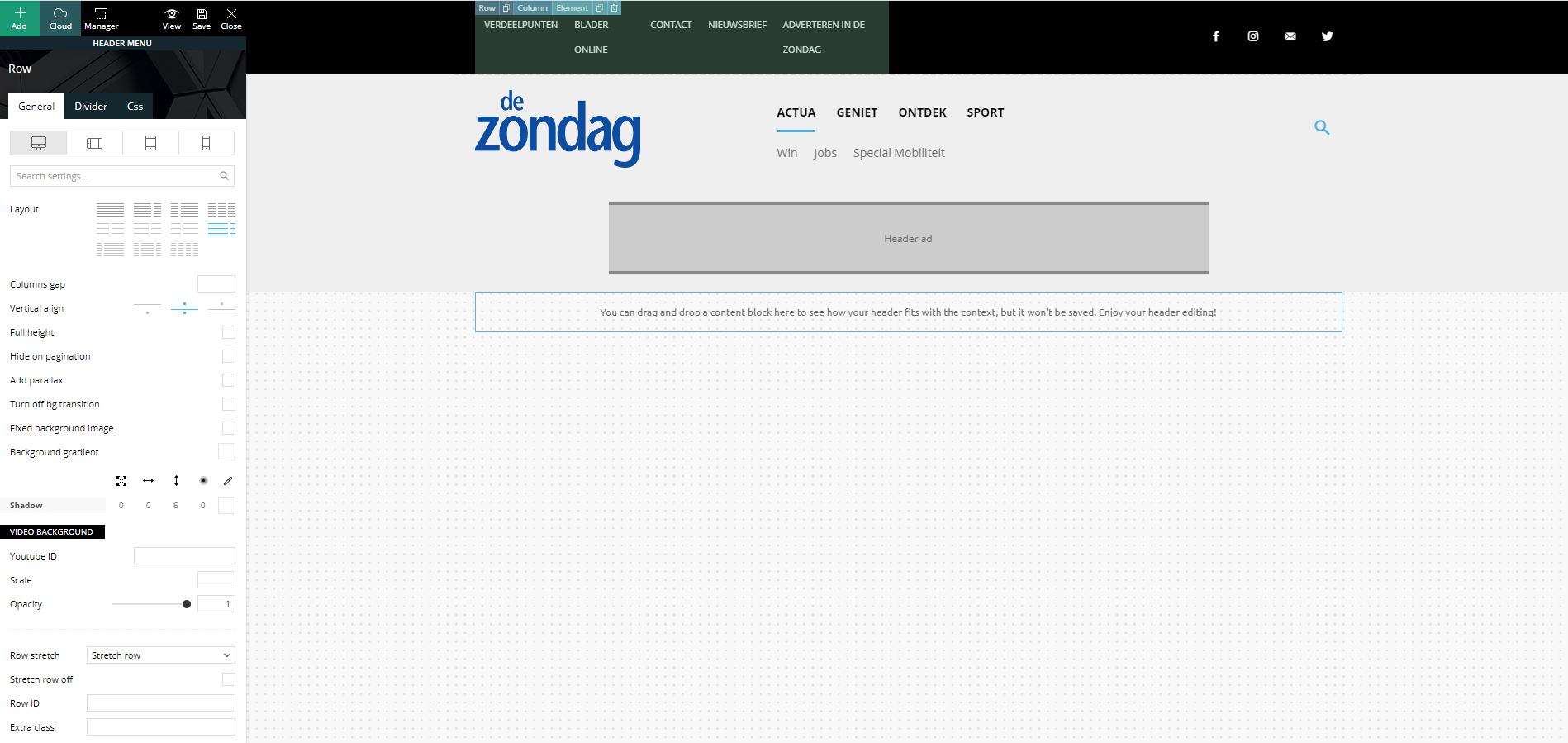
Strange but true, in the preview screen it shows a columns width of 6-6. I’m not able to change this (anymore)…
In my main menu, I’ve set the layout to a 3-6-3 columns width:
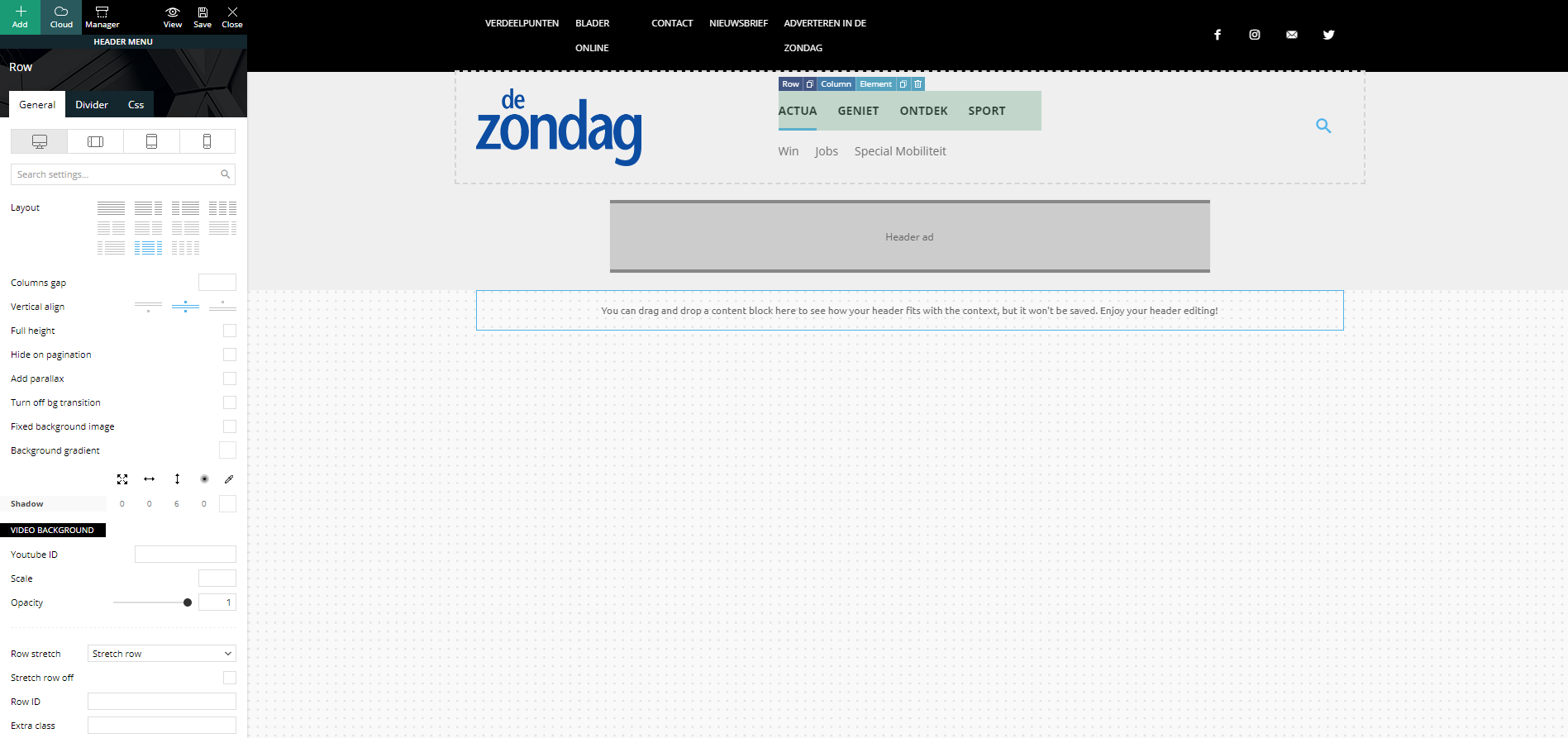
Strange but true, in the preview screen it shows a columns width of 4-4-4. I’m not able to change this (anymore)…
Footer problem
Same strange issues with my footer. Here I’ve set my footer columns (dark gray stroke) to a 4-4-4 width:
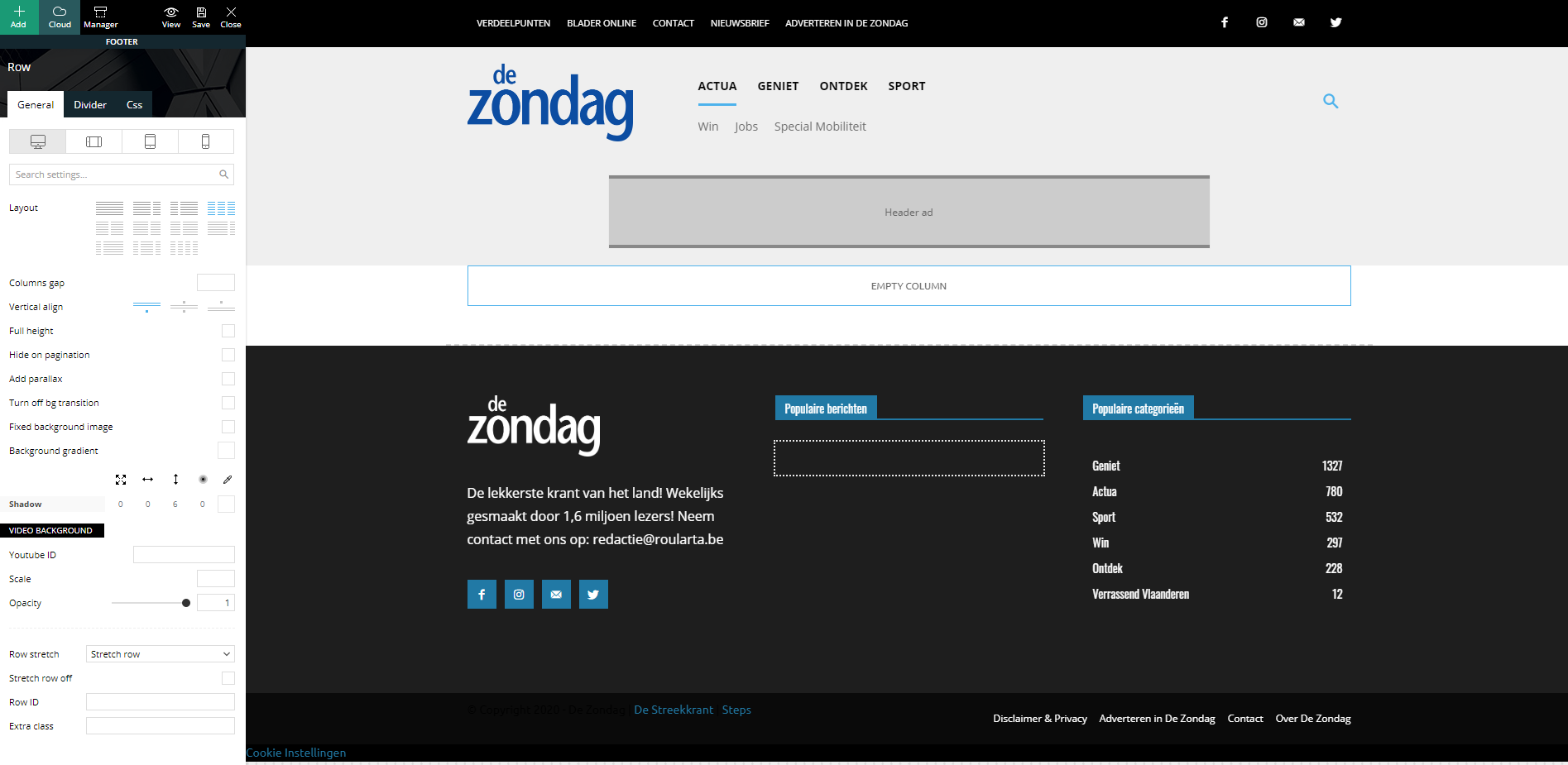
When I check my website, all columns are changed to a width of 12 and they are stacked under each other:
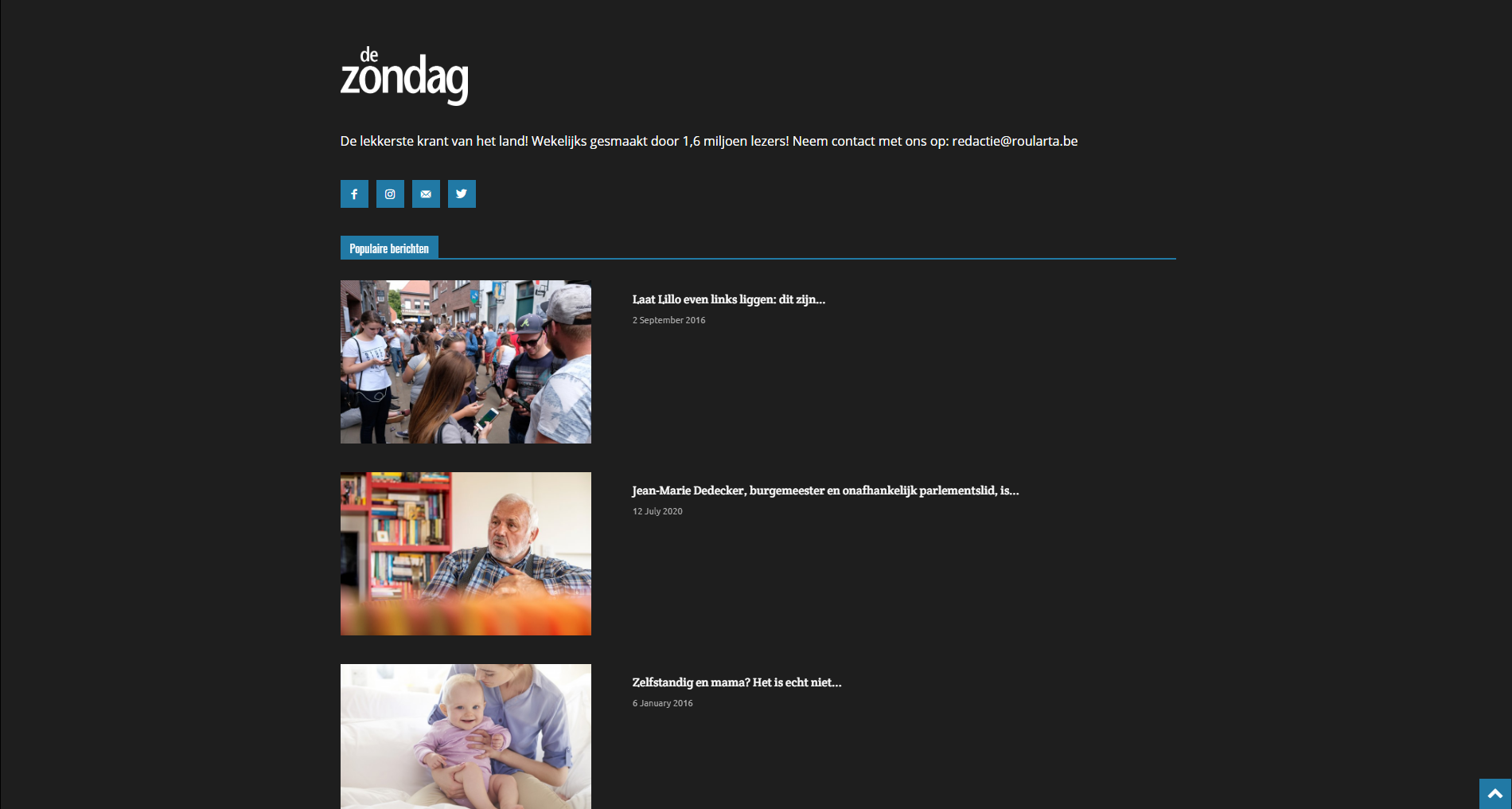
I have identical problems with my custom category pages.
Can you guide me how I can fix this please?
Kind regards,
Sam Clauw
 Pierre Graff
 Not working neither. and even more, i have now something strange with picture block, not showing anymore editable on td composer, and picture size get small now. so as i can not edit or find anymore block to edit these pictures, they have to stay there, smal. Please help to fix these bugs since update
here is link to see result. I finally deleted it with code,. but now, adding an inline image block, i have error message Invalid data Current state has involved an issue. You could try an UNDO operation (CTRL+Z / CTRL+SHIFT+Z) when replacing image from template with mine. hat a mess since update seroulsly….
https://madeincrete.com/olive-oil-and-wine-tasting-tour/
-
This reply was modified 6 years by
Pierre Graff.
 brainhouse
I’m having difficulty activating the theme, when I click on “Activate now” it goes to a page where it says “You don’t have permission to access this page.”
Another strange situation, I can’t edit the footer with the TagDiv Composer.
Calin Hi,
This is a strange case it should look like this -> https://i.imgur.com/Y6w2t7T.png, please send us an email at contact@tagdiv.com and provide admin login, as well as cPanel. We will take a look and fix this problem. Include a link to this topic in the email.
Thank you for your understanding!
 octofianus
 Hi, I already switched the google fonts off and on but tried it one more time. I also deleted cache but nothing helps. The strange thing is that the font is showing when I edit the page.
 RGLAS
RGLAS If I deactivate the Plug-in “tagDiv Mobile Theme”.
and only the plug-in “Official AMP for WP” Activate then the critical error is gone.
But then the “Listen Live” page doesn’t work properly anymore, like I made it for Mobile, so it shows the desktop mode. also that when I click on the menu on my mobile it doesn’t respond anymore. So I have to click on the Logo of the site again to be able to do something.
I think it’s strange, I can’t get out of this anymore.
 getlifespeed
 I just re-activated all my plugins and the problem resolved on its own. Strange.
Thanks.
RGLAS Hello Calin,
I did what you suggested, but now I have another problem. have selected AMP in the Mobile Settings but now my “Listen Live” Page can no longer be used for the mobile, now get the same as on my desktop.
And that’s what I don’t want. If I do set it to be good on a mobile, then something else happens, if I choose “Listen Live” on my mobile and the page is loaded the menu no longer works, you have to click on the logo so you return to the home page.
remains strange. I also adjusted the all theme requirements as indicated.
 Derek Little
I visited my website today and a strange layout suddenly appeared. Any thoughts?
https://marketingresults.club/
Here’s a screenshot of what I see.
https://www.screencast.com/t/9KJpHwlWpZtr
Calin Hi fabioweb90, indeed setting the min-height will not be like a background cover, this is because the block is using a smaller image as thumb and not a background image to can be cover without stretching the image. Unfortunately the solution mentioned by Simion is the only one that can make the blocks bigger and work properly.
Also to make sure that all the images has the same thumb size, you can regenerate the images -> https://forum.tagdiv.com/thumbnails-fix-strange-looking-images-on-blocks/
Thank you for your understanding!
 turma99
 Hi, Simion! These are Adsense auto ads and it only happens on AMP.
It’s a strange behavior. As I mentioned, it happens only in the most recent posts, right after their publication, and it lasts for a couple of hours.
Here’s another screenshot: https://drive.google.com/file/d/1bJ4n8MqilsXD-8aQdV77mKnDX4tD98TH/view?usp=sharing
Since we’re in different time zones and it takes some time for you to reply, I think it’s gonna be hard for you to observe this behavior. But I can give you admin credentials and you can simulate a publication an see it for yourself.
Thanks!
 Vlad S
 Hello !
I whenever you encounter a strange problem like this I first suggest you to clear your cache and if that is not working, start uninstalling the plugins, ALL of them except tagdiv ones. If everything works then activate plugins one by one an see which one is in conflict.
Thank you !
Vlad S Hello !
Please try and re-generate your thumbs as you can see in our guide here: https://forum.tagdiv.com/thumbnails-fix-strange-looking-images-on-blocks/
Let us know the result !
Thank you !
 nagappaagencies
Can anyone please help me with this
Error at rows: 2(models) : 1(dom). The model does not match the content Current state has involved an issue. You could try an UNDO operation (CTRL+Z / CTRL+SHIFT+Z)
 TeunisD
 I am also not able to change the standard “tags” colours for backgrouund and text. Also very strange!
TeunisD I also think it is very strange that the Theme Panel offers *too much to count* options like “show category tag on modules yes/no”, but fails to simply offer an option to change the <p> values for all content (including widget HTML). So, at least this is my analysis of the situation, but maybe I see it wrongly?
Calin Hi,
1. What You can do is to regenerate the thumbs -> https://forum.tagdiv.com/thumbnails-fix-strange-looking-images-on-blocks/ and see if there are some difference or not, if the problem persists, please provide me a link where I can inspect this problem.
2. As I can see the mobile version is displaying correctly, this part from here https://i.imgur.com/q3XMLui.png is look like this because you can slide the posts.
Thank you!
Calin Hi afuentessa, this is quite strange. Did the problem persists when you try only with tagDiv plugins?
If yes, then try the below steps:
1. Disable tagDiv Composer -> https://i.imgur.com/uzBdRB9.png
2. delete tagDiv Composer -> https://i.imgur.com/xGGfYE7.png
3. Reinstall tagDiv Composer -> https://i.imgur.com/Ay0zJHn.png or -> https://i.imgur.com/ZMgV9at.png
4. Clear all cache from your website, host and browser ( for browser use force refresh Ctrl Shift R ).
Usually the “Invalid reply from server endpoint error” is caused by insufficient WP_Memory_limit, if you’ll set it to 256M, and is still not working, please check the rest of settings from our guide.
Also make sure that all theme settings are as in our guide ->
– https://forum.tagdiv.com/requirements-for-newspaper/
and please increase all requirements that are lower, and follow all steps.
If there is still a problem, you can send us an email at contact@tagdiv.com and provide admin login, as well as cPanel. We will take a look. Include a link to this topic in the email.
Let me know the results!
Thank you!
 sevengamer
Hello!
On the Page, The Team, is used the Team Member in tagDiv Composer. I created the site on 3.08.2020: https://sevengamer.de/das-team/
For Some people i set up an Placeholder avatar and now i want to change some avatars with a Photo.
I can remove the avatar, but i can’t set a other Picture then the Avatar itself. I can remove my photo, but not set a other Picture then the photos itself. Thats very strange.
I deactivated all Plugins, the child theme and cleared my Cache. I let only tagDiv Composer, tagDiv Social Counter and tagDiv Standard Pack activ. I also disabled the tagDiv Social Counter and the Standard Pack for testing purposes. But nothing Changed. I tried it on two different computers and three browsers: Firefox, Google Chrome and Microsoft Edge. And now I know no further
Theme Version: V 10.3.6.1
Wordpress: 5.5
Any Ideas? Or is it simple a real bug?
Calin Hi deuja14, this is strange, I tested with Opera, Firefox and there are no 451 errors, but when I try with chrome appears these errors, what I can suggest is to try to see if these errors are affecting your website or not.
Also is look that on Firefox that ads are appearing all the time, the problem appear some times but on other browses.
Thank you!
Calin Hi joandajer,
I just make a test using Yoast plugin and I a have a PRO Demo and for me there is no conflict and the website is work normal, i strange that for you when you actuate the cloud template the website became so slow.
I hope that the college on the emails will be able to solve your problem, in the meanwhile it will be good if you can make a test on localhots/sub-domain/another host to see if the problem still persists. I say this because is strange that the same product for some users to work and for others not.
Thank you for your understanding and sorry for the inconvenience!
RGLAS I did everything as described, just had to reinstall and activate my “tagDiv Mobile Theme”.
But when I go to my site on my iphone I get the message:
There has been a critical error on your website.
That’s strange, on the desktop and ipad no problem.
This is only on my home-Page all the others are doing well
-
This reply was modified 6 years by
RGLAS.



