
- NewsmagHow to update a plugin
- NewsmagHow to update the theme
- NewsmagHow to update the WPBakery plugin
- NewsmagCategory templates
- NewsmagWhat’s included in Newsmag theme package
- NewsmagAjax view count
- NewsmagSmart Lists
- NewsmagFeatured images
- NewsmagFeatured image or video
- NewsmagModal window
- NewsmagtagDiv slider gallery
- NewsmagVideo playlist
 kevan
kevan Hi
here are some instructions https://forum.tagdiv.com/how-to-update-the-theme-2/
regards
Kevan
 Dilwsi
Since the update we have been getting the images cutting off on the main site.
I have included an image. Is there a setting to change this.


 Waqasviki
 digitaleditor
Hi
Is there an easy way to update from 7.3 to 7.6? I do not see any update instructions.
Thanks
 Tuấn Vũ
You can instruct how to update from 7.5 to 7.6?
I see but do not know how patch_7.5_7.6 file updates. Please help new members.
 TrashTalk
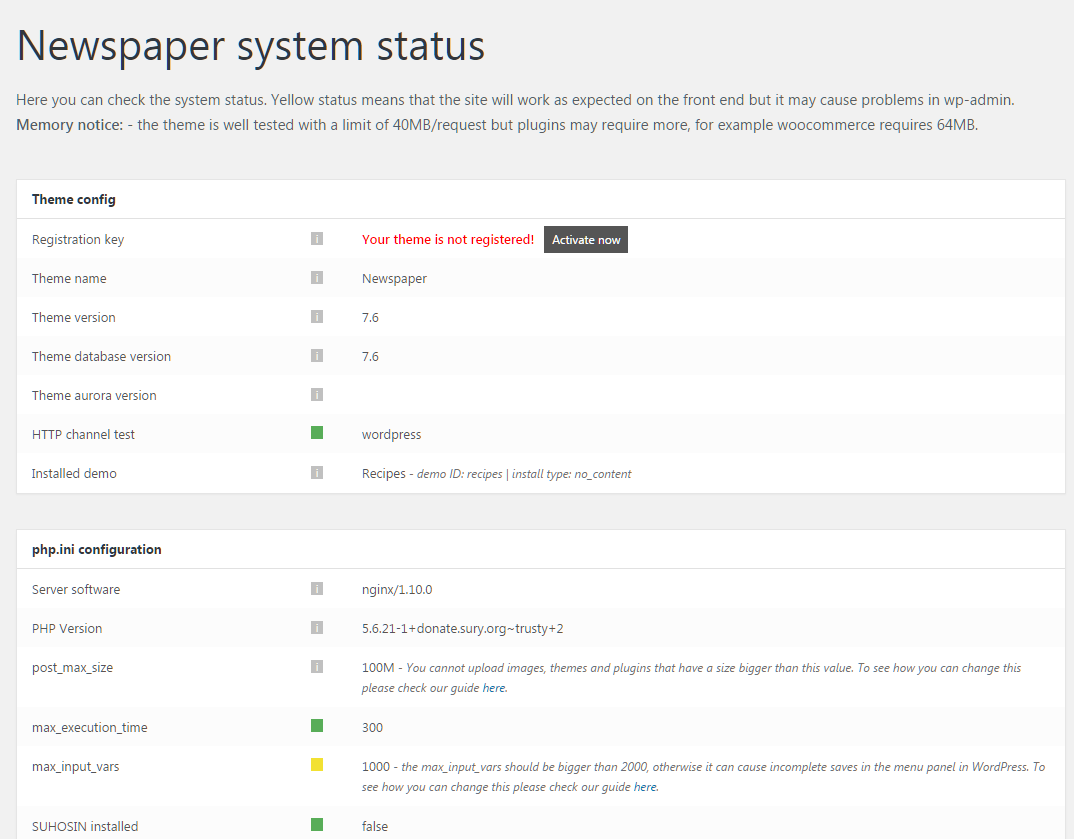
I just updated my Theme into the newest update / version 7.6 through my email and download it again on themeforest. Is there anyway I can just auto update it on my website?
Also, i tried to activate my registration key on the template but its getting an error once i click the activation button

 Bogdan B.
 Hello,
A new update was just released so please update your version of the theme and visual composer: https://forum.tagdiv.com/how-to-update-the-theme-2/
https://forum.tagdiv.com/how-to-update-visual-composer-plugin/
Then test this without any other plugins. disable all plugins except visual composer, clear cache and reset cdn files if you use it. Please also check any custom code you might have added to the theme panel or the theme files. If you use a child theme, please switch to the main theme to make sure it does not affect the proper functionality of the theme.
Let us know how it goes.
Thanks
 admindunet
 I downloaded the latest Newspaper update I bought, and installed as shown in your Visual Composer link.
When i want to create or edit a page or article, a blank page opens. But if I disable the visual composer it works very well.
Bogdan B. Hello Cosmin,
Sorry but unfortunately the demos cannot be changed dynamically. There is no such functionality implemented for the moment. It is a neat idea though and I will add it to our list for future updates. Maybe if the developers consider it, we will be able to bring such an option in future versions of the theme.
Thank you!
Bogdan B. Hello,
You do not have to buy visual composer and you do not need to update it from the plugin author. We will provide the updates along with our theme updates. Please read this guide: https://forum.tagdiv.com/how-to-update-visual-composer-plugin/
Thank you!
admindunetI bought a newspaper license, as soon as I want to do the Visual Composer update it tells me that I have to pay a new license for Visual Composer, Is that normal?
 stuartmasson
 Calm down dude. Visual Composer is notorious for breaking websites and clashing with other plugins, so the developers will not endorse a newer version until they are 100% happy that it will work with your theme. The theme or associated plugins may need modifications to work happily with Visual Composer 5.0, or it may be that the Visual Composer developers have made some errors and need to introduce a 5.0.1 update for it to work.
In the meantime, the latest version of VC (4.12.1) works just fine. If you want to live on the edge and risk your site breaking, go ahead and buy the latest version of Visual Composer for yourself.
 Catalin
 Hello NathiM,
You must update the theme to the latest version of it which is Newspaper 7.5 because this type of problem was been solved in our latest updates.
Thanks for the message!
 Fidel de Rooy
 Hey kfx!
I finally came into a solution for this issue by my self, regarding the logo resolution problem. Catalin simply did not provide the expected quality support (not a great theme support experience for me so far), so I’ll post it here step by step in case you can use it:
1. First of all, produce (via Illustrator or Photoshop) a high quality resolution PNG image of your logo. Try not to exceed a width of 1400px. Make sure it looks really sharp. Consider leaving a transparent background if needed.
2. Optimize it by uploading/downloading it to/from Optimzilla. This is to ensure your image achieves the minimum file size possible, while keeping its quality.
3. Upload it to your WordPress Media Library.
4. Change your logo image in the Theme Panel settings Theme Panel> Header> Logo & Favicon (be sure to load the proper image in both “Logo Upload” and “Retina Logo Upload” fields).
5. Go to Pages> Home, and open the Visual Editor for your homepage. Once in the Visual Editor, add this code into the Custom CSS option at the top right portion of the editor:
.td-logo {

    display: inline-block;

    width: 55%;

}
See http://www.screencast.com/t/zBtkB7Acv, if needed. You can always adjust the width property to your desired size.
6. Click “Save Changes”, and finally “Update” your page. When done, you should see a really sharp logo image in your header, like the one displayed in my site.
Hope it works!
Cheers,
Fidel
-
This reply was modified 9 years by
Fidel de Rooy.
-
This reply was modified 9 years by
 finanspara
 Do we expect to update for 1.5 months?
 aberniz
 Hi Chris! very insightful advice.
I am going over each of the points you sugest to check.
I will keep you updated.
Thank you very much,
Angel
 cityguide
i was happy for a long time but suddenly since last week update my contend is gone !!!???
every post is still available but content is gone .
already disabled all plugs to check what happen but no success..
 ronny3c
Hello,
In the global settings we have the option to show the author linked to author page and publish date. I would like a small variation on this.
I would like to show the last updated date (better for seo) and the author name without link to the author page.
Is this possible? And how can i arrange this?
Thanks!
Ronny
Bogdan B. Hello,
There seems to be a bug in the super cache plugin. Please use this topic for a quick fix until they update the plugin: https://forum.tagdiv.com/topic/mobile-theme-problems-3/#post-133756
Thank you!
Catalin Hello EverydayCareerGirl,
I do not exactly understand what you mean through the app? Notice that if you will update the Visual Composer, only this plugin will have to be updated and no other applications which are not related to plugin.
Thanks for the message!
Bogdan B. Hello,
The requests to admin ajax come from all the complex visual composer elements on your site. Please reduce the number of ajax uses by reducing pagination on most blocks, ajax filters, and other complex elements from visual composer. You can also make sure you use the latest version of the theme: https://forum.tagdiv.com/how-to-update-the-theme-2/
https://forum.tagdiv.com/how-to-update-visual-composer-plugin/
Thank you!
 jollyroger
Hello,
one of my sites is no longer working properly with mobile devices, while it keeps loading correctly with PCs.
The site is:
I tested it with my mobile device using android and with an iphone and it does not work correctly. Instead of the normal page that shows the articles of the different categories it shows the Visual Composer code.
I know it worked correctly about 10 days ago and after I noticed the problem I updated the theme and also the visual composer plugin but the problem continue.
Please provide support for this problem.
Thanks and regards
Gian L.
Catalin Hello judopower,
If you want to replace the theme to another website, you should only delete the theme from the old domain and install it to the new domain and it is ok. Before each update or migrating theme you should make a full backup to your data to be safe.
Thanks for the message!
Catalin Hello MahakPreet Singh,
Please try to update the theme to that latest version of it which is Newsmag 3.2 because this type of issue was resolved in our update. You should make your update via FTP because this is the surest method in this regard. -> https://forum.tagdiv.com/newsmag-install-via-ftp/
Thanks for the message!
 Fausto
 Just updated to 7.5, still the same 🙁
