- NewsmagHow to update a plugin
- NewsmagHow to update the theme
- NewsmagHow to update the WPBakery plugin
- NewsmagCategory templates
- NewsmagWhat’s included in Newsmag theme package
- NewsmagAjax view count
- NewsmagSmart Lists
- NewsmagFeatured images
- NewsmagFeatured image or video
- NewsmagModal window
- NewsmagtagDiv slider gallery
- NewsmagVideo playlist
 jsup
jsup Either way, there’s a “problem here:
if td-login-wrap is not supposed to affect colours, it should be taken out (since it’s not doing anything)
or
if the colours are meant to be adjusted, the css overrides for td-login-wrap should be updated to include the new prefix: eg; “mfp-content .td-login-wrap {”
(Specific Example: This is an override the appears in the css relevant to the login modal box – it includes an override for “.td-login-wrap” {V2 style login}, but not “.mfp-content .td-login-wrap” {V3 style login} – the login css should be either removed or updated from this override 🙂 :
.td-header-border::before, .td-trending-now-title, .td_block_mega_menu .td_mega_menu_sub_cats .cur-sub-cat, .td-post-category:hover, .td-header-style-2 .td-header-sp-logo, .td-next-prev-wrap a:hover i, .page-nav .current, .widget_calendar tfoot a:hover, .td-footer-container .widget_search .wpb_button:hover, .td-scroll-up-visible, .dropcap, .td-category a, input[type=”submit”]:hover, .td-post-small-box a:hover, .td-404-sub-sub-title a:hover, .td-rating-bar-wrap div, .td_top_authors .td-active .td-author-post-count, .td_top_authors .td-active .td-author-comments-count, .td_smart_list_3 .td-sml3-top-controls i:hover, .td_smart_list_3 .td-sml3-bottom-controls i:hover, .td_wrapper_video_playlist .td_video_controls_playlist_wrapper, .td-read-more a:hover, .td-login-wrap .btn, .td_display_err, .td-header-style-6 .td-top-menu-full, #bbpress-forums button:hover, #bbpress-forums .bbp-pagination .current, .bbp_widget_login .button:hover, .header-search-wrap .td-drop-down-search .btn:hover, .td-post-text-content .more-link-wrap:hover a, #buddypress div.item-list-tabs ul li > a span, #buddypress div.item-list-tabs ul li > a:hover span, #buddypress input[type=”submit”]:hover, #buddypress a.button:hover span, #buddypress div.item-list-tabs ul li.selected a span, #buddypress div.item-list-tabs ul li.current a span, #buddypress input[type=”submit”]:focus, .td-grid-style-3 .td-big-grid-post .td-module-thumb a:last-child::before, .td-grid-style-4 .td-big-grid-post .td-module-thumb a:last-child::before, .td-grid-style-5 .td-big-grid-post .td-module-thumb::after, .td_category_template_2 .td-category-siblings .td-category a:hover, .td-weather-week::before, .td-weather-information::before
jsup Hmm.. OK.. I changed my colour scheme in Version 2 of this theme, and they disappeared on the login modal box only when I updated to Version 3… Was it accidental that my login modal box was taking on colours from the theme’s color panel in version 2?
I realise a few extra parts were added / split off with the new mobile menu that has been created, but I guess I just assumed whoever recoded the login box simply used a new range of style tags that had not been included in the color lists… but if you say it was never meant to be like that, fair enough.
It seems weird to me that the overide CSS that gets applied on the same page as the login window includes “.td-login-wrap” as an overide (it never applies, because it’s not specific enough) – even in your version 3 color code overrides…..
..”.td-login-wrap” was the old class that was used in V2’s old login box used to use before you introduced .mfp-content in front of that selector….. Are you sure? If so, that’s a waste of a css tag if it’s not meant to do anything..
 Bogdan B.
 Hello,
Please update your theme to the latest version 7.1.1 by following this guide: https://forum.tagdiv.com/how-to-update-the-theme-2/ also: https://forum.tagdiv.com/how-to-update-visual-composer-plugin/
Please make sure you meet the requirements for newspaper: https://forum.tagdiv.com/requirements-for-newspaper/ and also increase your system status parameters: https://forum.tagdiv.com/system-status-parameters-guide/
Thank you!
 Nana
Nana Ok, so I get it, its not user id, its not playlist ids, is individual video ids. I might be the only one who didnt get it but i, think this could be made a little more clear. I was under the assumption that a user id could be used and the plug in will generate the playlist of videos from the account, or a playlist could be entered and the same will happen. If I am wrong and it can work by youtube playlist id please do let me know.
Anyways, thanks for the update.
 recons
 Andrei, you are welcome.
It would be good if the code or other solution would be included in your updates.
 Catalin
 Hello J-Michael,
Please keep in mind that Visual Composer come bundled with our theme and you will have to use only the version which comes with the theme and not other to achieve better results. Our latest version of the theme is Newspaper 7.1.1 and the right version for required plugins are -> Visual Composer 4.11.2 and Social Counter 4.1.
As you can see, all the plugins are in constant development. Each plugin will have to be checked with our theme for a good working and this process it may take a while. For example, the latest version of Visual Composer is 4.12 and the latest version of the plugin which has been tested with our theme is 4.11.2. In the future, after our developers will check this latest version of Visual Composer with the theme and they will find that the theme does not need to do some adjustments for, we will release an update with the latest version of Visual Composer (4.12). Until we will release the update with these latest versions you will have to ignore these messages.
So, please notice that if you want to have the latest version of the Visual Composer, you will need to have the additional license of this plugin and also, we cannot say for sure if this version of Visual Composer will work 100% with the theme because this version it is in testing.
For more information about Visual Composer, please check our documentation here -> https://forum.tagdiv.com/how-to-update-visual-composer-plugin/
Thanks for your understanding!
 Syambarkah
Hi,
I updated to newsmag 3.0 and found out the mobile menu has changed (I use fashion demo).
(1) How can I edit the mobile menu window (the window after clicking menu on mobile)? (the default background is kind of purplish with all social media button being shown)
(2) Can I do something with search? It seems the searching process from new search kinda slow and redundant.
Let’s say I’m a reader. There will be a new mobile search window after clicking the button. After I enter the keyword, need to wait for result to be shown on that window. But then the window closing and bringing me back to the result page (not on search window anymore).
here’s the url http://www.bukusakumama.com
It seems those things are easily done from the theme panel if I use newspaper theme. How about on newsmag?
(3) I wonder how to keep updated whether a new visual composer update is ready to download? (Usually I wait for the plugin to tell me if a new update has come, but I realize need to wait for tagdiv crews to put it on test first)
Keep up the good work,
Thanks
Bogdan B. Hi,
This means you need to update your visual composer plugin as there were a few issues regarding the compatibility between visual composer under version 4.11 and WP 4.5
Please update your plugin using this guide: https://forum.tagdiv.com/how-to-update-visual-composer-plugin/
You can find the latest version of the plugin inside the main archive you can download from envato.
Thank you!
Bogdan B. Hi,
As stated here: https://forum.tagdiv.com/how-to-update-visual-composer-plugin/ you cannot activate visual composer nor do you need to. It is a free version provided bundled with the theme and it cannot be activated or updated through the WP dashboard.
Thank you!
Bogdan B. Hi,
The fix for this is quite simple. You need to update your social counter. The old social counter is not compatible with newspaper 7 so it got updated to version 4.1 Please disable your social counter and delete files from the plugins section of Wp and then install the new social counter from the theme panel: http://screencast.com/t/Cmi2XwlLa
Thank you!
jsup Steps to replicate issue on a fresh install:
Set up a vanilla site. Change the colour scheme from blue backgrounds and blue writing to say red or something.
You will see nothing will update the colours of the login modal in full screen mode. Only applying forced custom css will work.
If this is by design, great – but in version 2 some colours did apply.
-
This reply was modified 10 years by
jsup.
Catalin Hello nooseitcom,
Please ensure that you have updated your theme to the latest version of it (Newspaper 7.1.1, Visual Composer 4.11.2 and Social Counter 4.1) only through FTP because this is the surest method in this regard. Please try to disable all the active plugins, leave just Visual Composer to active, clear all your caches and install only the plugins that come bundled with our theme and rule out the conflicting plugins. Also, if you are some trouble with saving and if you are using the Wordfence plugin, please try to disable it or try to set it according to Bryson T advice, from here -> https://forum.tagdiv.com/topic/cant-save-theme-settings/
Also, please ensure that your parameters are increased to be higher, according to our documentation here -> https://forum.tagdiv.com/system-status-parameters-guide/
Hope this helps and let us know how it goes!
Thanks for your understanding!
Bogdan B. Hi,
Visual composer had a few issues with version 4.5 of WP and it needs to be updated. The latest version of the plugin we provide is 4.11.2 Please download the theme from themeforest again and install the plugin from the main theme archive. You can use this guide: https://forum.tagdiv.com/how-to-update-visual-composer-plugin/
You can also update your theme to the latest version by following this guide: https://forum.tagdiv.com/how-to-update-visual-composer-plugin/
Thank you!
Bogdan B. Hi,
Unfortunately we have not tested http2 yet. I will add this on our list for future updates and if the development team decide it will get done, we will add compatibility for it in future theme version.
Thank you!
Catalin Hello Regiane100,
Please ensure that you have fully downloaded the latest version of the theme from the Theme Forest and then please make sure if you have fully installed the theme using the FTP method because this is the surest one in this regard. For more information about theme installation and update, please consult our documentation here -> https://forum.tagdiv.com/install-via-ftp/ -> https://forum.tagdiv.com/how-to-update-the-theme-2/
Hope this helps!
Thanks for your understanding!
 Andrei L.
 Hi
Make sure you update the theme according with our documentation because by default there shouldn’t be the Calendly icon. To make a clean install we recommend to update the theme via ftp method: https://forum.tagdiv.com/newsmag-install-via-ftp/
Thanks!
Andrei L. Hi
The theme create Featured category when it is installed for first time. The code which generate that category is located in td_first_install.php file: http://screencast.com/t/iSvZkyr8t There are defined the name and slug for that category which are used in code for different features.
You can use below code in function.php file to define a new category
wp_insert_term('Flash', 'category', array(

	'description' => 'Flash posts',

	'slug' => 'flash',

	'parent' => 0

));
I am not sure how you want to use this new category but to achieve the same exact functionality as for Featured category are required lots of customization. Basically you will have to search in theme’s code for each usage of Featured category name and add in code a case for your new category.
This is a complex task which involve good coding skills in order to be achieved. Unfortunately we cannot offer customization services at the moment so if you still need guidance on this or you’re not aware of the steps you need to take in this regard please consider hiring a developer or a freelancer to do this for you.
To reduce the number of days considered by 7 days sorting you have to edit td_data_source.php: http://screencast.com/t/nkiFBNen6B and td+page_views.php: http://screencast.com/t/DhtmnFzEbh and update the indicated value.
Thanks!
 Alin [tagDiv]
 Hi,
Please make sure you use the latest theme version 3.0 and update also the plugins provided with the theme (Visual Composer, Social Counter).
You can follow these guides(update using ftp method) – https://forum.tagdiv.com/newsmag-how-to-update-the-theme/ – https://forum.tagdiv.com/newsmag-how-to-update-visual-composer-plugin/
If the issue persist please send an email contact@tagdiv.com and provide wp-admin access so we can take a look and provide an answer as soon as possible. Also paste a link to this conversation.
Thanks!
-
This reply was modified 10 years by Alin [tagDiv].
Catalin Hello sobb29,
Please keep in mind that Visual Composer come bundled with our theme and you will have to use only the version which comes with the theme and not other to achieve better results. Our latest version of the theme is Newspaper 7.1.1 and the right version for required plugins are -> Visual Composer 4.11.2 and Social Counter 4.1.
As you can see, all the plugins are in constant development. Each plugin will have to be checked with our theme for a good working and this process it may take a while. For example, the latest version of Visual Composer is 4.12 and the latest version of the plugin which has been tested with our theme is 4.11.2. In the future, after our developers will check this latest version of Visual Composer with the theme and they will find that the theme does not need to do some adjustments for, we will release an update with the latest version of Visual Composer (4.12). Until we will release the update with these latest versions you will have to ignore these messages.
So, please notice that if you want to have the latest version of the Visual Composer, you will need to have the additional license of this plugin and also, we cannot say for sure if this version of Visual Composer will work 100% with the theme because this version it is in testing.
For more information about Visual Composer, please check our documentation here -> https://forum.tagdiv.com/how-to-update-visual-composer-plugin/
Thanks for your understanding!
 DaneOLeary
 Hey @Andrei_Luca
I just updated my Newsmag theme to 3.0 and since I’d forgotten to copy the files I’d changed, I’m having to go back through and change everything again.
One of the changes I’m making is adding the Calendly icon to my social media icons in the top bar. But if you’ll notice when you look at my website, there’s a > by the Calendly icon at the end and I can’t figure out why.
Here’s my code: http://i.imgur.com/ApOHhrJ.png
 J-Michael
 The price include visual composer and slider rervolution
There is a new version of Visual Composer WPBakery. View details of version 4.12. The automatic update is not available for this plugin. To receive automatic updates license activation is required. Please visit settings to activate your Visual Composer. Got Visual Composer in theme?
Activate Slider Revolution for Premium Benefits. You can Enter an existing licence key or Purchase a licence key.
Please one solution. thanks
J-Michael I thought the problem was solved, but no, the continuous problem and the solution on the forum it is no longer
There is a new version of Visual Composer WPBakery. View details of version 4.12. The automatic update is not available for this plugin. To receive automatic updates license activation is required. Please visit settings to activate your Visual Composer. Got Visual Composer in theme?
that no solution for this issue and the slider 5 same thing happens, require license
J-Michael Fixed backend, follow the instructions in this forum, plugin updated. frontend does not appear. In the menu of work, lack visual composer.
 gomerblog
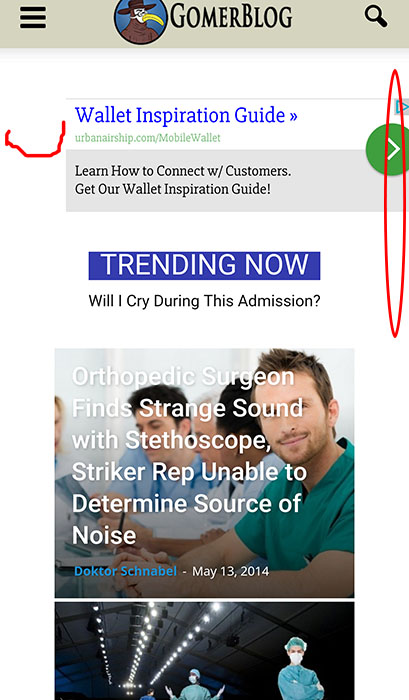
Hello I just updated to 7 and noticed our ads are shifted to the right on mobile. http://www.gomerblog.com/pics/mss.jpg . There looks to be some padding that is not needed. On ios the whole site is slightly scroll-able left to right because of this. Any ideas? Thanks
 gauravhasija
Hi,I’ve purchased & installed Newspaper theme from themeforest & now when there is a message that
“Hola! Would you like to receive automatic updates and unlock premium support? Please activate your copy of Visual Composer.”
And when i try to activate it says there is no license, purchase one.
What should i do?