Harrison
 And also how do I update to newspaper 6 from within WordPress without needing to uninstall as indicated form your YouTube video.
 kognitoweb
 Hi,
Alright, seems like these are the only possible pagination possibilites. Would be great to have a normal pagination to be implement in future updates, since its really a Standard possibility to paginate posts, and it must be easy to put this back in.
Also another strange issue is when using pages with “latest articles and pagination”, there, it is not possible to use the Ajax Filter with Tags for example, which, doesnt make sense at all also. Its just feedback and a feature request, thanks!
 Bogdan B.
 Hi,
If you have the latest version of the theme, then you can update the visual composer plugin from the theme panel. Please acces your plugins section under installed plugins and remove and delete the visual composer plugin:
http://screencast.com/t/N2y6KwkN0 and then http://screencast.com/t/EMdOXUV3nUp
After you delete the plugin, install the new version from here: http://screencast.com/t/w4yRDbML
I hope this helps.
Thank you!
 paralaxe
Hi, there
Please help me solving this issue.
I have updated my site http://www.multidesportos.pt to the most recent versions of wordpress, newsmag and visual computer.
However images are not showing; menus have no links; vc not working in main page.
I have done all that was suggested: disabling all the plugins, clearing caches, aso, bu immages still not showing (neither the other probles solved).
Please help
Thanks,
Carlos Pereira
grupo.paralaxe@gmail.com
 Andrei L.
 Hi
This is a very complex task because there are many aspects that must be considered. Let’s take an image by 100x100px as example. This image will be displayed fine in a 100x100px container on desktop without additional customizations and filters for its quality. However on mobile devices the situation it’s a bit different. To display a image in a container by 100x100px without affecting image’s quality, the image must be at least by double size. That means that the image must have 200x200px to keep its good quality on mobile.
Loading big images on mobile devices is not a good practice because site’s load speed will be affected, also requires more traffic.
We still investigate this and hopefully in future updates we will come out with a better implementation. However I can’t say how much time will pass until some changes will be made as we need to find the best solution from any point of view.
Thanks for your suggestions and for your message.
Andrei L. Hi
After WordPress’s last update there appeared a jQuery conflict in our theme. We fixed this conflict and the current theme version available on themeforest works fine, also we included last version of Visual Composer plugin.
Try to update the theme at V 2.3.6, and Visual Composer at V 4.11.2 following our documentation: https://forum.tagdiv.com/newsmag-how-to-update-the-theme/ – https://forum.tagdiv.com/newsmag-how-to-update-visual-composer-plugin/
Thanks!
 Catalin
 Hello kognitoweb,
Please try to update the theme to the latest version. The pagination issue was solved in the older version of the update. Please check our changelog here > http://themeforest.net/item/newspaper/5489609 on the bottom of the page.
Hope this helps and let us know how it goes!
Thanks.
Catalin Hello fitnessfactory,
Please ensure that you have the latest version of the theme (v.6.7.1) and Visual Composer plugin (v.4.11.2), otherwise, please try to do it and check the results after this. For more information about updating, please check here -> https://forum.tagdiv.com/how-to-update-the-theme-2/ -> https://forum.tagdiv.com/how-to-update-visual-composer-plugin/
Hope this helps and let us know how it goes!
Thank you for the message!
 Boricua1
Hi:
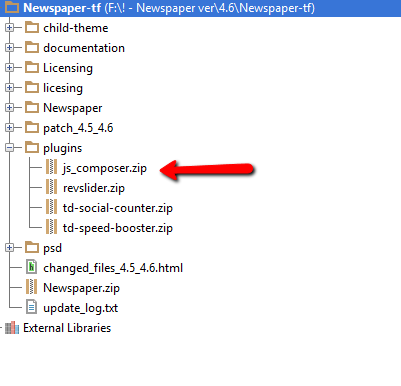
I have your theme (newspaper) already update. I’m not professional so I don’t understand where I can find de VC plugin that you describe in step 4. neither the files in https://forum.tagdiv.com/wp-content/uploads/2015/01/visualc_newspaper.png
Sorry, but I think I need more detailed instruccion. Can you help me?
As I remember the Envato people install your theme (not sure) for me.
Please help
ivonne
Catalin Hello eugqua,
Please notice that here is support department and our team handle only the issues/problems/situations that require support and this is not the team of developers. As I said you above, we have no such a list for default fonts, sorry! We have added this suggestion on our list of improvements and we will consider in next future updates but we cannot say for sure the exact date when it will be accomplished this. Sorry for the inconvenience and if you are unhappy and you want to request the refund, please send us an email at contact@tagdiv.com with your request in this regard.
Thank you for your understanding!
Sorry for the inconvenience!
 Xperten
 Won’t it delete all our settings on various pages, if we delete the Visual Composer first and then install the new one to update the plugin?
 vcandpro
 hi,
I updated theme+plugin but it’s stil not working..
Bogdan B. Hi,
The new version of wordpress ‘broke’ visual composer. They released an update and we included it in our theme update as well. Please update your theme and visual composer and thing will go back to normal:
https://forum.tagdiv.com/how-to-update-the-theme-2/
https://forum.tagdiv.com/how-to-update-visual-composer-plugin/
Thanks.
Bogdan B. Hi,
The new version of WP caused a few issues so please update your theme to the latest version: https://forum.tagdiv.com/how-to-update-the-theme-2/ and also update you visual composer plugin: https://forum.tagdiv.com/how-to-update-visual-composer-plugin/
As for the theme settings, make sure you have all the system status parameters increased according to this guide: https://forum.tagdiv.com/system-status-parameters-guide/
Thank you!
Catalin Hello Hugom,
Please consult our changelog here -> http://screencast.com/t/TpLU6FdwoJjt -> http://themeforest.net/item/newspaper/5489609 This kind of issue was resolved in an earlier version 6.6.2. I have checked your website and I saw that you are using the Newspaper 6.5.1 version. Please try to update your theme to the latest version 6.7.1. For more information about updating theme, please check here -> https://forum.tagdiv.com/how-to-update-the-theme-2/ Before doing the update, we recommend to do a backup.
Thank you for the message!
Bogdan B. Hi,
These changes are due to the social networks changing over time. The social counter plugin does not work anymore in your version. You will have to update and set it up according to the new facebook rules. Pleas update your theme to the latest version and also uninstall and delete the social counter and visual composer and install the ones that come with the theme. Please follow these guides to update:
https://forum.tagdiv.com/how-to-update-the-theme-2/
https://forum.tagdiv.com/how-to-update-visual-composer-plugin/
Also set up your new social counter version: https://forum.tagdiv.com/tagdiv-social-counter-tutorial-2/
Things change overtime and you have to keep up with the changes. If you do not update your theme regularly you will not benefit from the improvements and you will have issues as wordpress gets changed, social networks change and so on. Things will start to not work anymore if you do not update the theme.
Thank you!
Andrei L. Hi
@newsguy replied you here: https://forum.tagdiv.com/topic/visual-composer-stopped-working/
@snledo replied you here: https://forum.tagdiv.com/topic/update-wordpress-4-5-the-picture-does-not-appear-and-a-lot-of-error/
Thanks!
Andrei L. Hi
I’ve checked your site and noticed that your using an older version of the the and also Visual Composer plugin is outdated: http://screencast.com/t/y02wUfy7r Try tu update the theme at V 2.3.6 which is available on themeforest and also update VC at V 4.11.2 which is included in theme’s path. Here you can find our documentation about the update process: https://forum.tagdiv.com/newsmag-how-to-update-the-theme/ – https://forum.tagdiv.com/newsmag-how-to-update-visual-composer-plugin/
@haronno you don’t need to put this thread down. If you managed to solve your issue we will consider it as closed.
Thanks!
Andrei L. Hi
Make sure you’re using latest theme version available on themeforest, V 2.3.6, Also update Visual Composer at V 4.11.2 whici is included in theme’s path, clear all caches and test again. Here you can find our update documentation: https://forum.tagdiv.com/newsmag-how-to-update-the-theme/ – https://forum.tagdiv.com/newsmag-how-to-update-visual-composer-plugin/
Thanks!
Andrei L. Hi
Please address us ion English as we don’t speak Spanish and it’s hard to understand your requests.
Try to update the theme at current version available on themeforest, V 2.3.6 and also update Visual Composer at V 4.11.2. Here you can check our documentation for more details about the update process: https://forum.tagdiv.com/newsmag-install-via-wordpress/ – https://forum.tagdiv.com/newsmag-how-to-update-visual-composer-plugin/
Thanks!
Catalin Hello travisnw,
If you have not done some customization through code, it is not necessary to make the child theme because your settings will be loaded in your database and in the next update you will not loose them.
Thank you for the message!
Andrei L. Hi
The theme wasn’t intended to import different menu style from other theme and I can’t say how this will affect it’s functionality. Most likely will be required some customizations and many tests to make sure that the new menu will work fine.
We certainly plan to extend the theme flexibility in the future updates. I’ve added your suggestion on our list and when the time comes our developers will consider it. This may take some time because we have a long implementation list and we take them one by one.
Thanks for your suggestion, have a nice day.
Andrei L. Hi
@newsguy @iisnet mak sure you’re using latest version of Visual Composer included in theme’s path, V 4.11.2: https://forum.tagdiv.com/newsmag-how-to-update-visual-composer-plugin/ deactivate all plugins except Visual Composer and test again.
@RachelG when you’re using the Envato Toolkit to update the theme you will also get latest version of Visual Composer but will not become active until you activate it. Deactivate and delete the old version of VC, clear all caches then install new plugin’s version from Plugins panel: http://screencast.com/t/S7Jd4CGMi
Thanks!
Andrei L. Hi
I’ve checked your site and you’re not using our theme now so I can’t say for sure why you have this issue. Please make sure that you’re using last theme version available on themeforest, V 2.3.6 and also use Visual Composer V 4.11.2 which is included in theme’s path. Here you can check our documentation about the update process: https://forum.tagdiv.com/newsmag-how-to-update-the-theme/ – https://forum.tagdiv.com/newsmag-how-to-update-visual-composer-plugin/
Thanks!
 fitnessfactory
 I also have the problem with the visual composer…
Since the last update Version 6.7.1 I have a problem with the visual composer. The Visual composer isn’t activated anymore. I’d try everything is written in the documentation and this support forum but it doesn’t work.
The versions are 6.7.1 of the theme and version 4.11.2 of visual composer. I installed the visual composer new for 10 times, but no changes.