
 genfinity
Hello I was looking at this article(https://forum.tagdiv.com/unique-articles/) for making a page have unique posts, but I am not able to find the page settings for my homepage.
Can someone please walk me through how to edit my homepage template to enable the unique posts features?
Thank you
 jojo99
I realized I was behind in the theme updates (my other themes have easy auto updates) and am running v9.8. I also had a malware issue from the tagDiv plugins that I had to clean up.
I tried to update to the current version but it completely breaks my site. How can I update without it messing up the site?
 commandeleven
 We have no child theme, nor any CSS code added. The plugins with 12.6.1 were updated, but threw the whole site out of whack.
We updated and installed all the plugins related to 12.6.1, but when it wrecked our site, I downgraded again and fixed the mistakes caused by the update.
I am willing to give you credentials to login and sort out the problem, otherwise we will be looking for a new theme that doesn’t continuously cause problems for us.
 debasishsinha
 All required mandatory plugins of the standard pack plugins are installed and updated as well but still the codes are exposed. If there was a space to upload the screen shorts i would have uploaded them. Well, here is the link Please have a look https://www.insysdnet.com
 liza_dev
I have a mobile theme for main page. After last update to Newspaper 12.3 I saw that header contain custom content – text Newspaper Pro. Also default blocks in body looks not as earlier.
 msakande
 Dear,
since this morning the plugin tagDiv Cloud Library AUTO DISABLED
When I try to enable it I get the error Plugin Error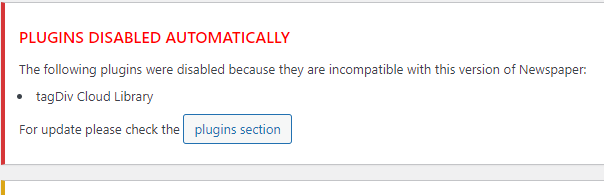 .
.
I delete the plugin and install it again, but I cannot activate it.
The Theme is up to date 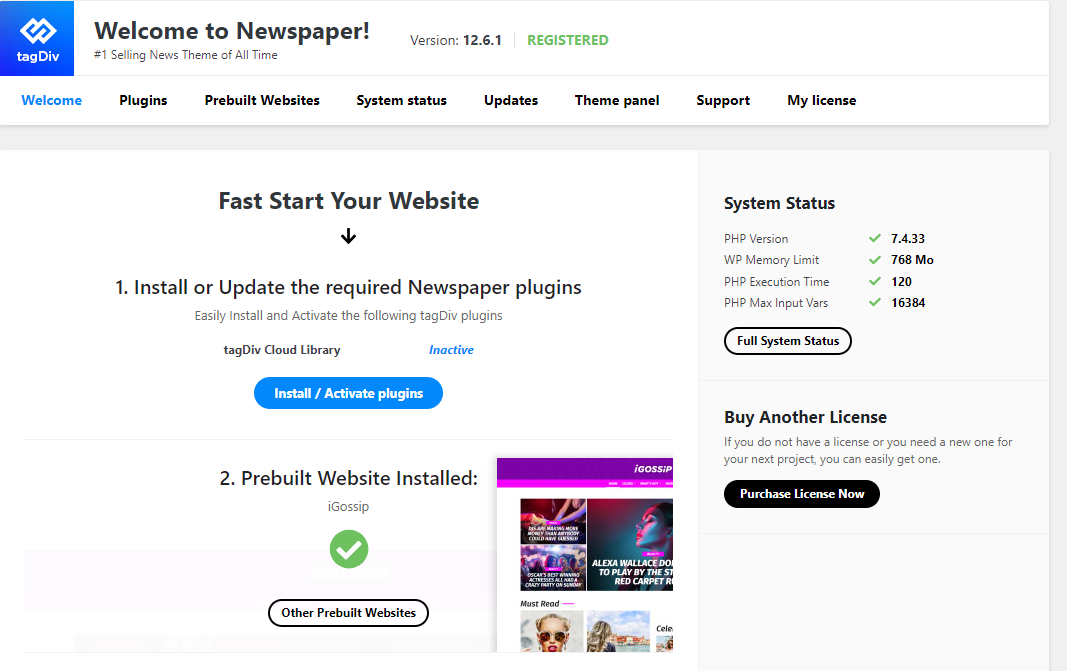
 Bettina
 Hello @novodia!
If you use cloud templates, then you need to change the logo in the tagdiv Composer.
Please check our tutorial here: https://forum.tagdiv.com/tagdiv-composer-tutorial/
More documentation about the cloud templates is here:
– https://forum.tagdiv.com/cloud-library-templates/
– https://forum.tagdiv.com/design-post-pages-using-cloud-library-templates/
– https://forum.tagdiv.com/cloud-library-category-templates/
We have 3 options for mobile versions that you can use:
1. Responsive version: A responsive version of your website looks similar to the desktop version. TagDiv Composer is used to edit the page.Click on the mobile viewport: https://www.screencast.com/t/XDQJedlggSB. There, you can see your mobile version and edit or adjust the elements to look better.
2. Mobile pages: https://tagdiv.com/newspaper-10-3-7-update-brings-customizable-and-fast-mobile-pages
3. Mobile theme plugin: The Mobile Theme is a performance-optimized theme included in the main Newspaper theme that only loads on mobile devices. It comes with its own templates and designs for pages, posts, categories, etc., so your current templates from the desktop theme will get converted to the mobile theme layout. Please see https://forum.tagdiv.com/the-mobile-theme/ and https://forum.tagdiv.com/mobile-theme-introduction/ for more information.
A full explanation is here: https://www.youtube.com/watch?v=SpGkOnJeNZY
If you need to use mobile version 1 or 2, then you need to uninstall the Mobile Theme plugin and AMP.
Thank you!
commandelevenHello,
After downgrading to 12.5.1, we thought the new update would solve the issues of the 12.6 update, instead it’s created more.
The header is completely wrong and we haven’t been able to get into other pages to see how bad they are.
When we downgraded back to 12.5.1, the problems of 12.6.1 didn’t disappear.
 Anamaria
 Hi,
You need to disable the mobile theme and amp to have mobile responsive version.
Using our theme you can choose from 3 mobile versions
-> mobile responsive => https://www.screencast.com/t/oJ2ShOp47
-> mobile theme plugin => https://forum.tagdiv.com/the-mobile-theme/
-> mobile page => https://tagdiv.com/newspaper-10-3-7-update-brings-customizable-and-fast-mobile-pages/
If you created the mobile pages with tagDiv Composer, then when you install the Mobile Theme plugin, your pages will be overwritten by the plugin (the mobile theme comes with its templates for page, post, category, etc so your current templates from the desktop theme will get converted to the mobile theme layout, the page content is made without builders in mobile editor => https://www.screencast.com/t/xbgZG8kH also, the options that are provided to edit the mobile theme version are limited (this keeps the things simple)).
This is a video about Responsive Newspaper Theme, AMP & Mobile Theme, Mobile Pages & Templates -> https://www.youtube.com/watch?v=SpGkOnJeNZY
So, the mobile responsive is what you see then that you select the viewport on phone => https://www.screencast.com/t/matV17hH, so some settings may apply for each viewport(where is the border blue), and others are not(where the border is black).
The mobile page has the mobile templates from Cloud Library => https://www.screencast.com/t/YCcZ8rL8
The Mobile responsive version of the theme and the mobile page editor can be edit with tagDiv Composer, the mobile theme plugin cannot.
For example, you can have the mobile theme plugin activated and use the mobile page/mobile responsive version for the homepage/pages, but for the categories pages/404 page, you can’t use the mobile page/mobile responsive version if you have the mobile theme plugin activated.
So, if you want to design the pages with tagDiv Composer, you can use the mobile page or mobile responsive version.
Thank you!
Anamaria Hi,
When you update, please use the main theme, not the child theme. I recommend that you update the theme manually https://forum.tagdiv.com/how-to-update-the-theme-2/ via FTP/cPanel/File Manager, also if possible disable extra plugins during the theme update to avoid any problems that may arise and make sure that you have activated the tagDiv Standard pack plugin to keep the website’s look. You can try to update the theme on a staging website.
After you update the theme, you need to update the theme plugins too.
In the worst cases, the settings in the theme panel may be lost (there have been isolated cases), in these cases, after the theme plugins that were previously used are activated, you will have to use a backup for the theme panel -> https://forum.tagdiv.com/import-export-theme-settings/
Thank you!
 Airane
  pixlgr
 Hi Anamaria,
thanks for your quick reply. We thought of this strategy because the direct update causes a lot of problems on our website. We we would like to do it in 2 steps. You’d still advice do everything alltogether?
Kind regards
Anamaria Hello,
There are a lot of updates and I think it might be a “waste of time” to update the website with each version of the theme. You can also try to update on a subdomain or staging website and try to update the theme to the latest version and see what problems may arise. -> https://forum.tagdiv.com/how-to-update-the-theme-2/
You should download the latest version of it from the Theme Forest account
Please make a full backup to all files and database => https://www.youtube.com/watch?v=LAJXrSI-dDA
Here you can find information about the changes that have occurred in each update over time https://tagdiv.com/newspaper/
I recommend that you update the theme manually https://forum.tagdiv.com/how-to-update-the-theme-2/ via FTP/cPanel/File Manager, also if possible disable extra plugins during the theme update to avoid any problems that may arise and make sure that you have activated the tagDiv Standard pack plugin to keep the website’s look. You can try to update the theme on a staging website.
After you update the theme, you need to update the theme plugins too.
In the worst cases, the settings in the theme panel may be lost (there have been isolated cases), in these cases, after the theme plugins that were previously used are activated, you will have to use a backup for the theme panel -> https://forum.tagdiv.com/import-export-theme-settings/
Thank you!
 sandeep15r
 Please work in this regard. It is essential for the Mobile theme to show “updated date” in blog posts. The reason is that Google indexes mobile pages and more people search on mobile phones than desktop.
Pl do the needful in matter.
pixlgrHi team,
I need to update my website from version 10.x.x.. I would like to first update to Newspaper 11 and then to Newspaper 12 – can I download the older theme files somewhere (those of 11)?
Kind regards
debasishsinhaThe header is broken and codes are exposed , no internal changes done , though it will be rectify after the theme update but even after update of the theme its same.
 Yigi
YigiHello, I updated my Word Press and I have problems installing the tagDiv Composer Plugin. When installing it, it sends me the error that it could not create folders or upload files. My WordPress version is the latest, and my PHP version is too
Bettina Hello!
Make sure your plugins are up to date.
Activate the Standard Pack plugin.
That option need to be in Post Settings -> Post and custom post types -> show date.
Thank you!
 jamie@gundigest.com
 Hello Bettina,
Our pages are not default or built with another builder.
It is extremely frustrating that we are asking for help from TagDiv support and you are responding with cut and paste replies from other support threads, and that now you are saying that we need to completely redesign our website.
We have read all the other threads on this topic and in some of them you ask for login credentials for the site so your team can take a look. Are you no longer providing this type of support?
We have only ever used tagDiv Newspaper as our theme, so we don’t think it’s unreasonable to ask for help when your latest version is not displaying our site correctly and there seems to be no way to repair it. We paid to update our account to give access to support, but we don’t feel like you’ve provided much support thus far.
Please let us know what kind of actual support is available outside of links to other threads and suggesting that we completely redesign our site of 7000+ posts.
Thank you,
Bettina Hello!
We have 3 options for mobile versions that you can use:
1. Responsive version: A responsive version of your website looks similar to the desktop version. TagDiv Composer is used to edit the page.Click on the mobile viewport: https://www.screencast.com/t/XDQJedlggSB. There, you can see your mobile version and edit or adjust the elements to look better.
2. Mobile pages: https://tagdiv.com/newspaper-10-3-7-update-brings-customizable-and-fast-mobile-pages
3. Mobile theme plugin: The Mobile Theme is a performance-optimized theme included in the main Newspaper theme that only loads on mobile devices. It comes with its own templates and designs for pages, posts, categories, etc., so your current templates from the desktop theme will get converted to the mobile theme layout. Please see https://forum.tagdiv.com/the-mobile-theme/ and https://forum.tagdiv.com/mobile-theme-introduction/ for more information.
A full explanation is here: https://www.youtube.com/watch?v=SpGkOnJeNZY
If you need to use mobile version 1 or 2, then you need to uninstall the Mobile Theme plugin and AMP.
Every mobile version has its own settings section.
Thank you!
Bettina Hello @ramiz1819 !
Unfortunately, AMP is not working with the cloud templates because the AMP’s layout is not fully customized.
The AMP version works best with default templates and not cloud templates. That’s why we integrated it with the Mobile theme plugin.
The feedback from our clients about AMP was negative and it is not used anymore, that’s why we didn’t add more customization options. From my point of view, if you don’t use the Mobile Theme plugin, then there is no reason or benefit to AMP.
We have 3 options for mobile versions that you can use:
1. Responsive version: A responsive version of your website looks similar to the desktop version. TagDiv Composer is used to edit the page.Click on the mobile viewport: https://www.screencast.com/t/XDQJedlggSB. There, you can see your mobile version and edit or adjust the elements to look better.
2. Mobile pages: https://tagdiv.com/newspaper-10-3-7-update-brings-customizable-and-fast-mobile-pages
3. Mobile theme plugin: The Mobile Theme is a performance-optimized theme included in the main Newspaper theme that only loads on mobile devices. It comes with its own templates and designs for pages, posts, categories, etc., so your current templates from the desktop theme will get converted to the mobile theme layout. Please see https://forum.tagdiv.com/the-mobile-theme/ and https://forum.tagdiv.com/mobile-theme-introduction/ for more information.
A full explanation is here: https://www.youtube.com/watch?v=SpGkOnJeNZY
If you need to use mobile version 1 or 2, then you need to uninstall the Mobile Theme plugin and AMP.
Thank you!
Bettina Hello @kmosek !
Unfortunately, no. There were a lot of SEO reasons why our developers implemented it like that.
So, if our developers find a useful method for this, then it will be added to the next updates. Otherwise, no.
Thank you for understanding!
Bettina Hello @antcariello !
I think the problem may be caused by the infinite loading of the pages. But our feature will load only the needed images on the page. And it did not load the useless images.
Our developers are aware of this issue and try to synthesize the composer, which is big, and fix the major problems of the theme and speed in the latest update.
This issue about ajax calls has been discussed already here, please check: https://forum.tagdiv.com/topic/content-preloading-admin-ajax-php/
Thank you!
Bettina Hello @remuninja!
If you use default templates and some settings disappear after the update, please activate the Standard Pack plugin from Newspaper -> Plugins.
If you use cloud templates, then you should add the elements to the page with the help of the tagdiv Composer plugin.
We recommend using cloud/PRO templates in order to have the possibility to edit them with the TagDiv Composer, which contains a lot of functions and features. Please check our tutorial here: https://forum.tagdiv.com/tagdiv-composer-tutorial/
More documentation about the cloud templates is here:
– https://forum.tagdiv.com/cloud-library-templates/
– https://forum.tagdiv.com/design-post-pages-using-cloud-library-templates/
– https://forum.tagdiv.com/cloud-library-category-templates/
Thank you!
Anamaria Hello,
Using our theme you can choose from 3 mobile versions
-> mobile responsive => https://www.screencast.com/t/oJ2ShOp47
-> mobile theme plugin => https://forum.tagdiv.com/the-mobile-theme/
-> mobile page => https://tagdiv.com/newspaper-10-3-7-update-brings-customizable-and-fast-mobile-pages/
If you created the mobile pages with tagDiv Composer, then when you install the Mobile Theme plugin, your pages will be overwritten by the plugin (the mobile theme comes with its templates for page, post, category, etc so your current templates from the desktop theme will get converted to the mobile theme layout, the page content is made without builders in mobile editor => https://www.screencast.com/t/xbgZG8kH also, the options that are provided to edit the mobile theme version are limited (this keeps the things simple)).
This is a video about Responsive Newspaper Theme, AMP & Mobile Theme, Mobile Pages & Templates -> https://www.youtube.com/watch?v=SpGkOnJeNZY
So, the mobile responsive is what you see then that you select the viewport on phone => https://www.screencast.com/t/matV17hH, so some settings may apply for each viewport(where is the border blue), and others are not(where the border is black).
The mobile page has the mobile templates from Cloud Library => https://www.screencast.com/t/YCcZ8rL8
The Mobile responsive version of the theme and the mobile page editor can be edit with tagDiv Composer, the mobile theme plugin cannot.
For example, you can have the mobile theme plugin activated and use the mobile page/mobile responsive version for the homepage/pages, but for the categories pages/404 page, you can’t use the mobile page/mobile responsive version if you have the mobile theme plugin activated.
So, if you want to design the pages with tagDiv Composer, you can use the mobile page or mobile responsive version.
Thank you!
