
 Anamaria
 Hi,
So, please disable the mobile theme plugin and check the results.
Also, please provide the link to your website and screenshots.
Using our theme you can choose from 3 mobile versions
-> mobile responsive => https://www.screencast.com/t/oJ2ShOp47
-> mobile theme plugin => https://forum.tagdiv.com/the-mobile-theme/
-> mobile page => https://tagdiv.com/newspaper-10-3-7-update-brings-customizable-and-fast-mobile-pages/
If you created the mobile pages with tagDiv Composer, then when you install the Mobile Theme plugin, your pages will be overwritten by the plugin (the mobile theme comes with its templates for page, post, category, etc so your current templates from the desktop theme will get converted to the mobile theme layout, the page content is made without builders in mobile editor => https://www.screencast.com/t/xbgZG8kH also, the options that are provided to edit the mobile theme version are limited (this keeps the things simple)).
This is a video about Responsive Newspaper Theme, AMP & Mobile Theme, Mobile Pages & Templates -> https://www.youtube.com/watch?v=SpGkOnJeNZY
So, the mobile responsive is what you see then that you select the viewport on phone => https://www.screencast.com/t/matV17hH, so some settings may apply for each viewport(where is the border blue), and others are not(where the border is black).
The mobile page has the mobile templates from Cloud Library => https://www.screencast.com/t/YCcZ8rL8
Mobile responsive version of the theme and the mobile page editor can be edited with tagDiv Composer, the mobile theme plugin not.
For example, you can have the mobile theme plugin activated and use the mobile page/mobile responsive version for the homepage/pages, but for the categories pages/404 page you can’t use the mobile page/mobile responsive version if you have the mobile theme plugin activated.
So, if you want to design the pages with tagDiv Composer, you can use the mobile page or mobile responsive version.
Thank you!
 ajsakal
https://ajsakal.com/
Missing all Icons on my newspaper theme WordPress Website.for your kind information I already updated my site upto date but still not showing.
 christianmuda
 Hi,
I did find an easy solution.
1) Changed to 20-23 theme
2) Removed all plugins from past theme
3) Updated all other plugins
4) Installed Newspaper with no issues!
Anamaria Hello,
Yes, in the next update will be added.
Thank you!
 Bettina
 Hello!
Unfortunately, the mobile theme won’t work like that. If you uninstall the mobile theme, then you will see that the smartlists will display on the mobile viewport as well.
Actually, we have 3 options for mobile versions that you can use:
1. Responsive version: A responsive version of your website looks similar to the desktop version. TagDiv Composer is used to edit the page.Click on the mobile viewport: https://www.screencast.com/t/XDQJedlggSB. There, you can see your mobile version and edit or adjust the elements to look better.
2. Mobile pages: https://tagdiv.com/newspaper-10-3-7-update-brings-customizable-and-fast-mobile-pages
3. Mobile theme plugin: The Mobile Theme is a performance-optimized theme included in the main Newspaper theme that only loads on mobile devices. It comes with its own templates and designs for pages, posts, categories, etc., so your current templates from the desktop theme will get converted to the mobile theme layout. Please see https://forum.tagdiv.com/the-mobile-theme/ and https://forum.tagdiv.com/mobile-theme-introduction/ for more information.
A full explanation is here: https://www.youtube.com/watch?v=SpGkOnJeNZY
If you need to use the mobile version 1 or 2, then you need to disable the Mobile Theme plugin.
You can choose the mobile version and the menu you want to use. By default, we use option 1 for mobile, and you can customize it from the tagdiv Composer.
Thank you!
 tw144
tw144 I updated the post and cleared the cache, but still cannot see the duration. Can you try with this video? https://www.himmlisches-jerusalem.de/wp-content/uploads/media/video/DEU/Wer-ist-der-antichrist_mobile.mp4
Thanks!
 romerito13
 HI Ana,
No, it’s not solved. My problem is that I’m not able to change the actual banner.
Now there is a AdSense banner, but I want to change it in header for this code:
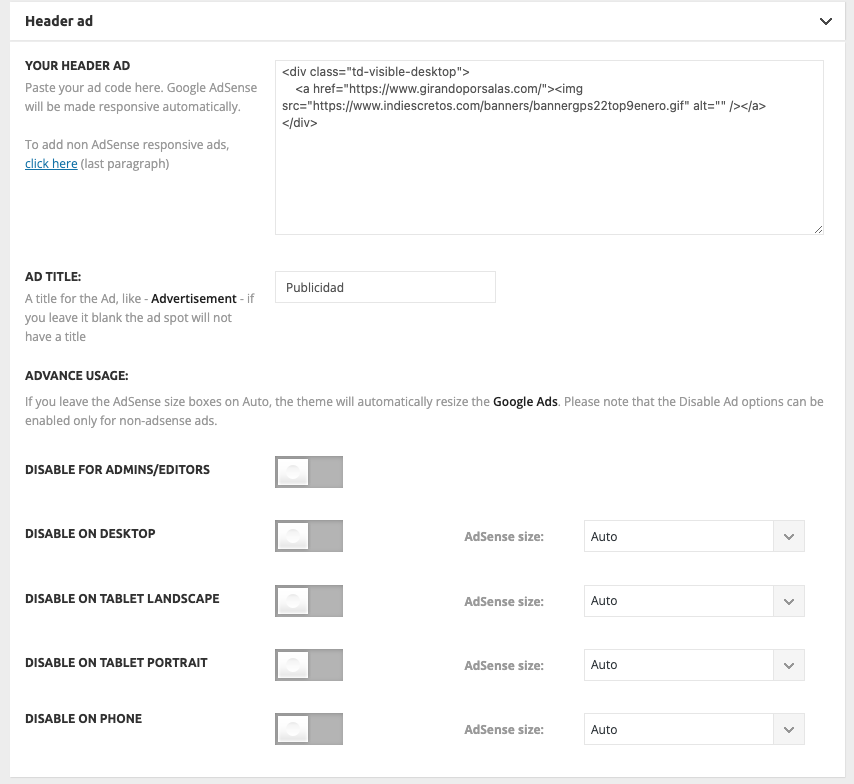
But it’s not being updated and Adsense banner remain located instead customized.
-
This reply was modified 3 years by
romerito13.
Anamaria Hi,
I did a test and for me, the video duration is displayed https://i.imgur.com/nFOuIRO.png please try to update the post and clear the cache.
Thank you!
Bettina Hello!
Then this file cannot be overwritten with the child theme.
Make the modification directly on the code, save and replace it after the update.
Thank you!
 Atithya
It has come to my notice that view counts which shows up on right corner of every article, wp is counting them very low as compared to analytics. Why is it so?
 smga
smgaHello
patchstack.com just sent out a warning about a vulnerability in the WPBakery Page Builder Plugin < 6.13.0
The vulnerability is characterized as Cross Site Scripting (XSS)
In the latest template update, we got WPBakery version – 6.11.0
Does this issue currently affect site owners with the Newspaper template, and if so, what actions to expect?
Thank you in advance
Bettina  platamun47
 Dear Betina,
any update about this.
thanx in advance
 PatWire
 What was the solution for this?
I have the same issue with Litespeed cache – some content blocks not updating, others are updating
When in TDComposer they show as updated, but after saving they show older posts. Offset is blank and they are sorted as Latest by Category.
Thank you
-
This reply was modified 3 years by
PatWire.
 jonybuy
 Update: already sent all the details.
jonybuy Hello, Anamaria.
This happened yesterday and we didn’t updated anything – wordpress version, theme version, plugins. We had all that to update, but we didn’t changed anything, and from nothing, website stopped working correctly.
I already updated wordpress version, theme version and plugins, but the problem persists. I even tried to do a rollback from the actual version of the theme to the previous one, but the problem persists.
For example, if you go here, you will see that nothing works as it should…
Anamaria Hello,
Have you checked if don’t have a plugin conflict? Did you update a plugin or the theme recently?
Also, you can try to reinstall Cloud Library and the tagDiv Composer plugins. Delete them and reinstall from Newspaper -> plugins
Thank you!
Bettina Hello @aevtimov !
Actually, we have 3 options for mobile versions that you can use:
1. Responsive version: A responsive version of your website looks similar to the desktop version. TagDiv Composer is used to edit the page.Click on the mobile viewport: https://www.screencast.com/t/XDQJedlggSB. There, you can see your mobile version and edit or adjust the elements to look better.
2. Mobile pages: https://tagdiv.com/newspaper-10-3-7-update-brings-customizable-and-fast-mobile-pages
3. Mobile theme plugin: The Mobile Theme is a performance-optimized theme included in the main Newspaper theme that only loads on mobile devices. It comes with its own templates and designs for pages, posts, categories, etc., so your current templates from the desktop theme will get converted to the mobile theme layout. Please see https://forum.tagdiv.com/the-mobile-theme/ and https://forum.tagdiv.com/mobile-theme-introduction/ for more information.
A full explanation is here: https://www.youtube.com/watch?v=SpGkOnJeNZY
If you need to use the mobile version 1 or 2, then you need to disable the Mobile Theme plugin.
You can choose the mobile version and the menu you want to use. By default, we use option 1 for mobile, and you can customize it from the tagdiv Composer.
Thank you!
 tonyl
tonyl PROBLEM SOLVED
Solution was:
1) Install YOAST plugin and activate the option to remove the “/catgeory/” word from the URL.
2) Update permalinks so they just contain the post name.
 Romi
Romi Okey I’ll try your advice, I will update if this work, thank you very much, Nagib Alaydrus
Anamaria Hi,
If you need to make an update, before please make a full backup to all files and the database, in case something goes wrong. => https://forum.tagdiv.com/how-to-update-the-theme-2/
Here you can find information about the changes that have occurred in each update over time https://tagdiv.com/newspaper/
After you update the theme, you need to update the theme plugins too.
In the worst cases, the settings in the theme panel may be lost (there have been isolated cases), in these cases, after the theme plugins that were previously used are activated, you will have to use a backup for the theme panel -> https://forum.tagdiv.com/import-export-theme-settings/
The child theme is used if you made changes in the theme files.
Thank you!
Bettina Hello Jeremy!
Actually, we have 3 options for mobile versions that you can use:
1. Responsive version: A responsive version of your website looks similar to the desktop version. TagDiv Composer is used to edit the page.Click on the mobile viewport: https://www.screencast.com/t/XDQJedlggSB. There, you can see your mobile version and edit or adjust the elements to look better.
2. Mobile pages: https://tagdiv.com/newspaper-10-3-7-update-brings-customizable-and-fast-mobile-pages
3. Mobile theme plugin: The Mobile Theme is a performance-optimized theme included in the main Newspaper theme that only loads on mobile devices. It comes with its own templates and designs for pages, posts, categories, etc., so your current templates from the desktop theme will get converted to the mobile theme layout. Please see https://forum.tagdiv.com/the-mobile-theme/ and https://forum.tagdiv.com/mobile-theme-introduction/ for more information.
A full explanation is here: https://www.youtube.com/watch?v=SpGkOnJeNZY
If you need to use the mobile version 1 or 2, then you need to disable the Mobile Theme plugin.
You can choose the mobile version and the menu you want to use. By default, we use option 1 for mobile, and you can customize it from the tagdiv Composer.
Thank you!
Anamaria Hello,
The update was lunch May 18th, 2023, so now you can find it in the Composer, Gallery -> https://i.imgur.com/5keZ4Ke.png
Also, to add more images element wasn’t added, because there were some issues.
Thank you!
 Calin
Calin Hi,
Indeed, we have similar reports and we consider that there can be something in the tagDiv Standard Pack plugin. We already informed our developers and the plugin will be checked and we’ll make sure it will be fixed for the coming theme update.
Thank you for your understanding!
 kopisz
Hello!
It is not clear to me whether it is possible to update the theme without using a child theme so that the page does not fall apart?
If I just install the main theme and update, will there be no problem? With other WP themes, this does not work without a child theme, the page falls apart in the event of an update, it can only be solved with a child theme to prevent this from happening.


