
 Calin
Calin Hi,
Please select an element from the page and if it appears to have only 2 viewports like this – https://i.imgur.com/qxokRl4.png then you edit a mobile page https://tagdiv.com/newspaper-10-3-7-update-brings-customizable-and-fast-mobile-pages/ and not the main page.
 discernin
 Hi,
Any updates on this issue? I sent the login details to the email address contact@tagdiv.com to verify the installation. Please don’t hesitate to ask if you need any further information.
By the way, is this issue only related to the test mode? In other words, if I activate Stripe in production mode, will I be able to start charging subscriptions to my audience?
Regards,
Calin Hi,
Regarding the item count option, it appears there was an issue. One of our developers has implemented a fix, and it will be included in the upcoming theme update.
We’ll follow up with you via email and let you know everything we can do to resolve this as quickly as possible.
Thank you!
 Sam
Sam We’ve detected potential vulnerabilities in installed plugins. Please check them and keep them updated.
Plugin: tagDiv Cloud Library
tagDiv Cloud Library [td-cloud-library] < 4.0
[+] CVE-2025-62032
Calin Hi,
A website can go down due to issues with the web host, high traffic spikes, cyberattacks, problems with themes or plugins, or errors in code.
To prevent future downtime, choose a reliable host, use a content delivery network (CDN), keep software updated, have regular backups, and monitor security.
How to keep a website from going down
9 Things to Do if Your WordPress Site Keeps Going Down
Thank you!
 petar777
 Hey there,
Yeah, got it. If possible – consider it for future updates, it would be useful for publishers because a lot of websites currently add links to Google News Showcase to boost traffic.
 Sim2
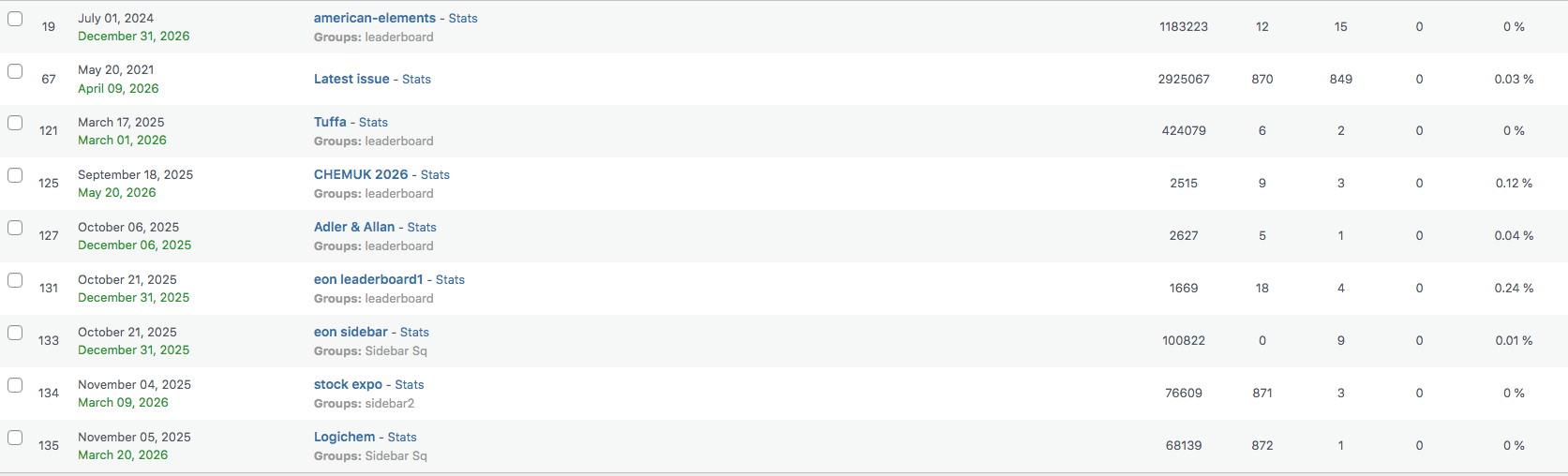
Sim2We use newspaper theme on our website chemicalindustryjournal.co.uk and we use a plugin called adrotate that manages ads on our site. Before we updated to newspaper 12 the stats for impressions from the header and the sidebar were consistently the same but since we have started to use the cloud templates the header stats have dropped down dramatically.
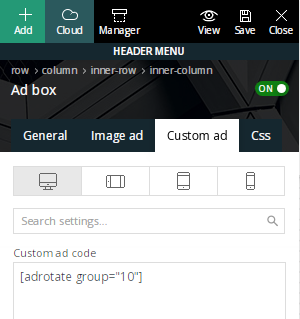
We use shortcodes in the ad box in header to place the ads and in the sidebar too, see screenshot, and we are just trying to work out why this is happening, does that make sense?
Calin Hi,
Unfortunately, the social counter currently does not support displaying Google News. However, you can create a custom button, style it to match your existing social icons, and link it to your Google News page. Please note that both the text and the count number will need to be added manually and updated whenever necessary. You may also need to apply custom CSS to ensure the button visually matches the style of the social counter.
Thank you!
 liz@dullesmoms.com
I deleted an old staging site, created a new one, and in my new staging site, the option to assign/unassign my theme is greyed out, and I can’t make a choice. I can’t test code until this is updated. Any advice?
Calin Hi,
If you have the last theme version Newspaper v12.7.3 and the opt-in builder is updated to the latest version 1.7.3, then please contact us via email at contact@tagdiv.com and provide wp-Admin acess, and we’ll also need strip access or screenshots with the settings you have.
Make sure this is set as in our guide https://forum.tagdiv.com/stripe-setup/
The theme files processing the strype are:
wp-content/plugins/td-subscription/includes/tds_api.php
wp-content/plugins/td-subscription/includes/shortcodes/tds_subscription.php
Thank you!
 Torgut
 Update: fixed by disabling and activating the SEO plugin
discerninHi,
I am writing to report a critical issue that is currently blocking the subscription checkout process on our website.
1. Issue Description
When attempting to complete a subscription purchase through the checkout, the process fails and returns the following error message directly from the Stripe API:
“stripe api > customers search/create error: Search is not supported on api version 2019-11-05. Update your API version, or set the API Version of this request to 2020-08-27 or greater.”
2. Technical Analysis
The error clearly indicates that the customer search functionality (customers search), which the plugin’s subscription logic attempts to use, is incompatible with the Stripe API version currently being initialised (2019-11-05).
Details on Investigation:
Account Version vs. Code Version: Our default Stripe account version is an older one (2019-11-05), which appears to be inherited by the plugin’s API calls.
Attempted Fix (Unsuccessful): We attempted to force a modern API version (2025-11-17) during the Stripe client initialisation within the tds_api.php file. We achieved this by modifying the StripeClient call to include the api_version parameter in the configuration array. However, the error persists, suggesting that the failing initialisation is either being performed or overwritten elsewhere in the code (potentially in tds_payment_api.php or a static configuration function).
3. Specific Request
To ensure a permanent fix that will not be lost in future plugin updates, we kindly request the following:
Confirmation of where the Stripe API version is initialised for the calls utilising customers search/create.
Provision of a WordPress filter hook (Action Hook or Filter Hook) that would allow us to externally inject the required API version (e.g., 2020-08-27 or the current latest version) before the failing API call is made.
Your help in resolving this critical issue promptly would be greatly appreciated.
Kind regards,
Calin Hi,
Before updating the theme, make a full backup.
After that, check teh theme plugins you are using and make sure that after the theme update, you also update those plugins (if the plugins are not updating automatically, you can do it from Newsapper > plugins).
Thank you!
 mediax
Hi there,
I recently Updated Newspaper theme. After update, i tested – all worked, besides search that gave an empty white screen. Doing some troubleshooting I noticed in console that an error 500 was thrown.
Looking at logs, i see this:
[21-Nov-2025 10:37:05 UTC] PHP Fatal error: Uncaught TypeError: Illegal offset type in /var/www/html/public_html/wp-content/plugins/td-composer/legacy/common/wp_booster/td_util.php:1196
Stack trace:
#0 /var/www/html/public_html/wp-content/plugins/td-composer/legacy/common/wp_booster/td_util.php(340): td_util::get_template_id()
#1 /var/www/html/public_html/wp-content/plugins/td-composer/legacy/common/wp_booster/td_wp_booster_functions.php(513): td_util::check_header()
#2 /var/www/html/public_html/wp-includes/class-wp-hook.php(324): td_load_css_fonts()
#3 /var/www/html/public_html/wp-includes/class-wp-hook.php(348): WP_Hook->apply_filters()
#4 /var/www/html/public_html/wp-includes/plugin.php(517): WP_Hook->do_action()
#5 /var/www/html/public_html/wp-includes/script-loader.php(2299): do_action()
#6 /var/www/html/public_html/wp-includes/class-wp-hook.php(324): wp_enqueue_scripts()
#7 /var/www/html/public_html/wp-includes/class-wp-hook.php(348): WP_Hook->apply_filters()
#8 /var/www/html/public_html/wp-includes/plugin.php(517): WP_Hook->do_action()
#9 /var/www/html/public_html/wp-includes/general-template.php(3192): do_action()
#10 /var/www/html/public_html/wp-content/plugins/td-standard-pack/Newspaper/header.php(11): wp_head()
#11 /var/www/html/public_html/wp-content/plugins/td-composer/td-composer.php(254): require_once(‘/var/www/html/p…’)
#12 /var/www/html/public_html/wp-includes/class-wp-hook.php(324): {closure}()
#13 /var/www/html/public_html/wp-includes/class-wp-hook.php(348): WP_Hook->apply_filters()
#14 /var/www/html/public_html/wp-includes/plugin.php(517): WP_Hook->do_action()
#15 /var/www/html/public_html/wp-content/themes/Newspaper/header.php(2): do_action()
#16 /var/www/html/public_html/wp-includes/template.php(810): require_once(‘/var/www/html/p…’)
#17 /var/www/html/public_html/wp-includes/template.php(745): load_template()
#18 /var/www/html/public_html/wp-includes/general-template.php(48): locate_template()
#19 /var/www/html/public_html/wp-content/themes/Newspaper-child/search.php(1): get_header()
#20 /var/www/html/public_html/wp-includes/template-loader.php(106): include(‘/var/www/html/p…’)
#21 /var/www/html/public_html/wp-blog-header.php(19): require_once(‘/var/www/html/p…’)
#22 /var/www/html/public_html/index.php(17): require(‘/var/www/html/p…’)
#23 {main}
thrown in /var/www/html/public_html/wp-content/plugins/td-composer/legacy/common/wp_booster/td_util.php on line 1196
Please could you offer me some advice on how to resolve this?
Thanks
 vineetdhiman
When i update my Newspaper theme to the latest version my home page design changes? Please help
Calin Hi,
While the AMP project itself is not officially deprecated, it is widely considered outdated and not a priority for modern websites. For WordPress, this means that while plugins like Si AMP for WP still receive updates to fix issues, AMP technology is less relevant because the performance benefits are now achievable through modern web standards and performance optimization techniques. It is often recommended to remove it and focus on improving the speed of your main site.
Thank you!
 toursuk
 Hi Calin,
So for weeks now, I have followed the guidance of and troubleshooting using the above article and these Newspaper Docs: https://forum.tagdiv.com/general-options-may-interfere-newspaper-theme/ https://forum.tagdiv.com/tagdiv-composer-not-working/ https://forum.tagdiv.com/requirements-for-newspaper/ https://forum.tagdiv.com/cache-plugin-install-and-configure/ https://forum.tagdiv.com/how-to-make-the-site-faster/ and although I learnt about not loading unused CSS & JS resulting in increased page speeds, the Wp Editor is still hanging :(.
I have updated the /wp-content + /wp-content/plugins .htaccess files accordingly, checked the php.ini file, changed the object cache plugin, checked the apache error logs, ran multiple diagnostic checks on the server configuration and still the WP editor hangs and I am exhausted on this.
Can someone from your team take a look for me please?
Thanks.
 Calin
Calin Hi,
We hope to make another update this year; unfortunately, it will not be in this one. This will include fixes and adjustments for CWV.
Thank you!
 ruilavrador
 Is there a reason specific or possible reason for the automatic update wont work on my wordpress instalation? Thanks for your reply.
Calin Hi,
In case you are not using the mobile theme plugin, then there are two other 2 situations.
Unfortunately, i can not see the image because the Cloudflare is down – https://i.imgur.com/DnPm99f.png
– in case you are using a mobile page /template https://tagdiv.com/newspaper-10-3-7-update-brings-customizable-and-fast-mobile-pages/
– in case you are using the option to disable the desktop zone on mobile and the mobile zone on desktop – https://i.imgur.com/TT2slI3.png https://i.imgur.com/jWPKhXS.png
In the above scenarios, there is a need to use a cache that can create and provide a cache per device (mobile and desktop cache), most of the cache plugins have this option.
Thank you!
Calin Hi,
I apologize the AJAX option for Flex Loop Filters has not been added yet. It’s on our improvement list and is currently in development. It will be included in one of the upcoming updates.
Thank you for your understanding!
 jcarhuazv
Hi, the new theme update requires an active license to enable editor mode with TagDiv Composer. I have the license on the website, but I need to test it on localhost before deploying some customizations. Do I need to purchase a new license to use it for development on localhost?
Calin Hi,
You can assign a mobile page template to a page from the frontend on the page you want to be – https://i.imgur.com/d0Br641.png https://tagdiv.com/newspaper-10-3-7-update-brings-customizable-and-fast-mobile-pages/ on pages will see the page that is a mobile page and you can also see on what page is the mobile page is assigned – https://i.imgur.com/0tk6fIA.png
Thank you!
Calin Hi,
Please make a full backup and update the theme to the latest version, Newsaper v12.7.3
Make sure that all current themes that are used before the theme update will also be used after teh theme update.
Thank you!
 kadsbaker
Hello,
Since updating the Newspaper theme my Homepage for mobile now redirects to a completely different page. This shows within the “pages” section and I can’t for the life of me figure out how to assign it back to the static homepage. It works on desktop, but for mobile instead of going to Home it goes to Gear Reviews. Website is http://www.ultralightnerd.com.
Screenshot: https://imgur.com/r5o7hBz
Anyone know how to reassign my Homepage to its own Mobile homepage instead of a different page altogether? Feel like I’ve tried most everything at this point point. Thanks!



