Anamaria
 Hello,
At the moment we have as documentation the video sent and this presentation => https://tagdiv.com/whats-new-in-the-newspaper-theme-10-4-update/
Thank you!
 kimbright
 The same happened to my site this morning after the 10.4 update. Had to revert back down to 10.3.9.1 to bring the site back up.
Help, support!
Thanks.
-
This reply was modified 5 years by
kimbright.
 rico11
Updated to 10.4 City Pro cloud templates (and maybe others) not appearing when browsing in “add new template”.
 RKdium
Hello guys,
My site is broken since update to 10.4.: https://www.londressecret.com/
The layout is completely broken.
I updated WordPress, Plugins, Theme to latest versions.
I have also reinstalled all TagDiv Plugins.
Standard Pack as well as Cloud Library are activated.
What can I do?
Best,
Roman
 bibendus
Hello everyone,
the widget in question works well, much better than various plugins on the net … but I would like to have, if possible, an additional function:
In the User Album view, it would be convenient to enter which albums to display, and not how many albums at the present time. This is because when creating a new album, the page in question would update, and this is not my case … I would like to see only the X Y Z albums …
it’s possible?
RKdiumHey guys,
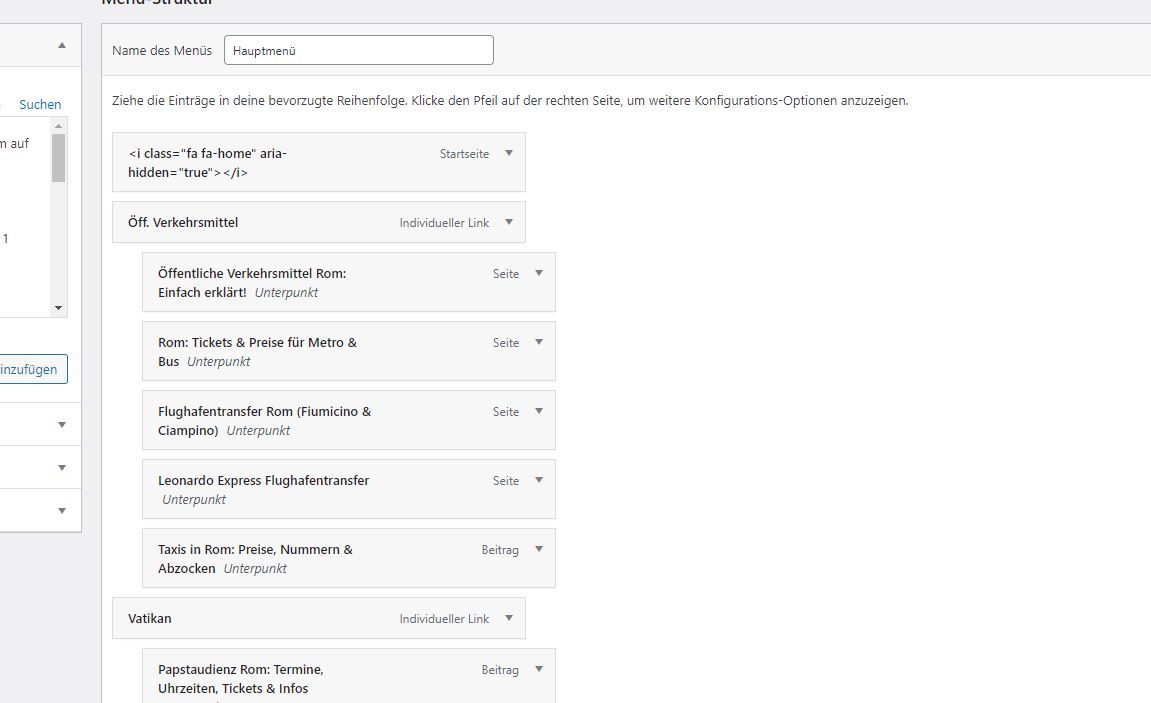
All of a sudden, the dropdown items in my menu disappeared and i can’t get my items in the menu builder from WordPress to drag.
I updated all plugins, theme, and WordPress to latest version, but it still doesn’t work.
Site is: https://www.rommalanders.com
My menu should look like that: https://www.rommalanders.com/wp-content/uploads/2021/01/Menu-Structure.jpg
Any idea what the problem could be?
Thanks a lot for your help!
 Vlad S
 Hello !
This issue is because you need to install and activate the TagDiv Standard pack plugin. From what version have you updated ? Also please note that using Newspaper 10.3+ there is no more needed the Speed Booster plugin.
Thank you !
 Bettina
 Hello!
If you don’t have the plugins up to date, any solution will not work for you that’s why I suggest to give it a try and check because if you had an old version to your updates, then the theme update is not updating your plugins automatically.
Also, you should reinstall the TagDiv Composer again and delete your cache(even from your browser).
We understand that your website means work, time, etc that’s why we recommend all the time a full backup before update.
If you tried all these solutions which was really helpful for a lot of clients, then there could be a plugin conflict.
Please give it a try and let us know about your results!
Thank you!
Bettina Hello!
Please check this topic because it could help you: https://forum.tagdiv.com/topic/there-is-showing-critical-error-on-my-website-after-update-10-4/
Let me know about your results!
Thank you!
Anamaria Hello,
The page speed is not related only to the theme that you are using, this is affected by plugins/content/ads/ external resources, etc.
You can see on our demos what page loading speed score can a website loaded with content can have -> https://demo.tagdiv.com/newspaper_pro/ . However, page loading speed can depend on many factors, and each website is unique from this point of view.
Let me explain some of these factors and maybe they give you some starting points for optimizing your website.
External factors: server speed, if you are using CDN or not, the external resources loaded by your website like ads, fonts, tracking scripts like Facebook Pixel, Google Analytics, Twitter analytics, Hotjar and so on.
Internal factors: the number of elements on the page, image size, image formats, if you are using mobile optimized layouts, console errors, if you are using the Standard Pack plugin on not, if you are using PRO demo or a standard one.
We have such a great result with this new update and with our new tool: https://www.youtube.com/watch?v=tnkVapqhIHc
Thank you!
 mungerald
 Got that, but how do i add the phrase “Last updated”
 admin_martinoBettina
 Hello Sean!
It seems you use a responsive version of your desktop and not the Mobile Theme plugin.
For this mobile version there is no cookies there.
A responsive version of your website is looking similar like on desktop, then you need to deactivate Mobile Theme plugin, edit the page with TagDiv Composer, click on the mobile viewport: https://www.screencast.com/t/XDQJedlggSB ; there you can see your mobile version and you can edit the elements there.
Check and let me know if you have a mobile page assigned to your homepage. For more information about this mobile version please take a look in this article: https://tagdiv.com/newspaper-10-3-7-update-brings-customizable-and-fast-mobile-pages/
Thank you!
Anamaria Hello,
With tagDiv Composer, you can add the element Single Post Modified Date in Single Post Template and
you can change the additional text in “Last updated on” => https://www.screencast.com/t/EvfUQMfzkd , and the Single Post Modified Date will show you the last time you edited that post => https://www.screencast.com/t/j74uz43paZj
You can change the position of the elements as you want them to look.
Hope this helps you!
Thank you!
 Peter
PeterHi there,
Update to version 10.4 causes the site to loose the header, mega menu and footer and breaks links to category posts. https://coconutoilpost.com/
This screen shot indicates the issues lie with the tag div speed booster 4.2 plugin. [Active or inactive]: Screen shot from clicking on post link All supporting plugins were updated as required. Booster did not have an update. Caches have been cleared PHP and memory is as required.
Can you please advise on how to fix the site.
Regards
Peter
PeterHi there,
Update to version 10.4 causes the site to loose the header, mega menu and footer and breaks links to category posts. https://coconutoilpost.com/
This screen shot indicates the issues lie with the tag div speed booster 4.2 plugin. [Active or inactive]: https://a.cl.ly/eDuj9bmO All supporting plugins were updated as required. Booster did not have an update. Caches have been cleared PHP and memory is as required.
Can you please advise on how to fix the site.
Regards
Peter
Bettina Hello!
Please note that if you use a cloud template, you need to do these settings in TagDiv Composer in the element called ” Single Post Content ” because if you set up just in theme panel, then they won’t display.
If you use a default template and did the settings in theme panel, then it should display well.
Also, try to reinstall the TagDiv Composer plugin, update your WordPress and TagDiv plugins and it should work just fine.
Thank you!
Anamaria Hello,
@MattiaVe for your error please make sure all the settings are like in our requirements, please follow the guide carefully
– https://forum.tagdiv.com/requirements-for-newspaper/
and please increase all requirements that are lower, and follow all steps and you do not have a plugin conflict, please deactivate ALL plugins except tagDiv plugins, also if you are using a child theme or cache plugin, deactivate them, clear all cache and try again.
@jesperj Please provide some screenshots with the problem, because otherwise, I have no way of knowing exactly what problem you have. Have you tried to do a test on a subdomain for iPad using only tagDiv plugins and see if it’s still a problem? maybe you have plugins that interfere with our theme and cause these problems.
@avtomir Please do a test on a subdomain and use only tagDiv plugins, and see if the ads from the sidebar are still on the top of the post. Also, please provide screenshots and a link to your website to investigate the problem.
@dnf67 as I said above, please do a test on a subdomain using only tagDiv Plugins, because the update can not change so radically the aspect of the website only if you have used extra plugins that are not tested with the theme and they interfere with her.
@Playground Lda. and @mathew I’m not sure I fully understand your issue, please provide more details (screenshots).
@slimster8 I think the problem can be from the plugin cache you use. Please try the WP Super Cache plugin https://forum.tagdiv.com/cache-plugin-install-and-configure/ and see if the problem persists. Also, if your host uses cache then you should not use any cache plugin, and maybe, the cache plugin used by the host may not recognize if you use mobile page or mobile theme.
In the future, it will be recommended that each one of you create a separate topic so that we can answer to each one in part, this is because in this topic many of you have different problems.
Thank you for understanding!
 ML
MLHello,
I have a problem since the most recent update. In the cloud template, when trying to edit a column text, the editor goes on infinity load.
Please check the link to see all errors appearing : https://imgur.com/4o3wkeW
I already tried deactivating all plugins. WP + Theme are up to date.
Thanks
Anamaria Hello, @StefanG,
Please make sure that you are using the last theme version, Newspaper v10.4 and last WordPress version 5.7 and please make sure all the tagDiv plugins are enabled.
Also, if you have the plugins enable, please make a test only with tagDiv plugins, if you have extra plugins please deactivate them and see if the tagDiv CSS Analyzer will be displayed.
The page speed is not related only to the theme that you are using, this is affected by plugins/content/ads/ external resources, etc.
Thank you!
 Calin
Calin Hi, as soon that our developers will implement all fix that are on our list it will be released the theme update, and yes we hope it will be now in April.
Thank you!
 esadd93
Hello again. After i update i realize another problem with my website. So sometimes when i check “next prev ajax” and see if its loading more content i see it doesnt work. Also tabbed blocks such as Flex block 3 and flex block 1 has these option too. So when i click on a category to see articles under that category i see that “square newspaper loading animation” get stuck and never load those categories. This happened twice now. I have fixed the issue by reloading wordpress 5.7 but i dont want to do this all the time.. Im sure theres something wrong because this happening after update. Please help. p.s: website working fine for now but not sure how long this error will come back again.
my website: neneden.co
Thank you very much
 keha
kehaHello. Since the last update, I have this message when I want to edit a page via tagDiv Composer. How do I fix this error?
Error at zones: 6(models) : 0(dom). The model does not match the content Current state has involved an issue. You could try an UNDO operation (CTRL+Z / CTRL+SHIFT+Z)
 cheryldimof
 OK, the issue on events seems to be solved. But I had to do it by switching out my single event template (the default page.php), which was working fine before the update. But with the template update, headers are displaying correctly again.
Thanks
 gooma2
I am trying to get the breadcrumbs off of my main homepage, but when you add the breadcrumbs module, it becomes sitewide without any seeming way to limit it.
I tried an earlier suggestion from Jan 2021, but that didn’t work, and I’m assuming with the sweeping changes in the update, there might be a different approach now.
Any help/suggestions would be great.
https://movietvtechgeeks.com/
Also, I have Yoast SEO breadcrumbs enabled (would that be causing an issue?)
Thank you,
Curt