
- Apitd_api_top_bar_template::update_key
- Apitd_api_top_bar_template::update
- Apitd_api_single_template::update_key
- Apitd_api_single_template::update
- Apitd_api_footer_template::update_key
- Apitd_api_footer_template::update
- Apitd_api_smart_list::update_key
- Apitd_api_smart_list::update
- Apitd_api_thumb::update_key
- Apitd_api_thumb::update
- Apitd_api_category_top_posts_style::update_key
- Apitd_api_category_top_posts_style::update
- Apitd_api_category_template::update_key
- Apitd_api_category_template::update
- Apitd_api_module::update_key
- Apitd_api_module::update
- Apitd_api_block::update_key
- Apitd_api_block::update
- Apitd_api_header_style::update_key
- Apitd_api_header_style::update
 Anamaria
 Hi,
So you resolved it? You can hide them with custom CSS because when you update theme, they will also be displayed.
Thank you!
 Bettina
 Hello!
Follow this guide to clean your WordPress and theme of malware: https://askwpgirl.com/10-steps-remove-malware-wordpress-site/
After that, you can update the theme to the latest update.
For every update, we always recommend the following:
-> First of all, please make sure you have a backup.
-> Please deactivate all the non-tested plugins with our theme before updating.
-> Update WordPress, PHP, the theme, and plugins to the latest version: https://forum.tagdiv.com/how-to-update-the-theme-2/.
-> Check all these requirements for the theme: https://forum.tagdiv.com/requirements-for-newspaper/
A last workaround is to start again with a new WordPress installation.
I hope that helps you!
Thank you!
 omattelin
Hello,
I am using the Infinite Loading for Single Posts feature in the Newspaper theme and I have a question regarding its functionality.
Is it possible to completely exclude posts from a specific category so they do not appear when scrolling through posts using the infinite loading feature?
If this is not currently possible, could you please let me know if there is any workaround I could use to achieve this functionality? Additionally, are there any plans to add this feature in future updates?
Thank you for your assistance!
 asiandrama
 Project: TheThinkingConservative.com
Old Theme: Living Mag Prebuilt Website
New Theme: Free News Prebuilt Website
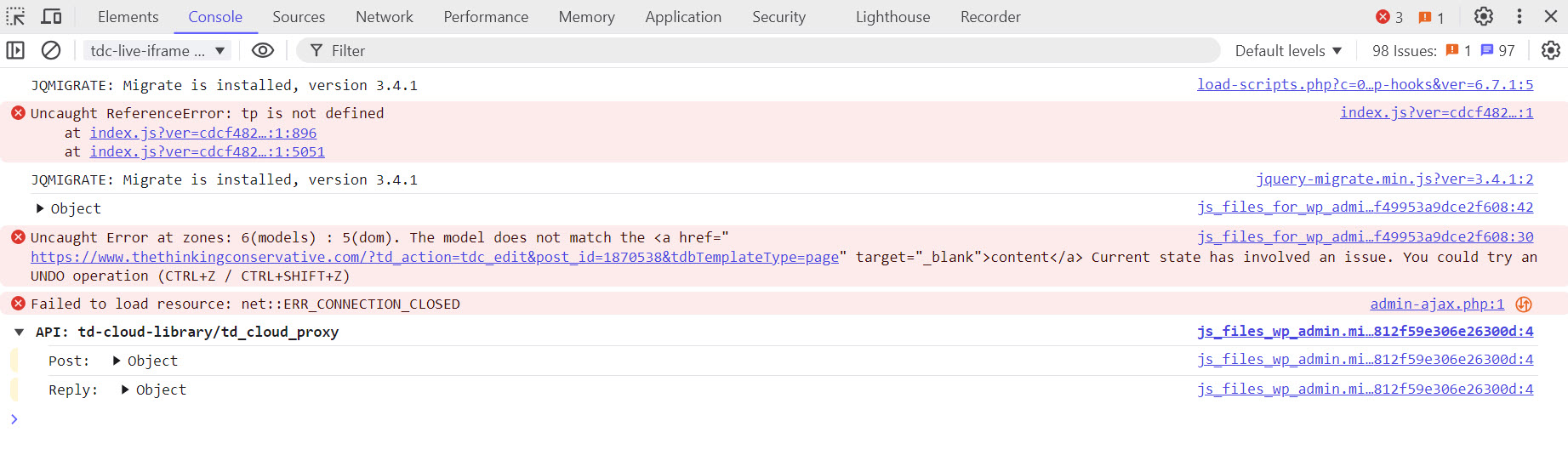
I just spent 2 days and one night updating my website from the Living Mag Prebuilt Website to the Free News Prebuilt Website. I figured everything out and the last thing I attempt to do was update TagDiv Social Counter info. When I went to save the page I got the following error message :
Error at zones: 6(models) : 5(dom). The model does not match the content Current state has involved. You can try an UNDO operation (CTRL+Z / CTRL +Z
Now my entire home page content disappeared except for the header. Please advise ASAP!!!
I have attached two images, one of the home page as it currently looks and a developer tools console screenshot. Please advise ASAP.
Is the home page content permanently gone. I can’t leave the site down like this.
Please advise ASAP!!!
Chrome Developer Console Screenshot
 mlazzeri
I need to update the newspaper theme version: 9.2.2 to the last one and I don’t see the update button to get the last version automatically.
Now I had to deactivate the tagdiv Composer plugin because is infected.
I want to update automatically, how can I make this action?
Anamaria Hello,
No, I think that we will do this year the update. The holidays are approaching, and Christmas vacation includes days off
Thank you!
 remodelschool
My tagdiv composer stopped working randomly about 24 hours ago. I tried to update the theme to the most recent version and I keep receiving this error:
“An issue has been encountered while trying to validate your license key
Please reset the key from the System status tab and try to activate it again, or contact our customer support team at contact@tagdiv.com.”
I reset the key and then I even purchased another key just to see if that would resolve the issue. Neither solution worked. I need help to resolve this issue ASAP as I use my site to sell products and I can’t update it.
What are my options?
 bakamann
 Thanks for the response, I understand since Bluesky opened up to the public a couple of months ago.
Do we expect a new theme update before the holidays or after the New Year?
Bettina Hello!
I can see that the Tech articles are not as blurry as the other ones. Ensure all your images are updated in full size in your Media Library.
Thank you!
Bettina Hello!
You have a pretty good score on the desktop (92-100). You should increase your performance on mobile.
Improving page speed in WordPress is crucial for providing a better user experience and optimizing your website for search engine rankings. Here are some tips to help you enhance your WordPress site’s page speed:
Optimize Images: Compress images before uploading them to your WordPress site. You can use plugins like WP Smush or EWWW Image Optimizer to automatically optimize images without losing quality.
Utilize Caching: Implement caching to reduce server load and speed up page loading times. WordPress caching plugins like WP Super Cache or W3 Total Cache can generate static HTML files of your pages to serve users instead of dynamically generating them each time.
Minify CSS and JavaScript: Minify your CSS and JavaScript files to remove unnecessary characters and reduce file sizes. This can be done manually or through plugins like Autoptimize or W3 Total Cache.
Enable GZIP Compression: Enable GZIP compression on your server to reduce the size of files sent from your server to users’ browsers. Most hosting providers offer GZIP compression, but you can also enable it through plugins like WP Rocket or W3 Total Cache.
Optimize Database: Regularly clean up and optimize your WordPress database to remove unnecessary data and improve performance. You can use plugins like WP-Optimize to automate this process.
Limit External Requests: Minimize the number of external requests your website makes by reducing the use of external scripts and widgets. Each external request adds overhead to your page’s loading time.
Enable Lazy Loading: Implement lazy loading for images, videos, and iframes so that they are only loaded when they are visible on the user’s screen. This can significantly reduce initial page loading times.
Optimize Server Response Time: Choose a reliable hosting provider with fast server response times. Consider using a content delivery network (CDN) to serve your content from servers closer to your users.
Regularly Update Plugins and Themes: Keep your WordPress core, plugins, and themes updated to the latest versions to ensure compatibility with the latest performance optimizations and security patches.
By following these tips, you can significantly improve the page speed of your WordPress website, leading to better user engagement, higher search engine rankings, and overall improved performance.
Thank you!
Bettina Hello!
Ensure your cloud header is global and that you assign the correct header to the Website Manager https://forum.tagdiv.com/tagdiv-composer-website-manager/ . If you use a mobile page, you should also convert the header and footer and assign them to the mobile page https://tagdiv.com/newspaper-10-3-7-update-brings-customizable-and-fast-mobile-pages/ .
Thank you!
 vignesh
 Ok Will check and update you thanks
 bwpage3
The change log for update 12.6.8 is not linking to the change log update to see the changes. It is linking to the website https://tagdiv.com/Newspaper/
Anamaria Hello,
1. You can add in the ad box only one image, you can try to use ad rotate and set the code in ad box-> custom code.
You can try if this plugin works https://wordpress.org/plugins/adrotate/ -> https://www.wpbeginner.com/plugins/how-to-manage-ads-in-wordpress-with-adrotate-plugin/
2. AMP is deprecated as of January 2023-> https://developer.bigcommerce.com/docs/storefront/wordpress/platform-integration/enabling-amp so we don’t longer recommend it.
3.Using our theme, you can choose from 3 mobile versions
-> mobile responsive => https://www.screencast.com/t/oJ2ShOp47
-> mobile theme plugin => https://forum.tagdiv.com/the-mobile-theme/
-> mobile page => https://tagdiv.com/newspaper-10-3-7-update-brings-customizable-and-fast-mobile-pages/ The option that you need to use.
Suppose you created the mobile pages with tagDiv Composer. In that case, when you install the Mobile Theme plugin, your pages will be overwritten by the plugin (the mobile theme comes with its templates for page, post, category, etc, so your current templates from the desktop theme will get converted to the mobile theme layout, the page content is made without builders in mobile editor => https://www.screencast.com/t/xbgZG8kH also, the options that are provided to edit the mobile theme version are limited (this keeps the things simple)).
This is a video about Responsive Newspaper Theme, AMP & Mobile Theme, Mobile Pages & Templates -> https://www.youtube.com/watch?v=SpGkOnJeNZY.
So, the mobile responsive is what you see when that you select the viewport on phone => https://www.screencast.com/t/matV17hH, so some settings may apply for each viewport(where is the border blue), and others are not(where the border is black).
The mobile page has the mobile templates from Cloud Library => https://www.screencast.com/t/YCcZ8rL8
The Mobile responsive version of the theme and the mobile page editor can be edit with tagDiv Composer, the mobile theme plugin cannot.
For example, you can have the mobile theme plugin activated and use the mobile page/mobile responsive version for the homepage/pages, but for the categories pages/404 page, you can’t use the mobile page/mobile responsive version if you have the mobile theme plugin activated.
So, if you want to design the pages with tagDiv Composer, you can use the mobile page or mobile responsive version.
Thank you!
Anamaria Hello,
Are you referring to having the post view on the posts? What is not working? To have the post views count on the posts, you need to edit the single post template and add the single post view -> https://forum.tagdiv.com/single-post-shortcodes/
Ajax post views count is a feature of the Newspaper theme that allows you to keep counting post views with cache plugins. Enabling this feature will update the post views, on single post pages, using Ajax.
Thank you!
 techclyde
Unable to update or change any details under the Theme Panel. When we click on ‘Save,’ it continuously shows a progress loop that never ends.
Kindly assist. Here is my website: https://onionminds.in
https://drive.google.com/file/d/1E-39yzsp37AD7RxVh-BWqke0fmfY4e4r
 macmandk
Hi guys. Just updated to version 5.4.3.1 and that changed the font in the main menu for posts. It’s now different from the font in the pages and the front page. Any solution for that?
Thank you, Carsten
 Santy
SantyGood morning. I have 3 problems to solve in case you can help me. 1-I need to upload several advertising banner images inside the same box. I have used ad box to upload some punctual but I would need several to appear within the same ad and be able to control the appearance with each page update to be able to offer it to customers. 2- I would also need those ads to appear in the mobile version as in the web version because in the amp version they do not appear and in the Mobile version they are placed in another area. 3- is there a possibility of making a design in the PC version and another in the mobile version? For example, that an ad appears in PC version above and on mobile that same ad below. Thank you very much for your help
 gabor
gabor Hello Annamaria,
Thanks for the very fast answer.
I tried with both PHP version 8.0 and 8.1 the very same error persists.
Meanwhile I also tried with other prebuild websites, for example with “DEFAULT PRO”, the very same error occurs. , so this is a more general issue. I also carefully read the other thread you linked https://forum.tagdiv.com/topic/error-at-zones-6models-1dom-the-model-does-not-match-the-content-currene/, but unfortunately there are no steps to follow there and also there is no solution described there 🙁
I am using official WordPress docker images, so any developer on your side can spin up exactly that image and reproduce the error:
– wordpress:6.7.1-php8.3-apache
or as you recommended:
– wordpress:6.7.1-php8.1-apache
– wordpress:php8.0-apache
For detailed diagnostics, all my experiences are on freshly installed images, with no other themes and plugins.
Theme name i Newspaper
Theme version i 12.6.8
Theme database version i 12.6.8
HTTP channel test wordpress
Installed demo i Default PRO – demo ID: default_pro | install type: full
System Status
————–
PHP Version 8.0.30
WP Memory Limit 384 MB
PHP Execution Time 600
PHP Max Input Vars 3000
WordPress Health Info from Tools -> Site Health
———————————————–
### wp-core ###
version: 6.7.1
site_language: en_US
user_language: en_US
timezone: +00:00
permalink: /%postname%/
https_status: true
multisite: false
user_registration: 0
blog_public: 1
default_comment_status: open
environment_type: production
user_count: 1
dotorg_communication: true
### wp-paths-sizes ###
wordpress_path: /var/www/html
wordpress_size: 56.95 MB (59713887 bytes)
uploads_path: /var/www/html/wp-content/uploads
uploads_size: 0.00 B (0 bytes)
themes_path: /var/www/html/wp-content/themes
themes_size: 20.08 MB (21059932 bytes)
plugins_path: /var/www/html/wp-content/plugins
plugins_size: 315.73 KB (323305 bytes)
fonts_path: /var/www/html/wp-content/uploads/fonts
fonts_size: directory not found
database_size: 4.70 MB (4931584 bytes)
total_size: 82.04 MB (86028708 bytes)
### wp-active-theme ###
name: Newspaper (Newspaper)
version: 12.6.8
author: tagDiv
author_website: https://themeforest.net/user/tagDiv/portfolio
parent_theme: none
theme_features: core-block-patterns, post-formats, post-thumbnails, automatic-feed-links, html5, woocommerce, bbpress, align-wide, align-full, editor-font-sizes, widgets-block-editor, editor-style, menus, widgets
theme_path: /var/www/html/wp-content/themes/Newspaper
auto_update: Disabled
### wp-themes-inactive (4) ###
Twenty Twenty-Five: version: 1.0, author: the WordPress team, Auto-updates disabled
Twenty Twenty-Four: version: 1.0, author: the WordPress team (latest version: 1.3), Auto-updates disabled
Twenty Twenty-Three: version: 1.3, author: the WordPress team (latest version: 1.6), Auto-updates disabled
Twenty Twenty-Two: version: 1.6, author: the WordPress team (latest version: 1.9), Auto-updates disabled
### wp-plugins-active (3) ###
tagDiv Cloud Library: version: 3.7 | built on 26.09.2024 10:39, author: tagDiv, Auto-updates disabled
tagDiv Composer: version: 5.2 | built on 26.09.2024 10:39, author: tagDiv, Auto-updates disabled
tagDiv Social Counter: version: 5.6 | built on 14.11.2024 7:59, author: tagDiv, Auto-updates disabled
### wp-plugins-inactive (2) ###
Akismet Anti-spam: Spam Protection: version: 5.3, author: Automattic – Anti-spam Team (latest version: 5.3.5), Auto-updates disabled
Hello Dolly: version: 1.7.2, author: Matt Mullenweg, Auto-updates disabled
### wp-media ###
image_editor: WP_Image_Editor_Imagick
imagick_module_version: 1691
imagemagick_version: ImageMagick 6.9.11-60 Q16 x86_64 2021-01-25 https://imagemagick.org
imagick_version: 3.6.0
file_uploads: 1
post_max_size: 30M
upload_max_filesize: 30M
max_effective_size: 30 MB
max_file_uploads: 20
imagick_limits:
imagick::RESOURCETYPE_AREA: 122 MB
imagick::RESOURCETYPE_DISK: 1073741824
imagick::RESOURCETYPE_FILE: 786432
imagick::RESOURCETYPE_MAP: 512 MB
imagick::RESOURCETYPE_MEMORY: 256 MB
imagick::RESOURCETYPE_THREAD: 1
imagick::RESOURCETYPE_TIME: 9.2233720368548E+18
imagemagick_file_formats: 3FR, 3G2, 3GP, AAI, AI, APNG, ART, ARW, AVI, AVIF, AVS, BGR, BGRA, BGRO, BIE, BMP, BMP2, BMP3, BRF, CAL, CALS, CANVAS, CAPTION, CIN, CIP, CLIP, CMYK, CMYKA, CR2, CR3, CRW, CUR, CUT, DATA, DCM, DCR, DCX, DDS, DFONT, DNG, DPX, DXT1, DXT5, EPDF, EPI, EPS, EPS2, EPS3, EPSF, EPSI, EPT, EPT2, EPT3, ERF, FAX, FILE, FITS, FRACTAL, FTP, FTS, G3, G4, GIF, GIF87, GRADIENT, GRAY, GRAYA, GROUP4, H, HALD, HDR, HEIC, HISTOGRAM, HRZ, HTM, HTML, HTTP, HTTPS, ICB, ICO, ICON, IIQ, INFO, INLINE, IPL, ISOBRL, ISOBRL6, J2C, J2K, JBG, JBIG, JNG, JNX, JP2, JPC, JPE, JPEG, JPG, JPM, JPS, JPT, JSON, K25, KDC, LABEL, M2V, M4V, MAC, MAGICK, MAP, MASK, MAT, MATTE, MEF, MIFF, MKV, MNG, MONO, MOV, MP4, MPC, MPG, MRW, MSL, MTV, MVG, NEF, NRW, NULL, ORF, OTB, OTF, PAL, PALM, PAM, PATTERN, PBM, PCD, PCDS, PCL, PCT, PCX, PDB, PDF, PDFA, PEF, PES, PFA, PFB, PFM, PGM, PGX, PICON, PICT, PIX, PJPEG, PLASMA, PNG, PNG00, PNG24, PNG32, PNG48, PNG64, PNG8, PNM, POCKETMOD, PPM, PREVIEW, PS, PS2, PS3, PSB, PSD, PTIF, PWP, RADIAL-GRADIENT, RAF, RAS, RAW, RGB, RGBA, RGBO, RGF, RLA, RLE, RMF, RW2, SCR, SCT, SFW, SGI, SHTML, SIX, SIXEL, SPARSE-COLOR, SR2, SRF, STEGANO, SUN, TEXT, TGA, THUMBNAIL, TIFF, TIFF64, TILE, TIM, TTC, TTF, TXT, UBRL, UBRL6, UIL, UYVY, VDA, VICAR, VID, VIDEO, VIFF, VIPS, VST, WBMP, WEBM, WEBP, WMV, WPG, X, X3F, XBM, XC, XCF, XPM, XPS, XV, XWD, YCbCr, YCbCrA, YUV
gd_version: bundled (2.1.0 compatible)
gd_formats: GIF, JPEG, PNG, WebP, BMP
ghostscript_version: 9.53.3
### wp-server ###
server_architecture: Linux 6.8.0-1018-azure x86_64
httpd_software: Apache/2.4.56 (Debian)
php_version: 8.0.30 64bit
php_sapi: apache2handler
max_input_variables: 3000
time_limit: 600
memory_limit: 500M
admin_memory_limit: 512M
max_input_time: -1
upload_max_filesize: 30M
php_post_max_size: 30M
curl_version: 7.74.0 OpenSSL/1.1.1w
suhosin: false
imagick_availability: true
pretty_permalinks: true
htaccess_extra_rules: false
current: 2024-12-17T08:17:27+00:00
utc-time: Tuesday, 17-Dec-24 08:17:27 UTC
server-time: 2024-12-17T08:17:26+00:00
### wp-database ###
extension: mysqli
server_version: 11.4.4-MariaDB-ubu2404
client_version: mysqlnd 8.0.30
max_allowed_packet: 16777216
max_connections: 151
### wp-constants ###
WP_HOME: undefined
WP_SITEURL: undefined
WP_CONTENT_DIR: /var/www/html/wp-content
WP_PLUGIN_DIR: /var/www/html/wp-content/plugins
WP_MEMORY_LIMIT: 384M
WP_MAX_MEMORY_LIMIT: 512M
WP_DEBUG: false
WP_DEBUG_DISPLAY: true
WP_DEBUG_LOG: false
SCRIPT_DEBUG: false
WP_CACHE: false
CONCATENATE_SCRIPTS: undefined
COMPRESS_SCRIPTS: undefined
COMPRESS_CSS: undefined
WP_ENVIRONMENT_TYPE: undefined
WP_DEVELOPMENT_MODE: undefined
DB_CHARSET: utf8
DB_COLLATE: undefined
### wp-filesystem ###
wordpress: writable
wp-content: writable
uploads: writable
plugins: writable
themes: writable
fonts: not writable
`
 StefanGebala
 Thank you very much for help. I wouldn’t have guessed that AIOSEO has this feature and update turns it on!
It worked 🙂
 Proposition Media
 Update:
When I load an header template (from Cloud) the TD Composer for that header works, but still not for my old one. Still does not show up on homepage when i choose it for Global.
Still cant edit any other pages or templets either.
-
This reply was modified 1 year by
Proposition Media.
-
This reply was modified 1 year by
Proposition MediaHello,
I’m not entirely sure how to explain this because it’s very strange. Suddenly, the TD Composer stopped working, and the header on my website disappeared. I can’t access the Composer as it just keeps loading. Initially, all templates were loading “post” regardless of whether it was a template for a page, and now it’s not loading anything at all. However, the URL in the Composer indicates that it’s trying to load a post.
Before the issue occurred, I hadn’t installed or updated anything. The problem appeared out of nowhere. I’ve now updated plugins and everything else, but there’s no change.
Theme version is 6.2 – should i update? (running child-theme).
 Alex harper
 I want to know the hook name thats just show/print your custom content in loop
Triggered Hook: td_filter_google_fonts_post_id
Triggered Hook: td_filter_google_fonts_settings
Triggered Hook: td_filter_icon_fonts
Triggered Hook: pre_option_td_live_css_local_storage
Triggered Hook: option_td_live_css_local_storage
Triggered Hook: td_wp_body_open
Triggered Hook: td_wp_booster_after_header
Triggered Hook: td_data_source_blocks_query_args
Triggered Hook: td_block__get_block_js
Triggered Hook: td_block_set_unique_id
Triggered Hook: td_shortcode_to_args
Triggered Hook: td_wp_booster_module_constructor
Triggered Hook: pre_transient_td_update_theme_Newspaper
Triggered Hook: pre_option__transient_timeout_td_update_theme_Newspaper
Triggered Hook: option__transient_timeout_td_update_theme_Newspaper
Triggered Hook: pre_option__transient_td_update_theme_Newspaper
Triggered Hook: option__transient_td_update_theme_Newspaper
Triggered Hook: transient_td_update_theme_Newspaper
Triggered Hook: pre_transient_td_update_theme_to_version_Newspaper
Triggered Hook: pre_option__transient_timeout_td_update_theme_to_version_Newspaper
Triggered Hook: default_option__transient_timeout_td_update_theme_to_version_Newspaper
Triggered Hook: pre_option__transient_td_update_theme_to_version_Newspaper
Triggered Hook: default_option__transient_td_update_theme_to_version_Newspaper
Triggered Hook: transient_td_update_theme_to_version_Newspaper
Triggered Hook: pre_transient_td_update_theme_latest_version_Newspaper
Triggered Hook: pre_option__transient_timeout_td_update_theme_latest_version_Newspaper
Triggered Hook: default_option__transient_timeout_td_update_theme_latest_version_Newspaper
Triggered Hook: pre_option__transient_td_update_theme_latest_version_Newspaper
Triggered Hook: default_option__transient_td_update_theme_latest_version_Newspaper
Triggered Hook: transient_td_update_theme_latest_version_Newspaper
Triggered Hook: pre_transient_td_update_plugin_subscription
Triggered Hook: pre_option__transient_timeout_td_update_plugin_subscription
Triggered Hook: option__transient_timeout_td_update_plugin_subscription
Triggered Hook: pre_option__transient_td_update_plugin_subscription
Triggered Hook: option__transient_td_update_plugin_subscription
Triggered Hook: transient_td_update_plugin_subscription
Triggered Hook: pre_transient_td_update_plugin_subscription_latest_version
Triggered Hook: pre_option__transient_timeout_td_update_plugin_subscription_latest_version
Triggered Hook: default_option__transient_timeout_td_update_plugin_subscription_latest_version
Triggered Hook: pre_option__transient_td_update_plugin_subscription_latest_version
Triggered Hook: default_option__transient_td_update_plugin_subscription_latest_version
Triggered Hook: transient_td_update_plugin_subscription_latest_version
Triggered Hook: td_post_theme_settings_mb_setup_options
Triggered Hook: td_custom_post_types
Triggered Hook: td_config
Triggered Hook: td_wp_booster_legacy
Triggered Hook: td_wp_booster_before
Triggered Hook: td_global_after
Triggered Hook: td_wp_booster_loaded
Triggered Hook: td_cloud_library_loop_map_filter_array
Triggered Hook: td_composer_map_filter_array
Triggered Hook: td_composer_map_exclusive_label_array
Triggered Hook: gettext_td_composer
Triggered Hook: pre_option_widget_td_block_1_widget
Triggered Hook: option_widget_td_block_1_widget
Triggered Hook: pre_option_widget_td_block_2_widget
Triggered Hook: option_widget_td_block_2_widget
Triggered Hook: pre_option_widget_td_block_3_widget
Triggered Hook: option_widget_td_block_3_widget
Triggered Hook: pre_option_widget_td_block_4_widget
Triggered Hook: option_widget_td_block_4_widget
Triggered Hook: pre_option_widget_td_block_5_widget
Triggered Hook: option_widget_td_block_5_widget
Triggered Hook: pre_option_widget_td_block_6_widget
Triggered Hook: option_widget_td_block_6_widget
Triggered Hook: pre_option_widget_td_block_7_widget
Triggered Hook: option_widget_td_block_7_widget
Triggered Hook: pre_option_widget_td_block_8_widget
Triggered Hook: option_widget_td_block_8_widget
Triggered Hook: pre_option_widget_td_block_9_widget
Triggered Hook: option_widget_td_block_9_widget
Triggered Hook: pre_option_widget_td_block_10_widget
Triggered Hook: option_widget_td_block_10_widget
Triggered Hook: pre_option_widget_td_block_11_widget
Triggered Hook: option_widget_td_block_11_widget
Triggered Hook: pre_option_widget_td_block_12_widget
Triggered Hook: option_widget_td_block_12_widget
Triggered Hook: pre_option_widget_td_block_13_widget
Triggered Hook: option_widget_td_block_13_widget
Triggered Hook: pre_option_widget_td_block_14_widget
Triggered Hook: option_widget_td_block_14_widget
Triggered Hook: pre_option_widget_td_block_15_widget
Triggered Hook: option_widget_td_block_15_widget
Triggered Hook: pre_option_widget_td_block_16_widget
Triggered Hook: option_widget_td_block_16_widget
Triggered Hook: pre_option_widget_td_block_17_widget
Triggered Hook: option_widget_td_block_17_widget
Triggered Hook: pre_option_widget_td_block_18_widget
Triggered Hook: option_widget_td_block_18_widget
Triggered Hook: pre_option_widget_td_block_19_widget
Triggered Hook: option_widget_td_block_19_widget
Triggered Hook: pre_option_widget_td_block_20_widget
Triggered Hook: option_widget_td_block_20_widget
Triggered Hook: pre_option_widget_td_block_21_widget
Triggered Hook: option_widget_td_block_21_widget
Triggered Hook: pre_option_widget_td_block_22_widget
Triggered Hook: option_widget_td_block_22_widget
Triggered Hook: pre_option_widget_td_block_23_widget
Triggered Hook: option_widget_td_block_23_widget
Triggered Hook: pre_option_widget_td_block_24_widget
Triggered Hook: option_widget_td_block_24_widget
Triggered Hook: pre_option_widget_td_block_25_widget
Triggered Hook: option_widget_td_block_25_widget
Triggered Hook: pre_option_widget_td_block_ad_box_widget
Triggered Hook: option_widget_td_block_ad_box_widget
Triggered Hook: pre_option_widget_td_block_authors_widget
Triggered Hook: option_widget_td_block_authors_widget
Triggered Hook: pre_option_widget_td_block_author_widget
Triggered Hook: option_widget_td_block_author_widget
Triggered Hook: pre_option_widget_td_block_popular_categories_widget
Triggered Hook: option_widget_td_block_popular_categories_widget
Triggered Hook: pre_option_widget_td_block_slide_widget
Triggered Hook: option_widget_td_block_slide_widget
Triggered Hook: pre_option_widget_td_block_text_with_title_widget
Triggered Hook: option_widget_td_block_text_with_title_widget
Triggered Hook: pre_option_widget_td_block_weather_widget
Triggered Hook: option_widget_td_block_weather_widget
Triggered Hook: pre_option_widget_td_block_exchange_widget
Triggered Hook: option_widget_td_block_exchange_widget
Triggered Hook: pre_option_widget_td_block_instagram_widget
Triggered Hook: option_widget_td_block_instagram_widget
Triggered Hook: pre_option_widget_td_block_pinterest_widget
Triggered Hook: option_widget_td_block_pinterest_widget
Triggered Hook: pre_option_widget_td_block_image_box_widget
Triggered Hook: option_widget_td_block_image_box_widget
Triggered Hook: sanitize_option_td_011
Triggered Hook: pre_option_td_011
Triggered Hook: option_td_011
Triggered Hook: pre_update_option_td_011
-
This reply was modified 1 year by
Alex harper.
Bettina Hello!
I recommend getting the latest updates on WordPress, PHP, and theme.
We do not have an ad manager so that you can manually turn on and increase revenue.
It also depends on the ad you are using. For example, use networks that prioritize fast-loading ads, like Google AdSense, Media.net, or specialized platforms like Ezoic or Mediavine. Use a CDN to deliver ads and other content faster to users: https://forum.tagdiv.com/cloudflare-cdn/
Page Caching: Employ a caching plugin like WP Rocket, W3 Total Cache, or LiteSpeed Cache to reduce server load and speed up ad delivery.
Avoid Overloading Pages: Too many ads can slow your site and negatively affect user experience. Prioritize high-paying ad spots.
AI-Based Ad Optimization: Use tools like AdSense Auto Ads or platforms like Ezoic that use machine learning to optimize ad placements and sizes dynamically.
Thank you!
 Speedster
Hi!
I have noticed the last weeks that the Header Ad spot is loading to slow and the visible view with Google Adsense is lower then ever, like 35%. It use to be up to 50%.
Is it possible to update the code so that spot load quicker and the revenue for the ads gets higher?
Kind regards
