

 Edward
 @vodol, подтверждаю, ваш сайт грузится как обычно, без мелькания градиентного фона (что вы указали в гифке).
Edward Edward Install the Theme via FTP: https://forum.tagdiv.com/install-via-ftp/
Edward Edward @reiseblitz, on your site is everything all right with first image:

Tested on Firefox 59.0.2 (64 bit) and Opera 52.0.2871.40.
Try force to clear cache of browser: Ctrl+R, Ctrl+F5
Edward Edward Try this method:
Some plugins like Auto Post Thumbnail Pro, can instead capture first image in post meta and make that featured image, which will then be the thumbnail used for modules/etc.
https://forum.tagdiv.com/topic/featured-image-post-image-thumbnail/
https://forum.tagdiv.com/topic/use-first-image-as-featured-image-2/
https://forum.tagdiv.com/topic/frustrated/#post-171222
https://forum.tagdiv.com/topic/support-using-an-external-image-as-the-features-image/#post-203106
Edward Проблема решена?
Edward Try this code (place it in Theme panel -> Custom CSS area):
.td-category-header .td-page-title{

text-transform:none;

}
All your category title will show as is.
Edward Sorry, I am not a representative of the support team and only Express my opinion. Please be patient. Method of eliminating errors of Instagram you are given above, and it works.
Work on the BIG update requires a lot of attention and careful debugging. I hope that the developers will release the update as soon as possible.
Edward No. Built-in functionality of WordPress does not give such possibility.
But you can try to make a replacement through the Mysql database or use the plugin. Read more here:
How to Find and Replace Text with One Click in your WordPress Database: http://www.wpbeginner.com/wp-tutorials/how-to-find-and-replace-text-with-one-click-in-your-wordpress-database/
How to do Search and Replace in WordPress with a Plugin: http://www.wpbeginner.com/plugins/search-and-replace-plugin-for-wordpress-database/
Important: be sure to make a copy of the database before you change it.
Edward Developers report that the new update is under deep testing. There is no deadline for this release.
Edward Edward Edward > The link you provide to the Instagram problem in latest questions is 404.
??
https://forum.tagdiv.com/topic/social-counter-and-instagram-problem/
Edward Edward Be sure to use the latest version of the Theme – 8.7.2.

I think the style 9 is not able to display social networking icons.
This style has 3 sections. It’s up to you to decide what content will be displayed in these widget columns.
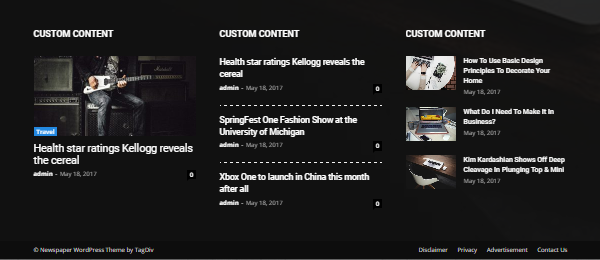
Try to use style 2 or 3 for example.
Edward This is not a problem of the Theme.
Try to set correctly Timezone for you.
Step 1: Sign into your wordpress administrator dashboard using your administrator level account.
Step 2: Go to Settings > General
Step 3: In settings, you will find a dropdown for Timezone, select appropriate time zone from the list there depending on your location and select the date and time format which you prefer. After you are done selecting these options, click on the Save changes button at the bottom of this page.
Edward You can try this code. Enter it in Theme panel -> Custom Css
/* Remove posts and comments counts in blocks and author widgets */

.author .td-author-post-count {

display: none;

}

.author .td-author-comments-count {

display: none;

}

.td_top_authors .td-author-post-count {

display: none;

}

.td_top_authors .td-author-comments-count {

display: none;

}
Edward Check options from here -> https://www.screencast.com/t/PuyYfFkOaoc
Edward Try to install via FTP: https://forum.tagdiv.com/install-via-ftp/
Edward Alternative Pastebin links
Social counter, please make these modifications:
https://www.screencast.com/t/rEBOoudPy
replace with
https://yadi.sk/i/7EaA4B8k3Tts5X
Instagram widget, you will have to replace this file:
https://www.screencast.com/t/da9nIfQr9DT
replace with
https://yadi.sk/i/L3ACAHxQ3Tts6T
Edward Have you carefully read the link I gave you?
https://www.screencast.com/t/7NU4jsu7G06
In my opinion, the screenshot everything is clear.
You need to delete the code marked on the screenshot in the file editor-style.css, which is located in the themes folder of Newspaper.
Also keep in mind please:
You could make a backup of the modified file, and after updating the theme replace the file with the modified one. Or check to see if this file can be overridden by a child theme.
Child theme support: https://forum.tagdiv.com/the-child-theme-support-tutorial/
Edward Read this topic:
How can I remove sidebar divider from my tinymce editor: https://forum.tagdiv.com/topic/how-can-i-remove-sidebar-divider-from-my-tinymce-editor-it-is-taking-half-the/
Edward You can disable the sidebar for posts globally – https://www.screencast.com/t/Igb8R3Ki or in each of the post edit page – https://www.screencast.com/t/QPUQHNNsEuH It is the same for category pages, you can remove the sidebar in general – https://www.screencast.com/t/J6aFHZrN and also per category – https://www.screencast.com/t/zO8NLfqyFK6
