Calin
Calin Hi,
The site will no longer crash, but you will not be able to update the theme, edit pages with tagDiv Composer, or import items from the Cloud Library.
I understand what you want to do, and it can be done. However, once it is completed, please let us know so we can also submit a request to have the license key checked. This will ensure that only the active domains are displayed for the key under Newspaper > My License.
Thank you!
Calin Hi,
A license key can be used on two domains: the main (live) domain and a staging domain. Assigning the key to a domain can be done the way you already did.
If you have a new license key that you want to use on a domain or staging site, please log in to that specific domain/staging site and go to Newspaper → System Status. There you will see which license key is currently assigned.
If the key shown there is not the one you want to use on that domain, click the Reset Key button and then enter the new license key you would like to activate for the theme on that domain.
Thank you!
Calin Hi,
Glad you got it.
Just select the row and choose the column numbers you want. If a column does not have any elements in it, it will not be displayed on the frontend, only in tagDiv Composer, but the layout of columns will be kept.
Thank you!
Calin Hello,
Those requests are generated by the theme and are usually related to pagination. If your website uses AJAX pagination, infinite scroll, or a “Load More” button, each time new posts are loaded a request like the one mentioned above is sent to the database.
To reduce the number of requests to /wp-admin/admin-ajax.php?td_theme_name=Newspaper?v=12.7.5, you can lower the number of pagination-triggered requests from your blocks—especially on the homepage. The homepage is typically the most accessed page and often contains the highest number of blocks with pagination enabled.
Thank you.
Calin Hi,
In this situation, the best approach is to use a migration plugin such as Duplicator: https://wordpress.org/plugins/duplicator/ This plugin will migrate everything exactly as it is now, including automatically adjusting the links.
After that, the remaining step will be related to the license key. The key can be used on two domains: the live domain and a testing (staging) domain. Once the testing domain is no longer in use, you can contact us by email at contact@tagdiv.com and provide the key that was used on the staging site. We will then check the key and remove the staging domain from the license, since it will no longer exist.
Calin Those informations are set by using the acf plugin and by creating the custom fields https://prnt.sc/ypl7–acJCxX if you want to add extra fields or taxonmies it can be done by adding frt those in the ACF plugin and after that on the CPT Cloud template https://i.imgur.com/BOJoHpq.png with tagDiv Composer https://i.imgur.com/9FaUPRJ.png – https://i.imgur.com/C0UO3FT.png
Calin Hi,
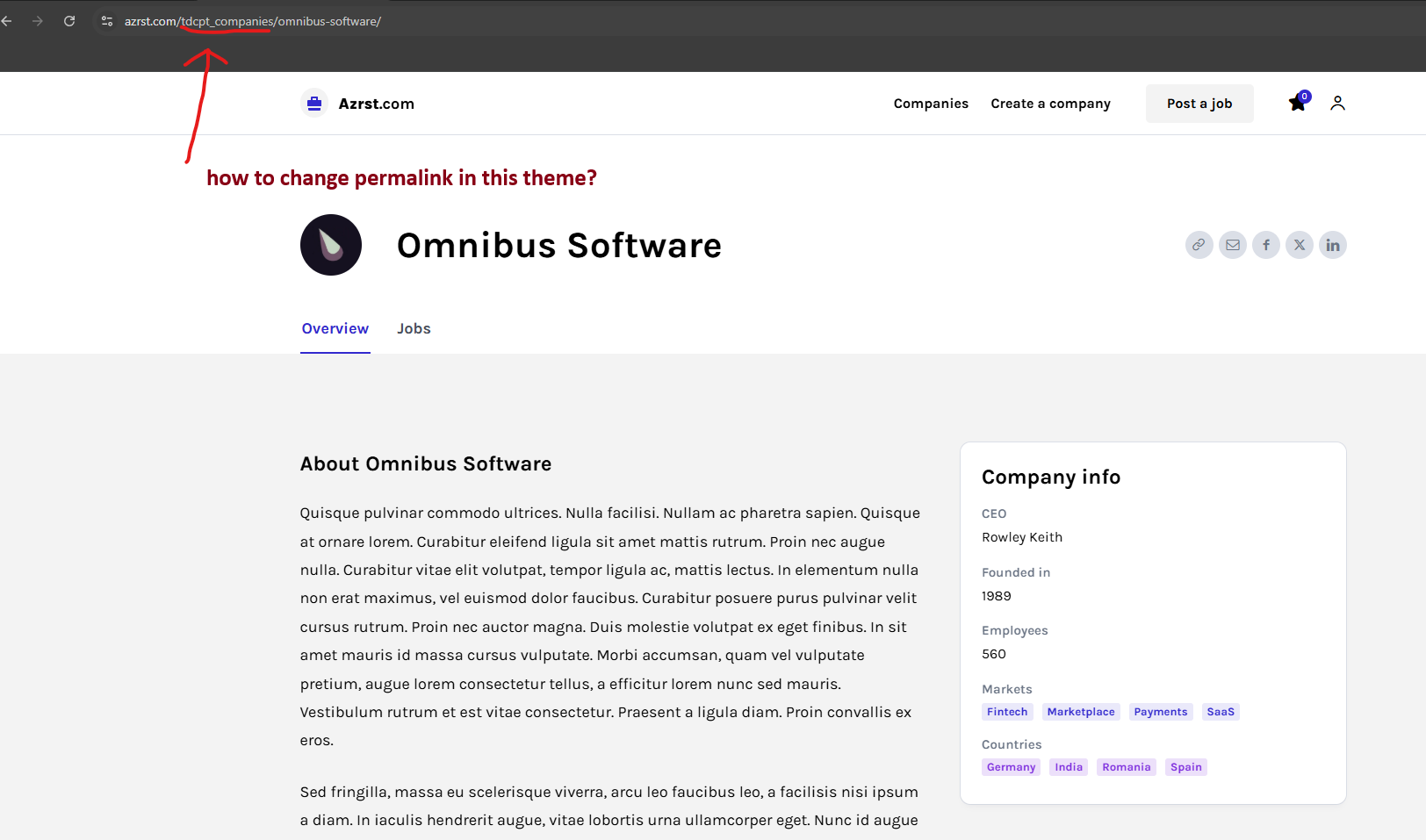
The CPT link https://azrst.com/wp-content/uploads/2026/03/Screenshot-2026-03-14-154535.png can be changed from ACF plugin> Post Types > https://prnt.sc/0Z9Q7r8PGyjn
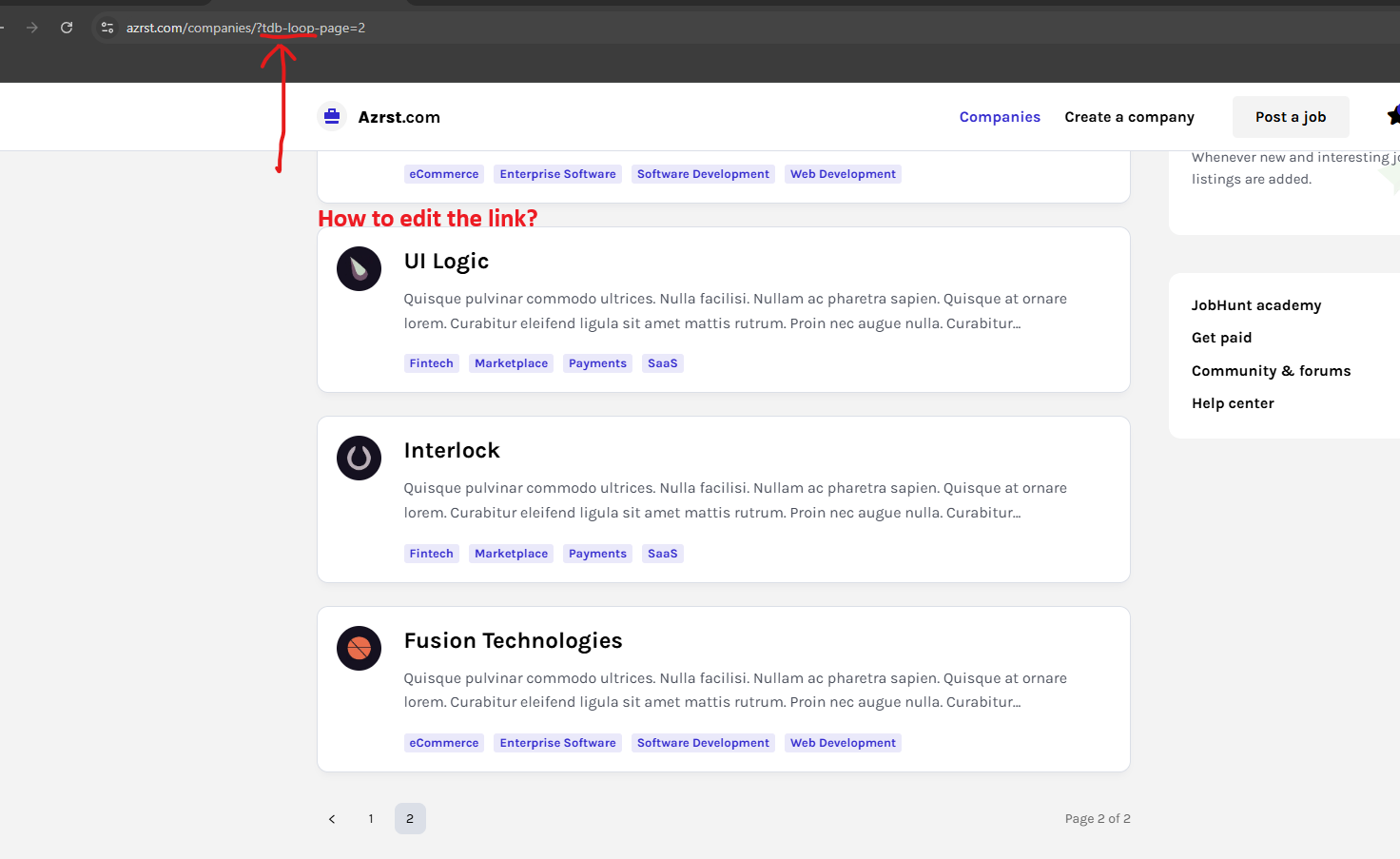
This https://azrst.com/wp-content/uploads/2026/03/Screenshot-2026-03-14-155042.png is the link of pagination created by the flex loop builder, unfortunately, it cna not be changed. The pagination is working with that type of parameter. What can be done is to change the pagination type from numbered to a load more button – https://prnt.sc/tR5HILKHyTdB
Thank you!
Calin Hi,
I appreciate your detailed message it’s very thorough.
Here’s what may have happened: after the theme was updated, one of the theme plugins might no longer have been installed or activated.
The best practice when updating the theme is the following:
– Create a full backup of the website and database.
– Update the theme.
– Update all theme plugins used with the theme. In some cases, these need to be updated manually from Newspaper > Plugins, because other plugins may interfere with the automatic update system, or there may be certain code restrictions.
https://forum.tagdiv.com/how-to-update-the-theme-2/
Thank you!
Calin Hi,
Unfortunately, the Block elements will not adjust to the website width if it is wider than the default. For this, you’ll need to use the Flex Block elements, which are adjustable based on the width and per viewport using tagDiv Composer.
Alternatively, you can create your own module using the Module Builder and display the block using the Flex Block Builder.
Thank you!
Calin Hi,
For this, please contact us via email at contact@tagdiv.com, and please provide the license key that has been used on those domains. A request will be made for that key to be checked.
Thank you!
Calin Hi,
You need to click on the green text “Assign” so the status will change to active https://prnt.sc/9L6GFvw9z4mT
Thank you!
Calin Hi malmed_wp, we hope that the next Yoast update will fix this problem.
Calin Hi,
Most of the time, the problem is from a shortcode that is not compatible with our theme or a plugin conflict; therefore, after you set it with tagDiv Composer and save the page/cloud template, the next time you try to edit it, you’ll get that error.
If is only for one page or a cloud template (it can be on the header or footer, you can change them for tests and see if the problem persists), this is from some settings/shortcodes set on it and it can be fixed using the page revision https://wordpress.com/support/page-post-revisions/
Thank you!
Calin HI,
For this request, please contact us via email at contact@tagdiv.com, and please provide the license key. We’ll request that it be checked as soon as possible.
Thank you!
Calin Hi,
The Newsaletter plugin that is coming with the theme is only to change the Newsletter layout https://forum.tagdiv.com/the-newsletter-plugin/, but you’ll still need to use a newsletter embed code. This is working only with 3 sources: Mailchimp, Mailer Lite or FeedBurner
Also, you can use the embed code from your newsletter provider and set it in column text in the text zone – https://imgur.com/DSSni9j
Calin Hi,
The image is 472×556 https://demo.tagdiv.com/newspaper_office_nexus_pro/wp-content/uploads/2024/03/preparing_your_workspace_for_tomorrow.png. The elements behind and over teh image are part of the image itself.
Calin Hi,
Normally, a license key is valid for one website only. Please review the ThemeForest license terms here:
https://themeforest.net/licenses/standard
https://themeforest.net/licenses/terms/regular
For reference: https://prnt.sc/X0AldIM7e7ni
However, we allow a license key to be used on two websites simultaneously, as many website owners maintain a testing/staging website in addition to their live website, and the theme often needs to be activated on both.
If the license key has been used on more than two domains, additional license keys will be required and we are unable to override this limitation.
If the key is currently used on only one domain (or on no live domain), please contact us by email at contact@tagdiv.com and include the license key so we can check its status for you.
Thank you for your understanding!
Calin Hi,
If it is an image that is slected it can be because the image is not selected in full size, and it is used as a thumb https://prnt.sc/zdg-XBLi53E3
Now if is a block, then you can edit teh page with tagDiv Composer, select the block and in the layout tab look for Image size. From there, select teh image size/thumb you want to be used – https://prnt.sc/g8z1ti5KjtCG
Calin Hi,
Could you provide some screenshots of the problem?
Please check if the key is assigned to teh localhost.
A license key can be used for up to 2 domains, so localhost will also be considered a domain.
Calin Hi,
Here is how we can do it: provide temporary access like before, and in the email include the link you want to have on each image from the gallery and the contact page, and I will set them up.
Calin Hi,
If those are taxonomies and not categories, then it can be added with custom code or with an extra plugin like ACF or similar, but based on the demo you have installed, it is also possible to have installed a theme dedicated plugin https://prnt.sc/-hcPUNiDVhJq, which indeed adds extra CPT and taxonomies.
Thank you!
Calin Hi,
I already tried it on my installation before providing the solution, so it should work for you as well.
Please try using a different browser, and if the situation persists, disable all plugins except the theme plugins and try again. By doing this, you’ll make sure that no extra plugin is interfering.
Calin Hi,
Could you please let me know the link you want to add in the image information block and which field you tried to set it in? I remember you also reported a similar situation with a different image. When I logged in and set the link, it was saved and worked without any problems. So it might be related to the link you’re trying to set, the place where you’re trying to add it, or even the browser extensions you have enabled.
Calin No, problem! If you have any questions related to the theme, just let me know!
Calin Hi,
I’m glad that you managed the situation!