
 Calin
Calin Hi,
Please try this custom css
.page-nav.page-nav-post {

    width: 100%;

}
Set the code in the theme panel > custom code > custom css > advance cess > phone css – https://i.imgur.com/9DndL2V.png
I hope this will help you!
Calin Hi mark-dev,
Those problems can be from multiple cases, but most of the time is due to a plugin conflict or from some extra code that is interfering.
If you agree, please contact us by email at contact@tagdiv.com and give us wp-admin and cPanel access, we will investigate this issue as soon as possible.
Thank you!
Calin Hi omarnso,
If the problem is related to the theme panel when you click on the save button there is an infinite loading icon, then most probably something is blocking the admin-ajax request, this can be checked using the console.
Also, check to do not have an object cache on the backend -> https://i.imgur.com/0jCU9xc.png -> https://forum.tagdiv.com/general-options-may-interfere-newspaper-theme/
The categories you want to add to the menu can be added from appearance > menu – https://i.imgur.com/Hy7otJu.png and you can set it in the theme from the theme panel > header > menu – https://i.imgur.com/41SUOgm.png
The problem with “HTTP Error 500” can be due to several causes, but first, make sure that all the theme requirements are set as we have in the guide – https://forum.tagdiv.com/newsmag-requirements-for-newsmag/ in special the WP Memory Limit and make sure that this code is also set – https://i.imgur.com/vy5xGW7.png
In case you checked all those and the problems persist, please contact us via email (contact@tagdiv.com). Make a full backup for your website and provide wp-admin and cPanel access via email and provide as many details as you can about the problem.
Thank you!
Calin Hi arvindk,
We will like to investigate this situation, if you agree, please contact us via email, be sure that you have a full backup, and let us know when we can update the theme to see what can cause the problem. Also, include the link to this topic to can identify you!
Thank you!
Calin Hi Felipe Moretti,
Unfortunately, there isn’t a general option that once is enabled the entire website is stretched to the desired width. This needs to be manually done on each page you want to change the layout width. Now for cloud templates, you need to edit the cloud templates that you are using and stretch the rows and all posts/categories/tags that are using that template will have that layout.
Also, if you have set a background color or image in the theme panel is also possible that the option for the boxed layout to be enabled. Please check the settings from the theme panel, normally to can stretch the rows the boxed option should be disabled – https://i.imgur.com/Vdqh54S.png
You can get more details about background color and image and boxed version from this guide – https://forum.tagdiv.com/background-introduction/
I hope this will help you!
Calin Hi Hamid Fekhart,
To scroll in the tagDiv Composer sidebar, you must have a mouse and use the mouse wheel or a laptop with a touchpad that allows scrolling. This is not made for editing from the phone.
Also, our theme comes only in English (elements from the composer and from the theme panel).
Thank you!
Calin Hi ilouie,
Indeed, for the moment the list menu element does not have the option for dropdown, this should be added in the coming theme update. Right now the list menu can be only like on this demo https://demo.tagdiv.com/newspaper_chained_news_pro/
Thank you for your understanding!
Calin Hi, indeed, twitter requires certain markups to exist in order to function – https://developer.twitter.com/en/docs/twitter-for-websites/cards/guides/getting-started
But the strange thing is that from what I can see, all these are already in the source pages. Can you set the code in robots.txt, if not it is already set.
It also means that if you use a standard post template and the option in the theme panel, even if it is unchecked, it no longer appears, then most of the time the problem is from an object cache – https://i.imgur.com/95pPehz.png
Thank you!
Calin Buna,
Te rog incerca acest css pentru deskto:
body .td-header-wrap .td-header-main-menu, .td-header-menu-wrap.td-affix {

backdrop-filter: saturate(180%) blur(5px);

    background: rgb(55 25 25 / 29%);

}
Daca nu este ce trebuie, te rog sa-mi dai un exemplu de cum sa fie.
Calin Adding multiple authors to your articles
Content
In this tutorial we will show you how to implement multiple authors to your posts using the Co-Authors Plus plugin.
We will make the implementation in the child theme so it will be easier to manage on theme updates. You will need to install and activate the Co-Authors Plus plugin first.
Adding the multiple authors is a three step process.
- Step 1 – Adding the required functions in your child theme functions.php file.
We created 2 custom functions for the author and for the author box which we can then call on the post styles and not have to use the entire functions each time.
Add these functions in your Child theme functions.php file: https://pastebin.com/ciYrSZvQ These will create the custom implementation to add the co-author and the author box for each co-author in particular.
- Step 2 – Adding the single post templates to your child theme.
In your main child theme folder, you will need to create the following folder structure:
Newspaper-child/parts/single
Then, under the “single” folder add both the single-template and the loop-single files for each of the post styles you use on your articles.
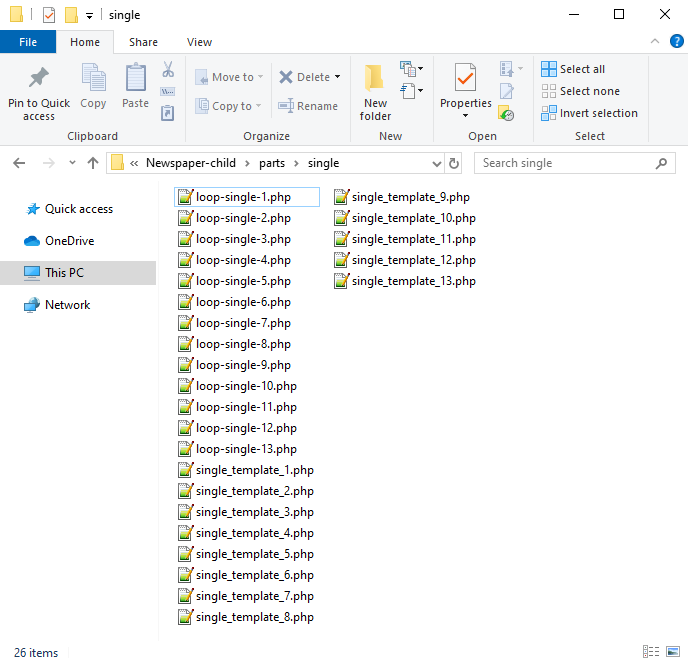
Now you will have to identify where the author is being called in each post style.
For styles 1, 5, 9 and 10 you will find the author code in the loop-single files while for styles 2, 3, 4, 6, 7, 8, 11, 12 and 13 the code is fount under the single_template files.
Edit the files corresponding to the style you want to apply the co-authors to and then call the functions added at step 1. Replace the default author and author box codes:
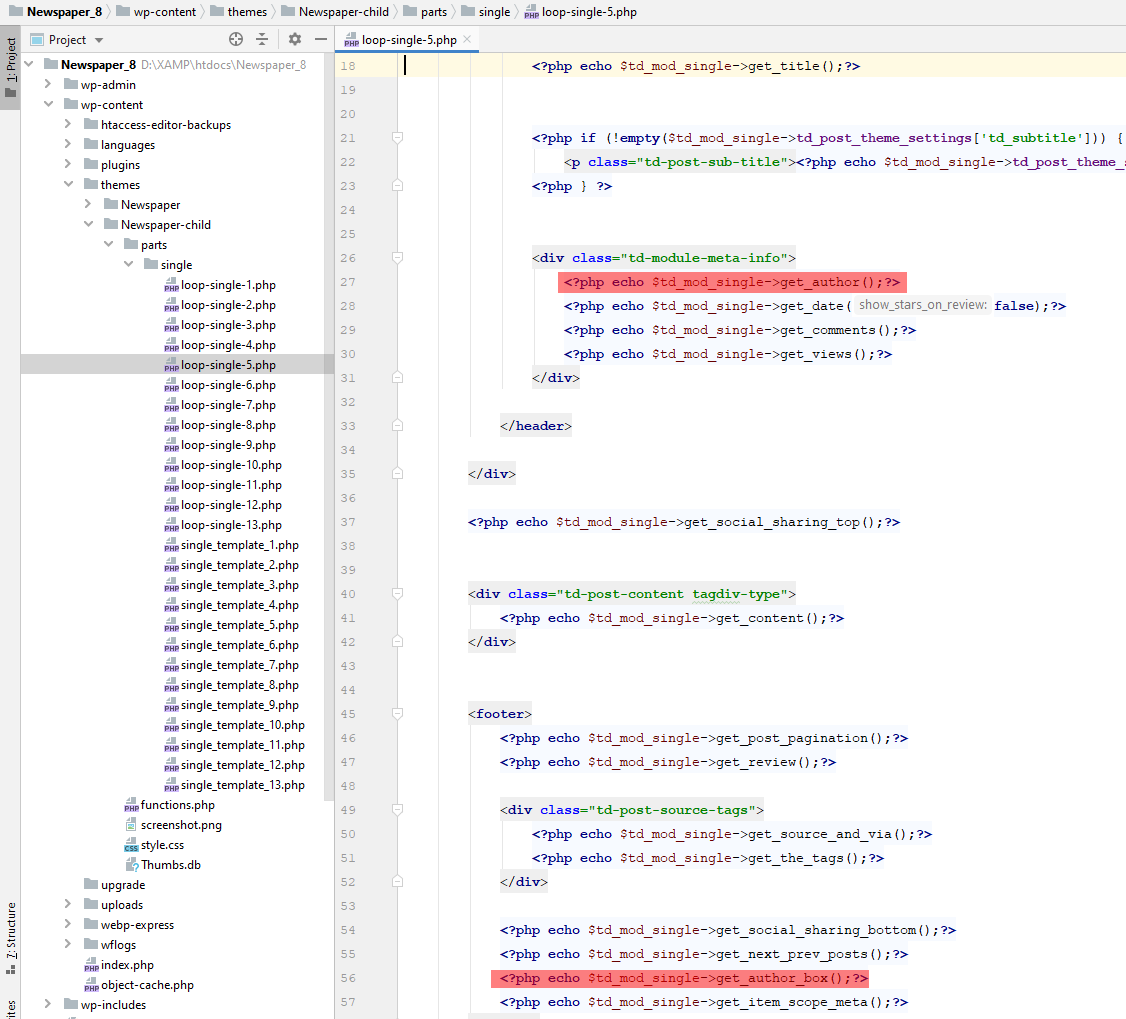
Replace the highlighted code with the following codes:
<?php echo td_get_post_coauthors();?>
and
<?php echo td_get_post_coauthors_box();?>
Maintain the codes position in the .php file though for proper results. \
- Step 3 – CSS styling
In order for the co-authors to position properly we also need a bit of CSS code to ensure proper styling so please add the following CSS code in the the theme panel under custom code-> custom CSS:
https://pastebin.com/dRaStewQ
Now you simply need to edit your post and add multiple authors using the plugin author field:
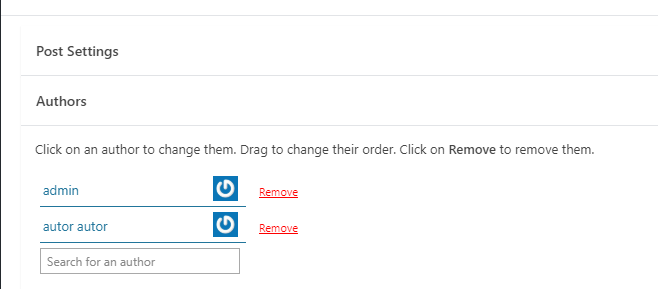
Calin Hi Atithya,
I understand what you are saying, there is actually a problem here. I searched in our archive and found steps that need to be taken, I will post them here in case someone else needs them:
Calin Hi Amitty,
I can help you with a custom css, for this I will need a link to your website where I can inspect a post with pagination. In this way, I can inspect the problem and I can make the necessary css for everything to look good.
Thank you!
Calin Buna,
De obicei pe forum scriem in engleza pentru a ajuta si alti utilizatori, dar acum o sa facem o mica exceptie.
1. Se poate folosi acest css pentru desktop
.td-header-menu-wrap.td-affix{

backdrop-filter: saturate(180%) blur(20px); /* Blurry */

background: rgba(255,255,255,0.7); /* White Opacity 70% */

}
Pentru mobil
body .td-header-wrap .td-header-main-menu, .td-header-menu-wrap.td-affix {

    backdrop-filter: saturate(180%) blur(20px);

    background: rgba(0,0,0,0.1);

    background-color: transparent !important;

}
Va trebui ca pentru elementele din meniu sa schimbati culoare de pe alb pe negru.
2. Trebuie sa setati cu tagDiv Composer pe elementul de featured image in viewport-ul mobil in tabul de css margine stanga si dreapta cu -20 – https://i.imgur.com/q7ShD5r.png
3. Dca functioneaza pe desktop se poate si pe versiunea mobila, trebuie sa selectati elementul in viewport-ul mobil si sa setati elementul the share sa fie inline – https://i.imgur.com/9c2SQUn.png poti fi mai multe solutii dar acum nu vad acest buton pe site pentru a oferi un exemplu mai concret.
Sper ca raspunsurile mele sa va ajute!
Calin Hi transcontinentaltimes,
Our developer implemented an option that will be added in the coming theme update and should fix/improve the theme requests to the database.
Thank you!
Calin Hi,
It looks like the element you use for the gallery has a stronger css than the one from the theme.
If you want to set them nicely on 2 columns you can use this custom css:
figure.wp-block-gallery.has-nested-images {

    display: flex;

    flex-wrap: wrap;

}
Set this css in the theme panel > custom code> custom css.
Also, if you want to remove the click from images on the gallery you can use this custom css.
.wp-block-gallery.has-nested-images.is-cropped figure.wp-block-image:not(#individual-image) a {

    pointer-events: none;

}
I hope this will help you!
Calin Hi smileycris,
You can use the “LATEST ARTICLES” from the page template with 4 posts – https://imgur.com/RdeEeZz, but there is no option to remove the pagination, it can be done only with a css.
Thank you!
Calin Hi,
Yes, clicking on that button will remove the license key. This can be get from the ThemeForest account – http://forum.tagdiv.com/how-to-find-your-envato-purchase-code/
Better contact us via email and provide wp-admin access and we’ll check the problem.
Thank you!
Calin Hi,
Can you please provide a link where I can inspect a gallery? In this way will be more simple to see what is happening and to provide a proper solution.
Thank you!
Calin Hi Michaelgroth and sco,
We found what the problem is and a developer is looking into it. The problem seems to be only for the header live search element when the search button is used (or the enter button is pressed which activates the search button as well), it seems that the developers forgot to add the functionality for this one as well.
If you want to display results from several types of posts and not show wrong results until the fix is committed, you can use the Search Form element.
Thank you for persevering until we discovered where the problem is!
Calin Hi,,
Then it should be the key that has been used to create this account. What I can sugest is to reset the license key from the Newspaper > System status and acttivate the theme again.
In casse taht the prolem persits, please contact us via email at contact@tagdiv.com and please provide wp-admin access and the license key and we’ll take a look.
Thank you!
Calin Hi,
You need to click on row elements and stretch the rows – https://i.imgur.com/TMQqbYX.png in your screenshot I see that you clicked on empty space from the content zone, but you need to do it on rows.
– https://tagdiv.com/how-to-add-delete-and-duplicate-row-newspaper-theme/
Thank you!
Calin Hi Zelda,
I added this as a suggestion to our list and I hope that there will be adding an option for it.
Thank you!
Calin Hi,
Unfortunately, the Theme and wordpress do not have an option like this, but maybe you can find some plugins, maybe like this one – https://www.wpbeginner.com/plugins/how-to-bulk-move-posts-to-categories-and-tags-in-wordpress/
Thank you!
Calin Hi,
Does this problem appear only when you are not log in? If so then it can be from a cache plugin.
Also, I checked your website now and this is displaying only shortcodes on the desktop – https://i.imgur.com/xugcMtw.png – https://prnt.sc/xDcp0jNzl4lZ if you are using CDN please purge it.
Thank you!
Calin Hi gqjesus,
That demo has the logo set as text, you need to remove it from there – https://i.imgur.com/FrCgina.png
Thank you!



