Calin
Calin Hi,
When I was login on your website I disable all non theme plugins letting only tagDiv plugins and other two -> https://i.imgur.com/LeY5AjH.png then the categories from post started to work, after I set back all plugin you had, as you can see in my screen record.
If I understand correctly, you made the same steps as me and the category sections was still not working ?
Thank you!
Calin Hi,
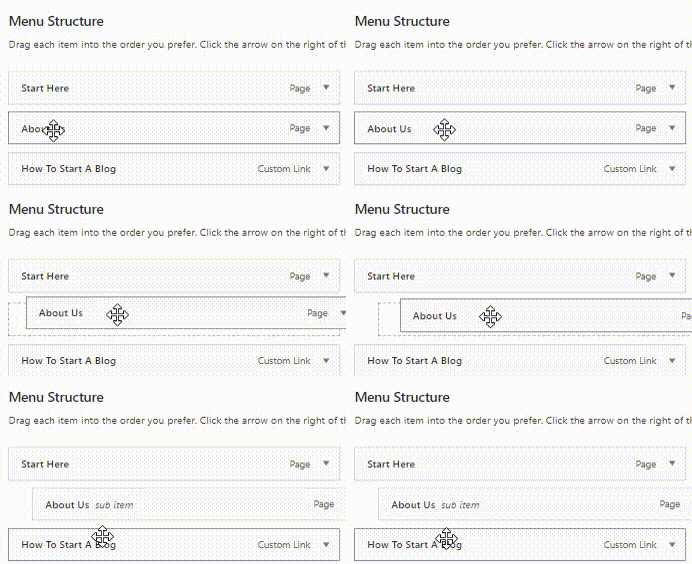
You can create a menu that has a dropdown like this -> https://www.wpbeginner.com/wp-tutorials/how-to-create-a-dropdown-menu-in-wordpress-beginners-guide/ example -> just add more menus elements here -> https://i.imgur.com/6ZgXESv.png
Another method for that can be use for a similar result is the option that can be set using tagDiv Composer, select the menu and set a fix width, then select the drop menu in more -> https://i.imgur.com/FVKKjqf.png
Personally I recommend the first option.
Hope this will help you!
Thank you!
Calin Hi,
If you are using the Romania News Pro then you are using a pro demo, this is using cloud template from tagDiv Cloud Library, therefore you can use tagDiv Composer to edit a template and this will be the same on all elements that has assigned that cloud template.
For example if you want to translate the word “By” then -> https://i.imgur.com/g9PahXN.png -> https://i.imgur.com/nMBM6Oh.png this will apply on all posts is the same fore updated text -> https://i.imgur.com/69W81Ql.jpg
Thank you!
Calin Hi,
Using the mobile theme plugin, you’ll gain a better speed then responsive version of theme, but in order to achieve that speed you’ll need to create a new content for pages because in the most of cases those were made with builders or shortcodes ( tagDiv Composer, WPBakery ) and you need to use only the mobile editor ( you need to set the content for pages in mobile editor -> https://i.imgur.com/ho41rUl.png and this content will be display on mobile theme, also the mobile theme will not display any sidebar)
-> https://i.imgur.com/9d0UWLT.png
Also you can show the responsive version on mobile theme (to get the same layout as on desktop on mobile) -> https://i.imgur.com/m0bVB5T.png you can check more details about mobile theme in our documentation -> https://forum.tagdiv.com/the-mobile-theme/ or if you want to have the responsive version only, you can use the amp option from mobile theme -> https://i.imgur.com/oofST3D.png (to use the mobile theme template on amp) or you can disable the plugin.
These options are like this:
Mobile -> the mobile theme will apply only on mobile version.
Mobile + amp -> it will apply on both and it will have the same layout.
Amp -> the mobile theme plugin layout will be use only for amp version.
Hope this will help you!
Thank you!
Calin Hi,
Unfortunately for the moment we do not have an import/export for cloud templates, sorry.
Now the best way to do this is to copy the cloud content from deploy to live website. All you need to do is to make sure that you are copy the content from a type of template and you set it in the same type. -> https://i.imgur.com/OJ5Yli3.png -> https://i.imgur.com/kdmxs0H.png (if you want you can use a blank template but it need to have the same type) -> then past the code -> https://i.imgur.com/LtiGzBt.png
Hope this will help you!
Thank you!
Calin Hi,
I’m glad that you manage to solved the problem.
if you have other questions let us know!
Thank you!
Calin Hi,
Please provide me a link where I can see this problem.
Thank you!
Calin Hi,
That is a cloud category and it can be edited using tagDiv Composer -> https://i.imgur.com/8ErXNKl.png -> https://i.imgur.com/6rcRoGF.jpg
The problem with “Lost Programming” was not yet checked, I was informed that it will verified and fix, but I did not get a time when this will be done, sorry!
Thank you for your understanding and sorry for the inconvenience!
Calin Hi,
Normal if you want to edit a page, you should still be able to do it from here -> https://i.imgur.com/gdhU8AD.png here -> https://i.imgur.com/vFMOl4j.png and here -> https://i.imgur.com/wEopm7Y.jpg form me are working all of them.
Make sure that you do not have a plugin conflict, please deactivate ALL plugins except tagDiv plugins, also if you are using child theme or cache plugin, deactivate them, clear all cache and try again.
Let me know the results!
Thank you!
Calin Hi ghoangit, I’m sorry for this, we are trying to answer to as many topics we can in our support hours. Normal you should get a reply from us in maxim 24h, exception make when the question was set in weekend.
Thank you for your understanding!
Calin Hi,
1. Yes, the ads for header has the same dimension for all header styles. Normal this is 728x90px.
Now there are only two ways to do this:
a. You can use an extra plugin, most of users do this.
20+ Best Ad Management WordPress Plugins 2020
b. You need to edit the theme files, this method is not recommended if you do not have the proper skills in programing.
2. This can be done using some custom css, I can help you with this, just provide a link to your website and I will provide the css that will remove the elements you do not want to use.
3. If you want to have something like this ->https://i.imgur.com/fYHdYdy.jpg then you can use a custom css:
.td-header-container {

    background: #111;

}
If this is not what you mean, please let me know!
4. I think that you are referring to mega menu, this can be set using our guide from here -> https://forum.tagdiv.com/mega-menu/
If there is still a problem, or is something that I do not understand correctly, please let me know!
Thank you!
Calin Hi,
Yes, you can do that using this custom css -> https://i.imgur.com/FjlkULp.png
.td_block_image_box .td-custom-title {

pointer-events: auto;

}
Also if you are using the extra class the code will be like this:
.imgC.td_block_image_box .td-custom-title {

pointer-events: auto;

}
Let me know the results!
Thank you!
Calin Hi,
Please try this custom css:
.postid-9059 .td-a-rec-id-content_bottom{

display: none;

}
Hope this will help you!
Let me know the results!
Calin Please try this code, this should be applying only on posts:
.single h1.entry-title {

    display: none;

}
Let me know the results!
Calin Hi,
I do not know that if that tool that you are using is working like google tool or not, but for me when I tested your website using the https://search.google.com/structured-data/testing-tool/u/0/ the results is without errors and duplicate meta -> https://i.imgur.com/kdLzkzi.png
I do not know exactly how moz.com is check your website and what meta description is trigger.
The only way that you can edit the meta description is to use a SEO plugin as I mentioned above.
Also please make sure that you clear all cache once that you make some changes on meta description.
Thank you for your understanding!
Calin Hi,
Just make sure that you installed the theme like in our guide -> https://forum.tagdiv.com/newsmag-install-via-wordpress/ then make sure that the theme requirements are as in our guide -> https://forum.tagdiv.com/newsmag-requirements-for-newsmag/ then activate the theme -> https://forum.tagdiv.com/newsmag-how-to-activate-the-theme/
Let me know the results!
Thank you!
Calin Hi Nieuwetijdskind, as I can see now you have the mobile version on desktop -> https://i.imgur.com/nnU28nM.png this problem is usually from the cache plugin that doesn’t recognize that there are two themes, one for desktop and one for mobile version (mobile theme plugin).
Please verify the console for error while saving the settings on the Theme Panel, usually it displays a 403 or 404 error.
If you don’t use a security plugin, please ask your host about this, maybe you have a security module which blocks this.
If you use a plugin like Wordfence please set it in learning mode.
Also sometimes this is a plugin conflict, but you already tested this.
Hope this will help you!
Let me know the results!
Calin Hi ghoangit, maybe I do not understand correctly what you mean from framing line for the post.
If is what I said above, to insert a post inside to other posts, then all you need to do is to copy the link from a post and just paste it inside the post you want to display a frame of that post.
-> https://i.imgur.com/ahKkG49.png -> https://i.imgur.com/VVN41nX.png -> https://i.imgur.com/kbuQcVd.png
If this is not what you mean, please let me know!
Thank you!
Calin Hi,
Please try these steps:
Disable tagDiv Composer and delete it, then reinstall the plugin from Newsmag > plugins.
If this is still not working, you can install a plugin that can help, this plugin is Enable jQuery Migrate Helper.
Let me know the results!
Thank you!
Calin I see that you find from where comes this text where to set the ads.
If you have other questions, let us know!
Have a nice day!
Calin Hi jihoon park,
This part -> https://i.imgur.com/1MzAQYU.png is not from our theme is from a plugin for ads that you have. Our theme doesn’t have these classes https://imgur.com/u5CMLgX
Newsmag theme has only the ads from theme panel -> https://i.imgur.com/jttUwvS.png -> https://forum.tagdiv.com/newsmag-header-ads/ these are the classes and type of ads that our theme is using -> https://i.imgur.com/QgTPXMY.png
Thank you!
Calin Hi Zaka ziko, I just checked some of your amp url and these are ok -> https://i.imgur.com/UPyg8rx.png -> https://search.google.com/test/amp?utm_source=gws&utm_medium=onebox&utm_campaign=suit&id=nHmYCZ_wHMSwaucy_Z6d1w -> https://search.google.com/test/amp?utm_source=gws&utm_medium=onebox&utm_campaign=suit&id=CqVcVrxKKOpbgeJpIx0HmQ -> https://i.imgur.com/pj4a5Up.png
If there is still a problem, let us know!
Thanks
Calin Hi,
Is possible to have the general option or comments enable on pages, normal our theme should disable it because we use it only for posts.
Here is a guide for how to disable the comments from pages: How to enable / disable comments in pages in WordPress ?
Hope this will help you!
Thank you!
Calin Hi Topy, if you have only the general tab, please set the extra classes for the style you want to use as in my example (https://imgur.com/MSPJ2v6).
This will work
Let me know the results!
Calin Hi,
For the moment this can be achieve if you are using a row set in two columns and set the grids or flex blocks that look as you like.
Also I note this on our suggestions list for better designs.
Thank you for your suggestion!