
 Vlad S
 Hello !
That is not Newspaper Theme related. You can follow this topic and see if it helps: https://stackoverflow.com/questions/17798815/remove-category-tag-base-from-wordpress-url-without-a-plugin
Thank you !
Vlad S Hello !
Unfortunately you cannot adjust your image like in the composer.
You can take a look at our Youtube channel: https://www.youtube.com/c/tagdivThemes or follow our guides here: https://forum.tagdiv.com/newspaper-theme-documentation/
Thank you !
Vlad S Hello !
I would recommend you to upload the new theme manually and also the plugins. Deactivate all the other plugins untill the update is finished. Also you can try to upload the theme and re-import your posts using a 3rd party plugin.
Let us know the results !
Thank you !
Vlad S Hello !
Please provide a link to your website in order to take a look.
Thank you !
Vlad S Hello !
I have spoken to Catalin. He will reply via e-mail and please make sure you provide all the information required to speed up the process.
Thank you !
Vlad S Hello !
Please contact us via email at contact@tagdiv.com and provide the following:
– admin url and credentials
– cPanel url and credentials
– A link to this topic in order to identify you
Our team will take a look !
Thank you !
Vlad S Hello !
That is not Newspaper Theme related. You can follow this topic and see if it helps: https://stackoverflow.com/questions/17798815/remove-category-tag-base-from-wordpress-url-without-a-plugin
Thank you !
Vlad S Hello !
Unfortunately not. In adBox you can use only one image with the option to manually change it.
In order to have scrolling ads you can set multiple adboxes in a column and then set the column to be sticky as you can see here: https://www.youtube.com/watch?v=fa7GenCHcBU&t=7s ; https://www.screencast.com/t/YJroVPnt9
Thank you !
Vlad S Hello !
Please follow our guide here and make sure that you install the newspaper theme properly as you can see here: https://forum.tagdiv.com/install-via-wordpress/
Thank you !
Vlad S Hello !
Please make sure to insert the code in here: https://www.screencast.com/t/1ycvvYrYgQ This should work like a charm.
Let us know the result !
Thank you !
Vlad S Hello !
Please make sure that you have accomplished all the system requirements as in our documentation here: https://forum.tagdiv.com/requirements-for-newspaper/
Please make sure that you do not have a plugin conflict, please deactivate ALL plugins except tagDiv ones, also if you are using child theme or cache plugin, deactivate them, clear all cache and try again.
Thank you !
Vlad S Hello !
Please follow our guide here and make sure that you install the newspaper theme properly as you can see here: https://forum.tagdiv.com/install-via-wordpress/
Thank you !
Vlad S Hello !
Please contact us via email at contact@tagdiv.com and provide the following:
– admin url and credentials
– cPanel url and credentials
– A link to this topic in order to identify you
Our team will take a look !
Thank you !
Vlad S Hello !
Sorry for the misunderstanding !
If you are using a Cloud library template for posts or a PRO demo you will have to edit the post template and add the review element as you can see here: https://www.screencast.com/t/EAGmcPZwpA
This is on their to do list but at the moment there is no ETA on this.
Thank you !
Vlad S Hello !
The Mobile theme was specially designed for optimization on mobile devices. Unfortunately on mobile theme you cannot do much changes of design. If you want to have the same design as on desktop mode you can achieve that by simply disabling the mobile theme.
You will have to recreate your pages into the Mobile editor or completely disable the mobile theme. The mobile editor will not render shortcodes !
Also you can disable mobile theme on certain pages or posts by following this setting: 
Please take a look here: https://forum.tagdiv.com/the-mobile-theme/
Mobile theme plugin can be disabled from Newspaper Plugins as you can see here: https://www.screencast.com/t/LnkZCEVC
Thank you !
Vlad S Hello !
I don’t think this is Newspaper Theme related since it doesn’t make any sense in why the newspaper theme would try to “hack” someone else. This is more likely happening because of your server being hacked by someone else.
We are able to offer you a refund if you make a request here: https://themeforest.net/refund_requests/new
We are sorry for the inconvenience !
Thank you !
Vlad S Hello !
Please make sure to properly clear your cache and reconnect to instagram in Theme Panel – Social Sharing – Instagram.
Thank you !
Vlad S Hello !
Please contact us via email at contact@tagdiv.com and provide the following:
– admin url and credentials
– cPanel url and credentials
– A link to this topic in order to identify you
Our team will take a look !
Thank you !
Vlad S Hello !
You cannot remove it. You can make it lighter by using less fonts. We recommend you to use maximum 1-2 fonts on your website.
Thank you !
Vlad S Hello !
Unfortunately the newsletter plugin offered by Newspaper Theme will only require the e-mail address. At the moment this is the only setting that this plugin offers.
Thank you !
Vlad S Hello !
Please make sure that you have cleared your cache in autoptimize plugin too. If that still does not work please try this css: .td-main-menu-logo img {
margin-bottom: -10px;
}
The code must be inserted in here: theme panel> mobile theme> custom code> CSS
But the clear cache option should fix this.
Let us know the result !
Thank you !
Vlad S Hello !
Please make sure that you have accomplished all the system requirements as in our documentation here: https://forum.tagdiv.com/requirements-for-newspaper/
Also please note that this is a hosting / server request. Your theme has nothing to do with this.
Thank you !
Vlad S Hello !
Please make sure that you have accomplished all the system requirements as in our documentation here: https://forum.tagdiv.com/requirements-for-newspaper/
Please make sure that you do not have a plugin conflict, please deactivate ALL plugins except tagDiv ones, also if you are using child theme or cache plugin, deactivate them, clear all cache and try again.
Thank you !
Vlad S Hello !
You have to set your wordpress to display a page as homepage as you can see in this setting: 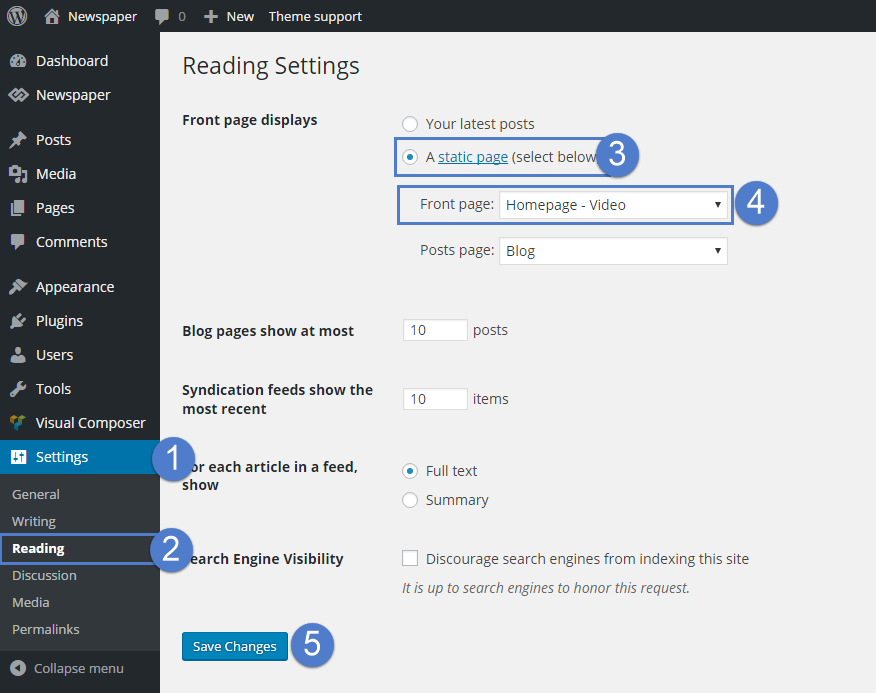
Thank you !
Vlad S Hello !
You have to set your wordpress to display a page as homepage as you can see in this setting:
Thank you !
