
 Vlad S
 Hello !
For this please follow our tutorial here: https://www.youtube.com/watch?v=HXQQygkCCJo
Thank you !
Vlad S Hello !
Please contact us via email at contact@tagdiv.com and provide the following:
– admin url and credentials
– cPanel url and credentials
– A link to this topic in order to identify you
Our team will take a look !
Please note that due to the high amount of support requests anwers can be delayed up to 72hrs !
Thank you !
Vlad S Hello !
Unfortunately this option is not available with Newspaper Theme.
It may be created with custom work but please note that custom work is not covered by the support team.
Thank you !
Vlad S Hello !
Unfortunately at the moment there is no option in changing the fonts all from one place. You will have to manually go through every element of your page and edit the fonts.
Thank you for your understanding !
Vlad S Hello !
You will have to contact your host in order to restore a backup. And please note that nothing just vanishes. There may be something that caused your issue, a plugin conflict or something.
Thank you !
Vlad S Hello !
That can be found in Appearance – Widgets: https://www.screencast.com/t/JTL1ZbkniU
Thank you !
Vlad S Hello !
Unfortunately this option is not available with Newspaper Theme.
Thank you for your understanding !
Vlad S Hello !
The author can be shown by editing the block using tagDiv Composer as you can see here: https://www.screencast.com/t/yEzE2n3dU
Thank you !
Vlad S Hi,
Please make sure that you do not have a plugin conflict, please deactivate ALL plugins except tagDiv Composer, also if you are using child theme or cache plugin, deactivate them, clear all cache and try again.
At the moment the Support team is not 24/7 available. Please note that we answer the topics from Latest to Newest Monday – Friday from 08:00AM to 05:00PM GMT+2 So multiple replies to your topic will only make us to get harder to your topic.
Thank you !
Vlad S Hello !
Please provide a link to your website so we can inspect.
Thank you !
Vlad S Hello !
By editing the post template you will be able to add the modified date element: https://www.screencast.com/t/HYa34MFbY ; https://www.youtube.com/watch?v=I1R3j1QYod0
At the moment the Support team is not 24/7 available. Please note that we answer the topics from Latest to Newest Monday – Friday from 08:00AM to 05:00PM GMT+2 So multiple replies to your topic will only make us to get harder to your topic.
Thank you !
Vlad S Hello !
We have received your e-mail. We will reply to it as soon as possible.
Thank you !
Vlad S Hello !
1. Please make sure that you’re not facing a plugin conflict. Disable all the plugins except tagDiv ones, clear your cache and try again.
2. That issue is because of low resources: https://www.screencast.com/t/gMVcAEcp1T
3. That is normal.
Thank you !
Vlad S Hello !
Any cloud library template is fully editable using tagDiv Composer: https://www.youtube.com/watch?v=I1R3j1QYod0 You can import a template and adjust it. Please follow our video tutorials. They might be more helpful !
Thank you !
Vlad S Hello !
You will need to use a migration plugin but please make sure that your migration will be done correctly. After the migration is finished I would suggest removing and reinstalling only the tagDiv Composer plugin. In that way it will save all the new urls correctly.
Thank you !
Vlad S Hi,
Please make sure that you do not have a plugin conflict, please deactivate ALL plugins except tagDiv Composer, also if you are using child theme or cache plugin, deactivate them, clear all cache and try again.
If the problem persist, please set this code in functions.php -> wp-content/plugins/td-composer/legacy/Newspaper/functions.php
add_action('admin_head',function() {

echo '<style>.td-gutenberg-editor .editor-styles-wrapper .wp-block {max-width:726px;}</style>';

});
Or you can send us an email at contact@tagdiv.com and provide admin login, as well as cPanel or FTP if possible. We will take a look. Include a link to this topic in the email.
Thank you!
Vlad S Hello !
Please note that page speed is not covered by the support team. You can contact our custom work team here for more information and price quotations: https://tagdiv.com/web-development-services/
Unfortunately at the moment there is no facebook messenger option. You will have to use a 3rd party plugin for that.
The login can be disabled from Theme panel: https://www.screencast.com/t/vZTSjGAh
Thank you !
Vlad S Hello !
1. Unfortunately creating a block is not an option.
2. Please make sure that you do not have a plugin conflict, please deactivate ALL plugins except tagDiv ones, also if you are using child theme or cache plugin, deactivate them, clear all cache and try again.
3. This option lets you adjust images in posts: 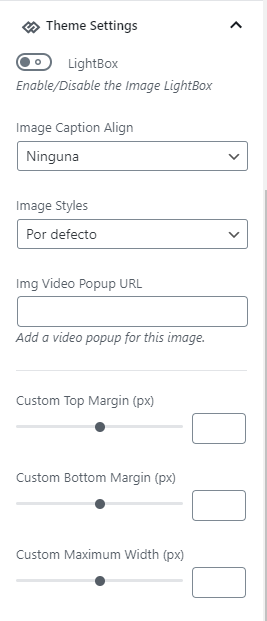
Thank you !
Vlad S Hello !
Please make sure that you do not have a plugin conflict, please deactivate ALL plugins except tagDiv ones, also if you are using child theme or cache plugin, deactivate them, clear all cache and try again.
Thank you !
Vlad S Hello !
Unfortunately the best way would be to recreate your website because many old features have been removed or re-named so you will not be able to straight update your website. Personally the fastest way would be simply to recreate your website on the new version ( With tagDiv Standard pack disabled ).
Thank you for your understanding !
Vlad S Hello !
Please make sure that you have accomplished all the system requirements as in our documentation here: https://forum.tagdiv.com/requirements-for-newspaper/
Please make sure that you do not have a plugin conflict, please deactivate ALL plugins except tagDiv ones, also if you are using child theme or cache plugin, deactivate them, clear all cache and try again.
Thank you !
Vlad S Hello !
You can create a custom page using tagDiv Composer: https://www.screencast.com/t/CHAKQHxdGd and set it as you primary page: https://www.screencast.com/t/kyPZzBXUCYFt
Thank you !
Vlad S Hello !
Please make sure that you have accomplished all the system requirements as in our documentation here: https://forum.tagdiv.com/requirements-for-newspaper/
Please make sure that you do not have a plugin conflict, please deactivate ALL plugins except tagDiv ones, also if you are using child theme or cache plugin, deactivate them, clear all cache and try again.
Thank you !
Vlad S Hello !
Please make sure that you have accomplished all the system requirements as in our documentation here: https://forum.tagdiv.com/requirements-for-newspaper/
Please make sure that you do not have a plugin conflict, please deactivate ALL plugins except tagDiv ones, also if you are using child theme or cache plugin, deactivate them, clear all cache and try again.
Thank you !
Vlad S Hello !
Please contact us via email at contact@tagdiv.com and provide the following:
– admin url and credentials
– cPanel url and credentials
– A link to this topic in order to identify you
Our team will take a look !
Please note that due to the high amount of support requests anwers can be delayed up to 72hrs !
Thank you !
