
 Vlad S
 Hello !
Please contact us via email at contact@tagdiv.com and provide the following:
– admin url and credentials
– cPanel url and credentials
– A link to this topic in order to identify you
– All 3 purchase keys
Our team will take a look !
PLEASE NOTE THAT DUE TO THE HIGH SUPPORT REQUEST THE RESPONSE MAY GET DELAYED UP TO 48H !
Thank you !
Vlad S Hello !
We will reply via e-mail !
Thank you !
Vlad S Hello !
Please make sure that you do not have a plugin conflict, please deactivate ALL plugins except tagDiv ones, also if you are using child theme or cache plugin, deactivate them, clear all cache and try again.
Thank you !
Vlad S Hello !
This is how it shows on mobile and desktop: https://www.screencast.com/t/p79P5cBHT5w it looks the same.
Thank you !
Vlad S Hello !
Please note that we recommend using Cloud library templates: https://forum.tagdiv.com/cloud-library-templates/ That means that after installing the cloud template your templates will be fully editable using tagDiv Composer. In there you will be finding the AdBox element which is the most recommended ad option having endless posibilities: https://forum.tagdiv.com/custom-ad-spots/
Thank you !
Vlad S Hello !
That is how the menu was created, Unfortunately that cannot be shortened.
Thank you for your understanding !
Vlad S Hello !
Unfortunately for this you will have to use a 3rd party plugin. Newspaper Theme does not have this option for woocommerce products page.
Unfortunately we have not tested any plugins in this matter so we cannot recommend one.
Thank you for your understanding !
Vlad S Hello !
Unfortunately for this you will have to use a 3rd party plugin. Newspaper Theme does not have this option for woocommerce products page.
Unfortunately we have not tested any plugins in this matter so we cannot recommend one.
Thank you for your understanding !
Vlad S Hello !
Please make sure that you do not have a plugin conflict, please deactivate ALL plugins except tagDiv ones, also if you are using child theme or cache plugin, deactivate them, clear all cache and try again.
Thank you !
Vlad S Hello !
In order to download the theme you will have to go into your Envato account – Downloads and download it: 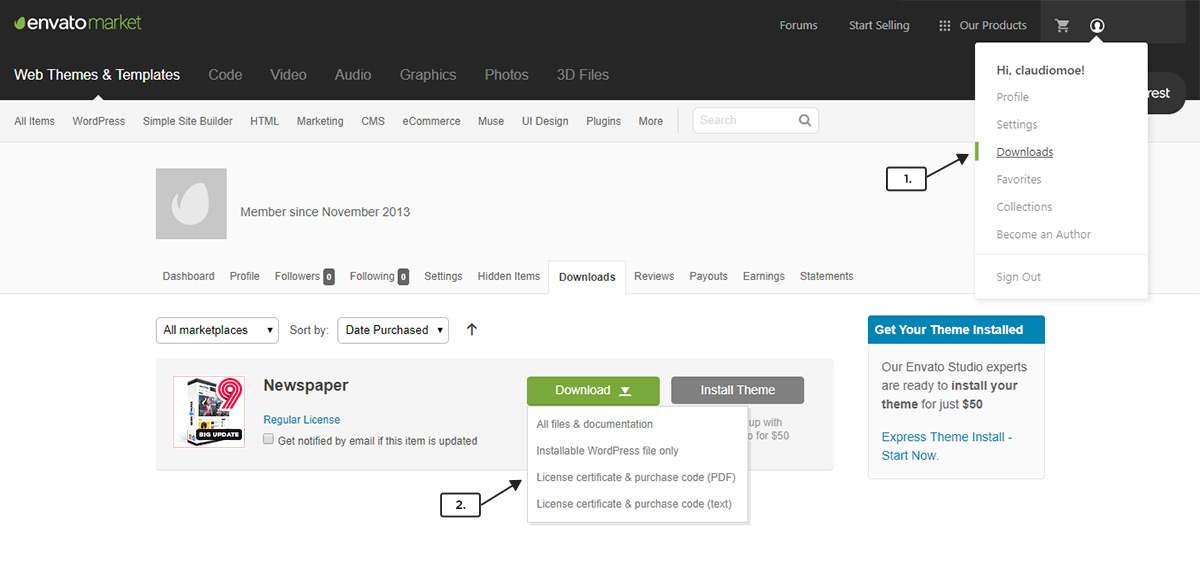
For instalation please follow our tutorial here: https://forum.tagdiv.com/install-via-wordpress/
Thank you !
Vlad S Hello!
You can use this css code: .entry-crumbs a{
color:Red;
}
.entry-crumbs{
color:Red;
}
The code must be inserted here: https://www.screencast.com/t/J1Nxw5s5
I hope this was helpful !
Thank you !
Vlad S Hello !
Please contact us via email at contact@tagdiv.com and provide the following:
– admin url and credentials
– cPanel url and credentials
– A link to this topic in order to identify you
– All 3 purchase keys
Our team will take a look !
PLEASE NOTE THAT DUE TO THE HIGH SUPPORT REQUEST THE RESPONSE MAY GET DELAYED UP TO 48H !
Thank you !
Vlad S Hello !
You can achieve that by editing the mobile theme in theme panel – https://www.screencast.com/t/TYBMHnKr
Thank you !
Vlad S Hello !
For sharing posts, you’ll need to make sure that you have og on that posts, we recommend the Yoast SEO plugin to manage sharing on socials, and provide the og data, the theme by itself doesn’t have what is required – https://forum.tagdiv.com/facebook-share/
Also please make sure that you do not have some plugins that can interfere with the sharing option, please deactivate all non theme plugins!
Thank you !
Vlad S Hello !
Please contact us via email at contact@tagdiv.com and provide the following:
– admin url and credentials
– cPanel url and credentials
– A link to this topic in order to identify you
– All 3 purchase keys
Our team will take a look !
PLEASE NOTE THAT DUE TO THE HIGH SUPPORT REQUEST THE RESPONSE MAY GET DELAYED UP TO 48H !
Thank you !
Vlad S Hello !
Please make sure that you have accomplished all the system requirements as in our documentation here: https://forum.tagdiv.com/requirements-for-newspaper/
Please make sure that you do not have a plugin conflict, please deactivate ALL plugins except tagDiv ones, also if you are using child theme or cache plugin, deactivate them, clear all cache and try again.
Thank you !
Vlad S Hello !
This seems to be a host error. Present this issue to your host and let them know about your issue.
Let us know the result.
Thank you !
Vlad S Hello !
That is a feature from the plugin not from the Newspaper Theme option.
You can activate only the thumbs you want from here: https://www.screencast.com/t/BkI09cq3csCs
Thank you !
Vlad S Hello !
Please provide a link to your website in order to inspect.
Thank you !
Vlad S Hello !
Please note that your request is custom work and is not covered by the Newspaper theme support team: https://forum.tagdiv.com/newspaper-theme-support/
Thank you for your understanding !
Vlad S Hello !
Please follow our documentation regarding this matter: https://forum.tagdiv.com/header-manager/
Thank you !
Vlad S Hello !
By selecting the Website manager you will be able to set the footer on your page as you can see here: https://www.screencast.com/t/y1ChVrBhj
Thank you !
Vlad S Hello !
Please make sure that you have cleared your cache. For cache we recoomend: WP Super Cache – https://forum.tagdiv.com/cache-plugin-install-and-configure/
Thank you !
Vlad S Hello !
You can achieve that by editing the ROW in 3 columns: https://www.screencast.com/t/tlLwrS8sP33 And add a header logo on the middle. You will have 2 create 2 menus, one for the left, one for the right one.
Thank you !
Vlad S Hello !
In order to achieve your request it will require custom work which is not covered by the support team: https://forum.tagdiv.com/newspaper-theme-support/
Thank you !
