
- NewsmagUsing the theme translations together with WPML
- NewsmagHow to update a plugin
- NewsmagCustom Post Type Support
- NewsmagAbove footer ads
- NewsmagWeather Widget
- NewsmagHow to update the theme
- NewsmagIntroduction
- NewsmagLogo & Favicon
- NewsmagFooter templates
- NewsmagUsing other ads
- NewsmagCustom ad spots
- NewsmagArticle ads
- NewsmagSidebar ads
- NewsmagHeader ads
- NewsmagLoading image effects
- NewsmagCategory top post styles
- NewsmagSmart Lists
- NewsmagGeneral settings
- NewsmagTheme thumbs
- NewsmagtagDiv slider gallery
 konfiguracjahome
Hi,
on our website (home page) shortcodes from the TagDiv plugin are displayed instead of implemented. Additionally, the logo disappeared and text appeared. Please help us in this matter.
Sample shortcode:
[td_block_big_grid_6 category_id=”1″]
 robbyyy
Hi – I’ve just updated to the latest version of Newspaper, but have noticed a considerable slowing of the site. Woocommerce product pages seem to be the worst impacted, taking some 30 seconds to load. They used to load in 3-4 seconds.
Example page:
https://www.platformexecutive.com/product/e-trade-financial-company-profile-and-swot-analysis/
Could you let me know what could be causing the sudden slowdown. I had no problems with the theme before the update.
 Anamaria
 Hi,
If you are referring to using anchor links, you can do it easily. You need to set an extra class on the element, for example, I set it on the “Single Post Comment” => https://i.imgur.com/EewW11X.png and set the class on the element icon or button, in Scroll to class => https://i.imgur.com/O3x7xpV.png -> https://imgur.com/xqIOgu0
Thank you!
Anamaria Hi,
The AMP is not longer recommended https://developer.bigcommerce.com/docs/storefront/wordpress/platform-integration/enabling-amp.
But the modal you are referring to when images are clicked (mobile theme active) will not work.
The mobile theme is kept as simple as possible for increased speed.
Thank you!
 bob@mrrogersweborhood.com
Website: okobserver.org
Mobile version of home page displaying differently when logged off and when logged on.
Logged off screenshot: https://www.dropbox.com/scl/fi/yj3ddtlcsouaa5loo0zed/2024-02-05-Logged-off.jpg?rlkey=68b36odtv6yejfoxlj4xlhf2q&dl=0
Logged on screenshot: https://www.dropbox.com/scl/fi/kf8d9ruknr2j2ydlswa8d/2024-02-05-Logged-on.jpg?rlkey=miyfwueczkoeuzx3yd2tt3q60&dl=0
 mostwonder
Without AMP, can we add redirect link from mobile theme to main theme? We can do this when AMP is active. The redirect link is automatically added to the footer section. I want to be able to do this feature without AMP.
 Bettina
 Hello Inamullah!
You can set an extra class “text” on that element (example: https://app.screencast.com/TCfMyzgF1vTZ1?conversation=jxeGZ8fZnLDvCjz4z8raDp) and use the code:
.text{text-align:justify!important;}
Thank you!
 FabiolaD
Hi guys,
I’ve been using your theme for years and recently decided to try the mobile and AMP implementations.
I understand it doesn’t render page building elements, but it also doesn’t seem to support embeded features, like facebook videos. Is there a way to include this? A lot of my posts contain embeded video’s from facebook and I would love to be able to capture these in a mobile version of the site.
The same applies for modal / popup images. When a user clicks an image when on the mobile theme, it jumps directly to the image file, as opposed to staying within the page and displaying it in a popup.
Any advice?
Thanks!
Bettina Hello @quochungbcvt!
I do not recommend you to use AMP anymore.
From my point of view, if you don’t use the Mobile Theme plugin, then there is no reason or benefit to AMP. Unfortunately, AMP is not working with the cloud templates because the AMP’s layout is not fully customized.
The AMP version works best with default templates and not cloud templates. That’s why we integrated it with the Mobile theme plugin.
The feedback from our clients about AMP was negative and it is not used anymore, that’s why we didn’t add more customization options.
Thank you for understanding!
 Demetri
Trying to change logo in mobile, thread shows to try > Theme Panel > Header and open the Logo & Favicon section but no such section exists in my Theme Panel. How do I change the mobile logo??? Have newest version ~ Version: 12.6.3
Anamaria Hello,
Usually the “Invalid reply from server endpoint error” is caused by insufficient WP_Memory_limit, if you’ll set it to 256M, and is still not working, please double it and check the rest of the settings from our guide -> https://forum.tagdiv.com/requirements-for-newspaper/ also make sure that you are using SSL and you have a good bandwidth, the one from our server is 1GB/s and the one that I use at home is 500MB/s, if you have low bandwidth, then you can access parts of the cloud, this can be done from the frontend, for example, if you are on a post -> https://i.imgur.com/4G74M7F.jpg or from tagDiv Composer -> https://i.imgur.com/2F6MhfI.png or from backend -> https://www.screencast.com/t/wekHmc7kJ8J
Thank you!
 Calin
Calin Hello,
This is a problem related to the cache plugin. When the tagDiv Mobile Theme is used the cache plugin should have the option for “mobile cache” support enable to can make a separate cache for mobile version and desktop, for example – https://i.imgur.com/Jcy670Z.png – https://forum.tagdiv.com/cache-plugin-install-and-configure/
Thank you!
 chabotjeff
Website using Newspaper repeats (duplicates) the posts in infinite scroll. Each post shown twice. I can’t find any setting to fix. See an example: https://hd-report.com/2024/02/04/2024-oscar-nominations-announced-with-some-surprising-omissions/
 anshab09
Hi Team,
How can I change the primary colour(#11B494) from my whole website?
http://15.207.121.108/ Staging site link
And Opt-in Builder Start setup wizard button is not working.
I already tried this https://forum.tagdiv.com/topic/opt-in-builder-subscriptions-setup-wizard-button-simply-does-not-respond/ but nothing works.
 birkasi
I know I’m giving a bit much feedback today. I’m sorry, but I’ve got time to deal with these things today. I love you all. I’m having a problem where if I post a new article and then open the main page, the main page doesn’t update with the new article. If I refresh it or use shift+F5 to refresh it, it’s fine. The bigger problem is that if I log in from a browser or device I have used for a long time and open the web page, I see the same status as the last time I saw it from that device. For example, I last visited the site on my old laptop in October 2023. In January, I turned the laptop back on, typed in the address of my website, and it was not the January 2024 front page, but the October 2023 status. Of course, after refreshing it, I can now see the fresh articles, but I fear that my visitors will think that the main page hasn’t been updated for a long time if they see this. I am using Wp-rocket on the site, but my other site (also Newspaper template and Wp-rocket plugin) has no such problem.
 quochungbcvt
I think maybe it’s because my website has 2 languages, but here I only let you choose 1 menu.
quochungbcvtMy website is: Babybloomberg.com
When entering the article detail page on your phone, the AMP interface will work. Everything is good, the only thing is that my website has 2 languages. Even though the articles are in Vietnamese, the menu in the AMP interface is always in English.
I use the Polylang plugin to create a 2-language website.
I have selected the Vietnamese Main menu and the English Main menu in the correct positions but they still do not display correctly.
I have attached a picture below.
Main menu VI 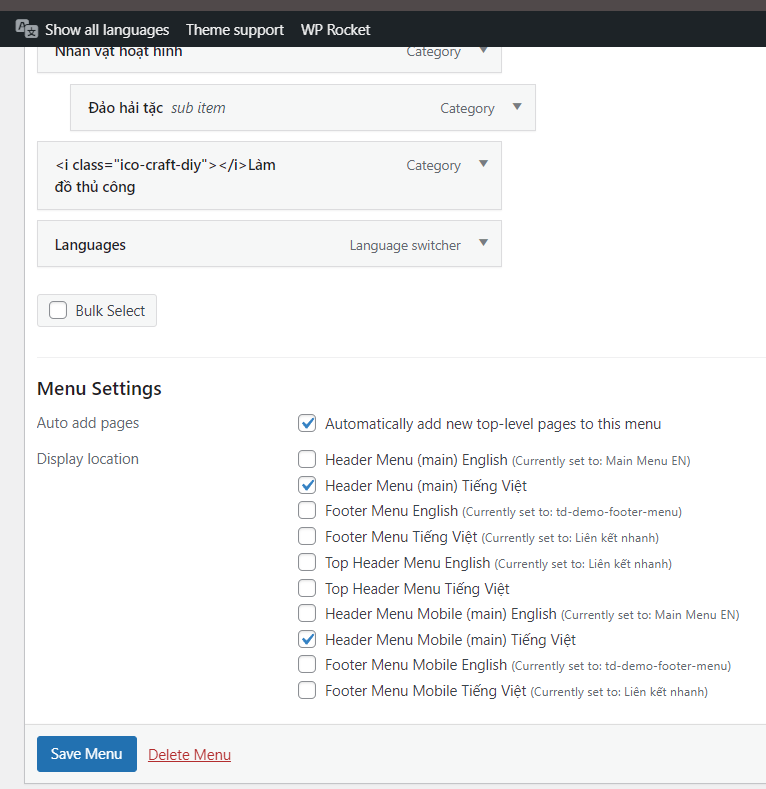
Main menu EN 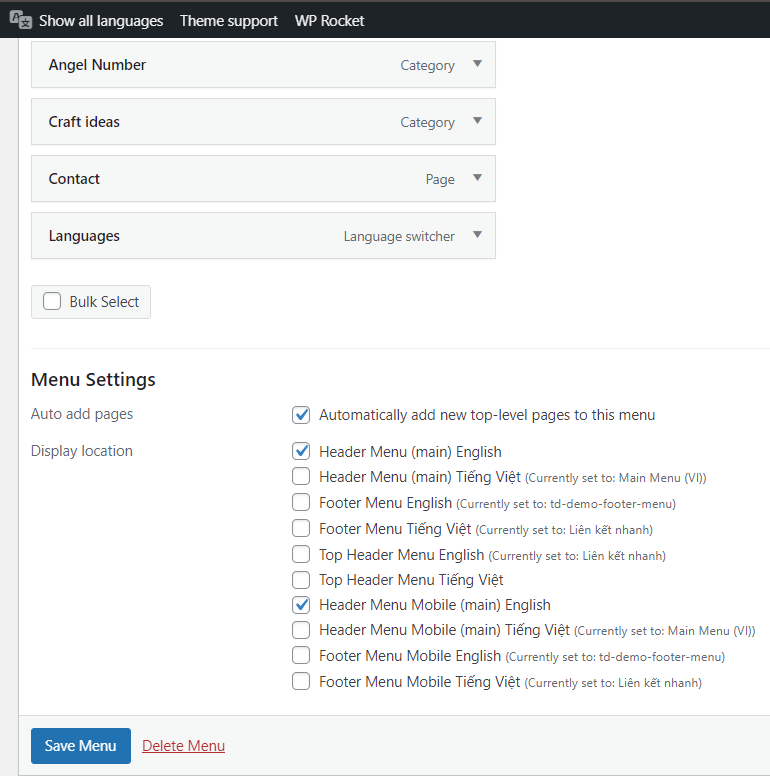
Menu in Vietnamese post in AMP interface 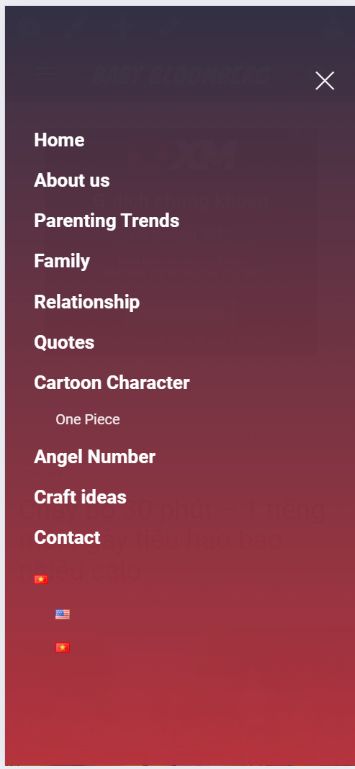
 heathcliff
Earth.com use sticky ads between paragraphs (within the content), see example.
I recreate something similar with Ad Inserter Pro but Newspaper’s css is preventing the ads being sticky. According to the plugin developer the theme sets the overflow CSS property which prevents sticky position: overflow: hidden, overflow: scroll or overflow: auto on the parent of a position: sticky element.
In the documentation with working demo of the sticky ad between paragraphs (the purple block if you scroll down) the author of the plugin mention: “Please note that sticky feature as described here depends on the styles used by the theme. If it sets overflow CSS propery on some parent element or otherwise prevents sticky position then sticky feature will not work.”
So is there a workaround this theme can work with Ad Inserter Pro?
Please advice.
Thank you.
 forcenews
 Hi,
here is an example of a business directory tab on the website:
https://www.portal-msp.pl/baza-firm
Bettina Hello @fabinhoalmeida !
I understand what you need. But, unfortunately, we have no settings in order to achieve what you need in our theme, and we do not recommend changing the theme code.
You can try to change the roles and capabilities of your users from here: https://wordpress.org/support/article/roles-and-capabilities/.
Try to use a plugin for this, for example, the Members, Membership, and User Role Editor Plugin.
I hope that helps you somehow!
Thank you!
 01Ezequiel
Is there a way for a title that exceeds the character limit to automatically adjust and not overflow the box as seen in this example?
Thank you.
 PIF21
PIF21Hi,
Is there an option to enter author box shortcode into the theme panel so they show up everytime I create a new post? I have two shortcodes from the PublishPress Authors plugin. I would like to add one, which is just the author’s picture and name at the beginning of the article and then add another that is the author’s full profile at the end of the article. This would save me from having to add the different shortcodes everytime I create a post. Thank you.
 marijn390
For several weeks now I have had a different font on some posts/pages.
I have no idea how to correct this. All settings seem to be correct. The latter type is different in the main menu but also in the footer.
Here is an example of the right font
Here is an example of the bad font
Bettina Hello Herwig!
The page templates can’t be global on each page, and it is not working as a single template, for example. Create a new page in Dashboard -> Pages, press the publish button, and view. Edit it with the TagDiv Composer: https://prnt.sc/gGw1zq0zdf3r and start customizing it as you like. You can import from the Cloud Library sections, blocks, etc. already designed.
Thank you!
 smartgirlsearch.com
 Hi,
https://app.screencast.com/U4n9QF8s7teZ1
Open flexblock – in the example above, don’t display the most recent post dynamically. Isn’t it something like -1 or something for the postID? The Ideja post that you see is the most recently added. I don’t want it to appear in that flexblock but I want that dynamically as I’m adding in another and the Ideja post will appear in that 4 post grid.
Does that make sense?
Thank you very much!



