
- NewsmagUsing the theme translations together with WPML
- NewsmagHow to update a plugin
- NewsmagCustom Post Type Support
- NewsmagAbove footer ads
- NewsmagWeather Widget
- NewsmagHow to update the theme
- NewsmagIntroduction
- NewsmagLogo & Favicon
- NewsmagFooter templates
- NewsmagUsing other ads
- NewsmagCustom ad spots
- NewsmagArticle ads
- NewsmagSidebar ads
- NewsmagHeader ads
- NewsmagLoading image effects
- NewsmagCategory top post styles
- NewsmagSmart Lists
- NewsmagGeneral settings
- NewsmagTheme thumbs
- NewsmagtagDiv slider gallery
 agoramt
After updated to 7.3 can’t configure ‘Thumbs on modules & block’, see imagem below:

And some icons only appear when I click on them.
 orlando
 hi,
I would like the html code of ads coustum 1 for example, to be able to fit inside
the single_template_2.php file or loop-single-2.php
example
<? Php echo $ td_mod_single-> get_content ();?>
<? Php ADS COSTUM 1>
I hope I was clear, I wait your news about.
 iNBishkek Magazine
 Hi Bogdan,
Was this the standard cookie cutter answer or what? Did you at least look at the link provided – http://testsite.inbishkek.com/block1 ? Is this the kind “support” I was promised when I bought the template? Feed me a link and let me sort it out myself? I have read through this tutorial before and again following your reply – it does not answer my question!
Slide #1 (http://testsite.inbishkek.com/block1) shows a nav menu in Block 1 that “auto populates itself” and my question is how, specifically and where, can I customize it to show 5 specific post categories that I want in the nav menu plus the “more” tab? Also, if I decide that I want to replace the more tab with another category, how to do that?
And please, do not send me another tutorial link, that is bogus customer service & support. You guys promised support, please deliver what you promised.
iNBishkek Magazine
 Watashi10
Hi, I would like to know if it’s possible to use the food recipes plugin into the “Health & Fitness” demo of the Newspaper theme. I think that would be a great combination, and also if the Newspaper 7 version includes all the demos listed (Food Recipes, Health & Fitness, etc.). It would be really great to be able to insert recipes but to use the Healdh & Fitness demo.
Waiting for your message.
Have a great day guys!
Elvis.
 blkphoenix66
Trying to configure block 4 and use multiple category ID’s and certain ones will not show up even though they are listed in the wordpress site (category) section with their ID.
For example would like to include Exclusives category but it does not show up in the ajax menu
Please advise?
test site is : http://newsmag7beta.wpengine.com/
 alexprepo
 Nope. No such string there.
We are searching for “Latest Article” and “About us” for example.
orlandohi,
I wanted to know the code sample ads custom one, to be able to fit inside the post.
news about your appearance and good job
 BW
BWGreetings again,
As you can see on this post: https://blackwhite-reviews.com/get-rid-garlic-breath/ , my issue is next:
I can’t use the “Pin It” button on my posts because when I try to Pin an image from my post, it is bringing me up the modal image window.
All I want is to deactivate that image pop up so the readers can pin images from my posts.
Info: 1. The issue appears only on “Smart Lists Posts”.
2. On featured images or images which aren’t from smart lists, everything is fine.
Basically, all that I want to do, is cut the link from the smart lists images so that the image pop up doesn’t appear => the users can pin that images.( just like the featured image from posts or other normal image).
Thank You
BW
 Catalin
 Hello Equapio,
If you want to make your mega menu items to be similar to the ‘Travel’ menu example, please consult the topic here -> https://forum.tagdiv.com/topic/mega-menu-with-grid-columns/ because there you will see all the steps which are needed to take in this regard for achieving this layout.
If you want to display more levels in our theme and you are not aware of all steps in this regard, please consider hiring a freelancer/developer to help you because we cannot provide customization services at the moment, sorry!
Hope this helps and let us know how it goes!
Thanks for your understanding!
 Yuda
YudaHow to change share icon on single post like this Example Post
Because i want all share icon have same form and size.
Thank you,
 Bogdan B.
 Hello,
Since this topic, the code has changed a bit. You will have to use a do_shortcode function inside the template files corresponding to each of the post styles that you use.
Hi
– add the ad code in one of theme’s custom ad spots
– create a new page and add an ad-block on it, select in ad-block the custom ad-spot which hold ad’s code: http://screencast.com/t/T9QrVpFshiG
– press the CLASSIC MODE button and copy the shortcode: http://screencast.com/t/09LWoaPqeUA
– edit the file corresponding with the post stylkes that you use and add this line of code:
<?php echo do_shortcode('[vc_row][vc_column][td_block_ad_box spot_id="custom_ad_1"][/vc_column][/vc_row]');?>
In above example I’ve used custom ad 1 but you can use any custom ad spot from theme panel.
Thanks!
 Andrei L.
 Hi
Thanks @Chris for your answer.
@pacoesni the tutorial for linkedin button was just a basic example about how can be added new buttons in theme’s options. As @Chris mentioned in its reply we can’t make a tutorial for any share button available as it’s not theme related. Instead you can se a plugin like Jetpack which have many buttons included and you don’t need any codeing to implement them on your posts: https://jetpack.com/support/sharing/
Thanks!
Andrei L. Hi
I’ve checked your site and the theme displays thumbs properly. The theme crop from every image a thumb for each module, for example on module 10 it’s used a thumb by 180x135px: http://screencast.com/t/BxUzqSDBpz From this image: http://www.imedita.com/blog/wp-content/uploads/2016/08/Step-by-Step-Guide-2.jpg the theme cut a new image which will be used on module 10. Because the image is smaller its content won’t be completely displayed, that’s why some parts from the text are missing.
Thanks!
Andrei L. Hi
You can use Social Counter for multiple accounts by adding different data in plugin’s settings. Here is an example for two different categories: http://screencast.com/t/X8ouLxE5AQu6 – http://screencast.com/t/3ft8AdfCz7E
You just need to create a new sidebar for each category, add social counter block in it then add the desired data in plugin’s settings.
Thanks!
 nairolf
 Albert
Hello,
I have a header style 10, I would like to know if I could include some information to the right and to left. For example links, widgets or something similar like this.
Thanks!
 sainthilaire
Hi i have some problem with mobile theme because it lost the style for example this categary http://www.sabanetasr.com/category/locales/ doesnt see like the others or the homepage style. Also this post http://www.sabanetasr.com/empresario-se-quita-la-vida-noticia-proceso/ lost the style and i cant see it in the mobile homepage
nairolf I have seen many users asking for this useful implementation.
tagDiv, when are you going to implement this into default settings?
@mabrell, you can alter the loop-single.php and add after line 40 this:
<div class="td-module-meta-info"> Last Update: <?php the_modified_date('j F, Y'); ?></div>
It appears under social icons and above the main image. I think is the best solution because if you try to put into the same row with the (publish date, visits counter & comments) on mobile looks pretty bad in two rows. (don’t forget, this modification you will have to do every time you update the theme)
Regards.
nairolf Hi @bintmusic,
For the moment I use 7.2 & WordPress 4.6
I think that 7.2 it’s fairly stable: no errors in GW, the organic traffic is stable & and for the moment i don’t see any major bug.
Regards
 Equapio
Hi
i want to display an overview of all categories and sub-categories of my page like this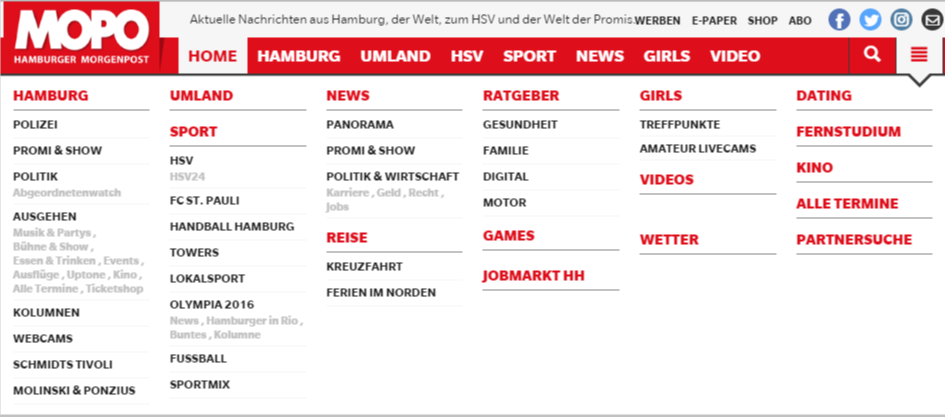 in the main menu under the 3 bar icon.
It looks good and correct on the main page but as soon as you view (click on) the nav icon from a different page or post the overview is displayed from top to bottom instead of next to each other like this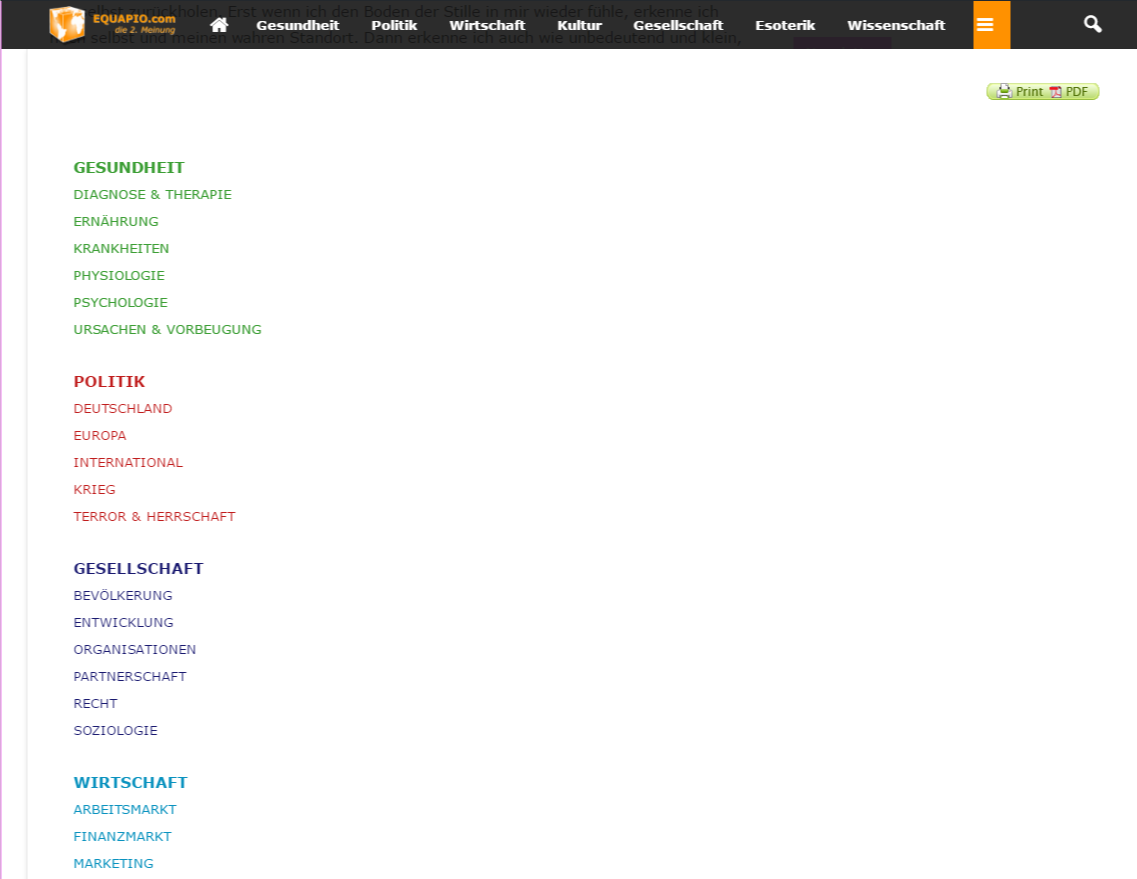 without being able to scroll.
I created the page with the visual composer using a blue layout (3 columns). Why does it work on my homepage and not on other pages and posts?
i actually like to have 6 columns like in the example pic and since you recommend not to use other layouts i tried it with a table. But the table won’t show proberly either.
Any advice how to get it done as in the example pic showing correctly on all pages and posts?
Help is much appreciated!
Thanks in advance
 Khalidbk
Hello !
I have a problem with sharing my articles on facebook. The latest articles when I share them on Facebook does not display the title, description and image.
for example : http://sante.orthodz.com/2016/08/27/lune-blanche-lautre-noire-et-pourtant-elles-sont-jumelles-explication/
web site : http://sante.orthodz.com
Thank you
 dodikmulyanto
Hi i use newspapper 7 theme , i got some problem . Some times my artikle index did not include time anda date , there are bug on newspaper ? example my link >> http://www.sustergadget.com/15459/jadwal-siaran-langsung-persegres-gresik-united-vs-semen-padang-live-streaming-indosiar-tscisc-2016-hari-ini/
 simchris
 Check one of your posts with GTmetrix.com — much better at explaining all the things you actually need to do to speed up your site, with examples. You can also exmplore my lenghty opus in the tutorials > best of forums if you dare 😉
simchris The example they linked to worked for me:
ref
http://screencast.com/t/RZLIOPUNdqh
but as also clearly stated in the linked thread, it may not work if certain plugins conflict and break the plugin entirely and what it tries to do — no way to make compatible with 1,000+ WP plugins out there.
So,
option
a) comment our or remove the section as previously indicated;
b) if does not work; then don’t use plugin
c) if you don’t use plugin, use my alternate suggestion
———
also as a tip from many users on themeforest and various theme support forums, avoid using the envato theme updater as more likely to break your site by doing partial or incomplete update of your theme. Best to always use FTP so you know 100% it is done properly every time for both theme and updated theme plugins.

 Edu Gomes
Site: http://www.agentesdeviagens.com
Hi guys!
I really don’t understand why my website is so slow… 🙁
My speed booster is active, My site looks so light, I barely install plugins, theres only one adsense banner… I just use TagDiv’s plugins…
I’ve checked your instructions at link: https://forum.tagdiv.com/how-to-make-the-site-faster/ ( But no sucess ), my site remains very slow when I check it on Google’s Speed Page.
If you guys can help, I’ll be very grateful.
Best Regards

