- NewsmagUsing the theme translations together with WPML
- NewsmagHow to update a plugin
- NewsmagCustom Post Type Support
- NewsmagAbove footer ads
- NewsmagWeather Widget
- NewsmagHow to update the theme
- NewsmagIntroduction
- NewsmagLogo & Favicon
- NewsmagFooter templates
- NewsmagUsing other ads
- NewsmagCustom ad spots
- NewsmagArticle ads
- NewsmagSidebar ads
- NewsmagHeader ads
- NewsmagLoading image effects
- NewsmagCategory top post styles
- NewsmagSmart Lists
- NewsmagGeneral settings
- NewsmagTheme thumbs
- NewsmagtagDiv slider gallery
 Romi
RomiHi All Tagdiv Team
I have a question as to how to pin an article so it’s pinned on above the block.
Here is the example of picture.

Let’s say in that category block, I want to pin the article in the place where I give border.
How do I do it, so the article keep on that place, albeit the category has new posts.
Thanks in advance guys.
Nagib.
 trispania
Hi. I want to connect two blocks of to avoid repeated pots. For example a first block with last 4 post. And in other part of my page, a new block with rest of posts (except the last 4)
An example:
1 row: block with 4 last post
2 row: other bloks (ad box, image,…)
3 row: block with 5,6,7,… posts
Thanks in avance.
Rgds.
 Anamaria
 Hello,
1. To set a specific color for each category, if it is so, then you can use a custom CSS like this one => https://www.screencast.com/t/WLgD2hJNMWN3
This is the code
.td-module-image a[href$="/music/"], .td-meta-info-container a[href$="/music/"], .td-module-container a[href$="/music/"], .single .td-category a[href$="/music/"], .tdb_single_categories a[href$="/music/"] {

background-color: green;

}

.td-module-image a[href$="/architecture/"], .td-meta-info-container a[href$="/architecture/"], .td-module-container a[href$="/architecture/"], .single .td-category a[href$="/architecture/"], .tdb_single_categories a[href$="/architecture/"] {

background-color: red;

}

.td-module-image a[href$="/video/"], .td-meta-info-container a[href$="/video/"], .td-module-container a[href$="/video/"], .single .td-category a[href$="/video/"], .tdb_single_categories a[href$="/video/"] {

background-color: blue;

}

.td-module-image a[href$="/architecture/"], .td-meta-info-container a[href$="/architecture/"], .td-module-container a[href$="/architecture/"], .single .td-category a[href$="/architecture/"], .tdb_single_categories a[href$="/architecture/"] {

background-color: red;

}
You need to change the category with your category (example: art with music) and also, you can change the color.
Set the code in Theme Panel ->Custom code -> Custom CSS -> https://www.screencast.com/t/St204VtFl3NU
2. The Posts Loops settings are divided into 4 tabs: General, Layout, Style, and CSS. The Posts loop is a special block and doesn’t have filtering options, you can only sort it =>https://www.screencast.com/t/geckLSYd5sa, so if you have set the Posts Loop on the homepage, then will display all post of all categories, if you have set the Posts Loop set on the category template, then will display the posts only from that category.
Hope this helps you!
Thank you!
 dharmendra11
 Thanks
https://www.uncutglobe.com/team-2/
How can I put a link on my image?
Example https://www.uncutglobe.com/team/
 imdarshanpetkar
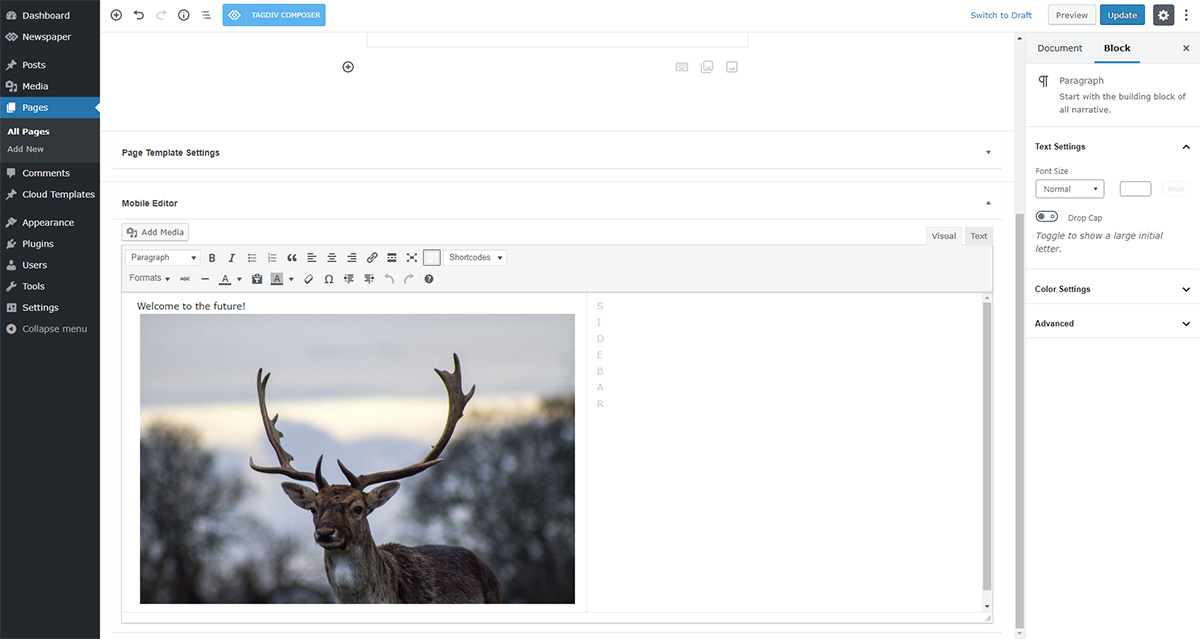
When the mobile theme plugin is active, how can I show my some particular category’s posts on them? Let’s say for example I have a Page Of Health Tips and on that page, I want to show only Health Tips category posts. I am unable to do it with the mobile editor option—-> https://tagdiv.com/wp-content/uploads/2018/11/gutenberg-welcome-to-the-future.jpg
How can I do that?
 katsar0v
 Hello Vlad S,
we are running native ads using Google Ad Manager.

However ads are not showing because of missing TCF and CMP Consent. The other AMP Plugin (AMP for wp) which we have used before supports privacy notice and gdpr popup, however with Newspaper there is no such solution.
Greetings!
katsar0v  mally
mallyhello. I was having some trouble making some changes to my website. I have tried everything but nothing seems to be working so I was wondering if someone from the team can please assist me.
for my landing page, I would like to have a hero post that displays the 3 latest posts with a hover option. I have attached an exact example of what I am looking for down below. if that can’t be done exactly, anything similar layout will work. I need urgent help with it. please let me know what needs to be done and I can send all info needed. thank you
 Adilmukhtarumt
Why I’m getting this (data:image/svg+xml, <svg xmlns=) error while I’m trying to open the image on my website. I added External Link and when i click on it they show me (https://chairfeature.com/wp-content/uploads/2020/11/Herman-Miller-Aeron-Ergonomic-Chair-Size-B-Graphite.png) or sometime this data:image/svg+xml, <svg xmlns=
My Site Example URL: https://chairfeature.com/what-chair-does-shroud-use/
 raclawski
Hi, I’m using newest available version of tagDiv & Newspaper template.
My problem is that I’m not able to edit any element in post template. I’m using “single post template 61 – Gadgets PRO” and I can’t edit any element on the template via tagDiv Composer. When I open template to edit I got error: “Errors at elements: 7(models):6(dom). The model does not to match the content. Current state has involved an issue.” and you cannot click on any section to edit it. I tried to upload template from cloud library again, but it doesn’t help.
Also I want to hide sidebar on post sites, but it’s always on right side, no matter what I choose from the menu (post menu and template menu).
How to do it properly? thanks!
 joelkennethsmith
Hello, I am experimenting with specific single post templates for posts inside a specific category, I imported a template from cloud, customized it, and now when you get to the bottom of the article on the front, it loads another article, and again and again….. example here: https://www.importsauce.com/toms-2009-volvo-c30-r-design/
Anamaria Hello,
The page speed is not related only to the theme that you are using, this is affected by plugins/content/ads/ external resources, etc.
I just checked your website and it looks that your images and thumbs are not optimized, for example, you can use EWWW Image Optimizer plugin, also, you can try other plugins like Autoptimize. => https://www.screencast.com/t/dPuNRR9u Your website needs an optimal speed that’s why you need to make some settings also to help for the improvement.
By the way, we have such a great result with this new update and with our new tool: https://www.youtube.com/watch?v=tnkVapqhIHc
Our tool is running only on normal pages and not for posts or categories for example.
Also, to increase the page speed you can check these similar topics for more solutions:
– https://forum.tagdiv.com/topic/optimize-script-to-improve-site-speed/
– https://www.infophilic.com/get-almost-100-pagespeed-newspaper-theme/
– https://forum.tagdiv.com/topic/a-few-tips-for-newspaper-x-speed-high-cpu-usage-issues/
– https://tagdiv.com/how-to-increase-page-loading-speed/
However, page loading speed can depend on many factors, and each website is unique from this point of view.
Let me explain some of these factors and maybe they give you some starting points for optimizing your website.
External factors: server speed, if you are using CDN or not, the external resources loaded by your website like ads, fonts, tracking scripts like Facebook Pixel, Google Analytics, Twitter analytics, Hotjar and so on.
Internal factors: the number of elements on the page, image size, image formats, if you are using mobile optimized layouts, console errors, if you are using the Standard Pack plugin on not if you are using PRO demo or a standard one.
To remove CLS please check these guide => https://developers.google.com/web/tools/lighthouse/ -> https://www.sqlpac.com/en/documents/google-pagespeeds-lighthouse-6-new-features-lcp-cls.html -> https://web.dev/lighthouse-whats-new-6.0/
Also, please remove the logo and add it again => https://www.screencast.com/t/Qj9gb0vY
Hope this helps you!
Thank you!
 zarpe77
 AnaMaria
Thank you for your help and I was able to resolve the issue.
However this has let me to another question
When I use ad box and place a image in the ad box with a link to that ad, it changes them on several other pages at the same time
I am trying to have separate ads on separate pages
I know there are global settings and categories settings and as far as I can tell I am changing it to categories settings in order to put the ad on that specific page.
For clarification purposes.. I am referring to the manually placed ads on the top of each page.. for example here; https://ticotimes.5e.cr/categories/retirement
Not the side widget ads that are being placed by Adthrive.
 anderss1
 Thanks for your excellent help :-). It would be great to put this short thread into your manual. hahahhaha.
https://www.frikurir.se/kategori/inrikes/
https://imgur.com/a/WNZeme3
Now my final problem is that the font color for the timestamp cannot seem to be changed.
Any ideas about this?
 vdaatland
Hi!
I know this topic has been up a couple of years ago, but we would like to know if there are any plans/process to make Newspaper WCAG 2.0 Level AA compliance “out of the box”.
This is now a requirement for sites in some countries (like Norway from january of this year), and required by law in EU (https://siteimprove.com/en/accessibility/eu-web-accessibility-directive/).
A lot is fixed by plug-ins, but there are issues – example is the header-menu and tab-navigation and skipping.
It would be great if you have this in mind when you develop (if not already). Unfortunately we now use other themes, like Icelander, for new projects (and may need to change themes for excisting sites). That would be bad, since Newspaper is by far our favorite theme to work with.
Regards,
V
Anamaria Hello,
What version do you use for mobile? Mobile responsive version or mobile page?
If you have mobile page, then you need to edit the mobile page, and select the header logo and change the text.
This is a video about Responsive Newspaper Theme, AMP & Mobile Theme, Mobile Pages & Templates -> https://www.youtube.com/watch?v=SpGkOnJeNZY
Thank you!
Anamaria Hello,
I just checked your website and seems the problem comes from here => https://www.screencast.com/t/a6N28wGw
Are you using a plugin for AMP?
I made a custom code CSS, which can help you => https://www.screencast.com/t/zsZgDBlZ
body.td-animation-stack-type0 .post amp-img:not(.woocommerce-product-gallery amp-img):not(.rs-pzimg) {
    opacity: 1;
}
Set the code in Theme Panel ->Custom code -> Custom CSS ->
Thank you!
 impact-media
Hi,
I cannot seem to find a whole bunch of elements that were in the theme in version 8 of the newspaper theme as I recently updated the theme to 10.4. For example, I cannot see the footer template style any more and cannot see [td_block_16 limit=”9″ custom_title=”Latest posts” td_ajax_filter_type=”td_category_ids_filter” ajax_pagination=”load_more”]. Please can you advice what alternative i can use thank you.
 tolgademir
some category pages have a color change at the bottom. In the management panel, a different color appears.
sample 1
*look at the footer color
https://www.tekohaber.com/category/gundem/
sample 2
*look at the footer color
https://www.tekohaber.com/category/sosyal-medya/ (footer problem category page)
footer default color is white
 Calin
Calin Hi,
Another suggestion is to check to be sure that the videos are set correctly https://wordpress.org/support/article/video-shortcode/ and then try a video shortcode plugin, for example I saw that some users use Mykraft Theme Responsive Video Shortcode plugin.
Maybe this can help you.
 alexcamarillo
Hi, after about a year of working with another custom-made theme, I decided to instal Newspaper again because I love tos functionality and performance and mainly because I wanted to improve user experience and generate more organic traffic. But a few days after the installation (March 3) Page Experience has dropped dramatically with only 8% good URLs. I thought my web performance and user experience would improve and this is very disappointing… maybe I have misconfigured something??? can you help me review this?
https://www.dropbox.com/s/l24dgsa7euugvsg/Screen%20Shot%202021-04-20%20at%2020.28.16.png?dl=0
https://www.dropbox.com/s/n9kyxc5yt9pcgkv/Screen%20Shot%202021-04-20%20at%2020.29.18.png?dl=0
Thanks!!
Alex C
 Gatso
Gatso Hi there
I tried it & cannot change single category color. If I change the color it changed all category color. If I want to change only 1 category color what I should do?
Thank you.
GatsoHi there,
How can I insert blogs there? See my picture:
https://imgur.com/L7aitiY
I think that blog & post are different each other. Right?
Best regards
 padaanet
 Can you explain more
The Posts Loop is automatically filtering the posts depending on the cloud template you set (for example on the category page there will be posted posts from that category).
 gooma2
 Thank you for bringing this up! I’ve been trying to figure out how to Preload the homepage featured images along with the article featured image only. Google is really focusing on these aspects, and I had assumed the theme would be updated with this in mind.
I did find this code for preloading featured images and wanted to let the Newspaper developer see if it would work with this one.
It would be great to have this figured out before May hits with Google’s changes.
Thank you.
/**

 * Preload attachment image, defaults to post thumbnail

 */

function preload_post_thumbnail() {

    global $post;

    /** Prevent preloading for specific content types or post types */

    if ( ! is_singular() ) {

        return;

    }

    /** Adjust image size based on post type or other factor. */

    $image_size = 'full';
if ( is_singular( 'product' ) ) {
$image_size = 'woocommerce_single';
} else if ( is_singular( 'post' ) ) {
$image_size = 'large';
}
$image_size = apply_filters( 'preload_post_thumbnail_image_size', $image_size, $post );
/** Get post thumbnail if an attachment ID isn't specified. */
$thumbnail_id = apply_filters( 'preload_post_thumbnail_id', get_post_thumbnail_id( $post->ID ), $post );
/** Get the image */
$image = wp_get_attachment_image_src( $thumbnail_id, $image_size );
$src = '';
$additional_attr_array = array();
$additional_attr = '';
if ( $image ) {
list( $src, $width, $height ) = $image;
/**
* The following code which generates the srcset is plucked straight
* out of wp_get_attachment_image() for consistency as it's important
* that the output matches otherwise the preloading could become ineffective.
*/
$image_meta = wp_get_attachment_metadata( $thumbnail_id );
if ( is_array( $image_meta ) ) {
$size_array = array( absint( $width ), absint( $height ) );
$srcset = wp_calculate_image_srcset( $size_array, $src, $image_meta, $thumbnail_id );
$sizes = wp_calculate_image_sizes( $size_array, $src, $image_meta, $thumbnail_id );
if ( $srcset && ( $sizes || ! empty( $attr['sizes'] ) ) ) {
$additional_attr_array['imagesrcset'] = $srcset;
if ( empty( $attr['sizes'] ) ) {
$additional_attr_array['imagesizes'] = $sizes;
}
}
}
foreach ( $additional_attr_array as $name => $value ) {
$additional_attr .= "$name=" . '"' . $value . '" ';
}
} else {
/** Early exit if no image is found. */
return;
}
/** Output the link HTML tag */
printf( '<link rel="preload" as="image" href="%s" %s/>', esc_url( $src ), $additional_attr );
}
add_action( 'wp_head', 'preload_post_thumbnail' );