
- NewsmagUsing the theme translations together with WPML
- NewsmagHow to update a plugin
- NewsmagCustom Post Type Support
- NewsmagAbove footer ads
- NewsmagWeather Widget
- NewsmagHow to update the theme
- NewsmagIntroduction
- NewsmagLogo & Favicon
- NewsmagFooter templates
- NewsmagUsing other ads
- NewsmagCustom ad spots
- NewsmagArticle ads
- NewsmagSidebar ads
- NewsmagHeader ads
- NewsmagLoading image effects
- NewsmagCategory top post styles
- NewsmagSmart Lists
- NewsmagGeneral settings
- NewsmagTheme thumbs
- NewsmagtagDiv slider gallery
 Oktay
OktayI’m using Eastcoast & Cali Sight templates for directories. However, I noticed that the map on the single directory page is actually just a screenshot image and not an actual interactive map. Also, on the Cali Sight search result, there is an “Explore” button which is not linked to anything else.
Is there, or what is the best way to go about adding OpenStreet Maps to the directories without breaking the theme and ensuring full compatibility? The website I am working on is https://double-glazing-windows.co.uk using the newspaper theme. Thanks
 lorandd
Hello,
I’ve configured WPML for multilanguage support as I saw it in the documentation that this is supported in the tagDiv themes.
I’ve configured EN(default) and RO languages
the EN version is accessible with the direct domain and the RO version with domain/ro
All the posts/pages are working ok so if I’m on the RO version and click a link the correct RO version of the link is loaded, but this doesn’t work correctly for the pages like myacocunt, register,etc
so if I’m on the RO language and want to go to my account page it goes to the my account of the EN version
I would have expected to go to domain/ro/my-account instead of domain/my-account
Is this a bug or a configuration problem?
Can you please advise?
Thanks,
Lorand
 Anamaria
 Hello,
Please check with the tagDiv Composer and disable the H1. For example, H1 from logo(header, footer, mobile, sticky): https://forum.tagdiv.com/topic/6-h1-tags-on-front-page-bing-have-deindexed-my-site/
Thank you!
 egosuriname
Hi,
I am facing an issue where the cloud template for categories loads different content on mobile, and I don’t know why.
I turned off the mobile and AMP plugins as I want to have the same structure on every device.
But the category template is showing different results if loaded from mobile.
I can load the same category page from a browser and resize it to mobile and get the desired result. But the moment I toggle the device toolbar, it renders something different.
Image Browser Responsive
Image Browser Responsive
Image Device Toolbar
Image Device Toolbar
 tola999
 kibiribi
 Thanks for your comment – it helps for post – https://prostobzor.com/uk/garmin-8-braclety-dovgyna/
But in this case, I need to fix the menu – acc. to this page –
But it doesn’t work for Template menu header
I’ve added lang. switcher to menu – it doesnt show in the header –
screenshot – 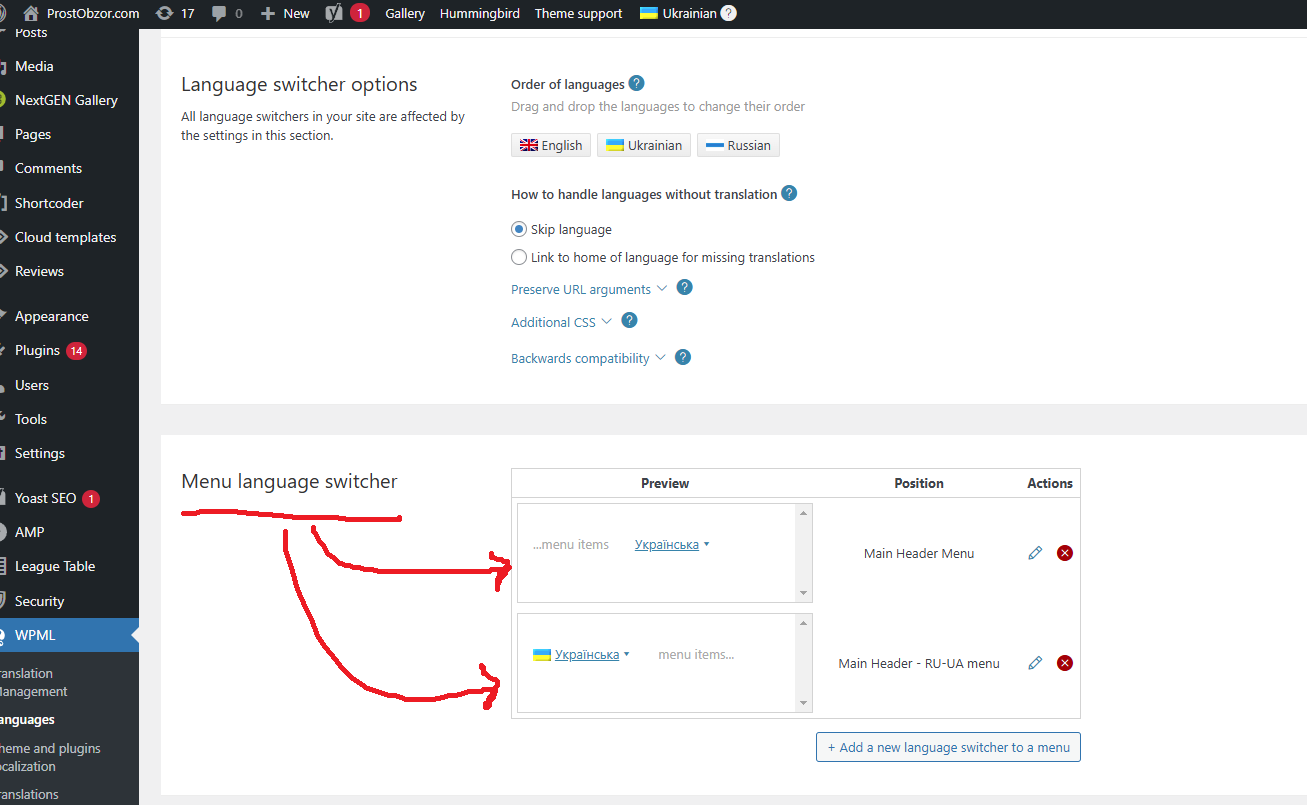
Do you have Tagdiv step-by-step instruction how to add WPML switcher to the Header menu?
Anamaria Hello,
You have the mobile theme plugin activated; please deactivate it and clear the cache.
Using our theme, you can choose from 3 mobile versions
-> mobile responsive => https://www.screencast.com/t/oJ2ShOp47
-> mobile theme plugin => https://forum.tagdiv.com/the-mobile-theme/
-> mobile page => https://tagdiv.com/newspaper-10-3-7-update-brings-customizable-and-fast-mobile-pages/ The option that you need to use.
Suppose you created the mobile pages with tagDiv Composer. In that case, when you install the Mobile Theme plugin, your pages will be overwritten by the plugin (the mobile theme comes with its templates for page, post, category, etc, so your current templates from the desktop theme will get converted to the mobile theme layout, the page content is made without builders in mobile editor => https://www.screencast.com/t/xbgZG8kH also, the options that are provided to edit the mobile theme version are limited (this keeps the things simple)).
This is a video about Responsive Newspaper Theme, AMP & Mobile Theme, Mobile Pages & Templates -> https://www.youtube.com/watch?v=SpGkOnJeNZY.
So, the mobile responsive is what you see when that you select the viewport on phone => https://www.screencast.com/t/matV17hH, so some settings may apply for each viewport(where is the border blue), and others are not(where the border is black).
The mobile page has the mobile templates from Cloud Library => https://www.screencast.com/t/YCcZ8rL8
The Mobile responsive version of the theme and the mobile page editor can be edit with tagDiv Composer, the mobile theme plugin cannot.
For example, you can have the mobile theme plugin activated and use the mobile page/mobile responsive version for the homepage/pages, but for the categories pages/404 page, you can’t use the mobile page/mobile responsive version if you have the mobile theme plugin activated.
So, if you want to design the pages with tagDiv Composer, you can use the mobile page or mobile responsive version.
Thank you!
 wmcoettc
 Hello
We have tried
How can we change the content?
Send marked image. We want other news or web!
https://drive.google.com/open?id=1-Lyi61IGRLHidQgp_gogdm1FyVVsjbhU&usp=drive_fs
Maybe it is easy but we don’t see how
web: https://www.coettc.info/?page_id=16462&preview=true
Thanks for your interes
-
This reply was modified 1 year by
wmcoettc.
Oktay Yes that is what I did.
I created a page called “Articles”. I customise it with cloud library blocks. It looks like this for example: https://prnt.sc/Jv50u3UhI6qb
But when I change the posts page on settings>readings>Posts page to “Articles”, the green button “Edit with TagDiv Composer” button disappears and the appearance reverts to default layout and does not show my customise design. It looks like standard template again when I set the post page to my custom design: https://prnt.sc/p5rcGqXXOEQ6
With the post page set to “Articles”, it says “TD Composer is disabled on Posts page” and does not permit me to edit the page via the cloud library. See this link: https://prnt.sc/cJiaBgRzfjuA.
Again the appearance becomes just a standard layout despite that I customised it prior to setting it to Posts Page.
 Hellpress
Hi, I have updated the Newspaper theme and got into a mess. Before the update all the content images that appeared in categories were the same size, and now each one appears cropped differently, without keeping the same ratio / proportion between them.
My webmaster died two months ago and all I do is experiment without success. This is a screenshot: https://imagizer.imageshack.com/v2/385x425q70/r/922/PYRCB5.jpg
My webmaster also had a modified functions.php that he uploaded every time he updated the theme, which solved a lot of things, although I don’t know about this. For example I have lost the header and footer “wordpress-driven” I had before and I have redone them as I could with Cloud Templates. I do not know how to recover the old ones (maybe uploading the modified functions.php instead). I also don’t know how to remove these empty columns to make everything more compact:
https://imagizer.imageshack.com/v2/991x340q70/r/922/fVPDfG.jpg
 pcrio22
 how did you solve it last time?
You said the solution was “There was a hidden modal popup element in the mobile viewport that should be deleted.”
Guide me and ill do it, I disabled AMP and Mobile as well, but its still there
pcrio22 Seems like to be resolved this issue, but now i have all my posts been appended a tds switching plans text after each link i have. Example
https://digitalizado.club/qual-e-a-renda-de-um-afiliado/tds-switching-plans-wizard/
how do i disable it? Thanks
 Bettina
 Hello!
Uninstall the Mobile theme and AMP plugin.
Thank you!
Anamaria Hi,
The cloud templates are custom post types, and these can be an index or not, therefore you can use Yoast SEO to control the SEO for cloud templates, for example https://i.imgur.com/6BRLmIs.png after that you need to reindex your website on Google (or you can reindex only that link).
You can see the cloud templates here https://i.imgur.com/uaqTmLk.png
Thank you!
Anamaria Hi,
The cloud templates are custom post types, and these can be an index or not, therefore you can use Yoast SEO to control the SEO for cloud templates, for example https://i.imgur.com/6BRLmIs.png after that you need to reindex your website on Google (or you can reindex only that link).
Thank you!
pcrio22Hey guys, I started crawling links at ahrefs and It found many issues related to formatting, like the examples above
https://digitalizado.club/o-que-faz-o-marketing-digital/{{post_cat_link}}
https://digitalizado.club/qual-a-melhor-forma-de-administrar-o-tempo/{{td_query_all_results}}
https://digitalizado.club/o-que-da-dinheiro-hoje/{{post_url}}
all 404 ofc.
How could i solve this pls?
thanks
Bettina Hello!
Please provide your website link or an example.
A solution for sending a screenshot/video is this:
Download, capture, and send: https://www.techsmith.com/jing-tool.html
After making the screenshot, you will have a link; paste it here.
Thank you!
 gurgaonmail
i have added cf7 form in footer .when we click on send button then it is redirecting in this URL ” https://news.gurgaonmail.com/wp-admin/admin-ajax.php?td_theme_name=Newspaper&v=12.6.8#wpcf7-f2513-o1″
Bettina Hello!
If you select a category as a filter and a post is assigned to that category, it should appear. If the post does not appear, there could be an offset set. Let the offset field be empty with no space or value, and see the results: https://prnt.sc/26SoUFv7QzxG -> https://www.screencast.com/t/peVbVmUDE.
If your articles have more than 1 category and the first category is displayed there.
A solution there could be to set a primary category for each article. To do this, you should edit the post normally and set the category you want displayed: https://www.screencast.com/t/W3DlctW1 ; then, the article will have the category you need there. Please note that this article will always appear with the primary category. (for 2 categories, for example)
Thank you!
Bettina Hello!
Yes. Check this thread and make sure you set up the page in the mobile editor as explained here: https://forum.tagdiv.com/topic/issues-with-buddypress-in-mobile-theme/. We have 3 options available for mobile versions that you can use:
1. Responsive version: A responsive version of your website looks similar to the desktop version. TagDiv Composer is used to edit the page. Click on the mobile viewport: https://www.screencast.com/t/XDQJedlggSB. You can see your mobile version there and edit or adjust the elements to look better.
2. Mobile pages: https://tagdiv.com/newspaper-10-3-7-update-brings-customizable-and-fast-mobile-pages
3. Mobile theme plugin: The Mobile Theme is a performance-optimized theme included in the main Newspaper theme that only loads on mobile devices. It comes with its own templates and designs for pages, posts, categories, etc., so your current templates from the desktop theme will get converted to the mobile theme layout. Please see https://forum.tagdiv.com/the-mobile-theme/ and https://forum.tagdiv.com/mobile-theme-introduction/ for more information.
A full explanation is here: https://www.youtube.com/watch?v=SpGkOnJeNZY
If you need to use mobile version 1 or 2, then you need to uninstall the Mobile Theme plugin and AMP.
Thank you!
 Simion C.
 Hi,
Creating a video post with a featured video, or embedding a video in the post content, should work fine regardless of doing it from desktop or mobile. I will take a closer look at this, please send us an email at contact@tagdiv.com and provide an example of these issues. Also provide admin login for the website, so I can test as well. On my end it seems to work fine, I used the same video and post template as you, and created the post via mobile https://prnt.sc/dTBsUKYbKYXp
Thank you!
 vysltnk
I installed the Newspaper theme and uploaded the Corona template as an example. On the homepage, in the blocks section, I noticed that even though I select certain categories, different category names appear instead of the ones I chose. Also, newly added posts aren’t appearing in the selected sections. What could be the reason for this?
1 : https://ibb.co/G2DCJ8w
2 : https://ibb.co/s3pJFBK
3 : https://ibb.co/zHWW36q
 Newszzie
How can I display a specific blog post in a designated section? I tried using the post ID (for example, #post-366), but the selected post isn’t showing up
I used Flex Blog 1, in Post ID filter I used the id name as #post-366 but its not showing
 CatholicSpirit
 Thanks! The developer we contract with for hosting (and has built us our other site) tells us that the TagDiv plugins create errors preventing us from moving to 8.2 and hampering us on 7.4. He insists the only way to fix it is for him to build us a site from scratch.
 mkh67
mkh67 Hello
Since some weeks, we do have the same problem : twitter posts that worked well before, now just show an url instead of twitter post “embed”.
Example : https://www.actual-immo.fr/guide-preparation-loi-dpe-2025/



