- NewsmagBlock settings tutorial
- NewsmagCategory tag on modules/blocks
- NewsmagtagDiv Composer Tutorial
- NewsmagWeather Widget
- NewsmagExchange widget
- NewsmagInstagram widget
- NewsmagHow to use the Visual Composer plugin
- NewsmagIntroduction
- NewsmagFooter templates
- NewsmagCustom ad spots
- NewsmagLoading image effects
- NewsmagSmart sidebar
- NewsmagFeatured images
- NewsmagGeneral settings
- Newsmag7 days post sorting
- NewsmagTheme thumbs
- NewsmagExcerpts introduction
- NewsmagTheme colors introduction
- NewsmagtagDiv slider gallery
- NewsmagVideo playlist
 elcanal
Hello,
Since the latest WordPress update (I’m now on 6.7.x), every “Advanced WordPress Backgrounds” block on my Newspaper 12.7.3 site has stopped working properly:
– Background images no longer centered
– Background color + overlay disappeared
– Border-radius completely removed
The problem is visible both in tagDiv Composer pages and in the normal Gutenberg editor.
Everything worked perfectly before the WordPress update.
Is this a known compatibility issue?
Could you please provide a quick CSS fix or include a patch in the next Newspaper update?
Thank you!
Best regards,
 Dviraciu Kultura
Hello, we are trying to understand how to use two themes in one. We are now setting Town Talk theme for our news but we want to add a feature where people can find right person and we want to use Directories theme Doctors for that. How I see I can use blocks of any theme right? What plugins do I need to install that directories will work
 bounama17
I add playlist block
and add these details:
Channel ID
Username
Playlist id
but not work
 Calin
Calin Hello,
If I understood correctly you want to show all the articles ordered by the most recent, if so, then you don’t need a category, but just a page where you can use a block, like flex block 1 and which is sorted by latest.
I think it is much more efficient to use a page instead of a category if all the articles will be displayed anyway, but if it was only a part, then it made sense to be a category, because there were only the articles in that category.
Regarding the situation you have with the category cloud template. When a cloud template is set as global, it will apply to all categories (this case), if you want it to be applied only to a specific category, you must have another cloud template (you can duplicate the existing one) and assign it individually to the respective category https://i.imgur.com/fTZlLJK.png
Thank you!
Calin Please try this custom css:
body .td_block_template_9 .td-block-title {

    text-align: right;

}

body .td_block_template_9 .td-block-title:after {

    right: 0;

    left: auto;

}
bounama17 We used td_block_template_9
and this demo https://demo.tagdiv.com/newspaper_default_rtl_pro/
Calin Hi,
If you are using the header style 1, then you can use this custom css:
body .td_block_template_1 .block-title {

    text-align: right;

}
Set teh code in the theme panel > custom code> custom css and all block headers that use the header style 1 will be aligned to the right.
Thank you!
Calin Hello,
1. That is only a notice and is not an interference or an effect on the website.
2. For that, replace teh last part of css I provided (this one)
body .tdc-content-wrap .td-module-container {

background: #f9f9f9;

border-radius: 0 0 10px 10px;

padding-bottom: 10px;

}
with this one:
body .tdc-content-wrap .td-module-container {

    background: #f9f9f9;

    border-radius: 10px;

    padding-bottom: 10px;

    border: 1px solid gray;

    box-shadow: 1px 1px 5px 1px gray;

}
you can adjust the code after your needs.
3. To align the stars and the price on the same line, it is necessary to change somewhere halfway through the css code above.
4. For this you need to use tagDiv Composer on the pages where you have blocks and see if the blocks you have on the website have the option to display the “View/read more” button https://i.imgur.com/eeiflV4.png
Thank you!
 israelru.news
Newspaper 12.7.3
File path contains typo: “blotsk” instead of “block”
Path: /wp-content/plugins/td-composer/legacy/common/wp_booster/wp-admin/panel/panel_core/td_panel_core.php
Line: 217
Expected file: td_thumbs_on_modules_and_blocks.php
Actual call: td_thumbs_on_modules_and_blotsks.php
Workaround: Created symlink to fix the issue.
Calin Hi,
Normally, you should use the Theme Builder to edit the block layout. Once you have adjusted one block, you can copy and paste the styles to the other blocks.
If you prefer to proceed using CSS, you can try something like this:
.tdc-content-wrap .td-excerpt{

padding-bottom: 16px;

border-bottom: 2px solid #e7f0f1;

}

html body .tdc-content-wrap div.star-rating {

float: left;

}

.tdc-content-wrap .td-module-meta-info{

border-radius: 0 0 10px 10px;

}

body div.td_woo_products_block .tdc-content-wrap div.td_woo_product_module .price{

margin-bottom: 0;

}

body .tdc-content-wrap div.td_woo_products_block .star-rating {

margin: 6px 0;

}

body .tdc-content-wrap .td-module-container {

    background: #f9f9f9;

    border-radius: 0 0 10px 10px;

    padding-bottom: 10px;

}
The CSS should be added in Theme Panel > Custom Code > Custom CSS. Be sure to check all pages to confirm that it displays correctly and does not break the layout of any blocks.
Thank you!
Calin Hi,
To have teh standard url pagination you need to replace the flex loop builder element with loop post element https://i.imgur.com/WiAjpQ2.png – https://i.imgur.com/NEX2sv5.png
The pagination behavior of these two blocks is different, which is why the current setup doesn’t support standard URL pagination.
Thank you!
Calin Hi,
This is because teh above code was made for a specific block, and that block also used an extra class that has been added on the block using the tagDiv Composer.
Do you want to have this layout https://i.imgur.com/gV60T5S.png on most of the blocks? We discuted about this and how to achive taht layout in this topic – https://forum.tagdiv.com/topic/woo-product-box/
Thank you!
 cloverjim
 Hi,
This is the demo template.
https://demo.tagdiv.com/newspaper_shop_makeup/
However, I added the previous codes but they didn’t work.
These were the previous codes:
.cls-wpb .td-excerpt{
padding-bottom: 16px;
border-bottom: 2px solid #e7f0f1;
}
html body div.cls-wpb .star-rating {
float: left;
}
.cls-wpb .td-module-meta-info{
border-radius: 0 0 10px 10px;
}
body div.td_woo_products_block div.td_woo_product_module .price{
margin-bottom: 0;
}
body div.td_woo_products_block .star-rating {
margin: 6px 0;
}
Website address: edubit.ir
Thank you!
Calin Hi,
If the template is editable with tagDiv Composer, edit it and set the class from the image on the block (cls-wpb), then make sure that the css is also loading on that template if not, then set it in a css element from tagDiv Composer.
Thank you!
Calin Hi,
Can you please provide some more details and some screenshots? I’m not sure if you are referring to an image inside an article or the top a block (more exactly, an excerpt from a block).
Thank you!
Calin Hi,
This can be done if you are using the tagDiv Composer, select or add a new block and set on that block the post ID you want to https://forum.tagdiv.com/flex-block-settings-guide/ https://i.imgur.com/oguqWd6.png https://i.imgur.com/2jePtiQ.png
Thank you!
 giulian
We have issues with saving the main category (when more than one are selected) for the posts.
It lets you chose the main category but it doesn’t save it.
Wordpress v6.9
Newspaper v12.7.3
Some AI debugging info:
TagDiv themes (Newspaper/Newsmag) implement their own “Primary Category” logic using td_primary_cat meta.
When WP versions change (especially 6.7+ → 6.8+ / 6.9), the taxonomy metabox structure changed, breaking older JS that TagDiv uses to capture the radio button selection.
Common causes:
1. JavaScript conflict or deprecation
The TagDiv metabox JS that listens for the “Make Term Primary” click fails to run.
WP changed DOM structure inside the metabox.
2. Theme or plugin outdated
Version 12.7.3 of Newspaper is known to have primary category issues with newer WP versions.
3. Autosave overwriting meta
If Gutenberg autosave is active, it can remove td_primary_cat before final save.
4. REST API conflicts
Security plugins or caching layers (Cloudflare, LiteSpeed, WP Rocket) may block the POST request saving meta.
Can I get some help with it?
It started last week. Let me know if you need more info or details.
thx for your fast reply since this is an urgent matter for our website.
Calin Hi,
I made some tests on my install and everything seems to be ok, but there were a few users with a similar problem, so please check the solution from this guide https://forum.tagdiv.com/topic/flex-block-1-keeps-loading-the-same-posts/
Another solution will be to replace the loop with a flex block.
 Koder
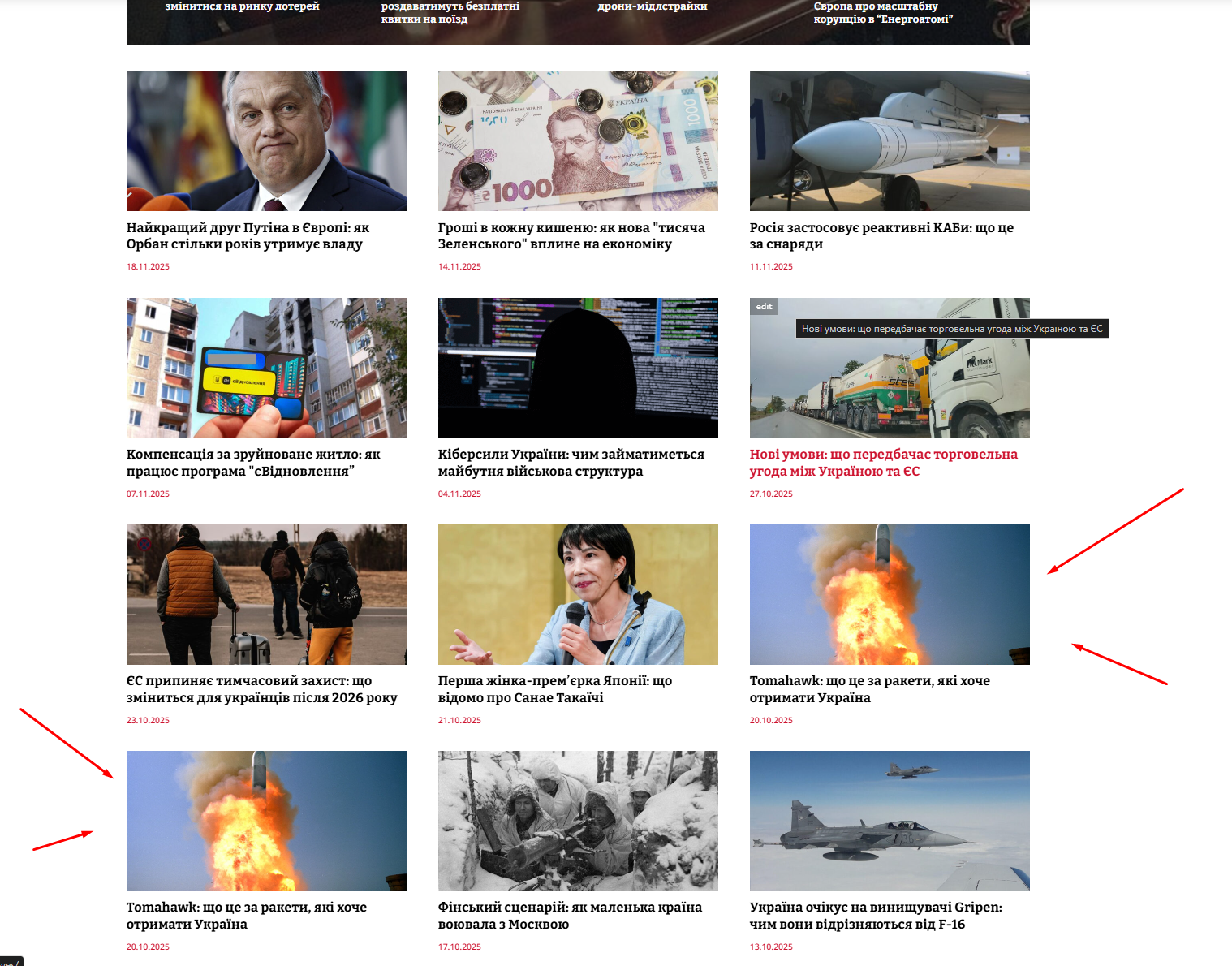
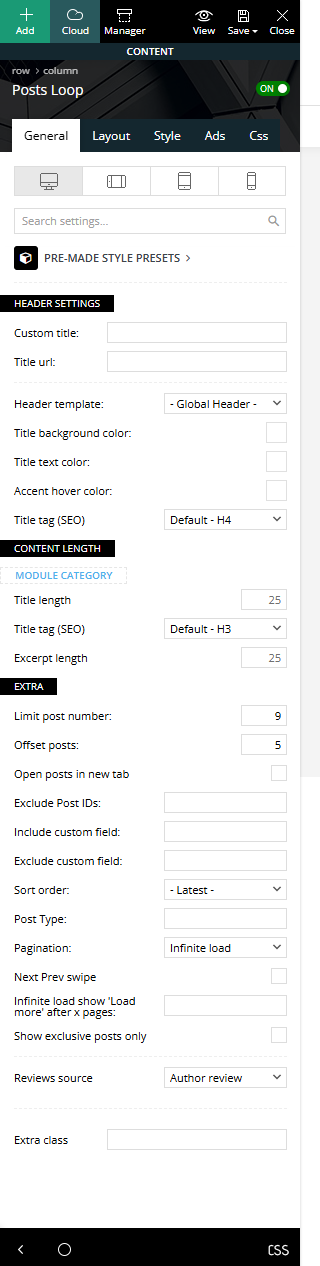
KoderI have a “Posts Loop” block, it has the Pagination “Infinite load” function, as well as skipping 5 posts. Only 9 posts are displayed in the block, and when loading the following posts, the 9th post is duplicated, that is, the 9th and 10th posts are the same (You can see on the screenshot:https://i.ibb.co/HfJVbhc6/Screenshot-2.png). What could be the problem? screenshot of the block settings:https://i.ibb.co/GfjZCxjm/Screenshot-3.png
Calin Hi,
Usually, when this is happening, something is blocking the WP Editor, for this please try our suggestion from this guide – https://forum.tagdiv.com/general-options-may-interfere-newspaper-theme/ – https://i.imgur.com/rJBqEg6.png
Calin Hi,
I’m really glad you were able to resolve it, and I’m sorry I didn’t catch the issue sooner to offer my help!
I see both banners the logo on the left and the banner ad on the right (https://i.imgur.com/CeruauW.png). If you’re not seeing the banner, it might be due to an ad blocker being enabled on your browser.
Thank you!
Calin Hi uwo,
I think there is a misunderstanding! As I mentioned above, if you change the feature image, this will be displayed on blocks, not inside the article; inside the article will remain the original one https://i.imgur.com/SMb1xyx.png
Thank you!
 Jareddelre
 Thank you. I just disabled it. I took an old snapshot before I saw this message and compared the code n the front page and fixed the broken blocks and that restored it as well.
I appreciate the response.
Calin Hi,
Unfortunately, I do not have a Mac to test it on a real device, and it appears that those simulators are not displaying the error.
The problems that can be on Safari are usually related to:
– position: sticky;
Parallax or “Zoom” effects in blocks:
– transform: translate3d()
– transform: scale()
Box-shadows
This uses a WebKit-specific media query that ONLY Safari matches:
/* Safari-only CSS */

@media not all and (min-resolution: 0.001dpcm) {

  @supports (-webkit-touch-callout: none) {

    /* Your Safari-only styles here */

    .td-module-image,

    .td-image-container,

    .tdb-header,

    .td-header-wrap {

        transform: translateZ(0);

        will-change: opacity, transform;

    }

    .td-block-span12 .td_module_flex,

    .td_module_10,

    .td_module_11,

    .td_module_1 {

        box-shadow: none !important;

    }

  }

}
Calin Hi,
If you want to globally remove the author from blocks, you can do this from the Theme Panel settings: go to Newspaper > Theme Panel > Block Settings > Meta Info on Modules/Blocks (https://i.imgur.com/7P6nxtv.png).
For single posts, you’re using a cloud template. To remove elements there, open the template in tagDiv Composer, select the elements you don’t need, and simply press the Delete key (or right-click the element and choose Delete from the menu). https://i.imgur.com/UsJvNAU.png – https://i.imgur.com/bCSgUTC.png
Thank you!