- NewspaperFlex Block Builder and Flex Loop Builder
- NewspaperHow to use the Flex Blocks cache option
- NewspaperHow to edit modules for Flex Block X
- NewspaperHow to insert a block inside the content of a post
- NewspaperFlex Block Settings Guide
- NewspaperMeta Info on Modules and Blocks
- NewspaperTheme modules and blocks
- TutorialsDefault Block Settings Guide
- NewsmagBlock settings tutorial
- NewsmagCategory tag on modules/blocks
- NewspaperThumbnails – Fix strange looking images on blocks
- NewspaperBlock settings tutorial
- NewspaperCategory Tag on Modules/blocks
- ApiPractical example – How to add a new Block and Module
- Apitd_api_block::delete
- Apitd_api_block::update_key
- Apitd_api_block::update
- Apitd_api_block::add
- ApiAPI – Blocks – Introduction
- NewspaperWP Rocket and Newspaper Theme: Optimization Guide
 allanh
 Relax, bro! this is how you fix it: You login into you envato account, go to downloads, download the licence and purchase … pdf or text, then you login into your website dashboard, go to newspaper / system status / reset key / then activate key … you enter the purchase code from the licence and purchase pdf and then save! Easy as pie!
This method worked for you, but did not work for many other people (including me).
-
This reply was modified 4 years by
allanh.
 rahulroushan
 Does that even answer my question? I already know what you’ve linked to. I’m asking if there is any workaround to stop the extra thumbs for the mobile theme? Like in different Flex Boxes, I can always use the same image size despite different widths etc. of the boxes. The best way could be where you modify the mobile theme blocks and add the option where images are auto-selected from default images. This will require code changes, and you should either consider providing in any update or explain where that code is in the theme files.
allanhIf the notice is displayed on the website, first please make sure the theme is activated with the key https://tagdiv.com/how-to-activate-the-newspaper-theme/
If the theme was activated, please try resetting the theme activation and then activate it again with the key, from the theme system status panel https://i.imgur.com/7Ktmd1e.png Ultimately, if there is a problem or the issue remains, please send us an email immediately at contact@tagdiv.com and we will take a look.
We are very sorry for the inconvenience.
So your solution is basically to “email contact@tagdiv.com” and nothing else?
And lots of people have emailed and getting no response after many hours and their sites (including mine) are still showing “This website is using an unregistered version of Newspaper theme”. Sending emails to contact@tagdiv.com gets no response and no solution, what is the point?
 player1
 +1 for midorin:
This is an issue that should never happen to begin with. How can we even know if it’ll happen again and with which frequency? This shouldn’t be the type of problem we’d have to deal with, especially when we’ve already paid for the theme, to begin with.
 ASedyshev
Hello
why is my website blocked?
I have a paid license!
bjs.city

 AndrewWc
Please refer to this image https://photos.app.goo.gl/CbGbybvc9LqKYX2P6 on this website https://www.gkgigs.com/ homepage (Desktop). When I sign in on my WP dashboard I could see everything fine but these errors could be seen since long time ago. I’m seeing lots of errors since the newspaper theme became 11 from 10. Kindly provide me with a solution ASAP.
rahulroushanHello, I know that in order to show thumbnails on mobile website when using Tagdiv Mobile Plugin, I need to enable the two thumbnails sizes in ‘Theme Panel –> Block Settings –> Thumbs on Modules/Blocks’
However, I want to avoid it because every image uploaded on the website will have two more thumbnail versions of it created, and thus eat up space (in ‘uploads’ folder) on the server.
Is there a way in which the Mobile Theme can use the default uploaded image or the ‘300×0’ sized image, and resize those using css to show the required thumbnails?
 Bettina
  Anamaria
 Hello,
Usually, that problem it is related to the CORS policy that are blocking the access, that should fix the problem, also I see that you have another problem https://www.screencast.com/t/6EpdZBQMela this problem can be solved using those guides:
– https://forum.tagdiv.com/topic/font-blocked-from-loading-by-cross-origin-resource-sharing-policy-no-access-co/
– https://stackoverflow.com/questions/25577981/font-from-origin-has-been-blocked-from-loading-by-cross-origin-resource-sharing
– https://webmasters.stackexchange.com/questions/71630/font-blocked-from-loading-by-cross-origin-resource-sharing-policy-no-access-co
Let me know the results!
Thank you!
Anamaria Hello,
Please disable the SUCURI plugin and check after that.
As far as I know, this plugin does not work with our theme and functionality issues may occur.
Also, please check the whitelist of the Sucuri plugin, because this plugin blocks the request when you try to save the settings.
Thank you!
 Adejayas
 Dear Bettina,
I cannot solve the advertisement problem. When I access my website http://lp2m.uinbanten.ac.id/, the advertisements appear. But when I log into the website with TagDiv, the advertisement blocks don’t appear. What I did, then, is to remove the images to which the advertisements refer.
When I access my website without logging into:
https://snipboard.io/Q5mlKr.jpg
https://snipboard.io/GDwjld.jpg
When I login into the website with TagDiv:
https://snipboard.io/a7Yyxt.jpg
https://snipboard.io/IjdqzL.jpg
Your help is very much appreciated.
Best regards,
Ade
 integralgr
Hello
Im using the gossip theme.
I have create almost the same modules on fontpage as your demo.
But on mobile the view is very disspointing!!!
Why soem of my blocks look like so big and angly?
Regards
 Bill Fleak
 Here is how we are adding the GAM code to the theme using Ad Block element and adding the GAM code. https://www.screencast.com/t/dMMp3fyc
We currently have ads delivering so you will see the ad and the Advertisement text above the ad. The issue is when we have not ad delivered and the Advertisement text still appears.
Please advise.
 princebilly
Hi there
I purchased Newspaper and also extended support now. I removed the old (not automatically upgradeable Newspaper 9) and exchanged the theme with Newspaper 11. Frontend works fine when i build the website using TagDiv Composer blocks again. But the posts do not work anymore due to an wp booster error (see [1]).
Please support. I love your theme, but this upwards not-compatibility is really hard to follow. Thank you.
Best j
wp_booster error: td_api_base::mark_used_on_page : a component with the ID: single_template_1 is not set.
/mnt/rawdata/www/cubicles/flock-0755/showreel.mdh.fhstp.ac.at/wp-content/plugins/td-composer/legacy/common/wp_booster/td_api.php
[1] https://showreel.mdh.fhstp.ac.at/5911/breathx-stressfree-radiotherapy/
Bettina Hello!
It should work well. Please make sure you use the Single Post Featured Image and not the Single Post BG Featured Image, change the element: https://www.screencast.com/t/lQoN5x6QAiU
CSS here:
@media print{ .tdb-featured-image-bg { display:block;}}
Results here: https://www.screencast.com/t/B7ohxOGj
Thank you!
Anamaria Hello Patrick,
If you want you can use the Flex Block and set the filter on Single – Related by category and you can check this article https://forum.tagdiv.com/flex-block-settings-guide/
Thank you!
Bill FleakWe are using the Newspaper theme with Cloud templates. We inserted the AD Block to display our ads from GAM using the Custom Ad tab for injecting the GAM code. We have the word -Advertisement- for the ad title in the Ad-block. When there are no ads displayed we would like to hide the word Advertisement above the ad. See link. We have 3 ad spots on the page. We have only 1 had being served of the 3. But the word -Advertisement- is still showing up where the ads would be. Is it possible that the text -Advertisement- not be displayed if there are no ads being delivered. Please advise.
 tomakisz
Hi,
I use the team member block to list all the employees of our site. I know it is possible to add their social media through a dedicated tool. However, I wanted to add a link to their profile on the website, e.g. in their name (without an additional icon underneath). Is there such a possibility? Unfortunately, I couldn’t find anything about it in the documentation.
Thanks!
 patrixx73
I, I just installed newspaper last Saturday and today i create the first mobile page. This is the error I am facing on the mobile ios device. Please help me solve it.
Kindest Regards
Patrick
wp_booster error:
td_res_context->get_att(gap) Internal error: The atts are not set yet(AKA: the render template method was called without atts)
/var/www/vhosts/ecodisofia.net/httpdocs/wp-content/plugins/td-composer/legacy/common/wp_booster/td_css_res_compiler.php
Array
(
[0] => Array
(
[file] => /var/www/vhosts/ecodisofia.net/httpdocs/wp-content/plugins/td-composer/legacy/common/wp_booster/td_css_res_compiler.php
[line] => 385
[function] => error
[class] => td_util
[type] => ::
[args] => Array
(
[0] => /var/www/vhosts/ecodisofia.net/httpdocs/wp-content/plugins/td-composer/legacy/common/wp_booster/td_css_res_compiler.php
[1] => td_res_context->get_att(gap) Internal error: The atts are not set yet(AKA: the render template method was called without atts)
)
)
[1] => Array
(
[file] => /var/www/vhosts/ecodisofia.net/httpdocs/wp-content/plugins/td-composer/legacy/common/wp_booster/td_css_res_compiler.php
[line] => 362
[function] => get_att
[class] => td_res_context
[object] => td_res_context Object
(
[settings:td_res_context:private] => Array
(
[all] => Array
(
[gap] => 10px
[row_auto_height] => 1
[row_fixed] =>
[stretch_off] =>
[row_anim_off] =>
[svg_z_index] =>
[flex_display] => block
[flex_width] =>
)
)
[current_media:td_res_context:private] => portrait
[atts:td_res_context:private] => Array
(
)
[index_style] =>
[responsive_atts:td_res_context:private] => Array
(
[0] => gap
)
[fonts_to_load:td_res_context:private] => Array
(
)
)
[type] => ->
[args] => Array
(
[0] => gap
[1] =>
[2] =>
)
)
[2] => Array
(
[file] => /var/www/vhosts/ecodisofia.net/httpdocs/wp-content/plugins/td-composer/includes/shortcodes/vc_row.php
[line] => 365
[function] => get_shortcode_att
[class] => td_res_context
[object] => td_res_context Object
 Henrieta
Can you help me figure out how to insert code Google Ads In-feed to Flex Block 1 among popular articles? Modules per row is 1.
I could not find the option for this type of Ads.
Bettina Hello!
Please check 1. if this code is missing from your htaccess file: https://www.screencast.com/t/iN0R93dD3p from our requirements, make sure you have all the requirements as you can see here: https://forum.tagdiv.com/requirements-for-newspaper/
2. the console, if you have any errors when you try to open the wp editor, maybe is possible to be from the firewall or security module which blocks the admin-ajax.php request, which usually displays a 403 or 404 error.
If you don’t use a security plugin, please ask your host about this, maybe you have a security module that blocks this.
If you use a plugin like Wordfence please set it in learning mode.
Also, if you are using Cloudflare, please make sure that is set as in our guide https://forum.tagdiv.com/cloudflare-cdn/, you need to disable the Rocket Loader.
Thank you!
Anamaria Hello,
Please make sure you have enabled the option to show the excerpt on the block => https://i.imgur.com/ZBvMnvZ.jpg, also, if you have set a limit => https://i.imgur.com/yeW3aCf.jpg
Thank you!
Anamaria Hello,
1. If you refer to this section https://i.imgur.com/wmA7Gzu.jpgyou can import it from Cloud Library on your page https://i.imgur.com/dUSydxo.png the block will be set at the bottom page content, but you can move it where you want, select the row => https://i.imgur.com/0Dj4R9b.jpg
2. You need to edit with tagDiv Composer https://www.screencast.com/t/Y5j6ArY8Ug, select the row on the top, and with right-click you can delete it => https://www.screencast.com/t/fdBMaqQevyo
3. To change/remove the background image for the menu on mobile, please access Newspaper -> Theme panel -> Background -> Mobile menu/search background and change/remove the image from here https://www.screencast.com/t/ATV1Jr7s
Also, on our channel https://www.youtube.com/channel/UCOT1RiNysIPCTPSnVZskwtQ, you can find more videos that can help you and documentation https://forum.tagdiv.com/newspaper-theme-documentation/ and you can ask us here on the forum if you have any questions.
Thank you!
 mojemazowsze
 tagDiv Support via email:
The option from the theme panel is used only for default headers https://i.imgur.com/BpI1Tss.png and for the mobile menu from responsive, because you have a cloud header that is editable with tagDiv Composer. Also if you are using the mobile theme plugin the option needs to be disabled from theme panel> mobile theme settings.
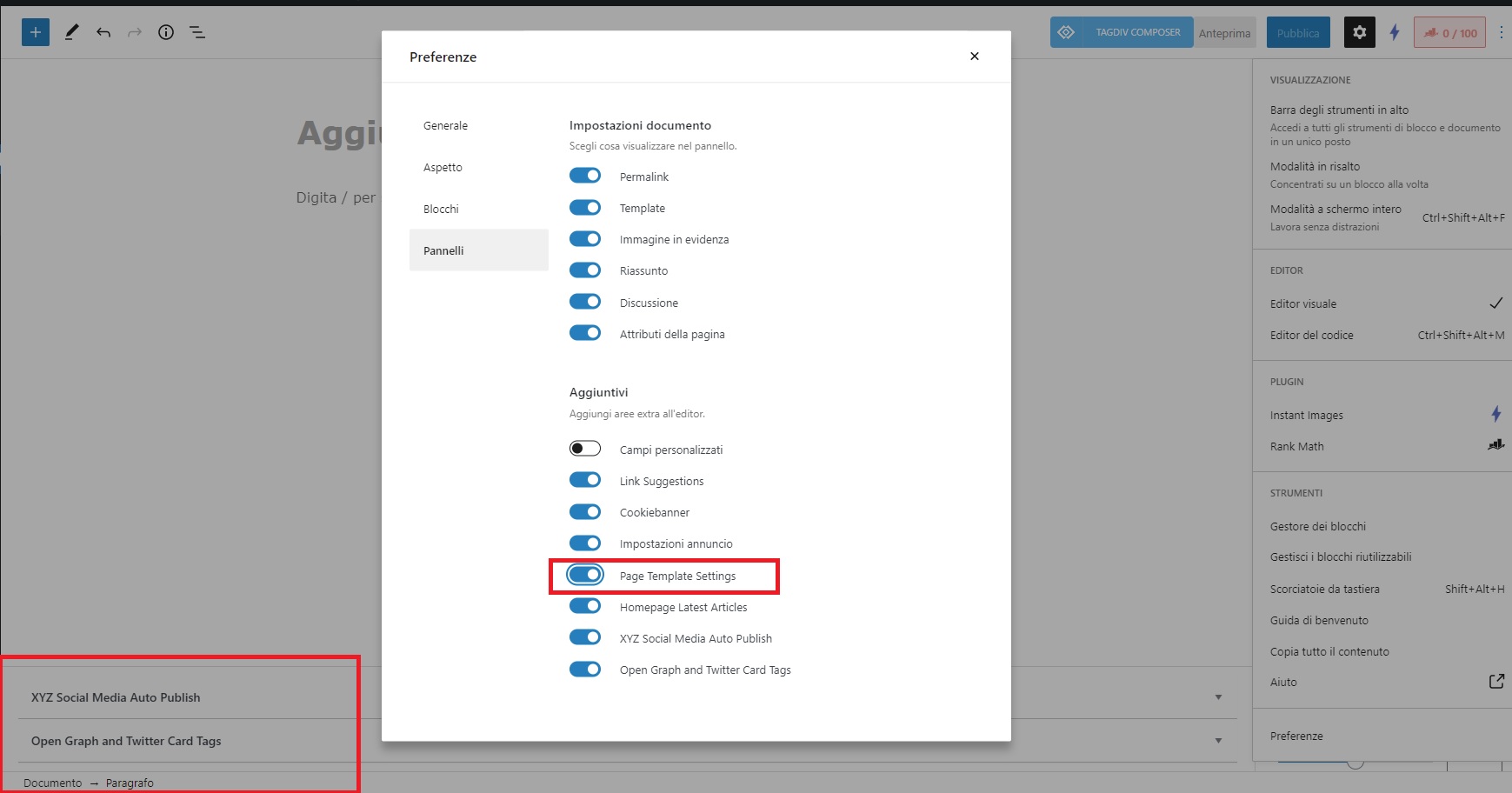
 marcorroma
 I have no problem with posts.
The problem is with the pages!
Can you try to display the function to avoid duplicate posts on post block pages?
Previously this function was available under the text of a page, during editing.
But now it’s gone!
I add that the “Page Template Settings” option in the pages is active, screenshot:
https://i.ibb.co/vDvZBJQ/err-avoid.jpg
But it is not displayed.
Thanks for support