
- NewspaperFlex Block Builder and Flex Loop Builder
- NewspaperHow to use the Flex Blocks cache option
- NewspaperHow to edit modules for Flex Block X
- NewspaperHow to insert a block inside the content of a post
- NewspaperFlex Block Settings Guide
- NewspaperMeta Info on Modules and Blocks
- NewspaperTheme modules and blocks
- TutorialsDefault Block Settings Guide
- NewsmagBlock settings tutorial
- NewsmagCategory tag on modules/blocks
- NewspaperThumbnails – Fix strange looking images on blocks
- NewspaperBlock settings tutorial
- NewspaperCategory Tag on Modules/blocks
- ApiPractical example – How to add a new Block and Module
- Apitd_api_block::delete
- Apitd_api_block::update_key
- Apitd_api_block::update
- Apitd_api_block::add
- ApiAPI – Blocks – Introduction
- NewspaperWP Rocket and Newspaper Theme: Optimization Guide
 channeld
 What do you mean there is no option? This is a bug.
You can’t tell me that that mark cannot be shown properly (it shows properly in WP default theme) and in all websites it should be wrong? Really? The registered trademark of a company???????
I can edit it in the texts but in specific blocks it simply doesn’t apply!!!! So, what is the solution? This is a bug of your theme and I have purchased numerous of your theme.
 Anamaria
 Hello,
Block 1 is an older block, please use Flex Block or Big Grid Flex Block which gives you more adjustment and flexibility options than blocks from tagDiv Standard Pack.
Did you use any plugins to optimize the images?
Also, please check if you have a cache plugin, please disable it and see if the problem persists.
Thank you!
 Jit
JitHi, my feature images/thumbnails aren’t showing up on my blog’s home page. I’m using Block 1.
However, they only load when I refresh the page. How do I fix this?
Anamaria Hello,
Please use a Flex Block or a Big Grid Flex and you can adjust them with tagDiv Composer.
Also, this article is described for each module which image size use https://forum.tagdiv.com/theme-thumbs/
Thank you!
Anamaria Hello,
Please try to use Single Post Template from Cloud Library, the posts style from theme panel are older design.
You can import a Single Post Template and can edit it with tagDiv Composer, and you can add a flex block and filter it on related articles. Also, on our channel https://www.youtube.com/channel/UCOT1RiNysIPCTPSnVZskwtQ, you can find more videos that can help you and documentation https://forum.tagdiv.com/newspaper-theme-documentation/ and you can ask us here on the forum if you have any questions.
Also, you can check this topic with the same issue https://forum.tagdiv.com/topic/related-articel-withou-author/
Thank you!
 PeteMason
 Hi Bettina,
Actually, it is no big problem. If we don’t publish the new issue page, then we can see all the published posts on it and deal with any issues before publishing.
If we filter the home page on issue tags too, then the new content doesn’t appear unless and until we update the block filters, after the issue page has been put to bed.
So its all good, as they say.
 stefanegirard
Hi,
I have the typography in each blocks of my posts set to 18px but when I watch the results I do not see a change.
Information: I set Custom Maximum Width (px) to 730px
Regards
Stefane
 Bill Fleak
 We manually copied the Excerpt Content to the themes Subtitle section and below is what we are seeing when we export the data to look at it to review its structure. From looking at the data how would we accomplish moving the Excerpt Content into the TD Themes Subtitle content?
td_post_theme_settings
a:1:{s:11:”td_subtitle”;s:52:”Subtitle text: This text will appear under the title”;}
a:1:{s:11:”td_subtitle”;s:133:”Check back with us daily as we provide the latest news and insights to how HR can best respond for the betterment of their employees.”;}
a:1:{s:11:”td_subtitle”;s:86:”Key considerations? Communication, explaining why and remaining creative and flexible.”;}
a:6:{s:11:”td_subtitle”;s:141:”Read this guide to get expert advice from HR consultant Tamara Rasberry on how to support your people’s mental health during difficult times.”;s:18:”td_quote_on_blocks”;s:16:”Quote on blocks:”;s:9:”td_source”;s:12:”Source name:”;s:13:”td_source_url”;s:11:”Source url:”;s:6:”td_via”;s:9:”Via name:”;s:10:”td_via_url”;s:8:”Via url:”;}
a:1:{s:11:”td_subtitle”;s:47:”Date & Time: Thursday, June 10, 2021 1:00 pm ET”;}
a:1:{s:11:”td_subtitle”;s:139:”Step one? Acknowledge, acknowledge, acknowledge, says Dr. Rachelle Scott, a psychiatrist and medical director of psychiatry at Eden Health.”;}
a:1:{s:11:”td_subtitle”;s:120:”As employers strategize for business after the pandemic, this is a prime opportunity to examine pay equity, experts say.”;}
a:1:{s:11:”td_subtitle”;s:115:”A session at the upcoming Oracle users conference will explore talent, reskilling, EX and other hot-button topics. “;}
-
This reply was modified 4 years by
Bill Fleak.
-
This reply was modified 4 years by
 TNT Creative
 Hi,
Thanks for getting back to us.
When we embed a youtube video it is on top of a couple of lines of text, making them not visible. For example, on this story, it is occurring: https://happilynews.com/military-dad-surprises-cheerleader-daughter-by-photobombing-group-photo/
It is difficult to see because the text is behind the video.
But the passage of text should read as follows:
<!– wp:paragraph –>
<p>The moment she saw her dad she jumped up in shock and her dad ran towards her.</p>
<!– /wp:paragraph –>
<!– wp:embed {“url”:”https://youtu.be/WGK0H-KpL3k”,”type”:”video”,”providerNameSlug”:”youtube”,”responsive”:true,”className”:”wp-embed-aspect-16-9 wp-has-aspect-ratio”} –>
<figure class=”wp-block-embed is-type-video is-provider-youtube wp-block-embed-youtube wp-embed-aspect-16-9 wp-has-aspect-ratio”><div class=”wp-block-embed__wrapper”>
</div></figure>
<!– /wp:embed –>
<!– wp:paragraph –>
<p>They both began to hug and wouldn’t let go of each other.</p>
<!– /wp:paragraph –>
<!– wp:paragraph –>
<p>Karlie said: “I was so relieved with joy that he was home and safe.</p>
<!– /wp:paragraph –>
<!– wp:paragraph –>
<p>“With everything going on with the military in other foreign places and some kids not being able to reunite with their parents, I had been so worried about my dad not making it home.</p>
<!– /wp:paragraph –>
<!– wp:paragraph –>
<p>“After crying to YouTube videos of people in the military’s kids being surprised by their parents returning home, I never thought that I would end up being one of those kids.</p>
<!– /wp:paragraph –>
<!– wp:paragraph –>
<p>“Thank you to everyone who participated and surprised me.”</p>
<!– /wp:paragraph –>
<!– wp:paragraph –>
<p>Dad, Kyle said: “I was nervous and excited to see her as the first half of the game took forever waiting to see her.</p>
<!– /wp:paragraph –>
<!– wp:paragraph –>
<p>“Then I felt relieved and overwhelmed when I saw her reaction.</p>
<!– /wp:paragraph –>
However, as you can see the video embed is covering the next six lines that should be straight after the video embed. So it seems to be a padding issue with the WordPress youtube embed widget.
This issue appeared to begin straight after we updated the theme to 11.3.1.
Anamaria Hello,
Please check if you don’t have set an offset on the block settings and let the offset field empty with no space, no value => https://i.imgur.com/WHvPdtz.png and see the results.
Thank you!
 MGrelewski
Site: https://gazetapetersburska.org/
I use flex blocks with sort order: latest posts and it seems to work in quite random way – not showing latest posts but starting form 3rd or 4th. I see this issue no matter if I am using Category filter or not. Can you help me please?
channeld Hi. See this page: https://alltestdomain.com/newwinmedica/lista-proiontvn/sideral-folico/
There the ® shows.
What I want is to have that character as superscript (<sup>) wherever is present on the website. Now, in that page I have these issues:
1. If I edit a text block and add <sup></sup>. The character shows correctly
2. If I edit a non-text block (i.e. a title or an icon box that has text, etc) then the character changes to sup but it doesn’t show! I see no class that makes it transparent but it is!
3. If I edit the Page Title with <sup> then the sup tag shows with the title and not the end result. But I want it to work right.
All these are for the case I want to manually go and edit each ® instance I see in the content. The ideal is to find/replace the char with <sup>®</sup>. I am OK to do it manually but it must work correctly.
So, why it works incorrectly?
 Bettina
 Hello!
Clear your cache (also from your browser) and check if you do not have any ad block.
Let me know the results!
Thank you!
Anamaria Hello,
Each thumb that you have enabled, will create a copy for that image.
So, our theme make thumbs which are enabled in Theme Panel -> Block Settings => https://www.screencast.com/t/ZvDvpiBFKY3 -> https://forum.tagdiv.com/theme-thumbs/
Also, WordPress creates thumbs => https://www.screencast.com/t/AMVBOZWto
Our suggestion is to take a look at what blocks you use and make sure that the thumbs are active only for that=> https://forum.tagdiv.com/theme-thumbs/
Thank you!
 David
DavidHi,
not sure if this has been recently fixed since I’m using 11.2 because of the known issues in 11.3 but I think I remember that it didn’t work in 11.3 either:
The “current category” filter in the flex block blocks does not work.
How to repead the issue:
Set up a website, install the Zodiac Demo Site, and edit the post single cloud template. Select “Category filter:” Category – current category.
Result: The filter does not work. Instead of posts from the current category posts of all categories are displayed.
Bettina Hello!
This issue is discussed already here: https://forum.tagdiv.com/topic/uneditable-block/
We recommend to use cloud/PRO templates in order to have the possibility to edit them with the TagDiv Composer which contains a lot of functions and features, please check our tutorial here: https://forum.tagdiv.com/tagdiv-composer-tutorial/
Documentation here:
– https://forum.tagdiv.com/cloud-library-templates/
– https://forum.tagdiv.com/design-post-pages-using-cloud-library-templates/
– https://forum.tagdiv.com/cloud-library-category-templates/
Check also our video tutorials here: https://www.youtube.com/c/tagdivThemes/videos
Thank you!
Bettina Hello!
For example, for a flex block, these are the borders available:
https://www.screencast.com/t/GVVa62DST0r
https://www.screencast.com/t/ViNrHISTA8
Thank you!
Anamaria Hello,
Please try to replace block 7 with flex block and then you can change the color with tagDiv Composer.
You can change the color for block 7 using custom code CSS.
Thank you!
 JJ0000
Not sure what’s causing this, might be some simple setting, but I’m getting a duplicate sidebar on the home page and extra blocks below my existing one.
Also how to update WPBakery Page Builder plugin? Maybe it’s related to that. Using Version 6.6.0
 Romi
RomiHi Tagdiv
Currently I am facing a problem for not being able to change text color and background color for pagination on Block 7 that I installed on sidebar. Because there is no option in Composer for changing the colors.

Thank you
Bettina Hello!
These elements are from a default template and you can not add them in a cloud template for example.
You can build them in the cloud template using a flex block and the weather widget: https://forum.tagdiv.com/weather-widget/
Thank you!
 John Prince
 Anamaria,
Just an update. Regarding 1. I deactivated most of my plugins and all of the tagdiv ones with no success. Still have the same problem. However, I may have stumbled onto something that might help you help me. When adding an extra block ‘single post content’ (which is where the problem is) the problem goes away on the new addition. However, after deleting one or the other (single post content block) the problem persists no matter which block I delete. Knowing this, I hope this helps you somehow.
 menneskedyr
 Thank you for the quick response, but that’s not quite it. Yes, TD Composer has a lot of queries and we live with it, but this was caused by a single (double, actually) repeating query from TD Standard Pack apparently fetching the site logo, using what seems to be a highly inefficient function:
attachment_url_to_postid()
And it was doing it twice, once for the desktop and once for the mobile logo, on every single page load. This caused mysqld to spike to 200% and above.
I see now that I have posted the wrong screenshot above, sorry. Here’s the correct one:
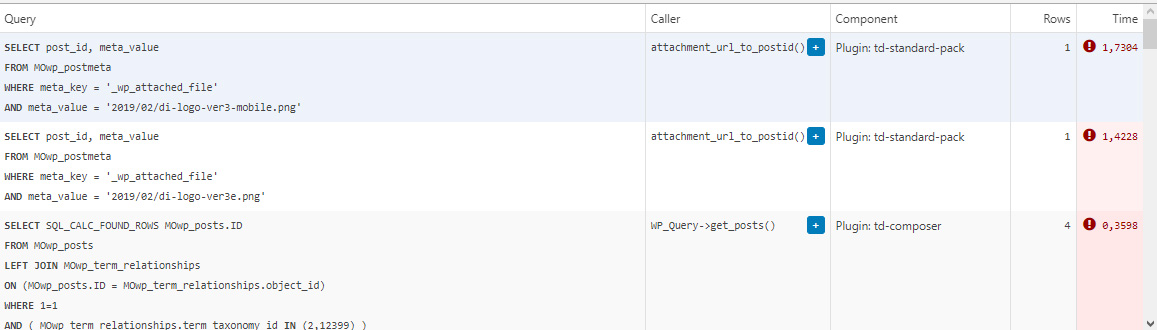
This morning I managed to patch up the problem, it’s a crude solution but may help someone. In header template I found that it was loading the logos from
plugins/td-standard-pack/Newspaper/parts/header/header-menu-h1.php
(yours may be different of course)
There I simply removed the PHP block fetching the logos and hardcoded the HTML for the logos in. As soon as I did that, the SQL spike went away. So I’d say it’s a bug, or inefficient code at least.
To be clear, we’re running the latest versions of WP, PHP, MySQL, the theme & plugins, all on a solid VPS. Yes there is quite a bit of SQL load, we’re working to optimize it with new blocks and Cloud Templates, but this was something else. Could be related to the latest Standard Pack update, don’t know, team didn’t report it before.
-
This reply was modified 4 years by
menneskedyr.
John Prince Hi Anamaria,
Love your name. 😉
Here’s what I got for you.
1. The block (if that’s what its called) is ‘Related Posts which I have below in full. Why is it appearing at the top of my capture in a diminished form (says RELATED only with images) in my post but not in the template. Doesn’t seem to have a way to get rid of it either in the tagdiv composer?
2. I’m using single post comments in conjunction with the ReCAPTCHA in WP comments form plugin. When deactivated I see now that the problem goes away, however I need the ReCAPTCHA.
3. My website is demo.johnprince.ca. I used the Single Post Template. Not sure which one as I renamed it? Possibly, either Tech News Pro or Art Blog Pro.
Don’t know how to do the video part?
John
Anamaria Hello,
I’m not sure I fully understand what the issue is.
1. Please check when you edit the post if you can select the block related, if not, then the block comes from another plugin.
2. Please let me know what you use for comments, seems you have the Disqus plugin activated.
3. Please provide a video and let me know what template you imported and a link to you website.
Thank you!

