
- NewsmagBlock settings tutorial
- NewsmagCategory tag on modules/blocks
- NewsmagtagDiv Composer Tutorial
- NewsmagWeather Widget
- NewsmagExchange widget
- NewsmagInstagram widget
- NewsmagHow to use the Visual Composer plugin
- NewsmagIntroduction
- NewsmagFooter templates
- NewsmagCustom ad spots
- NewsmagLoading image effects
- NewsmagSmart sidebar
- NewsmagFeatured images
- NewsmagGeneral settings
- Newsmag7 days post sorting
- NewsmagTheme thumbs
- NewsmagExcerpts introduction
- NewsmagTheme colors introduction
- NewsmagtagDiv slider gallery
- NewsmagVideo playlist
 Simion C.
 Hi,
Please provide a link to your website so we can take a look. That could happen if you have caching installed and maybe it is not configured properly.
The cache should be cleared when a post is published, like this setting in WP Super cache for example
– https://www.screencast.com/t/mbVEJPqe2D
Or maybe the filtering and sorting you set on the homepage does not display latest posts. Check that as well. This is a guide presenting block settings
– https://forum.tagdiv.com/block-settings-guide/
Thanks
Simion C. Hi,
So you want the block modules that display posts, to not display the featured image thumbnail and display the author avatar instead. You could use a block that does not display a thumbnail and modify it. Find a way to call the avatar in the module and then apply some further styling if needed.
These are somewhat similar topics
– https://forum.tagdiv.com/topic/small-author-image-just-before-the-author-name-after-the-title-of-the-post/
– https://forum.tagdiv.com/topic/author-bio-help/#post-45418
Thanks
 Catalin
 Hello Everette Moses,
Unfortunately, our theme does not have any such an option that allows you to change the number of items on Big Grid Slide, sorry! Notice that element is default predefined and it’s not easy to change their structure because it involves doing some custom work and we cannot provide something like this at the moment, sorry! If you want to make this changes, notice that you should do it yourself from the theme core file. In this case, you should edit the td_block_big_grid_slide.php as you can see here -> https://www.screencast.com/t/N98fdjiH This is the hint from where you can start your project. So, if you are a developer then I guess that you will know the steps which you have to follow in order to achieve as you wish.
Thanks for your understanding!
Simion C. Hi,
The top menu will not be displayed on mobile. It could be made to appear with custom code, like this for example
– https://www.screencast.com/t/F4Uj2zte22H
This is the code used, enter it in Theme panel->Custom CSS
@media (max-width: 767px) {

.td-header-top-menu-full,

.td-header-sp-top-menu {

display: block!important;}

.menu-top-container {

margin-right:0;

}}
Thanks
Catalin Hello magrtg77,
Please notice that here is talking a simple block title which can be changed from Widgets section from your Sidebar, like this -> https://www.screencast.com/t/P1hOEztok8Wl This is just a simple example.
Thanks for the message!
 diegofvg
Hello
I’ve created a section on the home page of my site so that authors can post articles.
I need these articles (posts) to display the author’s photo (avatar), name, title of the post and instead of the featured image of the post. How do I do that?
If the theme does not support this, does anyone know of a plugin?
Here is a print of what I need exactly:
https://imgur.com/a/CUKLU
 emoses
Hey Fellow Developers,
We’re working on a website for a client, and we are using the Newspaper 8 with College News. We attempted to widen the center of the site, and the top-most block of content doesn’t appear to work well with an adjustment to the width. The top most block is using Big Grid Slide. Is there a way to increase the number of items on BGS per pagination? Or even easily set the width of the center column for large screens and have all elements adjust accordingly?
Thank you,
Everette Moses
 Ginebiene
Hi Simon,
I use Newspaper 8.1.2
http://makanangin.de
On IPhone there is always shown the code from the Block 4.
See Screenshot:
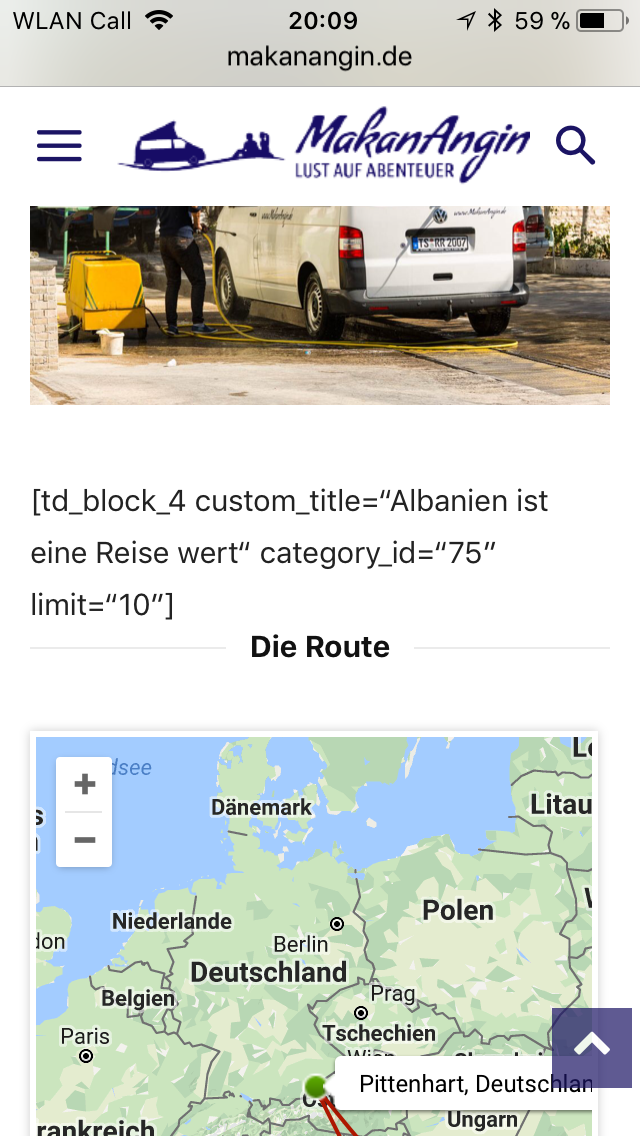
Where can I make a setting, that the code is hidden?
Thank you
Best regards
 mrgergoke
Hy. Text with title don t working. When i write anything in the text area on the text with title block, only Custom title
show, text area is hidden. Help please
Simion C. Hi,
The block title headings cannot be changed, unless through modifications to the theme files. This will affect all the blocks, not just blocks in sidebars.
The theme does not have any settings to change the default block title heading, at the moment.
Thanks
Catalin Hello,
To fix this problem, please check the following documentation here -> https://forum.tagdiv.com/thumbnails-fix-strange-looking-images-on-blocks/ Also, check your Modules/Blocks thumbs to be activated from theme panel, like this -> https://forum.tagdiv.com/theme-thumbs/ Also, after this you should regenerate your thumbnails using Force Regenerate or Thumbnails Regenerate.
Thanks for your understanding!
Simion C. Hi,
That is not possible with the current theme options. The ajax filter pull down for blocks cannot be disabled. This would require modifications to the theme files and it will probably not be an easy task.
Thanks
 adelemara
I need to make changes:
1) Change <h4> to <b> in all blocks in sidebar: http://joxi.ru/D2P4L60hpblq62
2) Change all styles so the appearance stays the same
Where can I do that?
My website:
https://old.nebo.ru
admin / Ie5ahHohq
Catalin Hello Vegasrenie,
If you want to customize your sorting order, you should consult our documentation our Block Settings section from here -> https://forum.tagdiv.com/block-settings-guide/
Thanks for the message!
Simion C. Hi,
Please provide more details about what you are trying to do and what is the problem. The theme works properly with Visual composer. There should be no issues placing grids and block on pages, using Visual composer
– https://forum.tagdiv.com/how-to-use-visual-composer/
Thanks
 Arioth
Hi,
I want to make a widget sidebar but i experience the following problem. Under the page Education(but i want for all pages) i divided the rows in two separate entities. On the left i have placed block No.11 and on the right side of the row a want to place a widget sidebar. The problem is that the widget sidebar do not load any of the sidebars of the menu. Please, can you provide me a solution for this problem?
 vachos
 hi there,
thanks for reply.
but what i need is: I have “Block 4” with all category with ajax filter. ANd i need all category display without dropdown menu just display inline or 2 lines.
Catalin Hello andreaskesler,
First of all, make sure that you are using the latest theme version, remove all of the untested plugins if you are using something like this, purge all CDN files if you are using Cloudflare and check the results. If the problem is still there, please provide your website URL so I can take a closer look at it. Regarding on sort order, please check our documentation here -> https://forum.tagdiv.com/block-settings-guide/
Hope this helps!
Thanks for your understanding!
 subbareddy
Hi,
when i selecting news sticker block it displaying Trending Now, but how can i change this title to Latest New
 ugyen
ugyenHi, I am trying to show page articles on homepage using Big grid and block inside of visual composer. But not able to do despite going through your forum. I can see options for post only.
Please help
 PAPPACLART
 Hello Catalin Thanks for the reply.
Very few of my articles have no sidebar. I noticed the problem when I decided to make an article without a sidebar. The articles with a sidebar are fine.
http://www.mcnews.com.au/2018-honda-gold-wing/6/ Just to show you, at the bottom of the page I added a slider block and as you can see it aligns to the left. Any Newsmag specific block/grids I add to a post page (with no side var) will always align left. Normal VC elements will align correctly.
The above example is on the live website. Like I mentioned I updated my development site to the latest version of the theme and VC and still have the same problem.
Also, and additional issue, sometimes as you will see in the link that some visual composer code shows.
Thanks
Regards
Ryan
-
This reply was modified 9 years by
PAPPACLART.
-
This reply was modified 9 years by
Simion C. Hi,
Indeed there seems to be an issue with the thumbnails quality. I have used one of your images in a test using same thumbnail size, these are the result
– https://www.screencast.com/t/tUG2n8k4n
There is a noticeable difference between the image quality. From what I can see the thumbnail is already created blurry
– https://www.southernvines.co.za/wp/wp-content/uploads/2017/11/Windmeul-Market-218×150.jpg
This should not happen, the theme does not influence the quality of the thumbnails. Please deactivate all plugins except them plugins, and clear all caching installed. Then regenerate the thumbnails again
– https://forum.tagdiv.com/thumbnails-fix-strange-looking-images-on-blocks/
The thumbnails will be recreates, and they should look better. If you have any image
quality filter added somewhere in the theme files or other configuration, remove it.
Thanks
Catalin Hello ThatisY
Check the Theme panel here -> https://www.screencast.com/t/LR2t4iKkei and try to disable the blocks/modules if you are not using on your website and in that way you will stop generating a lot of size of images.
Hope this helps!
Thanks for the message!
Simion C. Hi,
That happens because there is a condition that hides the image on mobile
– https://www.screencast.com/t/eEQS1YeLEj
Maybe there is a reason why it is not supposed to appear. You could make it display with a code like this, but it may require more modifications as the text is not visible anymore
– https://www.screencast.com/t/kVU6Ud6c
@media (max-width: 767px) {

.store-header-wrapper .store-image {

display: block;

}}
Thanks
 Bogdan B.
 Hello,
Please use this guide: https://forum.tagdiv.com/featured-posts-2/
For block settings: https://forum.tagdiv.com/block-settings-tutorial/
Thank you!

