- NewsmagBlock settings tutorial
- NewsmagCategory tag on modules/blocks
- NewsmagtagDiv Composer Tutorial
- NewsmagWeather Widget
- NewsmagExchange widget
- NewsmagInstagram widget
- NewsmagHow to use the Visual Composer plugin
- NewsmagIntroduction
- NewsmagFooter templates
- NewsmagCustom ad spots
- NewsmagLoading image effects
- NewsmagSmart sidebar
- NewsmagFeatured images
- NewsmagGeneral settings
- Newsmag7 days post sorting
- NewsmagTheme thumbs
- NewsmagExcerpts introduction
- NewsmagTheme colors introduction
- NewsmagtagDiv slider gallery
- NewsmagVideo playlist
 Simion C.
 Hi,
It should not be so hard to get used to the composer. It will take some practice however, as with all things. There is this guide that you can read and and a video tutorial
– https://forum.tagdiv.com/tagdiv-composer-tutorial/
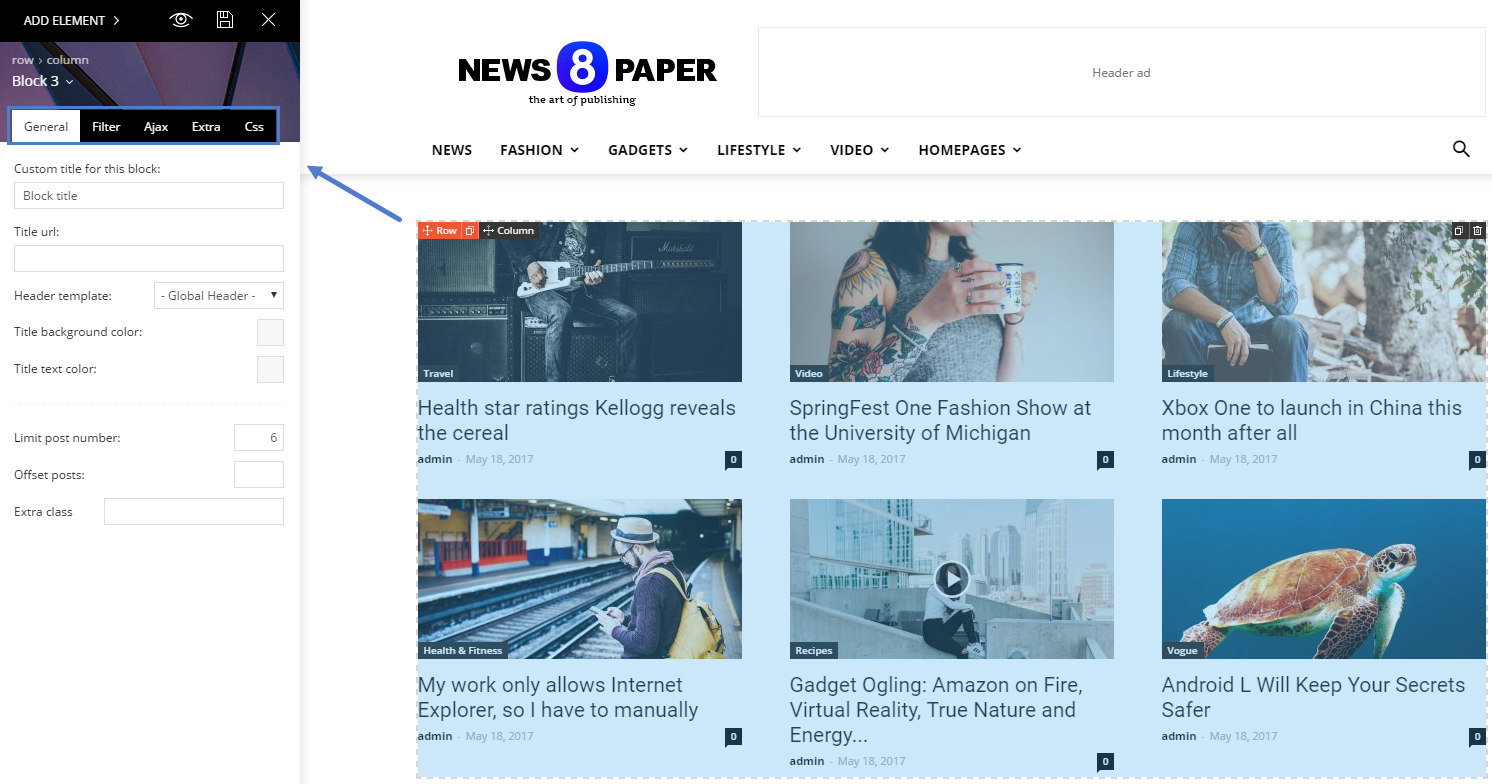
And here are all the available block settings
– https://forum.tagdiv.com/block-settings-tutorial/
Thanks
 chart
chart Hi there,
As I wanted no text under the title, if it helps I edited the file \Newspaper\includes\shortcodes\td_block_text_with_title.php
ORIGINAL:
   $atts = shortcode_atts(

	array(

		'content' => __('Html code here! Replace this with any non empty text and that\'s it.', TD_THEME_NAME ),

		'el_class' => '',

	), $atts, 'td_block_text_with_title' );
Modified:
   $atts = shortcode_atts(

	array(

		'content' => __('', TD_THEME_NAME ),

		'el_class' => '',

	), $atts, 'td_block_text_with_title' );
Hope it helps!
Christian
Simion C. Hi,
Unfortunately there is no option to allow this. The sidebar widgets will display posts based on the filtering and sorting used. The current viewed post is not taken into consideration.
Maybe you can find a solution based on available settings, filtering and sorting
– https://forum.tagdiv.com/block-settings-guide/
Thanks
 Catalin
 Hello 3pixelkindr,
I have inspected your website and I saw that your pagination works as expected. I saw that you are using the Pagebuilder+Latest Articles+Pagination as page template. So, if you want to have another pagination style, like Load More, you should simply switch to another page template, like, page template default and then, use a Block setup with Load More pagination, like this -> https://www.screencast.com/t/Dwx7b151X4 and then you will have Load More pagination, as you want.
If is not what you mean, please provide more details so I will be able to provide a more accurate response.
Hope this helps!
Thanks for the message!
Catalin Hello mea17,
I have inspected your website and I saw that our demo is to bit different than your site because most likely, you have made some changes regarding on Blocks and Grids and that’s why is different. Notice that the standard layout which is imported when you install this demo is here -> https://pastebin.com/PbeEd09B Try to create another page and add this code through it and you will see the same theme’s layout which looks like in the demo.
Regarding the second request, you should change the sort order of your blocks because by default, this is random and that’s why for each refresh, the posts will be changed. To make this changing, please check the following documentation here -> https://forum.tagdiv.com/block-settings-guide/
Thanks for your understanding!
Simion C. Hi,
It seems some thumbnails are missing, please try and regenerate the thumbnails
– https://forum.tagdiv.com/thumbnails-fix-strange-looking-images-on-blocks/
The excerpts will display content from the post. If the post begins with a link, the link will be displayed. A solution would be to set excerpts manually for the posts
– https://www.screencast.com/t/NRjAb2iTD
Thanks
 neritondias
I wonder if there is any way the latest notocias do not show up again.
Example: In the Big Grid I put to appear the last news of the category News, Sports and Politics. At the bottom I put a block that will appear only news of the category News, but in the block repeats the news that appears in the Big Grid.
Is there an automatic way to see the latest news on the Big Grid and the block also appear the latest news but not repeat the ones that appear in the Big Grid?
 xbass
xbassI try figure out how to set blue transparent title backgrounds like here, how to do this? I expected this to be a simple setting in the block css editor but it’s not there.
Thanks
 nicorola
Hi,
is there a way to remove the actual post to be shown in the blocks in the sidebar?
I’d like to display the latest posts, but without the actual one being ‘doubled’.
Thanks.
xbass  xbass
xbass Thanks!
I did not remove the featured category (why would I) but is wasn’t there also. So I created one and assigned to a few posts, but nothing happens so something missing.
Trying to discover the block settings, explained in the ‘Block settings tutorial’, showing ‘How to access the block settings area’ but lacks explanation where to find it. A poor and incomplete tutorial by people who don’t understand how to explain things clearly for everyone.
‘Block settings’ not in ‘theme panel’ and not in the ‘live editor’ either. In ‘theme panel’ is a tab ‘block settings’ but it not has this: https://forum.tagdiv.com/wp-content/uploads/2017/05/block_settings_1.png
 Roger0012
 You basically need to have open graph tags added to your site, typically with a plugin like Yoast SEO or similar.
It is true that a few days ago I update the Yoast Seo plugin. Now I am looking how to open graph tags but I don’t see the option.
Do you know where is it?
Thanks!
 Lastminutegoals
Hello.
We just started a new site using Newsmag latest version.
I want to create a custom block so I installed the plugin: td-api-plugin__1.0.2.zip included in the theme archive in my plugins folder. Your documentation seems to be a bit out of date, because I had to search in these forums that I need to add 'map_in_td_composer' => true and "category" => 'Blocks' in the td-api-plugin.php file in order for it to show up in the TagDiv composer.
Anyway, the block is now showing but it throws the following error:
wp booster error:

td_api_base::mark_used_on_page : a component with the ID: td_324x160 is not set.

/home/admin/domains/***.com/public_html/wp-content/themes/Newsmag/includes/wp_booster/td_api.php
What is causing this error and how can I fix it?
Thanks.
 Ken0929
 Sorry I don’t understand.
I want to change h4 design(for”post”) to the same design(block template style8).
Do I need to edit the theme core?
I edited CSS like…as below. But it didn’t work.
.td-post-content h4 {
font-size: 20px;
font-weight: 800;
margin-top: 0;
margin-bottom: 18px;
line-height: 29px;
position: relative;
overflow: hidden;
}
.td-post-content h4 > * {
position: relative;
padding-right: 20px;
color: #000;
}
.td-post-content h4 > *:before {
content: ”;
display: block;
height: 4px;
position: absolute;
top: 50%;
margin-top: -2px;
width: 2000px;
left: 100%;
background-color: #f5f5f5;
}
Catalin Hello meri,
Unfortunately, our theme does not have any such an option that allows you to display only the tags from a certain category, sorry! You should manually add the tag id for a certain category you want to display at your block.
Thanks for the message!
 meri
meriHi, when I limit a block to a category and then add “filter by tag”, it shows all the tags (and so some are empty because they are not related to this category). Is there a way to only show the tags present in a category?
Thanks for your help
Catalin Hello Ken0929,
If you want to change the headings for the block template style 8 you should edit the theme core files and make the following changes, like this -> https://www.screencast.com/t/DuMK3ZrKJ76c Clear all the caches and check the results.
Thanks for the message!
Simion C. Hi,
1. You simply have to click and drag the row you would like to remove, a red box will appear on the bottom right corner of the page
– https://www.screencast.com/t/zdTrwlw1hti
– https://www.screencast.com/t/TlxHte6Q5jKu
More information about the tagDiv composer here
– https://forum.tagdiv.com/tagdiv-composer-tutorial/
2. You can set a background image or color if you wish
– https://forum.tagdiv.com/background-introduction/
3. The filter works based on category IDs, enter categories you want to include, or enter categories you want to exclude. This is a guide containing all the block settings
– https://forum.tagdiv.com/block-settings-tutorial/
Thanks
 Abarac
 Hello, there they are … Most of the posts are video format so you can click on almost any post to see the problem
test url: http://www.alenbarac.com/tvistra/
Screens


Thanks, Alen
 simchris
 Usually you can go to ‘edit page,’ for your static home page template, select the block, then choose which category to pull content from such as ‘featured’ or the ID for ‘featured’ category, depending on where that is being done.
That’s how I do it anyway.
 jcaristina
I was able to delete all advertising blocks.
However, there is a non-editable one.
I need to remove it from the page. What do I do? I already followed all the tutorials here and it did not solve.
Look: https://goo.gl/7i6bfN
jcaristina I was able to delete all advertising blocks.
However, there is a non-editable one.
I need to remove it from the page. What do I do? I already followed all the tutorials here and it did not solve.
Ken0929Hi,
I would like to change H4 for “posts” to just like Block Header Style 8.
I tried change css for H4, but it didn’t work. I understand I can change on Theme panel for “pages”.
Could you help it?
 fatih-2
I am trying to show the categories that I filter. But eventhough there are posts attached all the categories it only shows the 4 category names. Turkish and English category ID’s differs for the same category name.
I even replaced category ID’s with the main language ID’s but no result.
Link to a page where the issue can be seen site
So some categories are not shown with the; Ajax dropdown – show the following IDs: (9853,9855,9829,9863,9831,9867,9868)
I’m using wp bakery visiual composer and WPML
Simion C. Hi,
That will not be a problem. All the blocks, grids and full grids can be added on pages. This is their main purpose, to be used on pages. Here you can see them all
– https://demo.tagdiv.com/newspaper/block-1/
– https://demo.tagdiv.com/newspaper/big-grid-1/
– https://demo.tagdiv.com/newspaper/full-big-grid-1/
These are the settings that are available for these elements
– https://forum.tagdiv.com/block-settings-guide/
You can build pages with the tagDiv composer, using the blocks and grids you like
– https://forum.tagdiv.com/tagdiv-composer-tutorial/
And set a homepage – https://forum.tagdiv.com/homepage-how-to-build-and-set-it/
Thanks