
- NewspaperFlex Block Builder and Flex Loop Builder
- NewspaperHow to use the Flex Blocks cache option
- NewspaperHow to edit modules for Flex Block X
- NewspaperHow to insert a block inside the content of a post
- NewspaperFlex Block Settings Guide
- NewspaperMeta Info on Modules and Blocks
- NewspaperTheme modules and blocks
- NewspaperThumbnails – Fix strange looking images on blocks
- NewspaperBlock settings tutorial
- NewspaperCategory Tag on Modules/blocks
- NewspaperWP Rocket and Newspaper Theme: Optimization Guide
- NewspaperSearch setup for custom post type
- NewspapertagDiv Opt-In Builder – Emails
- NewspaperBookmark – Save For Later
- NewspaperModules Builder in Newspaper Theme
- NewspaperFilters and sorting for taxonomies
- NewspaperUser review system
- NewspaperWooCommerce: Happy “Add to Favorites!”
- NewspaperLockers
- NewspaperLeads
 tatuazyk
Hi,
i am new here, but despite using the search engine, I have not found a soloution to my problem. This is rather a fairly simple matter, so it was probably discussed here, but somehow I can’t find the right topic.
After installing the demo version of the template, I changed the layout of the news on the main page and since then the news in the two boxes are duplicated with each other.
For example – this same news in two boxes on my homepage:

How can I solve it? On home page I would like to have 3 big news and 7 small ones.

I would like the news in blocks 23 and 12 above to not duplicate itself.
Thanks a lot!
 stephanwhelan
Hi – we’re slowly converting our pages to Tagdiv composer instead of Visual Composer. However, one piece of functionality that is missing is the RSS feed block that is available in Visual Composer but not in the TagDiv one. When is that likely to be addressed?
 diablue
Hello, thanks for the great theme that is Newspaper! Onto my issue: by default Newspaper has Retina images turned off. I turned them on for all blocks and sizes, and regenerated all thumbnails, as per the instructions you’ve left. However, what I’m continuing to get on both Microsoft Edge and Chrome, are the lower-res versions. I’ve tried clearing the browser cache, but it didn’t change anything. Only on Firefox, the pictures are indeed Retina-quality. My website is at http://www.gamerdino.com. Please let me know what I should do in order to fix this issue, so that all browsers start showing the Retina image variants. Thank you!
 Seekingknowledge!
 TagDiv will not say anything because it is true. I have tested it and when I removed SSL, the TagDiv composer stopped working, when I re-activated it, it was just fine. So that’s the truth. Also, this updated version has a lot of imperfections as thousands of people are affected. Everywhere you turn to it’s the same ugly complaint. Also, this theme does not allow you to import the type of block or grid that you would want to, or the type of slide that you would want to. There are many many things missing or many areas not affected by this updated version. It’s a tough task.
 GideonLupine
My buttons don’t look like the documentation
http://prntscr.com/fgj21s
Also, what are all the setting options. They are blank, and I can’t find the accepted values.
 nomoretechno
 whats the code for big grid slide
.td_block_big_grid_slide ???
 pstgibson
 I have found the problem.
On my home page is not showing as graphics, but as codes.
https://www.screencast.com/t/HEMowjsk0
How do I made it show the various blocks in normal mode?
Thanks
 Bogdan B.
 Hello Chris,
The post links are added across all the theme blocks and modules at the same time using this function: https://www.screencast.com/t/pDnUWhSzX7
You can add a tqarget=”balnk” to the anchor tag if you want tom then all the post sin the module sand blocks will open in a anew window.
Thank you!
 Catalin
 Hello nomoretechno,
You should use a bit of CSS code in order to hide this value. As a quick example, if you are using the Big Grid 3, you should use the following code and place it in Theme panel -> Cusotm CSS area.
The code is ->
.td_block_big_grid_3 .td-post-date {

display:none;

}
Thanks for the message!
Catalin Hello sekra,
Yes, it is possible. There is an option for it in Theme panel. You should check this here -> https://www.screencast.com/t/Yyv7QwJqN (for modules/blocks) and here -> https://www.screencast.com/t/TgAGvt8M (for posts).
Thanks for the message!
 Simion C.
 Hi,
Please try the code provided below, it will remove the category “Blogs” from the Popular categories widget – https://www.screencast.com/t/usxRL0fCb
The code must be entered in Theme panel->Custom Css
.td-footer-wrapper

.td-pb-row

.td-pb-span4 .td_block_popular_categories

 ul li

a[href*="blogs"]{

display: none;

}
Thanks
Simion C. Hi,
Each block element has options to filter by category or categories, also sort the posts and many more. Please follow this tutorial for better understanding of all the available options and settings of the blocks
– https://forum.tagdiv.com/block-settings-guide/
Thanks
Simion C. Hi,
At the moment you can only filter the posts displayed on blocks by post type
– https://forum.tagdiv.com/block-settings-guide/
There is no option to filter them by taxonomy unfortunately.
Thanks
Simion C. Hi,
The Big grids and blocks used have options that you can use to filter and sort the content that is displayed in them. Here you can find all the settings and options available for them
– https://forum.tagdiv.com/block-settings-guide/
You can filter by category or categories, then sort the posts as you wish.
The date displayed format can be modified in the WordPress settings
– https://www.screencast.com/t/mguT1kZD1hYR
But I believe for specific demands like you mention, you probably will need a plugin that has additional options. You can search for plugins with those capabilities and choose the one that you think it’s best.
Thanks
Simion C. Hi,
You need to create a homepage using the tagDiv composer and set it as a static homepage
– https://forum.tagdiv.com/homepage-how-to-build-and-set-it/
You can choose form the available page building elements and create the pages you want. Here you can find more information about using the front-end composer and all the available block settings
– https://forum.tagdiv.com/tagdiv-composer-tutorial/
– https://forum.tagdiv.com/block-settings-guide/
Thanks
Simion C. Hi,
You can display the custom posts in any of the theme blocks for example. The blocks have the option to filter posts by custom post type
– https://forum.tagdiv.com/block-settings-guide/
Thanks
Catalin Hello Jacob,
Unfortunately, our theme does not have any such an option that allows you to use the modules which create a block on 2 columns, sorry! Notice that the modules compose the blocks and if you want to use only the modules, you should use the Page Builders + Latest Articles + Pagination as page template. For more information about this, please check the documentation here -> https://forum.tagdiv.com/page-templates-2/
Thanks for your understanding!
 capnsmak
Hello, I recently changed my site (www.r3sist.com) to HTTPS so that it wouldn’t appear unsecure in Chrome. However, now I’m getting issues where some of the images on the site aren’t loading – and when I diagnose it via the Chromo developer panel, it’s giving me errors like the one below. Looks like the images aren’t being served via HTTPS, so it’s not loading them all in. Do you have any tips to solve this? Here is the example error message I’m seeing:
Mixed Content: The page at ‘https://r3sist.com/’ was loaded over HTTPS, but requested an insecure image ‘http://r3sist.com/wp-content/uploads/2017/06/deutsche-bank-ignores-u-s-trumprussia-query-democratic-staffer’. This request has been blocked; the content must be served over HTTPS.
 simchris
 I don’t use VC for much the same reason. However, you might try their new TD Composer …. muuuuuch better and can be used to setup custom blocks/areas on home page, which is what I use it for. Documentation > Newspaper > install theme ?
 Jacob85
Hi!
I use Newsmag and I want to use a widget to show Block1. When I go to the page with the widget I only see 1 column. But how can I get 2 columns like the example?
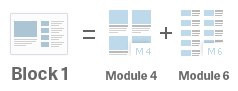
Bye
Jacob
pstgibsonDear support,
I am redesigning my home to suit business purpose. But I am having hard time locating some default features, so I can remove them. I want to remove the following from by home page:
1. MOST COMMENTED
2. LATEST IN FASHION
3. FOOD & RECIPE
4. Category list on the block 2 (All BusinessECOMMERCE MARKET FOR GOODS AND SERVICES)
Thanks
 ron
ronI’m using Post Template Style 6. That works fine. As you can see in this picture, this is what I have now:
But what I’m trying to get is that the post-text-block is always placed below the image, without overlapping it. As you can see in this image:
Is that possible?
Thanks a lot for your wonderful work improving this theme.
nomoretechnoHi, my images won’t size correctly in the big slide block. They will all fit if there is some enlarging/cropping but not much is needed for any image. Is there any way to get them to fit automatically?
Also, if they don’t fit, the area for the big slide that is not filled with an image is grey. Is there anyway to change its color to white? Visually this will help solve the sizing problem
 ventoura
Dear admin,
I’m developing region filter for posts in my category page http://theccompany.site/category/conflict/ using Ajax. I finish all things and I need to display results exactly like category page. So I need a function that I give it the type of block or template that I want to display and to give it the Id of posts that my filter return. I find this example of function :
echo td_global_blocks::get_instance(‘td_block_7’)->render(array(
‘custom_title’ => __td(‘POPULAR POSTS’, TD_THEME_NAME),
‘limit’ => 3,
‘sort’ => ‘popular’
));
So I want to know how to add to this function id of posts that my filter return,or if there’s other function that it can help me to do what I want. Thank you
Best regards,
 YellowFlash2012
Hello all,
I need help. I bought the newspaper a few days ago upon the recommendation of a very successful blogger but boy how disappointed i’m.
I chose the News demo without installing the content but just the layout and could you imagine i can’t add a simple sidebar to the homepage. i wrote to tagdiv and bogdan replied sending me a youtube video. i watched it and tried to do exactly what the video says but in vain.
when i drag blocks to the site, they don’t stick and nothing happens. it’s as though i didn’t drag anything there.
normally there was supposed to be step by step instruction as to how to replicate exactly the demo you choose to install but not so.
Someone has installed the News demo and could help me?
My site url is http://www.coolbabystuffsite.com see what a mess it has become after installing the News demo.
Lastly after each new login in the backend, i receive a message asking me to activate it even though i have done it many times already. And each the activation code is accepted. So what’s the issue here?
Thanks for your help.
