No search results were found in Documentation!
 jasm90
Descripción:
Estimado equipo de soporte de Newspaper,
Nos gustaría reportar algunos problemas recurrentes con el tema y sus plugins asociados:
Rendimiento de la CPU: Hemos experimentado picos de uso de CPU debido a la carga de contenido pesado, especialmente imágenes y consultas de base de datos. A pesar de la implementación de WP Rocket y Redis, el problema persiste.
TagDiv Composer: El plugin TagDiv Composer está causando una carga significativa en la CPU y el servidor, afectando el rendimiento general del sitio. A veces, la interfaz se vuelve lenta y no responde con la fluidez esperada.
Problemas con el Editor Gutenberg: El uso de Gutenberg junto con el tema Newspaper genera picos elevados de CPU, especialmente cuando se editan publicaciones con contenido multimedia pesado.
Optimización de la base de datos: A pesar de las optimizaciones realizadas (caché de objetos, optimización de imágenes, etc.), seguimos enfrentando problemas con la base de datos, especialmente cuando se manejan grandes volúmenes de publicaciones y medios.
Solicitamos asistencia para:
Identificar posibles configuraciones adicionales para mejorar el rendimiento en conjunto con TagDiv Composer y Gutenberg.
Optimizar el rendimiento general sin comprometer la funcionalidad o la carga de contenido histórico.
Gracias de antemano por su ayuda.
 Calin
Calin Hi,
So the problem is the sticky header? – https://i.imgur.com/IjULsiS.png if so then you need to edit the page using tagDiv Composer, select the row that contain the logo an menu and uncheck the sticky position option – https://i.imgur.com/IjULsiS.png save and clear all cache after that the row will no longer be sticky.
Thank you!
Calin Hi,
Do you use the responsive version for your website? If not, then please make sure that the cache plugin you are using has mobile cache support.
Also, it is possible that the problem was resolved when you updated the article and in that moment the cache has been cleared on that article.
Thank you!
Calin Hi,
If you are using a cache plugin then you can choose from that plugin to exclude the tdbMenu.js from delay.
Thank you!
Calin Hi,
The plugins you are using are ok, as far as I know non of them interfere with the theme.
Also, lightspeed server is ok, just make sure that the cache from it is not apply
If you want we can take a closer look, for this it will be need to make a full backup for the website and contact us via email at contact@tagdiv.com and provide temporary wp-admin and cPanel access and we’ll take a look as soon as we can.
Thank you!
 neagoe91
 I don’t use cache at all i deactivate…
List Module:
AMP
MailPoet
MC4WP: Mailchimp for WordPress
tagDiv Cloud Library
tagDiv Composer
tagDiv Mobile Theme
tagDiv Newsletter
tagDiv Opt-In Builder
tagDiv Social Counter
tagDiv Standard Pack
Selectează WPS Hide Login
WPS Hide Login
Yoast SEO
This is a list of my plugin.
i use Cpanel Litespeed Webserver
Calin Hi neagoe91, as simchris mentioned, you should use previous php versions for the moment, php 8.2 and 8.3 will do just fine. Also, please check if you are using and cache or object cache, sometimes this can interfere if the cache is also apply on backend.
Can you provide a list with the plugins you are using? and if you use Apache, lightspeed or nginx server?
Thank you!
Calin Hi,
1. When you see shortcodes on your website it is because some theme plugins are not installed and activated, please go to Newspaper > plugins and make sure that tagDiv Composer, tagDiv Cloud library are installed and activated, if there are still shortcodes on your website, this means that there are other team plugin that needs to be installed (it can be tgDiv opt-in builder, or maybe the tagdiv social counter or newsletter)
2. If I understand correctly you are referring to the post template used for your articles, if you have cache and object cache, make sure that you clear it select the template you want to use for your articles, try to set it in the theme panel – https://i.imgur.com/FcBQ13r.png
3. The media images that you are referring are coming from tagdiv Newsletter plugin, if you do not use it then you can disable the plugin and delete the images, but if you use the plugin and delete the image, then those will bring back when the newsletter shortcode is used and when the plugin is installed.
Thank you!
Calin Hi,
Please try this custom css:
.single .td-post-content h4 {

    font-size: 26px;

}
Set it in the theme panel in css place and make sure that you clear all cache, the results should be – https://i.imgur.com/moW3WEb.png
“How can I change the font size using TagDiv Composer for post content?” – this can be done if you replace the standard template with cloud template and you use single post template .
Thank you!
Calin Hi Vunt,
First please make sure that you are using a cache plugin that support to create different cache for mobile version only then you can use the mobile theme plugin, or mobile page templates without having problems. Next step will be to make sure you have done as much optimizations you can, for example, use small thumbs for mobile version, do not use many elements and blocks, do not load the desktop header on mobile – https://i.imgur.com/hjJSsZd.png
Using tagDiv Mobile theme plugin can help with the speed, but the mobile version will be totally different and the option to edit is very limited, you can check more in our guides – https://forum.tagdiv.com/mobile-theme-introduction/ so in case that you want to have a layout similar with the desktop one or the same elements as on desktop, then do not use the tagDiv Mobile theme plugin.
Thank you!
Calin Hi,
What you can try is to clear all cache, re-save the permalinks and if the problem persist, you can make make a test using only the theme and tagDiv plugins to see if the problem is still persisting. If the problem persist, the next step will be to check the browser console for errors.
Thank you!
Calin Hi,
This situation appears when tagDiv Mobile theme plugin is used and the cache plugin do not change the mobile version separate on desktop version. First recommendation is to check if the cache plugin supports separate cache for mobile, if not what you need to to is to use the tagDiv mobile theme plugin only for amp – https://i.imgur.com/FfcFP6t.png (in case that amp is used) or disable the plugin.
Thank you!
Calin Hi,
Usually this situation appears when your cache plugin do not make a separate cache for mobile version and is using the same cache for bot versions. In case that your cache plugin do not have an option for this, then you’ll need to disable the tagDiv Mobile theme plugin ( or use it only for amp)
Thank you!
 Marian
Hello,
We are using the theme on a news website, with adsense ads, on a Litespeed server, and we think it is reasonable to use Litespeed cache, as a caching plugin.
Is this theme compatible with litespeed cache, are there any settings we can do to lower the LCP, CLS and INP scores?
We also receive from the hosting, automatically the message “Hosting account resources exceeded”
We do not receive this message using any other theme. It seems that there are big problems, can we expect to see better optimization in the future?
Thank you!
 santiagocalaforra
 Hi Calin,
Thanks again for your reply!
I tried using the method you shared from StackExchange — I added this line to my child theme’s functions.php:
php
Copiar
Editar
add_shortcode( ‘output_post_excerpt’, ‘get_the_excerpt’ );
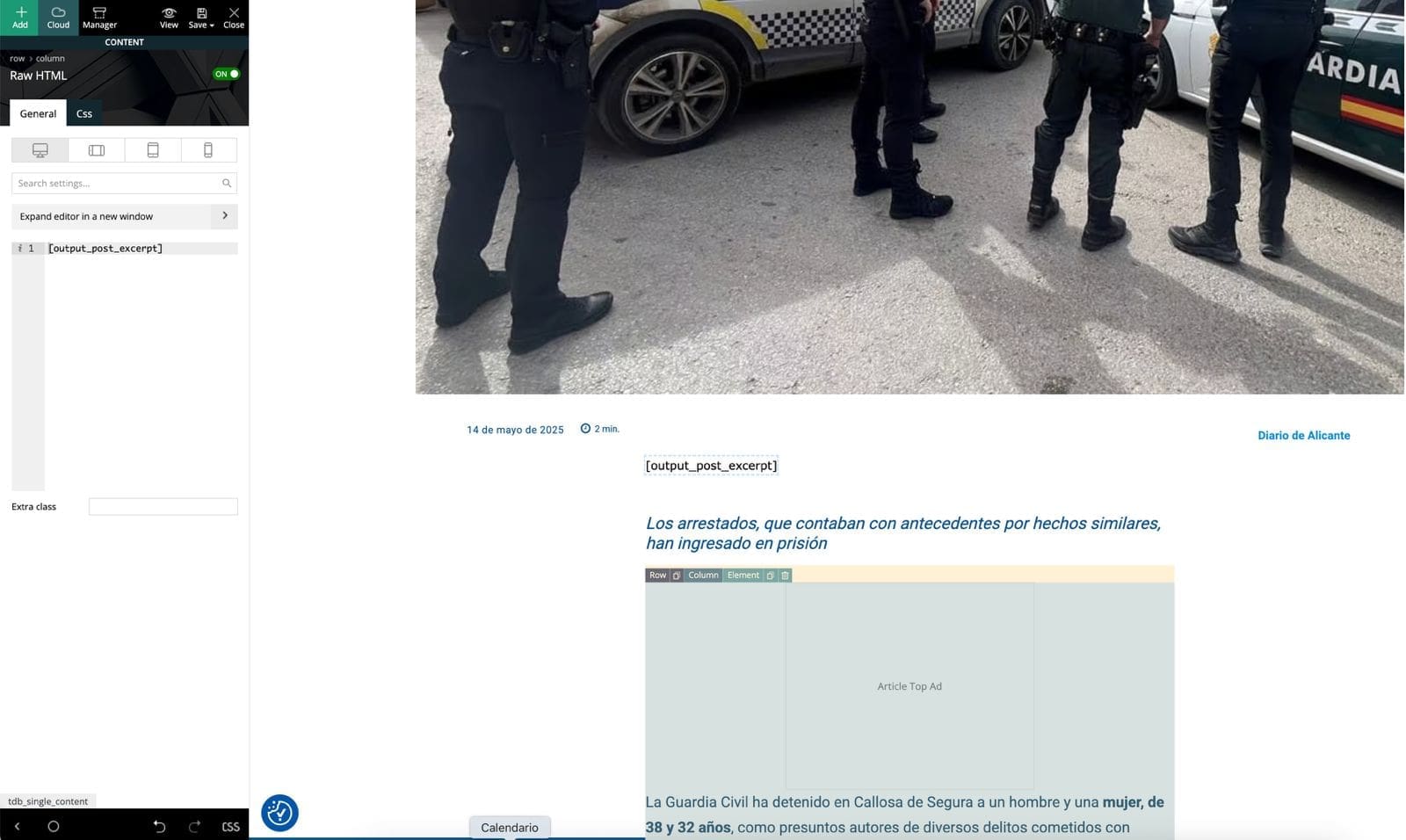
Then I edited my Single Post Cloud Template in tagDiv Composer, added a Text block, and inserted [output_post_excerpt].
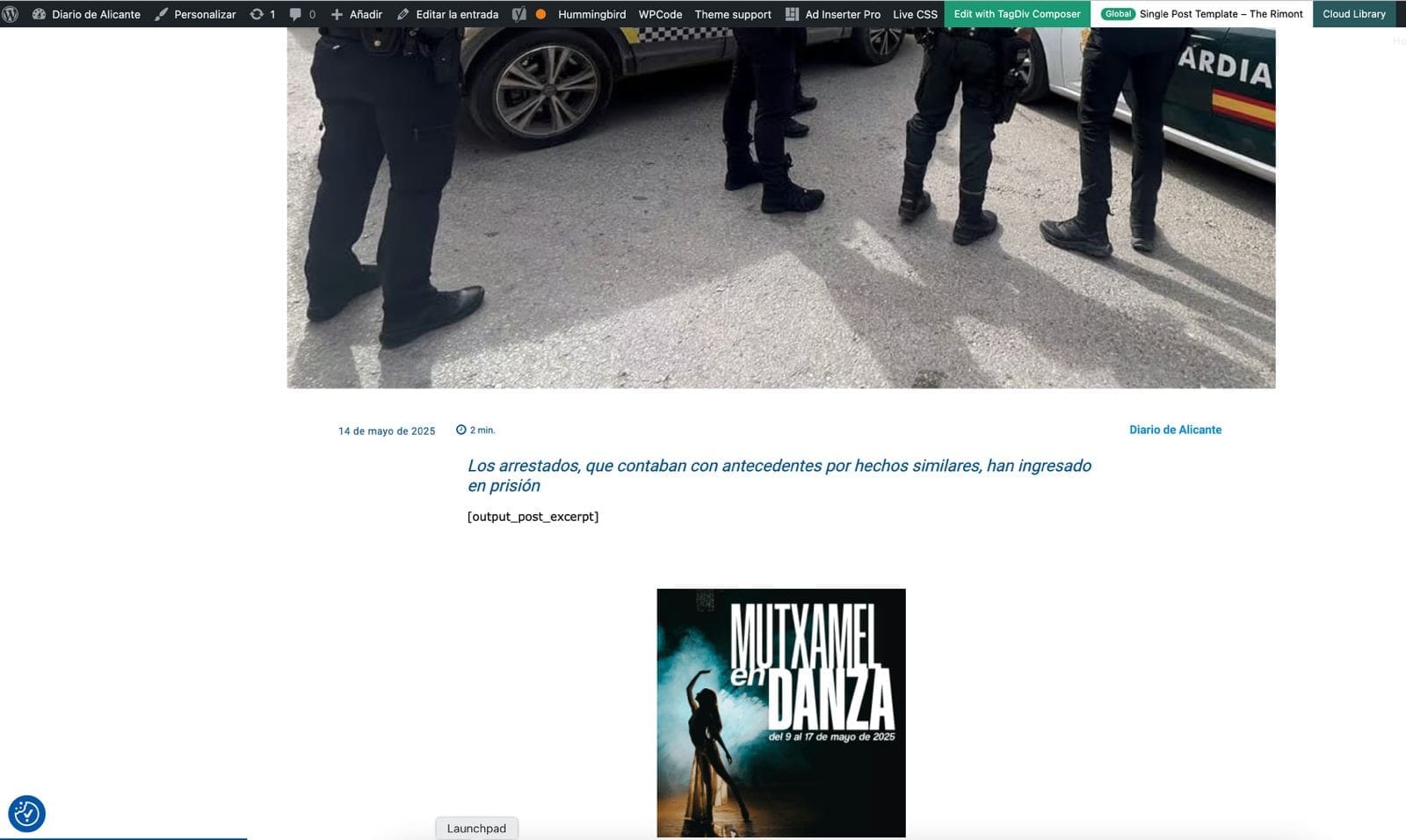
Unfortunately, the shortcode doesn’t render anything on the frontend. It just leaves a blank space where the excerpt should be. I’ve cleared all cache and reloaded everything, but still no result.
Is it possible that tagDiv Composer blocks don’t render shortcodes like this, or do I need a different type of block?
Any ideas or workaround would be greatly appreciated.
https://diariodealicante.net/wp-content/uploads/2025/05/editor.jpeg
https://diariodealicante.net/wp-content/uploads/2025/05/single.jpeg
Thanks!
Calin Hi,
This situation can be related to WordPress and Newspaper theme, but personally I think it is created by the cache plugin, please do a test, clear all cache settings and disable the cache plugin (make sure that no cache or object will apply on the website).
Thank you!
Calin Hi,
1. I see that you have the ad box element and you chose the header section from the theme panel for your ads, make sure that you have the ad set there.
2. This situation appears because the tagDiv Mobile theme plugin (this will change the mobile layout version) is installed and activated and your cache plugin do cache the mobile version separate on desktop version. The most simple solution for this is to disable the tagDiv Mobile Theme plugin and clear all cache.
Thank you!
Calin Hi,
That is a possibility and it can be tested, if possible to clear all cache and disable the plugin for a few minutes at least so there will no longer be the cache on website from server. Also check if you have the lazy load option on, if yes, please make a test with it disabled. Another test will be using only tagDiv plugins to see if even so the problem persist when you are logged in.
Thank you!
 detlev
 Hello Calin,
thank you very much for taking care of my problem. I also have the image display issue when I am logged into WP. Perhaps there is a causal connection with the fact that my Linux administrator has activated w3 total cache? Could that be the problem?
Best regards, Detlev
Calin Hi Detlev,
Can you first confirm if the problem persists when you are logged on the website? There were a few situations when the cache plugin was interfering with the modal image, if this is the case you should try to exclude the “lazyload.min.js” from Delay JavaScript execution and Excluded images or iframes:
“td-modal-image
wp-image-”
Thank you!
 stavrosgian
 Thank you very much for your reply and the clarification regarding the cache behavior of Flex Blocks.
We are already familiar with the method described in the link you provided, and we have used the theme panel’s cache clearing option under System Status. Unfortunately, this does not resolve the issue we are facing.
The main problem is that the Block Cache Expiration Time setting does not seem to work as intended, as also mentioned by other users in the support thread. As a result, the mobile version of our homepage does not update and continues to display outdated content — which makes it effectively non-functional.
At the moment, we have been forced to disable the mobile frontpage layout entirely, and mobile users are now served the desktop homepage as a fallback.
Please, we kindly ask for your urgent assistance in identifying a working solution. We are running a high-traffic news website and need the mobile homepage to function reliably with fresh content.
 50PlusToday
 Thank you, yes, I was able to get it fixed. It was a cache issue, as you said, but needed to fixed through cloudways (my host) in the backend. Their techs helped me get it fixed. Turned out it was not a tag div issue. Appreciate your help.
Calin Hi,
The cache option from blocks will apply individually for each block in part and it will not be clear when you clear the cache from cache plugin, what you can do to clear the cache from all blocks is to use the theme panel cache option under system status – https://forum.tagdiv.com/use-flex-blocks-cache-option/ this should resolve the problem.
Thank you!
Calin Hi,
Please check the browser console when you open the content editor. If there’s an error like this: https://i.imgur.com/iiBOHwP.png, go to the Network tab, select the error, and then click on the Preview section.
The issue might be caused by the server host. I suspect it could be a 403 or 404 error.
Please review this topic for suggestions:
https://forum.tagdiv.com/topic/wp-editor-for-text-with-title-and-column-text-not-updating-content/
Also, make sure to clear/purge all cache, as caching issues can sometimes cause this behavior.
Here’s another thread with a similar error that might help:
https://forum.tagdiv.com/topic/err_http2_protocol_error-on-go-daddy-hosting/
Thank you!
Calin Hi,
Please make sure that all cache as been cleared, also if is possible please try with multiple mobile devices to see the problem is the same on all (if possible with both iOS and android).
Thank you!