
- NewsmagRequirements for Newsmag
- NewsmagHow to update the theme
- NewsmagtagDiv Social Counter tutorial
- NewsmagTop bar templates
- NewsmagAjax view count
 mauro_boaro
Hello, since the last update, 8.7.3, we are facing troubles with our site.
We have been used for a while Photo Gallery by Envato, since we build our website. Now, whith the theme activated, we are no able to insert gallery on our posts, or open any option on the gallery plugin. If i desable the theme, the gallery works perfect.
The same happens with wp super cache and youtube free plugin, when they are activated, the website returns a HTTP 500 error. These plugins was working perfectly before the update. We dont update to version 8.7.4 yet, afraid of new problems. If the theme is desactivated, everything works perfectly.
All these plugin was working perfectly before the update.
Can you help us on that?
Thanks
 Bogdan B.
 Hello,
1. Please remove your customization made to the ticker. There is quite a bit of code change on your end that affects the news ticker.
2. This could be a plugin conflict so please disable all plugins except the page builder and yoast, clear cache and reset cdn files if you use it. Please also check any custom code you might have added to the theme panel or the theme files. If you use a child theme, please switch to the main theme to make sure it does not affect the proper functionality of the theme.
Thank you!
 Simion C.
 Hi,
The mobile theme will not apply to tablets, only phones. If that is happening for you, then something is not functioning properly. On tablet it would be like this
– https://www.screencast.com/t/8Zo6fKUzc
If you believe the Super cache is the cause, deactivate it as a quick test and clear all caching, check if this solves the problem.
Thanks
 Catalin
 Hello gauravkhan,
Ensure that you have installed the latest version of it which is NP 8.7.4 via FTP way, check the system status parameters to be increased according to our documentation from here -> https://forum.tagdiv.com/system-status-parameters-guide/ enable the mbstring parameter to your dedicated server, remove all of untested plugins if you are using something like this, clear all the caches, purge CDN files and check the results.
Hope this help and let us know how it goes!
Thanks.
Catalin Hello,
Please update the theme to the latest version of it which is 8.7.4 via FTP way, clear all the caches and check the results.
Thanks.
Simion C. Hi,
Current theme version is always displayed in the changelog here (bottom of the page)
– https://themeforest.net/item/newspaper/5489609
– https://www.screencast.com/t/5raTPuxvM
In 8.7.3 Instagram was fixed, and in the latest theme version Facebook should also work properly in the social counter.
Please update the theme and your Instagram related elements should work as expected. maybe clear your cache after updating. This is the theme update guide if you want to take a look
– https://forum.tagdiv.com/how-to-update-the-theme-2/
Thanks
 nitrofox
The last update of the super cache, transformed the web version in mobile theme in ipad devices which is bad and wrong, because ipad supports web desktop and you have no reason to be mobile, how can we reverse it?
Thanks,
Bogdan B. Hello,
This could be a plugin conflict so please disable all plugins except the page builder, clear cache and reset cdn files if you use it. Please also check any custom code you might have added to the theme panel or the theme files. If you use a child theme, please switch to the main theme to make sure it does not affect the proper functionality of the theme.
Thank you!
Catalin Hello Thephatvegan,
Please notice that by default, the Facebook Sharing works as expected, without any problems. So, if you will check our demo preview you will see good results. Do you have setup it via Seo Yoast? Clear all the caches and check the results. Also, you can try to make a new install to another sub-domain for testing only with the theme, without any untested plugins and check the results.
Thanks for your understanding!
Bogdan B. Hello,
This could be a plugin conflict so please disable all plugins except the page builder, clear cache and reset cdn files if you use it. Please also check any custom code you might have added to the theme panel or the theme files. If you use a child theme, please switch to the main theme to make sure it does not affect the proper functionality of the theme.
Thank you!
Catalin Hello,
From here -> https://www.screencast.com/t/WkE8zNmI you should edit the text. Clear all the caches and check the results.
Thanks for your understanding!
Simion C. @bsstone13 The Instagram feed seems to be displaying the latest images at the moment
– https://www.screencast.com/t/FxKox42kul1t
Could have been some caching, if you still see older images clear the browser cache.
@brenbrinkman You can install the social counter plugin from the theme plugins panel
– https://www.screencast.com/t/JW4cjwwGU
It is also provided in the theme package, plugins folder
– https://www.screencast.com/t/l8SiZxx7TcoM
– https://forum.tagdiv.com/whats-included/
Catalin Hello mradamrothwell,
Sorry, but I cannot recreate your error and behavior. You should try to re-create your website to another sub-domain for testing, use only the required theme’s plugins, clear all the caches and check the results. If you will check our demo preview on mobile, you will not see any problems.
Thanks for your understanding!
Bogdan B. Hello,
This could be a plugin conflict so please disable all plugins except the page builder, clear cache and reset cdn files if you use it. Please also check any custom code you might have added to the theme panel or the theme files. If you use a child theme, please switch to the main theme to make sure it does not affect the proper functionality of the theme.
Thank you!
Catalin Hello AWAY FROM LIFE,
I have inspected your website and I did not get any error. Also, I have checked your source page and I saw that you are using an old theme version (Newsmag 2.0 version) with the child theme. If you want to achieve well results you should update the theme to the latest version of it, switch the theme to the main theme, clear all the caches and check the results.
Thanks for your understanding!
Catalin Hello debarup,
Try to disable all of the untested plugins, clear all the caches and check the results. I saw that you are using a lot of untested plugins which can interact with the theme core files and causes a lot of unknown issues.
Thanks for your understanding!
Simion C. I would suggest that you clear all caching, including browser cache. Then check if this has any effect. Additionally try deactivating all plugins except theme plugins and check again.
Also take a look at the theme system status, insufficient resources can cause issues
– https://forum.tagdiv.com/requirements-for-newspaper/
If there is still a problem, please send us an email at contact@tagdiv.com and provide admin login, as well as FTP and cPanel if possible. Include a link to this topic in the email.
 ahujasahil
Hi
Please visit my site http://www.AccountingCapital.com and scroll to about 50%, under section “Accounting blog” you will see headsings “Assets” “Liabilities” “Revenues” then scroll down “Expenses”, “Basic Accounting” and so on…
All the font awesome icons show on the tagdiv builder and in preview but not on the live site.
I have cleared my browser cache & WP supecache’s cache, but that didn’t work. All I remember doing was activate slider revolution & wp bakery for some reason, but they are not deactivated.
Help me sort this out.
Regards
Sahil
 Alam chaudhari
I am experiencing weird Problem , My Homepage page is not showing the updates i do from backend , cleared every cache but still it’s showing 1 day old posts …. Incognito works fine … What should be the issue?…. Due to this Problem Regular/old users are getting old posts on Homepage ….
Theme – Newspaper 8.7
Plugin – Wp Super Cache
How to solve?
 juanca1612
 They commented to me from the server that it seemed that the code of the initial page was not correct, apparently it showed too much code and it could be the reason that Facebook will not get to read these labels.
The code that they advised me to start would be like this:
<!doctype html >
<!–[if IE 8]> <html class=”ie8″ lang=”en”> <![endif]–>
<!–[if IE 9]> <html class=”ie9″ lang=”en”> <![endif]–>
<!–[if gt IE 8]><!–> <html lang=”es-ES” prefix=”og: http://ogp.me/ns#”> <!–<![endif]–>
<head>
<style type=”text/css” media=”all”>/*!
<title>Blog de las Mejores Recetas con Thermomix. Recetas de Comidas, Carnes, Panes, Pescados y Cocina Española</title>
<meta charset=”UTF-8″ />
<meta name=”viewport” content=”width=device-width, initial-scale=1.0″>
<link rel=”pingback” href=”” />
I have fretted with the Autoptimize cache plugin and it seems to have removed enough code from the start, and another one to move it to the end of the page. I see that the page works well and that Facebook now does take the OpenGraph tags, could you tell me if the code looks good now?
Thank you very much Simion C.
 AWAY FROM LIFE
 Update: I deactivate all plugins (except the AMP Plugin), clear the cache, but it still not working.
When I inspect the site it seems that it will be play out the false id’s and classes as it should.
The header is incorrect, the icons are missing, the more article section is faulty and the footer is also not correct. Also when you surf online you won’t be hand off to the amp version as it should.
Please can you help me to fix the problem. It already seems that I lost in Google Ranking.
Thank you.
 BernieHolmes
 Hello,
I’ve had this problem on my main site for a couple of months now. I’ve come back to try working on it again but still can’t fix the problem.
(the problem is i only get the spinning gray wheel on TD composer edits
So far I have added these snippets to my .htaccess file
<IfModule mod_substitute.c>
SubstituteMaxLineLength 10M
</IfModule>
<IfModule mod_headers.c>
Header always append X-Frame-Options SAMEORIGIN
</IfModule>
My php memory limit is 256, i’ve cleared all cache’s since trying the fixes.
it is a fresh install via ftp, all fresh plugins, all up-to-date. No other plugins exist on the site other than default tagdiv ones.
I’m going to email you and grant access to see if you can help, thanks
 Edward
 disabled all plugins
???
/wp-content/cache/autoptimize/
/wp-content/plugins/onesignal-free-web-push-notifications/
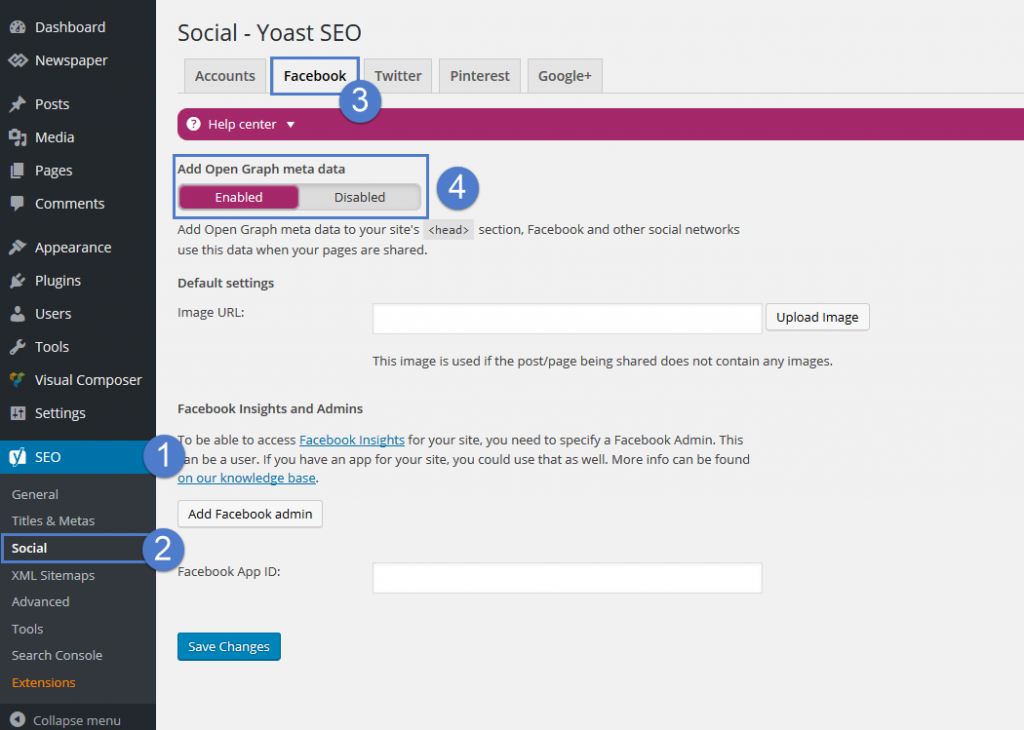
By default, the themes don’t come with any OG data. We decided not to add them because most SEO plugins come with such a feature. For best results, we recommend using the WordPress SEO by Yoast plugin, the Facebook metadata can be enabled from SEO -> Social -> Facebook:
 igrubio
 Hi! I updated the theme and plugins, cleared the cache with WP Super Cache and now the Instagram count is 0. I would appreciate further help
Thanks already for the responses
 Thephatvegan
 disabled all plugins cleared cache still not working I need this fixed asap mate
https://thephatvegan.com/2018/05/say-bro-is-your-beer-vegan/
-
This reply was modified 8 years by
Thephatvegan.
