- NewspaperHow to use the Flex Blocks cache option
- NewspaperCache plugin – install and configure
- NewspaperWP Rocket and Newspaper Theme: Optimization Guide
- NewspaperFlex Block Settings Guide
- NewspaperGeneral Options that May Interfere with the Newspaper Theme
- NewspaperThe Newspaper Mobile Theme: Introduction
- NewspaperAutoptimize Plugin – install and configuration
- NewspaperHow to update a plugin
- NewspaperCloudflare (CDN)
- NewspaperFacebook Share
- NewsmagRequirements for Newsmag
- NewsmagHow to update the theme
- NewsmagtagDiv Social Counter tutorial
- NewsmagTop bar templates
- NewsmagAjax view count
- TutorialsWhat is Ajax preloading?
- NewspaperVideo Playlist
- Newspaper7 Days Post Sorting
- NewspaperAjax View Count
- NewspaperTop bar templates
 Calin
Calin Hi,
Ok, so it appears that the FlyingPress is a cache plugin and this applies lazyload on images and I think it also applies a delay, so please check the plugin settings https://docs.flyingpress.com/en/articles/11406701-delay-all-javascript
Calin Hi,
Please check if this situation appears when you are logged in. From what I see, the page is using the standard block 14 from tagDiv Standard pack, so make sure that the cache plugin is not interfering with it (ususlay is related to css and js options from the cache plugin)
Calin Hi,
When you see shortcodes, it is related to a plugin that is not installed; it can be related to the tagDiv Opt-in plugin. Please go to Newspaper > plugins, install and activate the plugin, clear the cache, and let me know the results.
Thank you!
 avtomir
 In my case, the problem was caused by a WP Super Cache plugin. When you turn it off, the error disappears and everything works as it should.
avtomir In my case, the problem was caused by a WP Super Cache plugin. When you turn it off, the error disappears and everything works as it should.
avtomir In my case, the problem was caused by a WP Super Cache plugin. When you turn it off, the error disappears and everything works as it should.
Calin Hi,
Please go to the dashboard > Newspaper > Theme color> General and disable the boxed option and in case you have set a background color, please remove it, after that save the settings and clear the cache – https://prnt.sc/42oB6Pc-sRG9
I hope this will help you!
Calin Hi,
I’m glad that you managed to resolve the problem.
I checked the webiste and I see that you are using the plugin tagDiv Mobile theme, personaly I will recomand disable the plugin and use the responsive theme version, however if you want to use it please check our guide https://forum.tagdiv.com/mobile-theme-introduction/ how to create the content for mobile pages and how to change the logo and settings on the tagDiv Mobile theme plugin.
Also, the cache plugin that is used should be set to display a separate cache for mobile and for desktop.
Calin Hi,
Please connect to your dashboard and go to plugins, look for the plugin TD Mobile theme plugin and disable that plugin, clear all cache, and the problem should be resolved.
The theme will use the responsive version.
Thank you!
Calin Hi,
Please edit the Search template using tagDiv Composer -> https://i.imgur.com/9zcjlvq.png -> https://i.imgur.com/3ahOyy2.png
Select the Posts Loop element and check the General tab to see if an offset value is set.
If there is an offset number, remove it and leave the field empty.
Save the changes, clear the cache, and the problem should be resolved.
Calin Hi,m
I just checked the website and this is taking quite a long time, even when you access an article for the first time – https://prnt.sc/8jYsXbLsEYIX what is strange is after some time when I checked a few articles, the website starts to load ok (maybe until teh cache starts to work) adn now even the videos load ok https://prnt.sc/yNgXpWg5n0l6
In this situation is possible that the situation to can be impoved with a better cache plugin, optimize, css and js, images and the results should be better
Calin Hi jrpirestani,
As I mentioned in my previous email, please check for tagDiv Composer, tagDiv Cloud Library, and tagDiv Opt-in builder. From your screenshots, the problem is clear: the plugin tagDiv Opt-in builder is not installed or activated. Please install it and activate the plugin after that, then clear the cache.
Thank you!
 gleloudas
 Hello,
this statement is wrong ->It appears that this situation appears only when the cart is empty and you have something in it the layout is better – https://prnt.sc/4KLP06kqVlos
about:
o what the problem could be is something related to the cache settings, please clear all cache, object cache, purge CDN, and also check when you are logged in if the situation is the same. -> already did that and disabled caching plugin, cdn confirmed disabled (it was already)
In case the situation persists, and this is a WooCommerce bug, I will recommend getting the previous plugin version from here – https://wordpress.org/plugins/woocommerce/advanced/ https://prnt.sc/hRD8Lt4wzp-l and update the plugin only after this is fixed by WooCommerce developers. -> i did enable and tested up to woocommerce.10.4.3.zip and your theme downgraded to 12.7.2.
neither of these actions solved the issue. i noticed that during the update/downgrade when tagdiv is disabled checkout shows ok as woocomerce default as a block.
i also tried to revert to old shortcode (in this way i saw the page looking good) but our payment provider only supports blocks so i changed back to blocks…
Please for your assistance.
I can send credentials for checking…
Calin Hi,
It appears that this situation appears only when the cart is empty and you have something in it the layout is better – https://prnt.sc/4KLP06kqVlos
So what the problem could be is something related to the cache settings, please clear all cache, object cache, purge CDN, and also check when you are logged in if the situation is the same. In case the situation persists, and this is a WooCommerce bug, I will recommend getting the previous plugin version from here – https://wordpress.org/plugins/woocommerce/advanced/ https://prnt.sc/hRD8Lt4wzp-l and update the plugin only after this is fixed by WooCommerce developers.
Thank you!
Calin Hi,
Please check it when you are logged in and see if this is working when no cache is apply, most of the time, when the pagination is not working is related to the cache settings that are interfering with the ajax pagination (js and css options from cache plugin)
 jrpirestani
Instead of seeing my menus, I see a shortcode text. This happened after updating the theme.
I’ve already updated the theme plugins, switched to another header and it still doesn’t work.
No cache plugin currently being used. Attaching an image of the issue.
 asianmotorsport
Hi,
I’ve been experiencing an issue for several months where Divi Builder will not load properly on my site.
I am using the Newspaper theme and its associated plugins.
Whenever I click to edit a page with Divi Builder, it simply loads a blank screen. The standard WordPress editor works normally, but Divi Builder does not initialise at all.
This happens on all pages, including newly created ones.
Because of this, I stopped using Divi Builder for some time, but I would now like to resolve the issue properly.
What I have already tried:
Updated WordPress and Newspaper theme to the latest versions
Cleared all cache
Disabled CDN
Disabled caching and optimisation features
Flushed permalinks
The issue still persists.
Could you please advise whether this is a known compatibility issue between Divi Builder and the Newspaper theme, and what steps I should take to properly diagnose and fix it?
Thank you.
Calin Hi,
Please do a test install teh classic editor and disable the one you use and see if the problem is resolved, also make sure that all cache on your browser has been cleaned.
Thank you!
Calin Hi,
Check if you have any object cache or cache on the backend. If you have it, please clear it, and after that, check again.
Also, make sure that you have a full backup before making the theme update – https://forum.tagdiv.com/how-to-update-the-theme-2/
Calin Hi,
Ok, so I just checked this situation, and it appears that some images are being replaced with a WebP image (for example, https://novusnews.eu/tech/4-android-apps-you-should-delete-2026/), but not all of them. It’s possible that something else is interfering. I can see that the preloaded image is the WebP version, but it is not replacing the main image with the WebP format.
Please clear the object cache and all other caches. Also, exlude the featured image from lazyload. After that, log in using incognito mode and check if the correct version is being used.
Calin Hi Marc,
I just checked the website, and this seems to be working ok for visitors. Also, I see that you are now using the LiteSpeed Cache plugin.
Now, related to the page speed results, this depends on factors like page dimensions, images, external resources, and cache…
UNfortubatley becouse the latespeed is not a tested pluginwe can not say for sure what option to enable and what option to disable to get a better performance, but let’s start with general pagespeed settings:
– convert images in webp format (there are cache plugins that can do this, but if the Litespeed is not doing this, the EWWW Image Optimizer can be used https://prnt.sc/DzMY6YynebbI). Make sure that only a lazyload option is enabled (the theme has an option https://prnt.sc/4pqTwHya8Awa and most likely other plugins that optimize the image to have the option)
– enable this theme option – https://prnt.sc/Ir7qNRhstgSA – https://prnt.sc/k2M5pc8odE1D (AGGREGATE INLINE CSS option needs to be tested with teh cache plugin)
– disable the mobile header on desktop and desktop header on mobile (this can be done for the sticky headers, but make sure that the mobile cache option is enabled – https://prnt.sc/r3QB7-vZ4UzH https://prnt.sc/KBdRK8nc90UW
– on mobile simply disable the mobile sticky menu https://prnt.sc/IFe6OfBzige7 and select the regular menu and set it to be sticky, also make sure that you have set a background color for it – https://prnt.sc/I6G0kypEakOM
– use an object cache (Redis or Memcached)
– use a CDN like Cloudflare
I hope those first steps to help you to get a better speed.
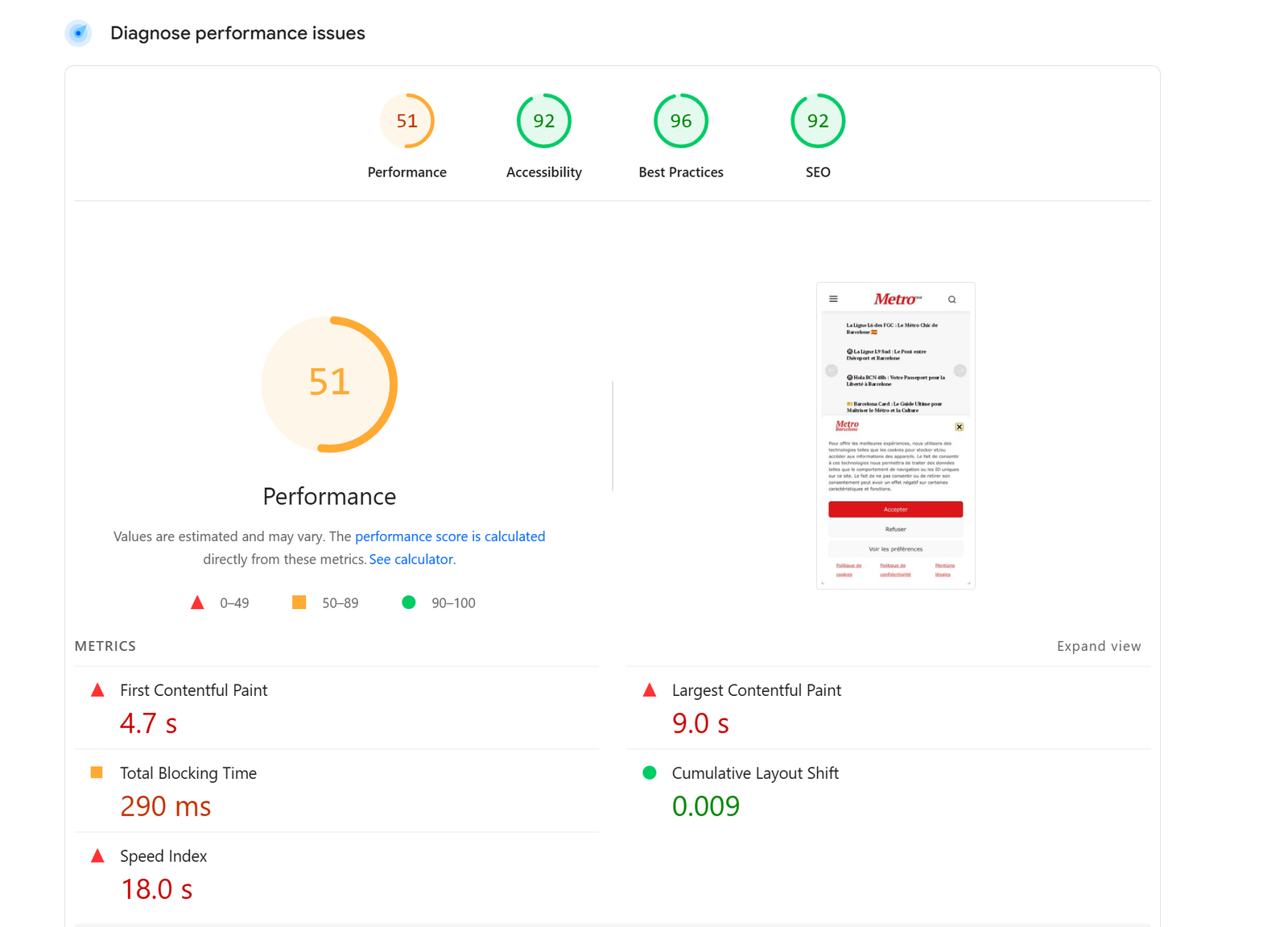
 Metro Barcelone
Hi, I took the newspaper demo Newsweek!
Very slow loading page speed. Homepage sometimes not even loading!
It is the first time it happens to me after purchasing around 20 licenses (from newspaper) for different websites.
Is it the theme or the demo?
I am using w3 total cache. I have cleared the cache several times.
Nothing changes even if using airlift plugin.
I also cleared the cache on server side.
Here a screenshot: http://metrobarcelone.fr/wp-content/uploads/2026/02/Screenshot-2026-02-26-044549.png
Can you please let me know where the problem is?
How can I improve page speed – this is very slow
Thanks
Marc
Calin Hi,
Normally, this should not be a problem, but if you want to use WP Rocket, then make sure the settings are as mentioned in our guide. Just make sure that you do not have any old cache or object cache on the backend.
Another approach is to disable the theme plugins, delete the theme, and reinstall those theme plugins from Newspaper > plugins. By doing this, you’ll ensure the theme plugins’ files are clean and have no changes.
Thank you!
 nuevo116
Hi,
Since installing LiteSpeed Cache, my website has been very slow when clicking on any page or post.
I tried going back to WP Rocket, but the problem persists. Interestingly, when I disable the tagDiv Cloud Library plugin, the site responds normally again.
Has anyone experienced this conflict between LiteSpeed Cache and tagDiv Cloud Library?
Is there a way to use both without causing such slow performance?
Thanks for any suggestions!
Calin Hi,
No, the settings in the theme settings are not enough. Please disable the plugin tagDiv mobile theme. If you check our mobile theme guide, you’ll see that this situation appears when you are using the tagDiv Mobile theme plugin, then, pages will render only content set with the mobile editor.
Please disable the plugin and clear the cache.