
No search results were found in Documentation!
 Alin [tagDiv]
 Hi,
Please disable Photon module from Jetpack as I have checked your site and you have this issue – http://screencast.com/t/o0whpae5 We don’t recommend using that photon module as the theme works based on the same system so we suggest you disable it. Or if you use CDN try to disable it.
Regarding the columns please provide a screenshot from our demo – http://demo.tagdiv.com/newspaper/ as I’m not really sure what you mean.
Thanks!
 Bogdan B.
 Hello,
I have checked your website and everything seems to be in order(apart from a few images in the big grid. try to upload bigger images or use the thumbnail upscale plugin together with force regenerate). I have not found any errors or content shifting. Maybe you fixed it in the meantime? It could be a plugin conflict. If the problem reappears please try to disable all your plugins except visual composer, clear your cache and purge cdn files if you use it.
Let us know if the problem reappears.
Thanks.
Bogdan B. Hello,
I have tested this and could not recreate the issue: http://screencast.com/t/jk6hD93gBaHO
Please try it without any plugins. Deactivate all of them except visual composer and try your fonts again.Also clear your cache and purge cdn files if you use it.
Let us know if the problem is still there afterwards.
Thank you!
Alin [tagDiv] Hi,
Please make sure you don’t use the photon module from Jetpack. The theme works based on the same system (creates and serves/uses thumbnails for each uploaded image), so if you use this module please disable it. Or if you use CDN try to disable it.
If the issue persist after this, please provide a link so we can inspect this.
Thanks!
Bogdan B. Hello,
What changes have been made to your website between the point when it worked and now? Did you install extra plugins? Did you make modifications?
Try it without any plugins to rule out plugin conflicts. Clear your cache and purge cdn file if you use it.
Let us know.
Thank you!
 tripledm
 I have figured out that it does that for all posts without images. But this client does not use images so not sure what I am going to do.
It’s by default like this and does this on other installs as well. I am from today on 4 sites with Newspaper theme and another 2 coming this week and I suspect they will all have this problem.
REF setup
– clean WordPress install
– clean Newspaper theme install
– NO CDN network
– Cache cleared, completely cleared and tested on multiple browser.
– all plugins off (accept visual composer) no change
– FRESH new clean isntall of Newspaper Theme, no luck.
SO I am back to square 1 but will make do with the module/block that does not cause problems. It’s only BLOCK 21 with the error.
Bogdan B. Hello,
I’m not sure why you are getting this error but you can try a few things to see if it works.
Please deactivate all plugins except visual composer, clear your cache (very important. clearing cache fixed this sort of issue for other users) and purge cdn files if you use it.
If the problem is still there you can check theme panel and reset the thumbnail setting. Disable thumbnails and enable them again from the theme panel.
You can also check your system status to see if all parameters are set according to this guide: https://forum.tagdiv.com/system-status-parameters-guide/
If all else fails, you can try to do a clean install of the theme. The best way to do it is via ftp: https://forum.tagdiv.com/install-via-ftp/
Let us know how it goes.
Thank you.
 Catalin
 Hello hcassin,
Please try to disable all the active plugins, except Visual Composer, clear all your caches, purge all CDN files if you use and try it again. Also, you should try to regenerate all your images with Thumbnail regeneration plugin and test it again. After these changes, if your problem is still there, please provide you URL website so can I inspect it closer. Also, please mention from what version you did the update. I need to know this so I can be able to provide a more accurate response.
Hope this helps and let us know how it goes!
Thank you for the message!
 simchris
 Usually resaving permalinks, making sure post name has no spaces in the slug, avoid naming a post the same thing as a page or category (e.g., if you have category “holiday treats” you can’t have post named “holiday treats” usually). Clear any caching or CDN if you recently changed themes.
 tajir
tajir i found Social counter V3.1 : http://cdn.tagdiv.com/wp-content/uploads/2015/12/td-social-counter.zip
and i install it : http://i.imgur.com/r8auTLG.jpg
but why the FB counter still 0 ? (use social counter v3.1)
 omar ahmed
 1- Gzip compression is still not active
enable sir but this messege from third party ( facebook) — please check messege
يؤدي ضغط https://static.xx.fbcdn.net/rsrc.php/v2/yp/r/sOXUQGepNJD.js إلى توفير ١٦٥٫٨ كيلوبايت (تقليل بنسبة ٧٥٪).
يؤدي ضغط https://static.xx.fbcdn.net/rsrc.php/v2/yI/r/jG4p3Ps_5O2.js إلى توفير ١٢٢٫٦ كيلوبايت (تقليل بنسبة ٧٢٪).
يؤدي ضغط https://static.xx.fbcdn.net/rsrc.php/v2/yf/r/eItQ6CL9r9J.js إلى توفير ١٢٢٫٥ كيلوبايت (تقليل بنسبة ٧١٪).
يؤدي ضغط https://static.xx.fbcdn.net/rsrc.php/v2/yR/r/JgJ7uCwXCUZ.js إلى توفير ٧٠٫٥ كيلوبايت (تقليل بنسبة ٧٠٪).
يؤدي ضغط https://static.xx.fbcdn.net/rsrc.php/v2/yB/r/lSRul-v_nG1.js إلى توفير ٢٤٫٤ كيلوبايت (تقليل بنسبة ٧٠٪).
يؤدي ضغط https://static.xx.fbcdn.net/rsrc.php/v2/yH/r/WaT-PMT8du6.js إلى توفير ٢٤٫١ كيلوبايت (تقليل بنسبة ٦٧٪).
يؤدي ضغط https://static.xx.fbcdn.net/rsrc.php/v2/y0/r/d-obwDWT0IV.js إلى توفير ٢٢ كيلوبايت (تقليل بنسبة ٧٤٪).
يؤدي ضغط https://static.xx.fbcdn.net/rsrc.php/v2/y0/r/ZP_M6dihf5_.css إلى توفير ١٧٫٣ كيلوبايت (تقليل بنسبة ٧٧٪).
يؤدي ضغط https://static.xx.fbcdn.net/rsrc.php/v2/ys/r/MtMLhaIG7mj.css إلى توفير ١٦٫٩ كيلوبايت (تقليل بنسبة ٧٤٪).
يؤدي ضغط https://static.xx.fbcdn.net/rsrc.php/v2/y1/r/OnEtjpeyyGe.css إلى توفير ١٣٫٣ كيلوبايت (تقليل بنسبة ٧٣٪).
يؤدي ضغط https://static.xx.fbcdn.net/rsrc.php/v2/yo/r/wKMVsNFz5XR.js إلى توفير ١١ كيلوبايت (تقليل بنسبة ٦٩٪).
يؤدي ضغط https://static.xx.fbcdn.net/rsrc.php/v2/yP/r/FIuGH8jAmLq.js إلى توفير ٩٫٨ كيلوبايت (تقليل بنسبة ٦٤٪).
يؤدي ضغط https://static.xx.fbcdn.net/rsrc.php/v2/yS/r/ZDQXrINXZRK.js إلى توفير ١٫٨ كيلوبايت (تقليل بنسبة ٥٢٪).
يؤدي ضغط https://static.xx.fbcdn.net/rsrc.php/v2/yj/r/n0F_FGOE19x.css إلى توفير ٦٥٨ بايت (تقليل بنسبة ٥٦٪).
2- please give me type file to put this cpanel in option gzip compression
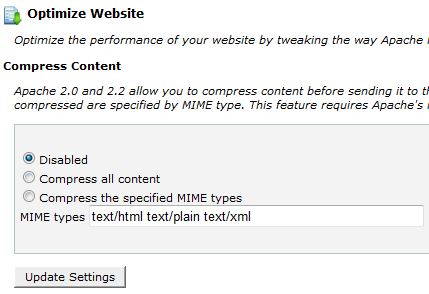
i used option number 3
3- Speed Booster show this messege in system status
v4.2 – Disabled – incompatible plugin detected: disqus-comment-system/disqus.php
i disable this plugin but still not active beacuse widget facebook and almost widget cause issue to speed booster
!!!!
finally i add plugin super cache and enable all option important in plugin but not effect also !!
-
This reply was modified 10 years by
omar ahmed.
Bogdan B. Hello,
Please try it without any plugins. Di0able all of them except visual composer, clear your cache and purge cdn files if you use it. Also please check your custom modifications if you have any.
Let us know how it goes.
Bogdan B. Hello,
I tried it on my end: http://screencast.com/t/Tu2f1bgGzBH6 The ad displays fine. Even in this forum the ad displays fine in your reply above.
Please disable all your plugin except visual composer, clear your cache and purge cdn files to rule out a plugin conflict.
Let us know how it goes.
Thank you!
simchris As you know “all of a sudden” implies:
a) theme or plugin update
b) server core system update
c) change with CDN / caching system
Likely helpful to know what happened.
Often resetting the expiration time for elements at CDN can help; double checking no bizarro thing changed in a theme that might impact the plugin, etc.
Also, funnily enough, sometimes in my case clearing the transients using wp-optimize helps, as does simply going to my home page and doing a “save” of my existing layout to fix something changed from an update.
Obviously if you did a THEME update, something might have changed with the theme itself and require modifications, especially if a child theme is no longer in sync with parent, etc.
Not sure any of that helped … I’m stuck here doing some admin today, where I can’t leave, but have a window open to pop in here and share some of my shaky wisdom, snarky comments, and general holiday eggnog overdosed commentary. 🙂
-
This reply was modified 10 years by
simchris.
Catalin Hello PatWire,
I’ve checked again your website on mobile and everything works fine. Please provide more information about your issue, so I can be able to provide a more accurate response. Also, please disable all the active plugins, except Visual Composer and install only the plugins that come bundle with our theme. Clear all your caches and purge the CDN file if you use and try again. After this, if your problem is still there, please make a screenshot of this because it is very useful.
Hope this helps and let us know how it goes!
Thank you!
Bogdan B. Hello,
Please try to disable all your plugins except visual composer, clear your cache and purge your cdn files if you use it. The featured video option should be there.
If it still does not appear please provide more details as to what was changed so the featured video no longer showes up.
Thank you!
Bogdan B. Hello,
Please try to disable all your plugins except visual composer to rule out a plugin conflict. Also clear your cace and purge CDN files if you use it. You can also try to regenerate your thumbnails using force the regenerate plugin.
Let us know how it goes.
Thank you.
Bogdan B. Hello Rhonda,
Facebook changed a few things in their code that broke our social counter (facebook option). The twitter button should work as expected. Simply refresh it. Change the id to another one (cocacola for example) and see if the counter picks up the followers.
For the facebook option we are working on a fix as we speak. Until we get it done, you can maybe use another version of the plugin which worked for some people: http://cdn.tagdiv.com/wp-content/uploads/2015/12/td-social-counter.zip
Remove your current social counter and install this one.
Thank you!
 Andrei L.
 Hi
Please make sure that you made the update according with our documentation: https://forum.tagdiv.com/newsmag-how-to-update-the-theme/ Also try do deactivate all plugins except Visual Composer, clear all caches, purge cdn files and test again.
Let us know how it goes.
Thanks!
Andrei L. Hi
Please check this guide regarding purging cdn: https://www.nginx.com/blog/9-tips-for-improving-wordpress-performance-with-nginx/ Also try to deactivate all plugins except visual composer, empty all caches again then test again. If the problem persist please provide the css code that you’re using so I can inspect it closer. I’ve also test test this on your site and the css for for excerpts works fine: http://screencast.com/t/v9DTOB56pUA
.td_module_10 .td-excerpt {

    color: red;

}
Thanks!
Bogdan B. Hello,
Please try to disable all your plugins except visual composer, clear your cache and purge cdn files if you use it. If it’s not a plugin conflict, please try to use a default footer to see if the error is still there. maybe some of the widgets in the footer were not added properly.
Let us know how it goes.
Thank you!
 rovito
 Hi I have already empty cache using WP Super Cache plugin, but i am not sure how to purge CDN files.
The same mistakes are showed in the homepage.
Thanks
 Lucian
 Hi,
Please make sure you also empty all caches and purge cdn files then test this again.
Let us know how it goes!
Thanks
Bogdan B. Hello,
Please try to disable all your plugins, clear your cache and purge CDN if you use it. If the problem is still there another thing you can try is check the system status parameters and try to get the in the ‘green’ zone: http://screencast.com/t/bpnfaltKJ You can use this tutorial to do it: https://forum.tagdiv.com/system-status-parameters-guide/
If everything else fails you can do an update to the latest version (6.6) and make sure you make a back-up first:
https://forum.tagdiv.com/how-to-update-the-theme-2/ – https://forum.tagdiv.com/how-to-update-visual-composer-plugin/
Thank you!
Catalin Hi Potpotsie,
Please try to disable all the active plugins except Visual Composer, clear all your caches, purge your CDN files if you use and try it again. Notice, please install only the plugins which comes bundle with our theme. Also, if you are using a natural small images, you can use a plugin to upscale, like Upscale Thumbnails plugin. Please try these suggestions and if after this the problem is still there, let us know.
Hope this helps!
Thank you for your understanding!

