
- NewsmagRequirements for Newsmag
- NewsmagtagDiv Social Counter tutorial
 Bettina
 Hello!
If you use a cloud template for your homepage, then it should appear there: https://prnt.sc/fWy6y6_BL59l
Thank you!
Bettina Hello Alex!
No. The elements can even be added to the homepage. Please note that you need a cloud template for that.
Thank you!
Bettina Hello Carlos!
You can have a faster website with any version how I said above.
There are a lot of factors which can make your site slow. Make sure you use only some templates and fewer functionalities and options.
Some factors which you need to take into account are:
External factors: server speed, if you are using CDN or not, the external resources loaded by your website like ads, fonts, tracking scripts like Facebook Pixel, Google Analytics, Twitter analytics, Hotjar and so on.
Internal factors: the number of elements on the page, image size, image formats, if you are using mobile optimized layouts, console errors, if you are using the Standard Pack plugin or not, if you are using the PRO demo or a standard one.
Unfortunately, no. Because the Mobile theme plugin overwrites the cloud templates.
Thank you!
 kubick
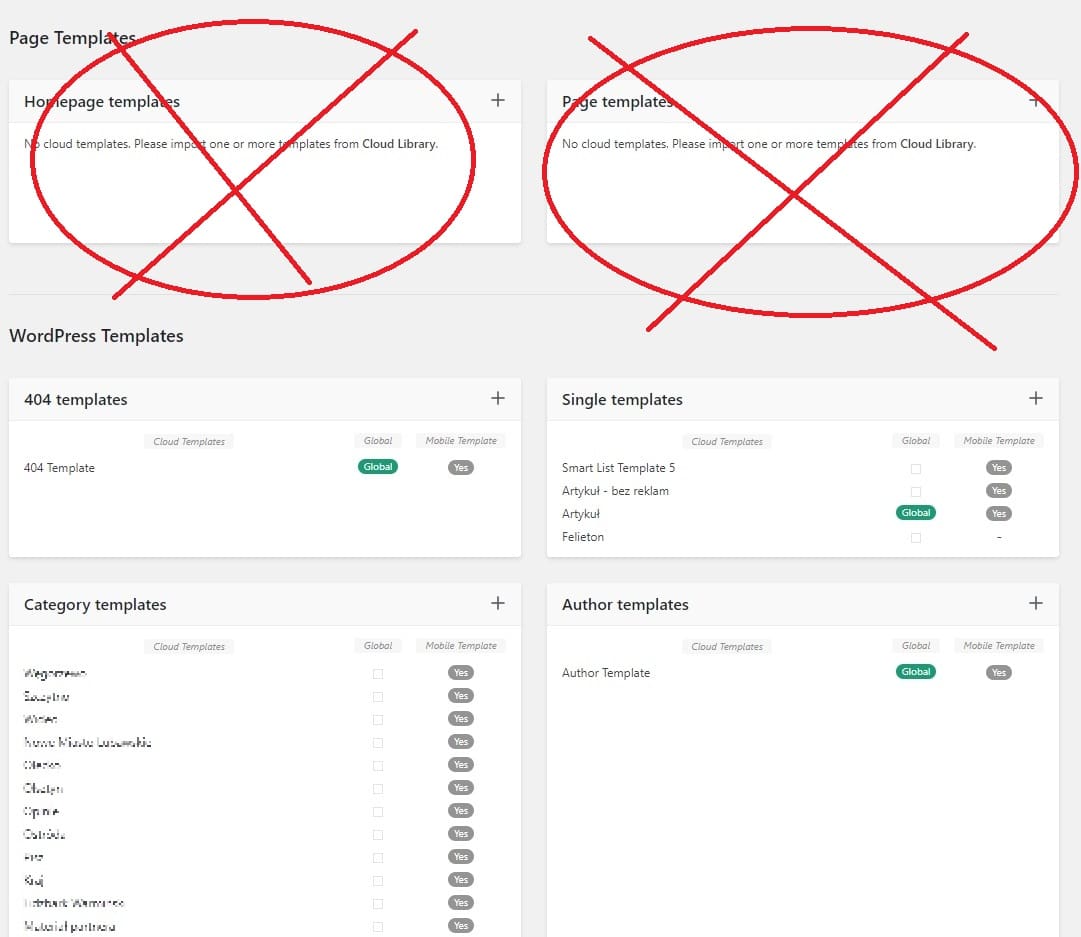
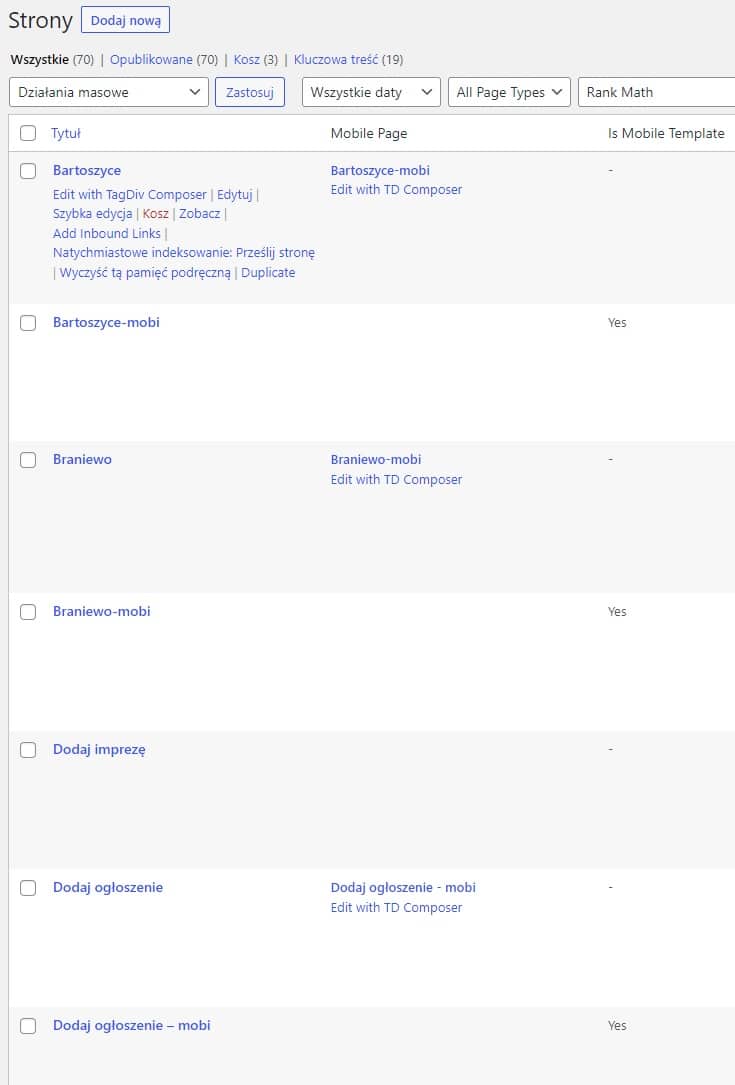
I have over 70 pages on my website. Each of them has its own layout and mobile version.
None of them show up in “Cloud templates”. Same home page. It is not visible in “Cloud templates” or in the admin bar.
I use 30 categories on the site. Each of them has its own layout.
Categories, however, show up in “Cloud templates” and in the admin bar on the front end of the page.
Shouldn’t pages be visible in “Cloud templates”?
 Anamaria
 Hi,
Please make sure you have the latest version of the theme, 12.1.1
Please check if this code is missing from your .htaccess: https://www.screencast.com/t/iN0R93dD3p from our requirements https://forum.tagdiv.com/requirements-for-newspaper/ this requirement is not displayed in System Status.
Usually, after you set the code in .htaccess the WP editor works well.
Also, please check this guide about deny code https://forum.tagdiv.com/general-options-may-interfere-newspaper-theme/ ->
Please do a test using only tagDiv plugins and try to open the WP Editor.
Please check the console https://imgur.com/bRYwbvE if you have any errors when you try to open the wp editor, maybe is possible to be from the firewall or security module which blocks the admin-ajax.php request, which usually displays a 403 or 404 error.
If you don’t use a security plugin, please ask your host about this, maybe you have a security module that blocks this.
If you use a plugin like Wordfence please set it in learning mode.
Also, if you are using Cloudflare, please make sure that is set as in our guide https://forum.tagdiv.com/cloudflare-cdn/, you need to disable the Rocket Loader.
Thank you!
Bettina Hello!
Unfortunately, style 6 has no alt attribute. Please use another style of template in order to achieve what you need. Please note that you cannot customize these styles because they are defaults. We encourage you to use cloud templates instead.
Thank you!
 WordDom
 You say we need to use Cloud templates in order to change things like H4 on related articles. So i don’t understand your suggestion.
Can’t we reproduce the same thing with a cloud template ?
 rafael-l
 Google Core Web Vitals hold us accountable for users bad connection and processing power. So, all we can do is our best… My scores are 100 in lab tests (with newspapper), but not so good in field data. And we also have AdSense and so on…
The Pro theme is ultra optimized for that, but I hope it can improve. Core Web Vitals is a very unfair and HARD thing in my opinion and I have a good investment in CDN (Cloudflare) and so on…
For last, I’m always here reading this forum for help in ways I can improve…
Thank’s!
 karlostipo
 Hi Bettina,
Thank you very much for your answer. Now I am clearer on how it works.
But I have one last question please. For speed and optimization you advise to use the Mobile theme right?, so if I use Mobile theme for Mobile + AMP (which is advisable right?), it is no longer necessary for me to create the Mobile specific pages for the Cloud Templates and for the WordPress pages right? And I suppose that by removing all these mobile pages the website will be lighter and faster right?
Thank you very much in advance!. Best regards,
Carlos
Anamaria Hi,
This is an older template, which is not recommended because now you can use the cloud templates.
You can activate the tagdiv plugin, and set a template from the theme panel -> posts settings -> default post templates.
Thank you!
Anamaria Hello,
Please use the cloud template, i.e., the Single Post template; you can after customize it as you want the template and add the reviews
-> https://forum.tagdiv.com/user-reviews/
-> https://forum.tagdiv.com/custom-post-type-support/
Please check this guide to set up a Single Pist Template https://forum.tagdiv.com/design-post-pages-using-cloud-library-templates/ -> https://forum.tagdiv.com/single-post-shortcodes/
2. Please check the layout for a row; you can set the width for each column. Please check those articles about the flexibility of rows and inner rows
-> https://tagdiv.com/flexibility-rows-columns-newspaper-theme/
-> https://tagdiv.com/how-to-add-delete-and-duplicate-row-newspaper-theme/
I added this proposal.
Thank you!
 Calin
Calin Hi SvijetS,
That cod line is related to an image – https://i.imgur.com/p8o3jcJ.png so if the problem appears in the new cloud footer, then it can be related to an image that has something set on it, or something like that, or maybe has a different extension. If you want, I can take a look at it.
Thank you!
Calin Hi Abderrahmane Fath and Andsdc82,
This can be done only if you replace those elements with the popup element – https://forum.tagdiv.com/modal-popup/ what can be done is to set the popup set in it the search element and in the other one set the menu for mobile (this can be done if you are using a cloud header, not on standard headers).
I hope this will help you!
WordDom 1. Ok but in cloud template, i want to use single poste Template 12 and it’s the same problem, no alt attribute on featured image.
2. With Cloud Template, how to have the same related posts as the one i actually have ?
“Related articles | Same from the author”
https://www.freeiphone.fr/une-option-booster-speciale-black-friday-chez-free-mobile/
i See “Single related posts” block in single template 12 but when i clic on +, can’t find it and there is no “more from the author” in it.
3. Cloud Template and ads :
If i insert an ad after the first paragraph, doesn’t work. It’s inserted after the first H2.
I have a first phrase in blod (the exerpt), then -more- and then article content. It seems it doesn’t recognize the first phrase
Anamaria Hello,
Via is a normal field for the provider/s of article source ( In the online article or blog post, this has the sense of “from”). You can add them to the Single Post templates https://i.imgur.com/VhxHZoH.png
The source represents the place/article where you take the information.
If you use a Single template you can find the source and via these paths ->
wp-content/plugins/td-cloud-library/shortcodes/single/tdb_single_via.php
-> wp-content/plugins/td-cloud-library/shortcodes/single/tdb_single_source.php -> https://i.imgur.com/o2bKz80.png
Thank you!
Calin Hi WordDom,
I think you misunderstood, we do not recommend standard templates, we recommend cloud templates, but there are also users who prefer to use the old structure and standard templates to keep the site simple and edit it only from the settings in the theme panel and not from frontend.
Thank you!
Calin Hi poi19831,
The theme panel settings are added by tagDiv Standard pack plugin (you can see it in Newspaper > plugins), this plugin is used for classic/old/standard demos that use the theme panel settings.
Now, most possibly you are using a new demo, a PRO one, and those are no longer using tagDiv Standard Pack (it can be disabled), those demos use cloud templates from tagDiv Cloud Library and you can entirely edit them on the frontend using the tagDiv Composer. For example – https://i.imgur.com/yh9CTS7.png – https://i.imgur.com/pXNoXEn.jpg
How to Add a Logo to Newspaper
If you need further help, we can continue here on the forum or you can contact us via email at contact@tagdiv.com
Thank you for your understanding!
Anamaria Hello,
Please note that we don’t recommend you use WP Bakery anymore since there can be conflicts between TagDiv Composer and WP Bakery; also WP Bakery can’t edit the tagDiv Composer templates. You can use the cloud library and directly import a homepage template if you want: https://forum.tagdiv.com/homepage-how-to-build-and-set-it/
All the Cloud library templates are fully editable using tagDiv Composer.
Also, on our channel https://www.youtube.com/channel/UCOT1RiNysIPCTPSnVZskwtQ, you can find more videos that can help you and documentation https://forum.tagdiv.com/newspaper-theme-documentation/, and you can ask us here on the forum if you have any questions.
Thank you!
Anamaria Hello,
Please note that we don’t recommend you use WP Bakery anymore since there can be conflicts between TagDiv Composer and WP Bakery; also WP Bakery can’t edit the tagDiv Composer templates. You can use the cloud library and directly import a homepage template if you want: https://forum.tagdiv.com/homepage-how-to-build-and-set-it/
All the Cloud library templates are fully editable using tagDiv Composer.
Also, on our channel https://www.youtube.com/channel/UCOT1RiNysIPCTPSnVZskwtQ, you can find more videos that can help you and documentation https://forum.tagdiv.com/newspaper-theme-documentation/, and you can ask us here on the forum if you have any questions.
Thank you!
Anamaria Hello,
Yes, we recommend to use cloud/PRO templates in order to have the possibility to edit them with the TagDiv Composer which contains a lot of functions and features, please check our tutorial here: https://forum.tagdiv.com/tagdiv-composer-tutorial/
More documentation about the cloud templates is here:
– https://forum.tagdiv.com/cloud-library-templates/
– https://forum.tagdiv.com/design-post-pages-using-cloud-library-templates/
– https://forum.tagdiv.com/cloud-library-category-templates/
For mobile version our theme you can choose from 3 mobile versions
-> mobile responsive => https://www.screencast.com/t/oJ2ShOp47
-> mobile theme plugin => https://forum.tagdiv.com/the-mobile-theme/
-> mobile page => https://tagdiv.com/newspaper-10-3-7-update-brings-customizable-and-fast-mobile-pages/
If you created the mobile pages with tagDiv Composer, then when you install the Mobile Theme plugin, your pages will be overwritten by the plugin (the mobile theme comes with its templates for page, post, category, etc so your current templates from the desktop theme will get converted to the mobile theme layout, the page content is made without builders in mobile editor => https://www.screencast.com/t/xbgZG8kH also, the options that are provided to edit the mobile theme version are limited (this keeps the things simple)).
This is a video about Responsive Newspaper Theme, AMP & Mobile Theme, Mobile Pages & Templates -> https://www.youtube.com/watch?v=SpGkOnJeNZY
So, the mobile responsive is what you see then that you select the viewport on phone => https://www.screencast.com/t/matV17hH, so some settings may apply for each viewport(where is the border blue), and others are not(where the border is black).
The mobile page has the mobile templates from Cloud Library => https://www.screencast.com/t/YCcZ8rL8
Mobile responsive version of the theme and the mobile page editor can be edit with tagDiv Composer, the mobile theme plugin not.
For example, you can have the mobile theme plugin activate and use the mobile page/mobile responsive version for the homepage/pages, but for the categories pages/404 page you can’t use the mobile page/mobile responsive version if you have the mobile theme plugin activate.
So, if you want to design the pages with tagDiv Composer, you can use the mobile page or mobile responsive version.
Thank you!
 danshul
Hi
Do I need cloud templates in order to design the website? Is cloud templates for mobile also necessary? Because I downloaded the demo but it didn’t download any cloud templates for mobile.
Thanks and Regards
 ezioboy
1. sidebar on post
I’m using the [Real News] demo
Even if you put a review in the basic post provided by Real News, it does not apply.
I don’t know if this is an error.
So I selected tagDiv Standard Pack < STYLE 7 and the review is applied. The problem is that the sidebar is empty.
I want to customize this but I don’t know how!!!!!!
Is there any way to edit it intuitively in the post?
[Edit with tarDiv Composer] can edit only the main site, but not the post.
I went to wechat and there is nothing
where the hell are you doing
2. Top menw
https://ibb.co/nC9P5sM
Now I want to create a Top menu Bar on top of the menu and I want to organize the order.
Edit with tarDiv Composernel < HEADER < Cloud Libary
I’ve tried other
I don’t know how I can change the sort order.
https://ibb.co/4Fg9svJ
For example, changing the position of [Banner and Logo] or
This is an operation to change the order arrangement in the Top Menu Bar.
I tried dragging with the mouse in [Edit with tarDiv Composernel], but the size was fixed, so it didn’t fit even after changing it.
To change the order of the Top Menu Bar, I went into Customize.
There is no order on the menu
[proposal]
Thank you for applying Korea’s social kakao.
However, it seems that the applied cacao color of the current theme needs to be changed./
So, I am attaching an image of KakaoTalk logo in Korea. I would appreciate it if you would apply it in the next update.
Color seems to be important because users click after seeing the color and the look of the mark image.
 AhmadiKatu
 Hi Anamaria,
the problem is the tagDiv Cloud Library plugin can’t be activated. please refer the link below. Already try to active by manual but the error show as per link no 3.
1. https://ibb.co/TmhkH9n
2. https://ibb.co/MhWX76R
3. https://ibb.co/P5NcgNG
thanks in advance
Calin Hi WordDom,
Sorry, was my mistake, you write about a topic that has been discussed about Newsmag theme so I supposed that you have the Newsmag theme and not the Newspaper theme.
Since you are using the Newspaper theme, then what you can do is replace the standard header template with a cloud header – https://forum.tagdiv.com/header-manager/ now the changes on text visibility and big grid can be made like in the above suggestion.
About the mobile page, I do not quite understand, the number of impressions is less than before. https://imgur.com/a/tx2V5d5
If you have the Newspaper theme you can use the response version, the mobile theme plugin, or the mobile page template.
-https://www.youtube.com/watch?v=SpGkOnJeNZY
Thank you!
Bettina Hello @wimothy !
You modify the same cloud template; that’s why it is replaced.
Check this guide: https://forum.tagdiv.com/using-theme-translations-together-wpml/
Thank you!



